
What Is the Paper Editor?
Last updated: 2026-03-28·2 min read
Nubint AI's Paper Editor is a document editor optimized for academic papers.
From text formatting, citation insertion, AI autocomplete, AI editing, to DOCX
export — everything you need for paper writing is in one editor.
Screen Layout
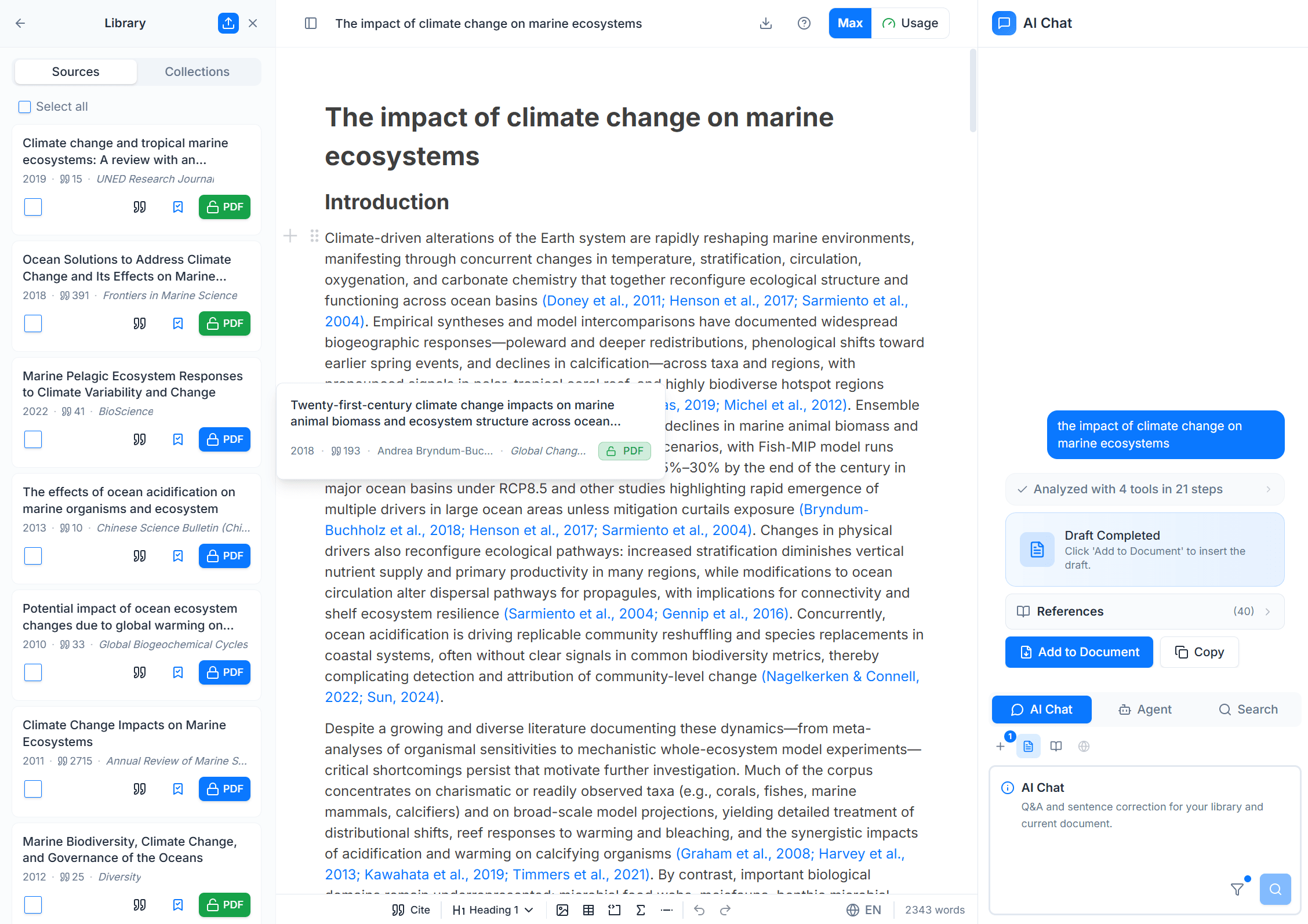
Nubint AI consists of three panels, and the Paper Editor is located in the center panel.
| Position | Panel | Role |
|---|---|---|
| Left | Library | Paper storage and management, Zotero import |
| Center | Paper Editor | Autocomplete, AI editing, citation insertion, document writing |
| Right | AI Chat | Research agents, paper search |
Key Features of the Paper Editor
| Feature | Description |
|---|---|
| Text Formatting | Drag to show toolbar, / slash menu for quick heading, list, table, equation insertion |
| Citation Insertion | Type @ to search library papers and add citations. APA, Chicago, etc. auto-formatted |
| AI Autocomplete | Place your cursor and AI suggests the next sentence. Press Tab to accept |
| AI Editing | Select text and refine with natural language commands ("more academic", "summarize", "expand", etc.) |
| Docx Import | Import existing Word documents (.docx) and continue editing with AI features |
| Docx Export | Export as APA 7th edition Word document. References auto-included |