
Step 1. AI draft
Enter one line about your topic and Nubint fills in the title, headings, and opening sections with citations. Three steps: prompt, search scope, heading style.
Find all the help you need for using Nubint.
Follow the path from your first Nubint draft to a polished, well-sourced manuscript. One pass takes about ten minutes.
Enter one line about your topic and Nubint fills in the title, headings, and opening sections with citations. Three steps: prompt, search scope, heading style.
Tell the AI chat what to change and it proposes the edits right on your document — the text to remove and the text to add. Step through them and accept or reject each one; only what you accept goes into the document.
For the full walkthrough see Edit and continue the document from the chat.
Seven reviews — peer review, proofreading, claim credibility, source quality, tone of voice, and two in beta (paper source overlap and AI writing detection) — point out the weak spots in your draft. Each finding jumps to the sentence it refers to.
Tell the AI chat what you are looking for and it finds related papers in a database of 460 million and answers with citations. Open Sources under the reply and click Save to collection to add the papers it found to your library. You can also search in Paper search in the sidebar and save from each card. The more papers you keep, the more accurate citation suggestions become.
For the full walkthrough see Using paper search.
Paste in a whole paragraph and Nubint finds the right paper for each claim, inserting citations sentence by sentence.
Export the finished manuscript as DOCX or LaTeX. The citations you inserted and the reference list carry over in the style you picked.
Describe a figure in a sentence, refine it on the canvas, and export it — one pass from blank to publication-ready.
Describe the figure you need in a sentence and get one you can put straight into your paper. You can attach a sketch or a reference image too. Before you send it, pick the style and the ratio — or start from a template for a common layout.
A first result that misses the mark does not mean starting over. Say what you want changed and only that part comes back different; or mark a region and redraw inside it, or fix the labels directly. Recolor, background removal, aspect ratio, and upscaling sit in the same bar. Region redraw and text editing are available from Starter.
The export menu shows the resolution and lets you pick a format. PNG and JPG download on every plan; editable SVG and PPTX are available from Starter. To adjust strokes and colors by hand, open it in the vector canvas instead. You can also include the authorization certificate journals ask for when a figure was generated with AI.
Chat comes down to deciding what to show the AI (attachments) and what to let it look for (search permissions). Those settings determine whether answers carry citations.
Click the paperclip attach button in the chat input and pick a PDF — it uploads and connects to the conversation at once. Uploaded papers are also saved to your library, so you can reuse them later in other chats via context.
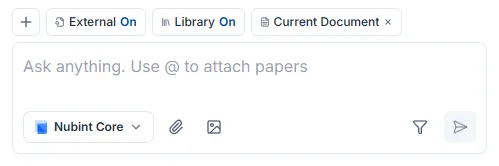
PDFs go through the paperclip button and images (JPEG, PNG, WebP) through the image button. Word documents like DOCX cannot be attached to chat — use the editor's document import instead.
If the AI cannot read your PDF, it is most likely a scan. Check whether the body text can be selected in a PDF viewer — if it cannot, the text exists only as an image and nothing can be extracted. A PDF with a real text layer works better.
PDF uploads have no count limit on any plan, the free plan included. See the pricing page for file size and page limits.
Context is the material you attach yourself for the AI to refer to. Click the + button in the chat input and pick papers or a collection from your library.
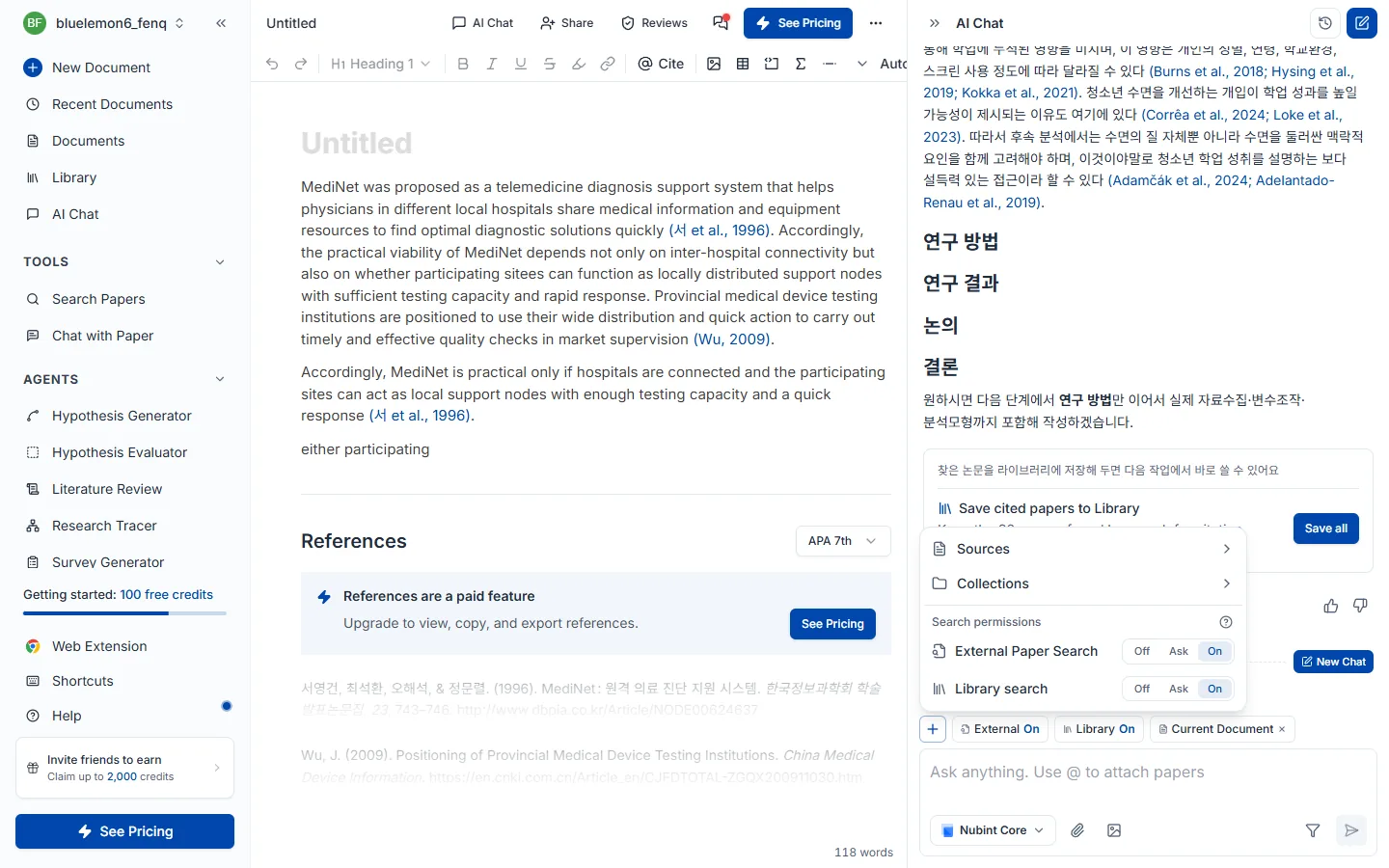
Typing @ in the input also attaches a library paper directly, and papers not in your library can be attached as PDFs. Attached material appears as chips above the input; the X removes them.
The document open in the editor needs no attaching. The chat beside the editor always reads the document you have open, so you can ask about your draft or ask for edits right away.
Reference-paper cap — up to 20 papers per message on Free, 30 on Starter, 40 on Pro and 60 on Max. A counter such as 3/20 in the + menu shows how many papers you have attached directly.
To let the AI find papers on its own instead, turn on search permissions.
Search permissions decide whether the AI may look for papers on its own. Click the External and Library chips above the chat input to turn each one on or off. The same setting is under Search permissions in the + menu.

There are two places to search, switched separately.
| Search | Where it looks |
|---|---|
| External | Pulls new papers from a 460M-paper academic database |
| Library | Picks from the papers saved in your library |
With a collection attached, library search looks only inside that collection.
Each search is either off or on.
| Mode | Behavior | Use it when |
|---|---|---|
| Off | No searching — answers from attached material only | You want to discuss only the papers you specified, or save credits |
| On | Searches whenever it judges a search is needed | You want to hand over the source gathering entirely |
Both can be on at once. We suggest turning external search on early in a project to explore broadly, then switching to library-only while drafting so it works from what you already have.
If citations are not appearing, check this setting first. When both searches are off and nothing is attached, the AI has no papers to reference and answers without citations.
Together with what you attach. Papers you attached as context and papers the search finds are combined, and they count together toward the papers referenced per message (20 on Free, 30 on Starter, 40 on Pro, 60 on Max). Slots fill in this order:
attached → library search → external search
When attached papers alone fill the cap, search adds no new papers. Detaching papers frees room.
By situation:
| Your situation | Setting |
|---|---|
| I want to ask about this one paper | Attach it as a source + search permissions off |
| I want to draft only from papers I collected | Library search on + external search off (attach a collection to narrow it) |
| I have a topic but no material yet | Turn external paper search on |
| I want my draft revised | Nothing to attach — the open document is always read |
While the AI is generating a response, the stop button in the input halts it immediately. Whatever was already generated stays.
Attach a PDF or pull in library papers through context, then ask. You can ask about anything in the paper — the core contribution, the method, how to read the results and limitations, terminology.
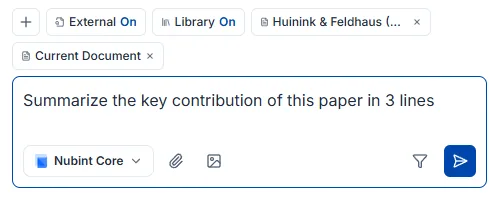
You can work across several papers at once. Attach a collection as context or select multiple papers, and the AI compares and synthesizes them — questions like "put the methodological differences between these papers in a table" or "what limitation do all three point to?" belong here.
Click a citation number in an answer to see which paper it came from. How citations get attached is covered in Citations in answers.
Citation numbers appear only on papers the AI actually consulted — search results and papers connected through context or attachments. It does not invent sources. Click a citation number in an answer to see the paper details and save it to your library.
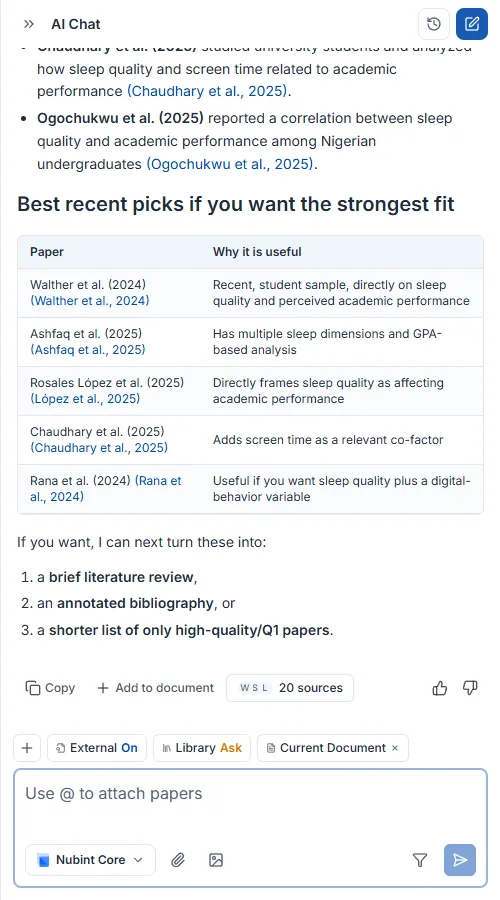
If citations are missing, there were no papers to reference. With all search permissions off and nothing attached, the AI answers from general knowledge and adds no citations. Check at least one of these:
Within the same chat, papers cited in earlier answers can continue to be cited later. To start the conversation fresh, create a new chat.
Click New chat at the top of the chat panel to start a fresh conversation. The previous one is saved automatically, and you can pick it from the chat list to return to that point and keep asking.

Start a new one when you move to a different research question, or when a conversation has run long and you want to reset the focus of the answers.
Build a skeleton with an AI draft, revise and continue the body from the chat, attach citations, then export to Word or LaTeX.
A new document offers three ways to start: Start with an AI draft (you have a topic but no idea where to begin), Start from a Word file (continue a .docx manuscript you already have), and Start with a blank document (the structure is already in your head).
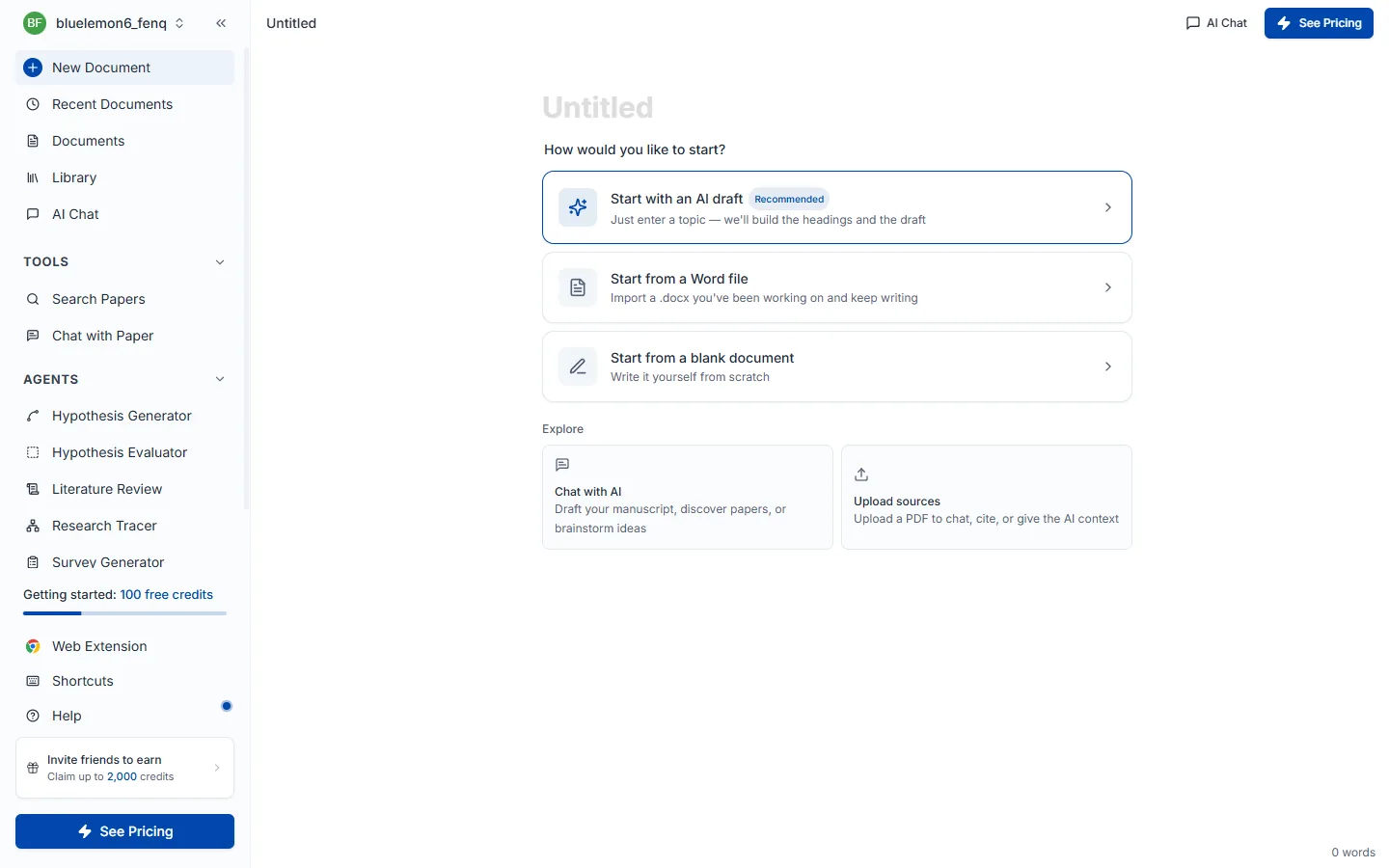
Choosing AI draft opens a three-step wizard; you have to pass all three to reach the final Write AI draft button.
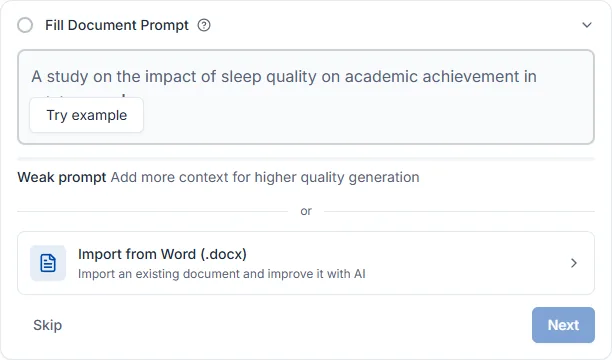
Step 1 — Draft prompt. Write the topic of your paper in one or two sentences. This is what the AI searches prior work against and writes from. The bar under the input is prompt strength, filling from light to deep green as you add words. Leaving the topic blank blocks the next step.
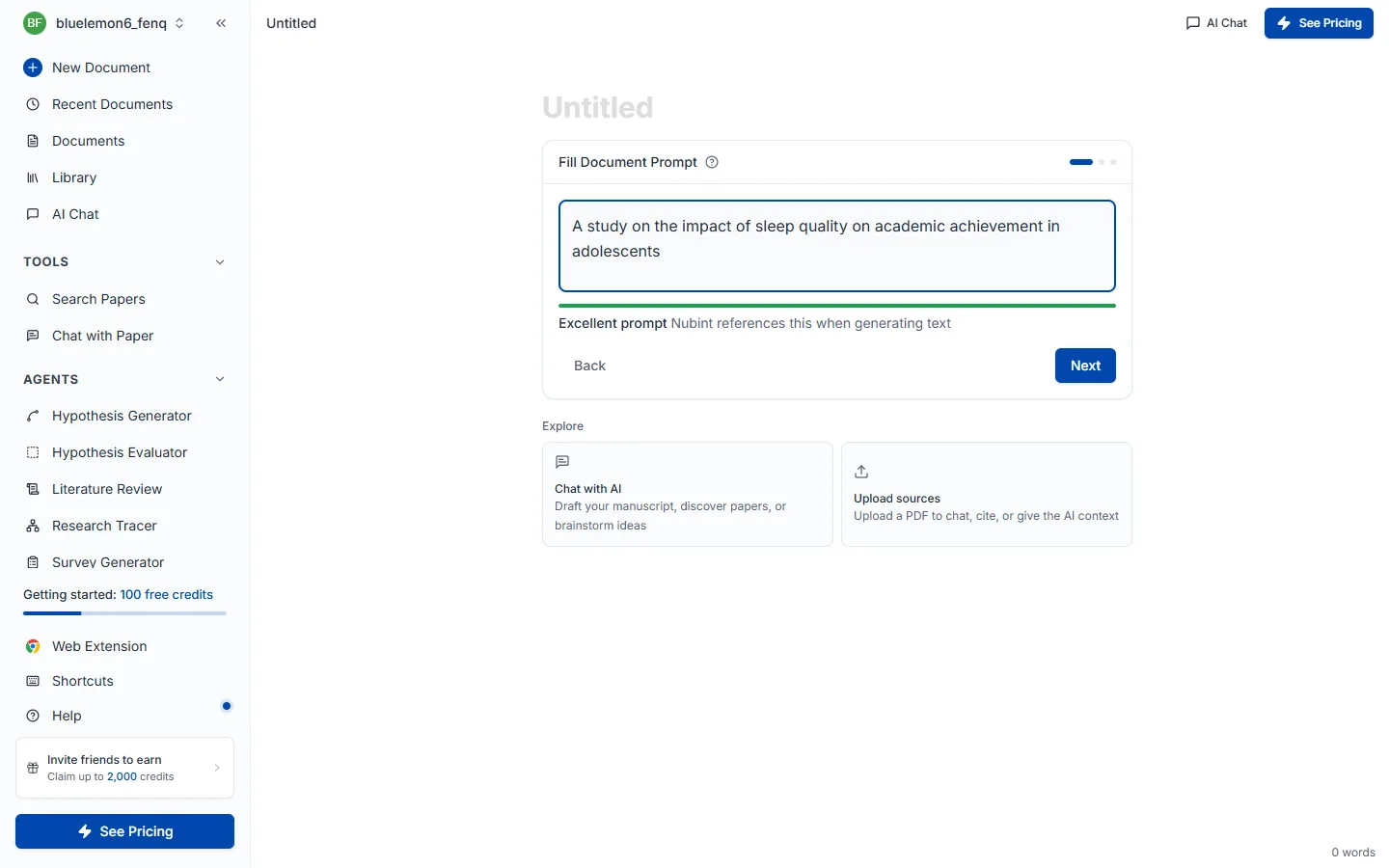
A good example is A study on the effect of sleep quality on academic achievement in adolescents; a weak one is sleep — with no population, outcome variable, or scope, search results scatter.
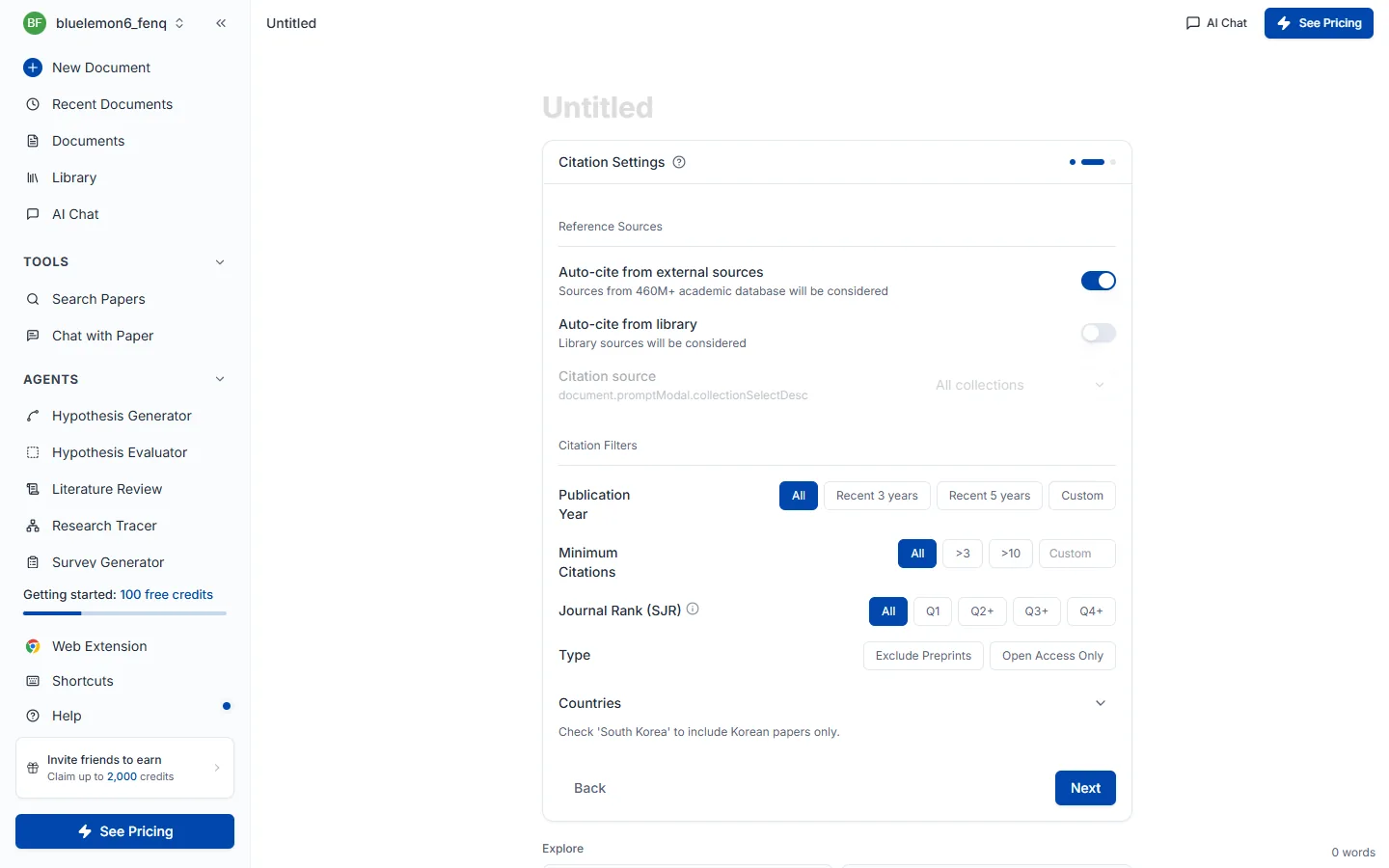
Step 2 — Citation settings. What you pick here applies to every sentence written afterwards. Reference source decides whether to auto-cite from external sources (a 460M-paper academic database) or only from papers saved in your library (which you can narrow further by collection). Citation filters let you constrain publication year, minimum citation count, journal rank (SJR), type, and country; left alone, it searches the full range.
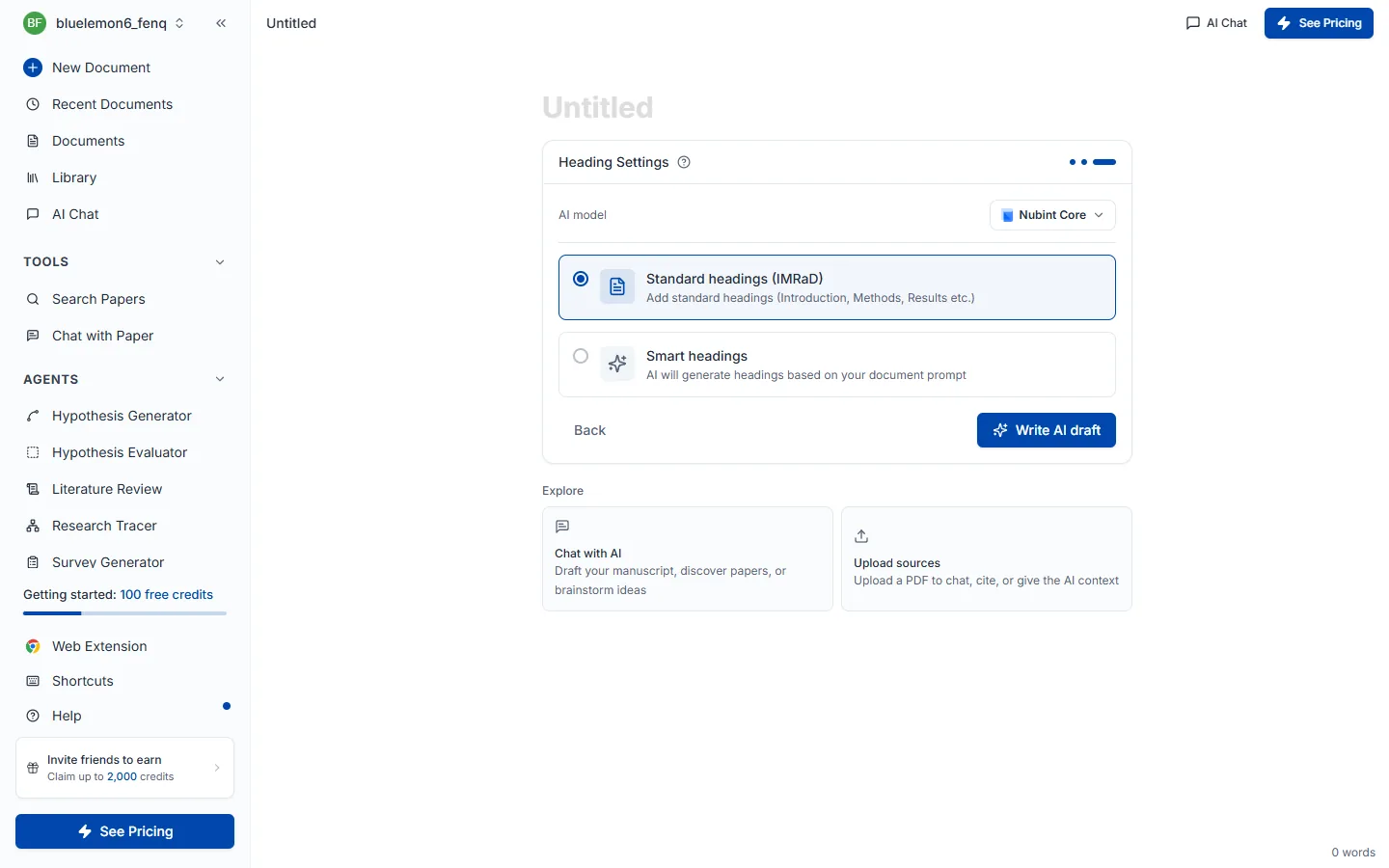
Step 3 — Heading & language settings. Choose the skeleton of the paper. Standard headings (IMRaD) gives the fixed six-part structure — introduction, background, methods, results, discussion, conclusion — while smart headings has the AI compose five top-level headings with two subheadings each, fitted to your topic. Experimental and survey-based papers suit standard headings; theoretical or interdisciplinary work where IMRaD fits poorly suits smart headings. The Paper language selector at the top sets the language the draft is written in.
Pressing Write AI draft searches prior work, inserts the title (H1) and outline, and writes the body of the first two sections with citations. The remaining sections are left as headings for you to continue. Citation numbers like [1] appear in the text and the reference list builds itself at the bottom of the document. It usually takes about a minute.
From there, develop the draft by asking the AI chat to revise and continue the document, and run checks in the review panel.
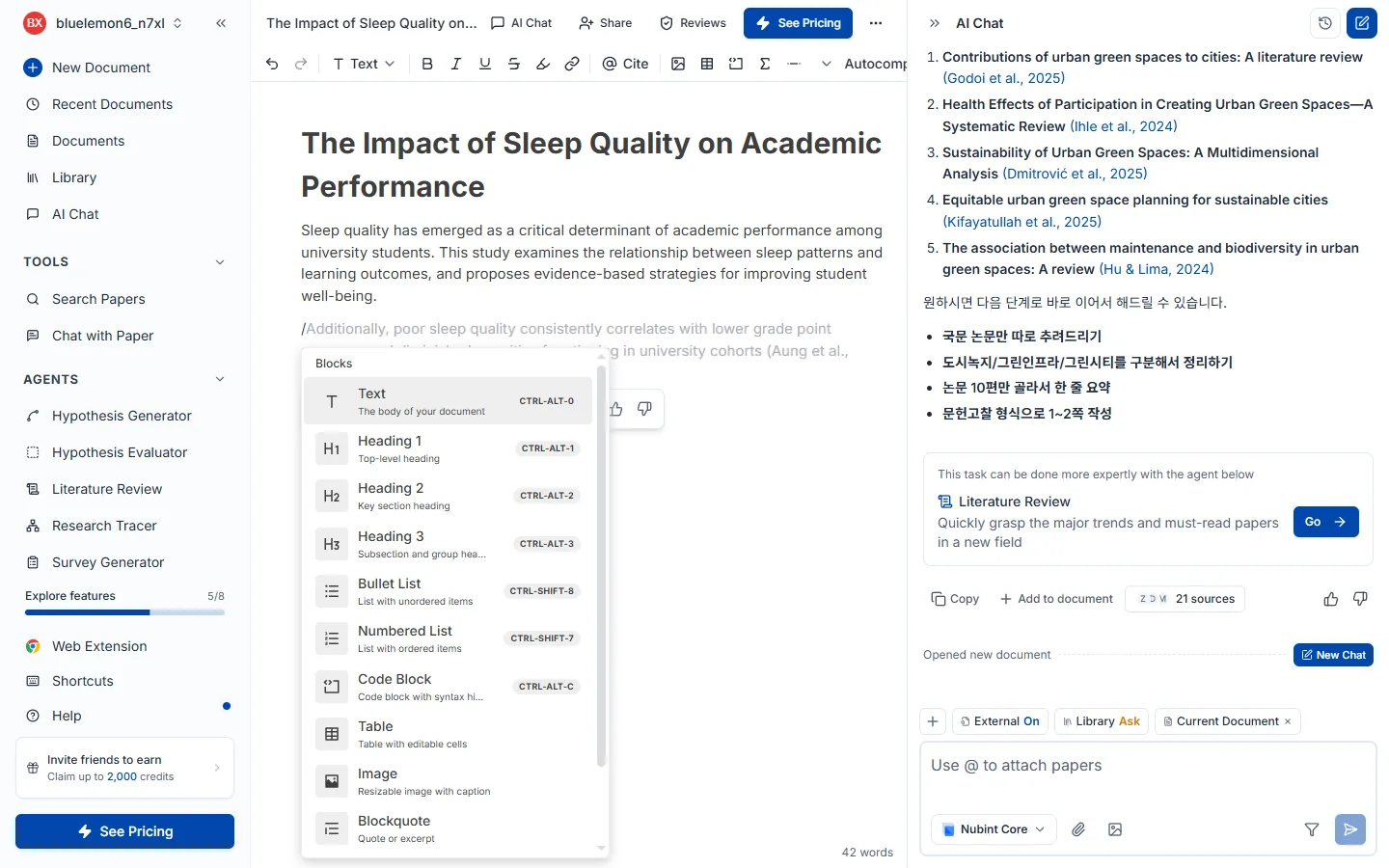
Typing / in the editor opens the slash menu. You can insert headings (H1~H3), bulleted and numbered lists, tables, code blocks, equations (KaTeX), blockquotes, and dividers.
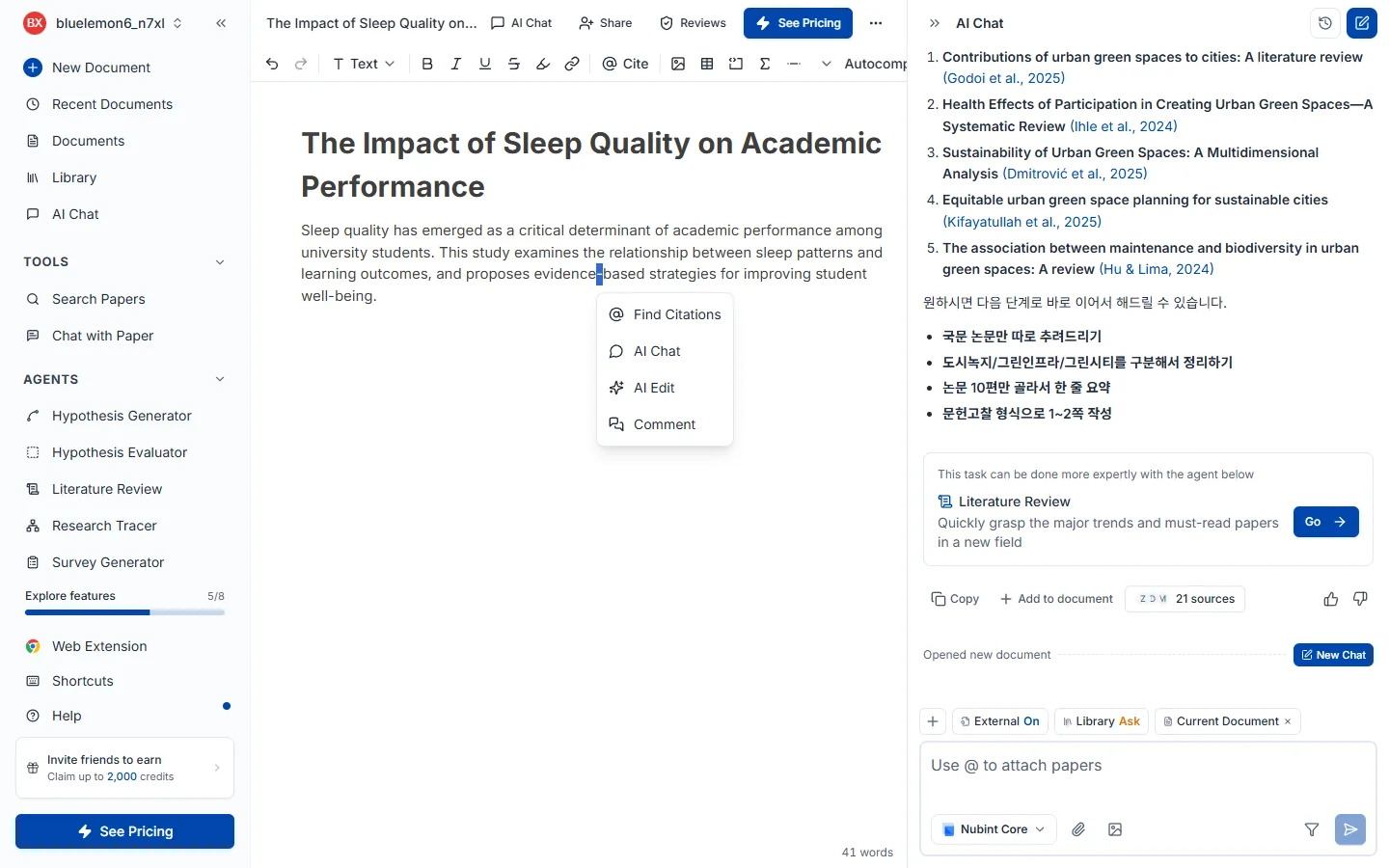
Select text by dragging, then apply bold, italic, underline, strikethrough, highlight, or a link from the toolbar at the top. Italics are the convention for technical terms and variable names. A menu also appears below the selection with Find Citations, AI Chat, Comment, and Review.
Open the style picker beside the reference list at the bottom of your document. It opens a dialog with two columns — the style on the left, the language on the right — and a live preview of what a reference will look like in the pair you have selected.
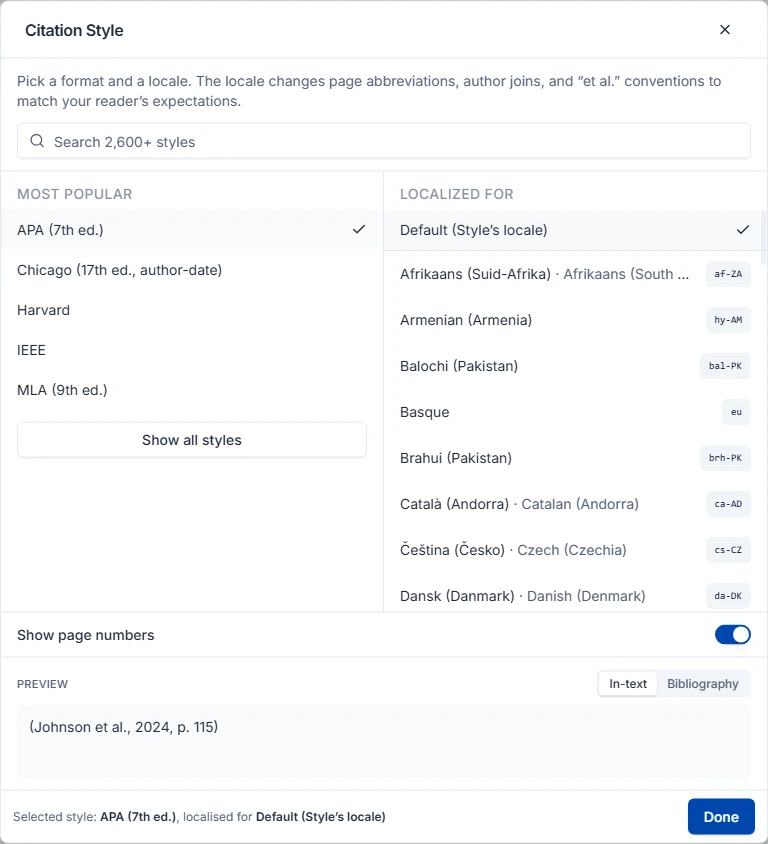
Five common styles are there from the start; the full list of roughly 2,850 CSL styles loads a moment after the dialog opens, so use the search box if you are after something specific. Nothing changes in your document until you press Done — until then you are only browsing.
Styles come from the Citation Style Language (CSL) project, published open source in the CSL Style Repository under CC BY-SA 3.0.
The style is a setting on the document, so changing it redraws every in-text citation and the whole reference list at once — and only in that document. Your other documents keep their own.
Three things it deliberately does not reach:
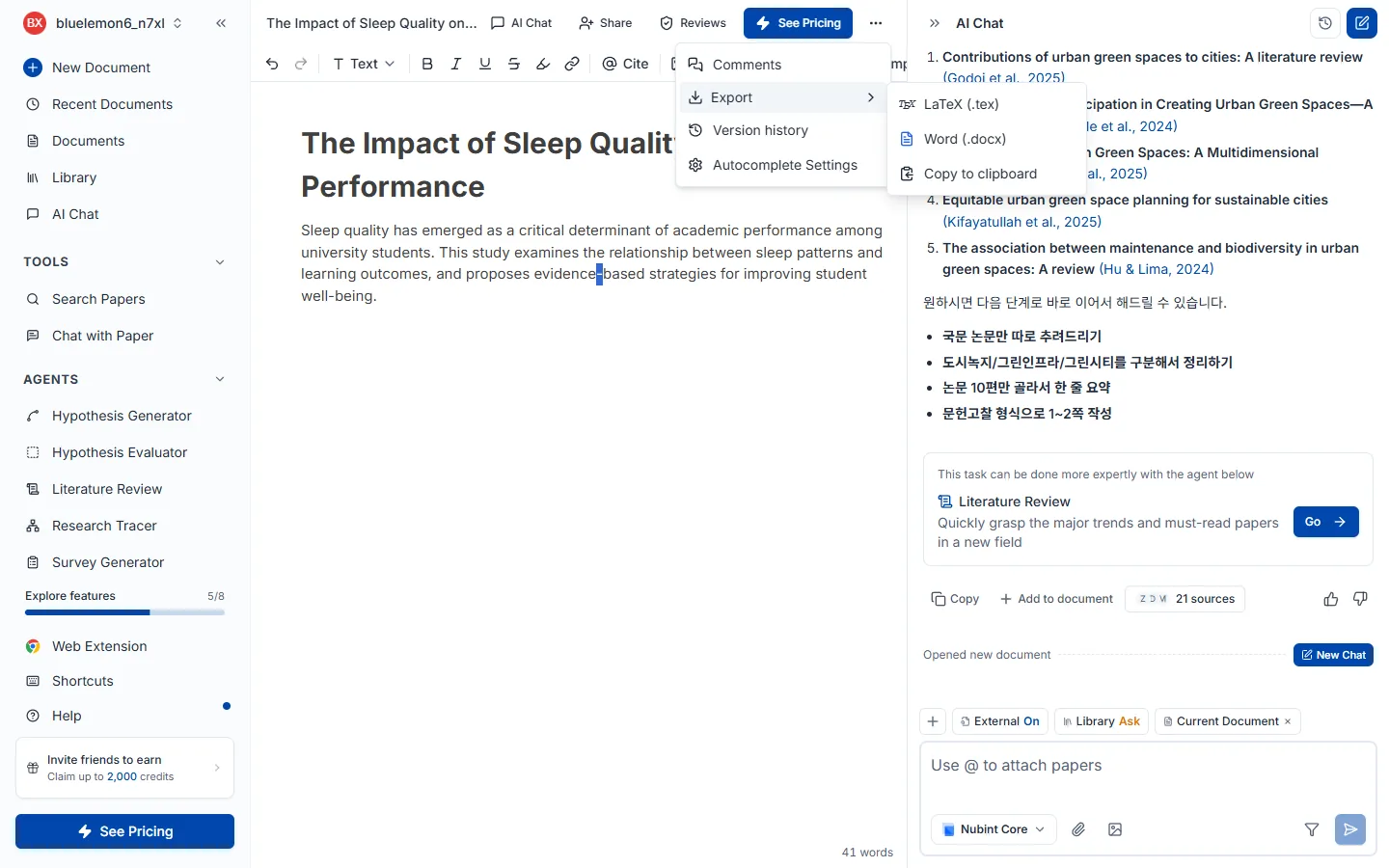
From the more menu at the top of the editor, Export opens a dialog: Word (.docx) or LaTeX (.tex). The same menu can copy the whole document to the clipboard. There is no PDF export — export to Word or LaTeX and print to PDF from there.
Pick a layout preset and you are usually done: Nubint default, Double-spaced manuscript (12pt Times New Roman, double spaced, 1in margins — typical for journal submission), Two-column paper (10pt, narrow margins — typical for conference proceedings), or Thesis or report (12pt, 1.5 spacing, with a title page and table of contents). Advanced options underneath opens paper size, columns, font family and size, line spacing, margins, and switches for a title page, a table of contents, page numbers and comments.
Word has one choice LaTeX does not: how in-text citations are written. MS Word native citations keeps cites and the bibliography linked through Word's own References feature — the right pick if you will keep editing in Word. Hyperlink citations writes clickable links instead, which is what Google Docs can handle.
Your citation style is not set here — the export follows the style set on the document, next to its reference list. If that style puts citations in footnotes, the exported file has footnotes too.
The free plan exports the body only; the paid plans (Starter, Pro, and Max) export the body together with references.
The AI chat next to the editor reads the document you have open and, when you ask, proposes edits right on the document. There is nothing to copy and paste: type what you want done in the chat, then accept the suggestions.
How to ask. Write what to change and how in the chat input, then send it.
Shorten this paragraphChange the title to …Fix the typosAdd a paragraph after thisWhat happens in the editor. When the reply finishes, deletions, replacements and insertions appear in the document as suggestions. It is the same screen as AI review results: step through the marked passages and choose Accept / Reject for each. Only what you accept goes into the document; rejecting leaves it untouched.
Handling them all at once. The suggested edits card under the reply shows how many suggestions are still waiting. Use Show in the document to jump to them, or Accept All / Reject All to settle them in one go. Sending another request does not clear earlier suggestions; if you ask for the same paragraph to be changed again, only that paragraph's suggestion is replaced.
Continuing the document. Ask it to keep going, for example Write the next chapter, and the new chapter arrives as a chat reply. Read it, then press Insert into document under the reply to place it where it belongs in the document. Only the first draft written with Create an AI draft goes straight into the document.
Undo. If you change your mind after accepting, press Ctrl + Z in the editor. Right after Accept All, the notice that appears also has an Undo button that reverts the whole batch.
To attach papers to the chat, see Add context; to let the AI find papers, see Search permissions.
On the start screen of a new document, click Start from a Word file and pick a .docx file to load its contents into the editor. Once imported you can edit and continue the document from the chat and use citation insertion right away.
Only .docx is supported — .doc, .pdf, and .hwp are not accepted.
For attaching a paper you chose yourself to a sentence you already wrote. If you want the AI to find the evidence for you, Citation recommender is the better fit.
There are three ways in and the rest is the same — search the paper picker by title or keyword, choose one, and the citation is inserted at that spot.
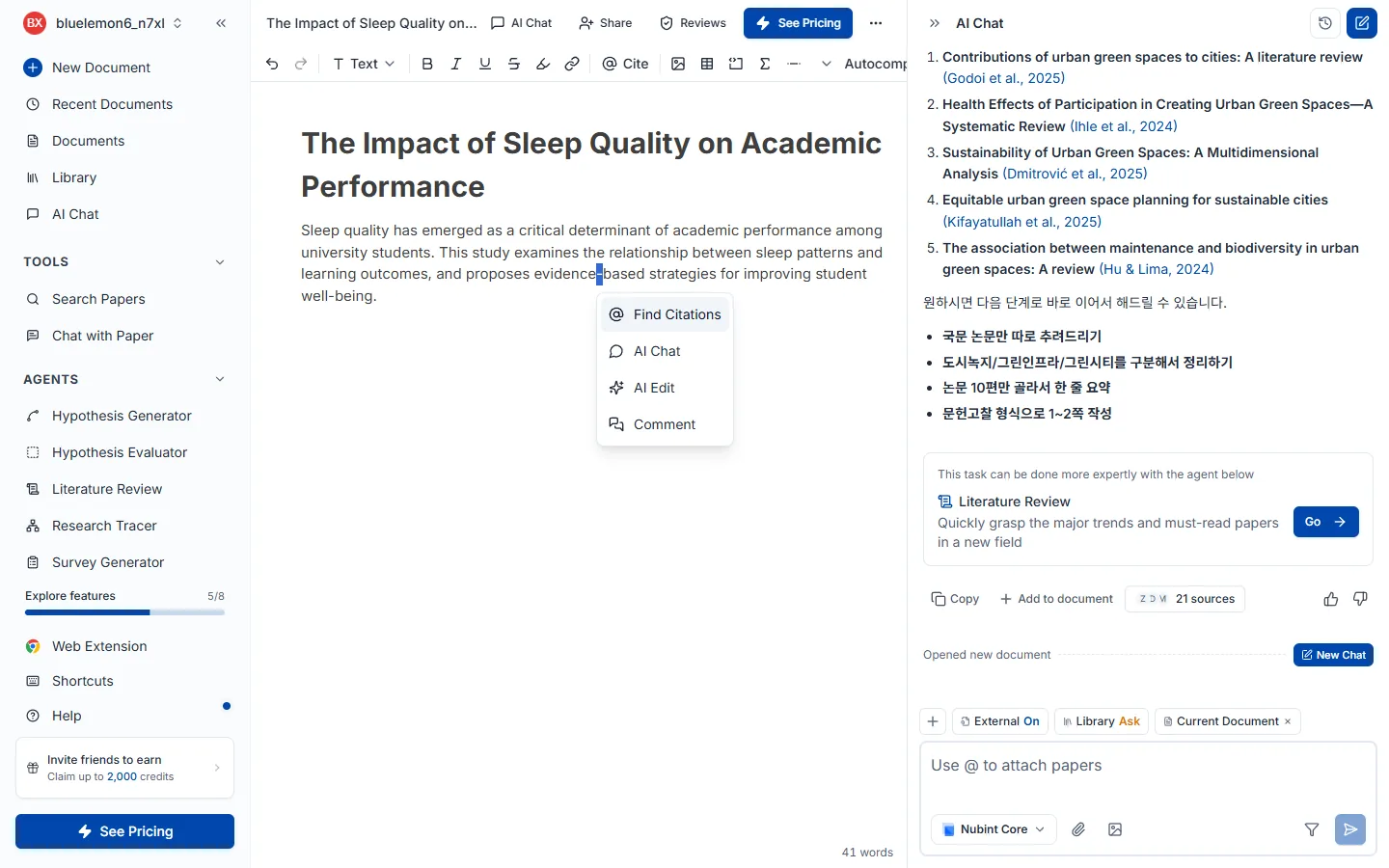
Typing @ where you want the citation is fastest. You can also place the cursor and click @ Cite in the top toolbar, or drag a sentence and click the cite button in the toolbar that appears.
Inserted citations are formatted to the style set on the document (APA, MLA, Chicago and so on) and added to the reference list at the bottom. To change the style, see Change citation style.
The seven reviews never look at the same thing. Work down from structure (peer review) to evidence (claim credibility, source quality) to sentences (tone of voice, proofread), then check paper source overlap and AI writing detection right before you submit.
Click Review at the top of the editor and the review panel opens on the right. The seven reviews are listed as cards, and Run review on any card starts it. If you have run it before the button becomes View results, and after you edit the draft you can re-run it with the refresh icon at the top right of the results screen. The ? on each card opens that review's help. Opening the panel alone costs nothing.
The seven reviews never look at the same thing. Working from the big picture down to the sentence is the efficient order — fixing structure rewrites sentences anyway.
| Review | What it looks at | When to run it | Free |
|---|---|---|---|
| Peer review | Structure, logic, methodology, citation depth | Once the draft is roughly complete | — |
| Claim credibility | Claims asserted without evidence | Once the draft has substance | ✅ |
| Source quality | The credibility of the papers you cited | Once citations are in | — |
| Tone of voice | Whether the overall register fits academic writing | When you start polishing | ✅ |
| Proofread | Grammar, spelling, punctuation, word choice | Last, once content is final | — |
| Paper source overlap (beta) | Sentences that overlap a paper's wording | Final check before you submit | — |
| AI writing detection (beta) | Paragraphs that read as AI-written | Final check before you submit | — |
Claim credibility and source quality are easy to confuse. Claim credibility asks whether evidence is attached; source quality asks whether the attached evidence is any good. A sentence with no citation at all is caught by claim credibility; a retracted or low-ranked citation is caught by source quality.
Every review looks at the whole document. Even when you launch one from selected text or the mobile review drawer, the entire manuscript is the target — structure, logic and citations only read correctly with the surrounding context.
The results screen shares the same skeleton across every review. Expand N steps completed to see which checks ran, and Results summarizes the run in a paragraph (the 👍👎 beside it lets you rate the quality). Review changes walks you through findings one at a time, Detailed breakdown breaks them down by category (a check mark means nothing was flagged in that category), and All suggestions shows the total. Click an underlined passage in your text to see what the problem is and choose Apply / Dismiss. At the bottom, Try next recommends which review to run after this one.
Each review adds one thing of its own on top — peer review contributes Overall assessment scores and comments, source quality contributes Bibliography notes, and tone of voice contributes Selected preset.
Credits are charged by how long the reviewed document is, × a per-review rate, because a review reads the whole document and cost scales with length. The "A4 pages" in the pricing table are that length expressed in English-page terms.
| Review | Credits per Latin A4 page |
|---|---|
| Peer review | 12 |
| Claim credibility | 10 |
| Proofread | 6 |
| Source quality | 6 |
| Tone of voice | 6 |
| Paper source overlap (beta) | 6 |
| AI writing detection (beta) | 8 |
The rates above are per Latin A4 page (about 500 words). Length is rounded up in blocks of 5 pages, so a few lines are billed as 5 pages and a draft just over 5 pages as 10. Korean, Japanese and Chinese use about twice the tokens for the same page count, so they cost about twice as much — peer review is 120 credits on 10 Latin pages, and about twice that for a Korean document of the same length. For the exact figure on your own document, check the estimate shown on the review card before you run it.
Check your remaining credits under Credits and quotas, and plan differences on the pricing page.
Looks at structure and logic. It reads the whole document along four axes — paper structure, logical flow, methodological soundness, and whether citations are sufficient — and leaves the kind of comments a journal reviewer would. How to run it and how credits work are covered in Getting started with reviews.
Run it once your draft is roughly complete. Getting the big picture right first saves you from editing sentences twice, so we recommend it as the first of the seven. Sentence-level wording is Proofread's job, and whether claims have evidence is Claim credibility's. Every review runs on the whole document — there is no way to limit it to a selection.
Unlike the other reviews, the score comes first. Overall assessment rates validity, presentation, and contribution out of 4 each and produces a combined score out of 10, so read the axis scores to find the weak spot and then work down the Weaknesses list.
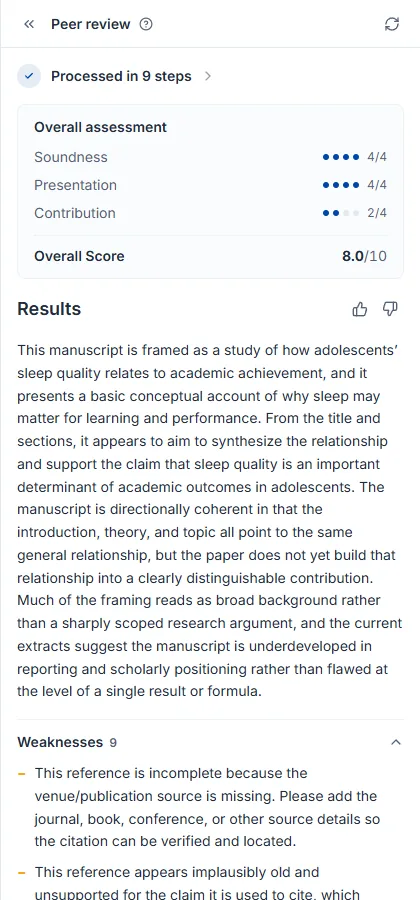
Findings arrive as comments in your document. Rather than the popover apply/dismiss flow of the other reviews, a reviewer comment is attached beside the sentence in question. Open a comment, read the point, edit the text yourself, then Resolve it to drop it from the list; re-running after edits adds new comments. Unresolved comments N on the results screen matches the badge on the list card, and when the badge hits 0 you have handled everything flagged in this round.
Looks at sentence-level wording only. It catches grammar, spelling, punctuation, and word choice sentence by sentence and proposes a rewritten version — particularly useful for tightening the academic register of an English draft. How to run it and how credits work are covered in Getting started with reviews.
Run it once the content is settled. If paragraphs are still going to change, later is better. The skeleton of the piece is Peer review's job, and whether the register fits academic writing is Tone of voice's. If you plan to run both, match the tone first and finish with proofreading — changing tone rewrites sentences.
Fixes are marked directly in your text: a red strikethrough is the original, green is the rewrite. Click an underlined passage and choose Apply / Dismiss.
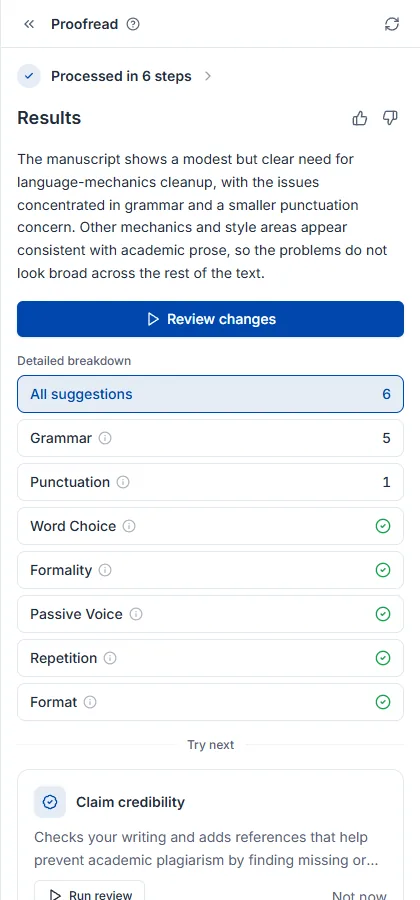
The full proofreading process is covered in the how to proofread a paper guide.
Checks whether each cited paper actually supports the sentence that cites it. Every cited sentence is compared with that paper's full text (or its abstract when the full text is unavailable), flagging contradictions, off-topic citations and weak support, and showing why along with the supporting sentence from the paper. Available on the free plan; how to run it and how credits work are covered in Getting started with reviews.
Run it once your draft has some substance. The quality of the citations that are attached (retractions, preprints, and so on) is Source quality's job, and to actually fill a flagged sentence with a real citation, use Citation recommender.
Under-supported sentences are marked in your text, categorized as miscited, contradicted by evidence, no evidence, weak evidence, or source unavailable. Click an underlined passage to see why it was flagged and the supporting sentence from the paper, then choose Mark reviewed / Dismiss.
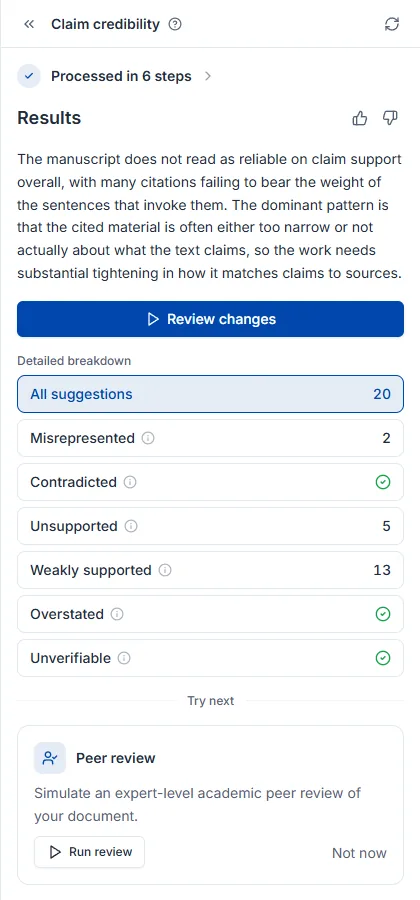
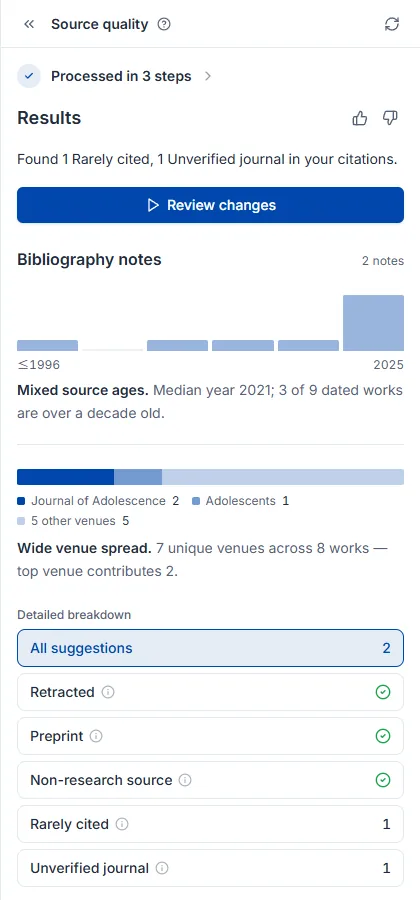
Looks at the cited papers themselves. It finds retracted papers, preprints that have not been peer reviewed, and low-ranked journals, so you do not have to vet a reference list by hand. How to run it and how credits work are covered in Getting started with reviews.
Run it once you have added some citations — with no citations there is nothing to check. Claims with no citation at all are found by Claim credibility, and replacements for problematic citations can be found with filters in Paper search.
What makes this review distinctive is that it reports the health of your whole bibliography, not just a finding count. On top of the shared result elements, Bibliography notes charts the year distribution and journal distribution of your references, so you can see at a glance whether the literature is dated or concentrated in one venue.
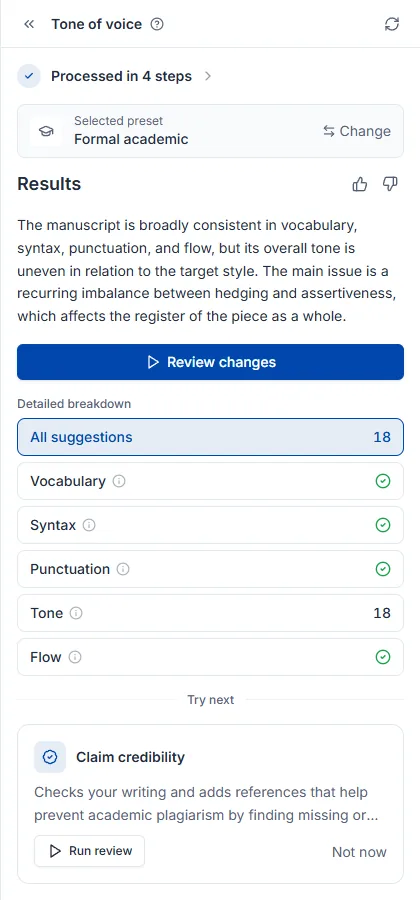
Looks at the register of the whole piece. It checks whether your draft reads like an academic paper and rewrites sentences that drift. Available on the free plan; how to run it and how credits work are covered in Getting started with reviews.
Grammar errors and typos are Proofread's job. If you plan to run both, match the tone first and finish with proofreading — changing tone rewrites sentences.
Setting the target register first matters. Use the settings icon on the card to pick a preset such as formal or concise, or point it at a paper in your library to match that paper's style. If you set nothing, it judges against general academic register.
The top of the results tells you which register it judged against. Different targets produce different findings, so start there. On top of the shared result elements, Selected preset shows what this run aimed for, and Change re-runs it against a different target.
Finds sentences in your draft that are nearly identical to a paper's abstract or full text. How to run a review and what it costs are covered in Getting started with reviews. Available from the Starter plan.
This is not a plagiarism checker. It compares only against Nubint's own paper corpus: paper abstracts (multilingual), Korean journal abstracts, and the full text of papers you cite (open-access full text and library PDFs). Papers you do not cite are compared by abstract only. It does not compare against theses, web pages, news, or textbooks, and it does not catch paraphrasing. It does not replace your institution's CopyKiller or Turnitin report.
There is still a good reason to run it. When AI drafts text, sentences from the abstracts it retrieved can land in your draft almost verbatim, and institutional checkers have those abstracts. This review finds those passages before you submit.
Findings come in two kinds.
Each finding shows the matching paper card and an excerpt of the source text so you can compare on the spot. Sentences wrapped in quotation marks are treated as direct quotes and are not flagged.
Korean drafts are compared only against Korean journal abstracts, so coverage is narrower than for English drafts. Coverage and thresholds will keep changing during the beta.
Estimates, paragraph by paragraph, how strongly the text shows the traits of AI-written prose. How to run a review and what it costs are covered in Getting started with reviews. Available from the Starter plan.
The result is a reference, not evidence. Every AI detector produces false positives. Formal academic prose, English written by non-native speakers, and machine-translated text are often flagged even when a person wrote them. Conversely, AI text that has been paraphrased often slips through. Results may differ from the detector your institution uses (GPTKiller, Turnitin, and others).
The method compares how "predictable" a paragraph is to two language models. The more easily both models predict it, the stronger the AI-writing traits. Nubint does not show a probability number; each paragraph gets one of two levels.
The top of the result shows a document-level verdict: safe, caution, or high risk. If the scorable text is under roughly 300 words the verdict is inconclusive and the run is not charged. Short paragraphs are judged together with their neighbours so they are not skipped. Headings (including numbered subheadings), horizontal rules, bold-only subheadings, table and figure captions, and quotations are not judged.
Judgement is per paragraph; highlights are per sentence. In a paragraph that shows AI traits, the sentences contributing most to those traits (up to three) are highlighted. Clicking a sentence shows why it reads as AI: its rank of contribution to the paragraph's AI traits, phrases common in AI writing, and nearly uniform sentence lengths in the paragraph, whichever apply. Only reasons verified to separate human from AI writing are shown. Sentence highlights point you to where to look; they are not per-sentence verdicts. Since there is no text to replace, the buttons are Mark reviewed and Dismiss.
If a paragraph you wrote yourself is flagged, you can leave it as is. Nubint does not offer a rewrite feature to lower detection scores, because that would mainly serve to evade institutional policies.
Thresholds differ by language. English, Japanese, Chinese and Korean are each calibrated against human-written academic abstracts to cap false positives. Tuning continues during the beta.
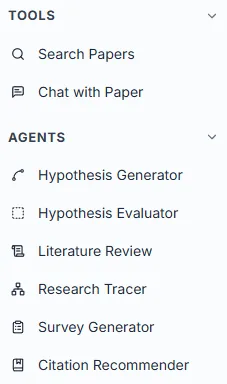
They handle the stages before writing — forming and evaluating hypotheses, surveying literature, tracing a field's lineage and finding citations. Each runs on its own page.
There are five, each run from its own page.
| Agent | What it does | What you give it |
|---|---|---|
| Hypothesis generator | Turns a topic into testable hypothesis candidates | A research topic, one sentence |
| Hypothesis evaluator | Scores a hypothesis you already have on five criteria | A hypothesis statement |
| Literature review | Gathers papers and writes a structured report | A topic to survey |
| Research tracer | Maps a field's lineage through the citation network | One seed paper |
| Citation recommender | Finds citations that support the claims in your draft | Text you already wrote (2,500 chars) |
Expand the Agents group in the left sidebar and click one to go to its page. Type what that agent needs into the input, press its run button, and you move to a results page with step-by-step progress. If a task in AI chat would suit a particular agent better, a recommendation card appears in the chat and Go takes you to that page.
The agents share the same screen layout: one input and a control row beneath it (citation flow is the exception — it starts from a paper search). Try example fills in a sample when you are unsure what to write. Search filters exist only on literature review and citation recommender, narrowing reference papers by publication year, citation count, journal rank and so on. The run button is named differently per agent (Generate hypothesis, Start investigation, …) and Enter does the same thing.
While a run is in progress the send button becomes a stop button (■), and pressing it halts immediately. Partial results are not saved, and no credits are charged — the same as a run that fails with an error.
Billing happens per run, at a fixed price per agent. A short run and a heavy analysis cost the same — the number on the pricing page is exactly what is charged. Paper search costs no credits, and there is no limit on how often you run it on any plan. The seven reviews work on a different axis, charged by how long the reviewed document is — see AI review. Check remaining credits under Credits and quotas, and plan limits on the pricing page.
Past runs are kept on each agent's page. They are stored separately from AI chat history, so a literature review run has to be found on the literature review page. Papers an agent collected go to your library, and drafts it wrote go to documents.
For when you have a topic of interest but no hypothesis in testable form yet. It builds hypothesis candidates grounded in 460M papers and attaches supporting papers to each. If you already have a hypothesis, go straight to Hypothesis evaluator.
Write your research topic in one sentence and press Generate hypothesis. It does not need to be a finished hypothesis — something like the effect of sleep deprivation on impulsivity in adolescents is enough. The screen layout and credits are covered in How agents work.
The result is a canvas, not a list. Hypothesis cards branch out from the topic you entered, one card per hypothesis.
Rather than expecting a finished hypothesis in one shot, pressing Refine on a card that nags at you and branching two or three times produces far more usable results. You can also branch in a direction of your own with + (for example, "from a policy intervention angle"), and the canvas keeps that exploration visible.
Click a card and the detail panel on the right opens with that hypothesis examined along five axes — overview, plausibility, novelty, feasibility, significance — alongside supporting papers. Every blue parenthetical citation in the text is a real paper, and Sources N at the bottom saves them to your library.
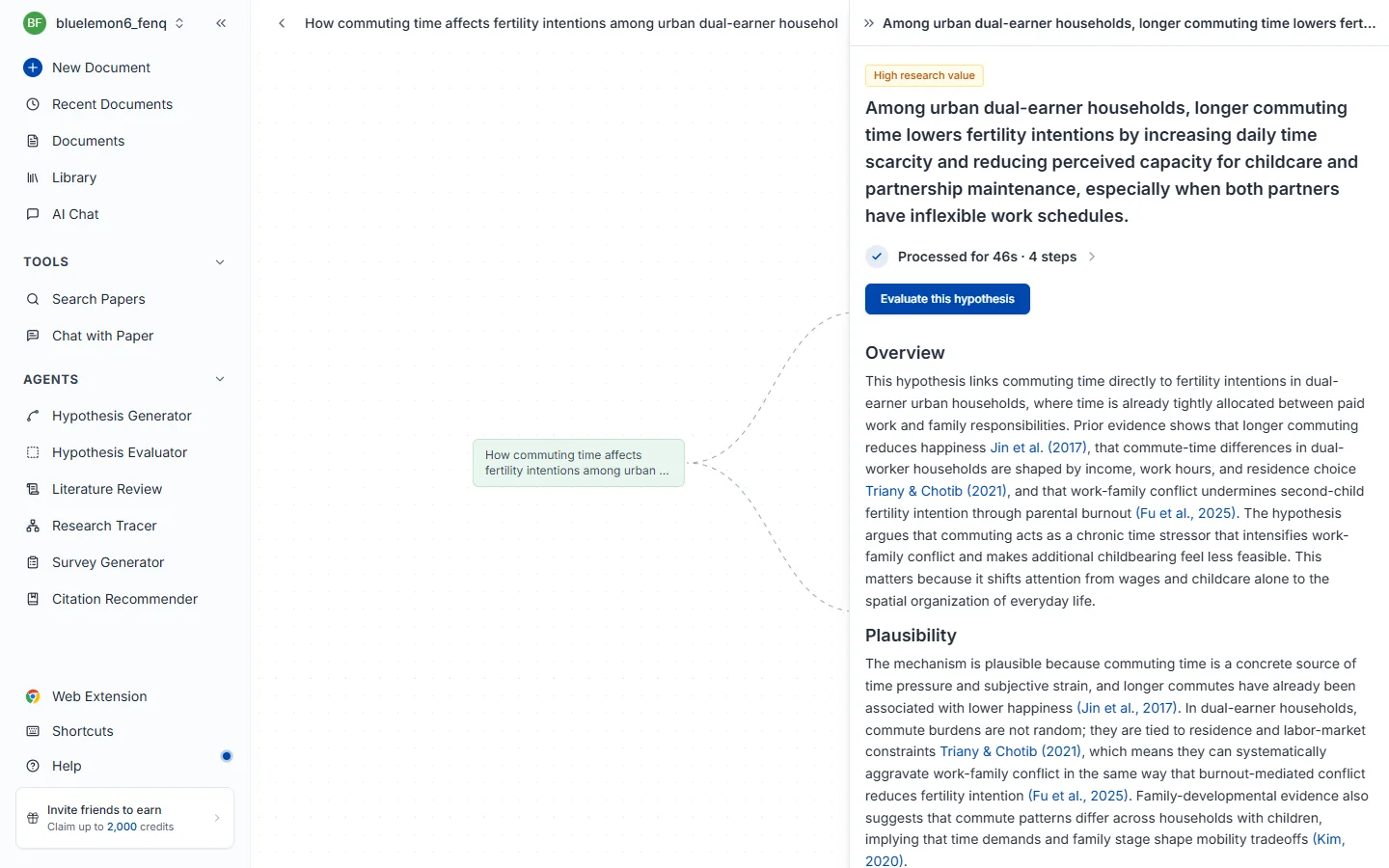
To get graded scores per criterion, hand it to Hypothesis evaluator with Evaluate this hypothesis.
For when you have a hypothesis and need to judge whether it is worth starting research on as it stands. It looks at the hypothesis from five angles — how clearly it is worded, whether the existing evidence supports it, what it adds to the literature, whether it can be carried out, and why it matters — and tells you how to fix whichever one scores low. Novelty is measured live against 460M papers.
Paste the hypothesis as it is and press Evaluate. A single sentence works, and so does a longer statement with conditions and expected effects, such as not using a smartphone in the hour before bed on weekdays increases total sleep time by at least 20 minutes. The screen layout and credits are covered in How agents work.
Overall assessment at the top names the hypothesis's strength and biggest weakness in a paragraph, and each criterion below carries a grade and a one-line diagnosis. The N papers beside the title is how many papers it actually checked against.
Do not stop at the grades — expand More on whatever scored low. What is written there is not "what is missing" but "how to narrow it". If novelty scores low, the topic has already been well covered; narrow the population, conditions, or measurement to create a distinction, then re-evaluate and watch the score move.
For when you need papers read and synthesized, not merely found. It gathers related work automatically, reads up to 30 papers in full, and organizes the major currents, methodologies, and open questions into a report with citations attached. If you only need to find things quickly, Paper search is the better fit.
Write the topic to survey in one sentence and press Start investigation. A sentence produces better results than a list of keywords — something like a study on the effect of sleep quality on academic achievement in adolescents.
Search filters constrain publication year, citation count, journal rank and so on. Filter by year to see only recent trends, or by citation count to see only well-established literature. It takes a while because of the volume analyzed, and can be stopped mid-run. The screen layout and credits are covered in How agents work.
The result is a readable report, not a list. The N papers beside the title is how many were actually analyzed.
Because every paragraph carries citations, you can copy a passage you like straight into your draft as scaffolding and just verify the citations. Blue (Author, Year) links go to the original, and Sources N at the bottom lets you pick papers to save to your library.
The full literature review process is covered in the how to conduct a literature review guide.
For when you need to know why a field developed the way it did, not just a list of recent papers. Starting from one seed paper it follows the citation network in both directions, up to four steps, and draws the lineage — useful for finding research gaps or laying out the narrative spine of a literature review.
Unlike the other agents, this one starts from a paper, not a topic. Search by title or author name, pick a seed, and tracing begins the moment you select it. A landmark paper in the field or a key paper you have read makes a good seed. The screen layout and credits are covered in How agents work.
The screen splits in two: the citation network graph on the left and the detail panel for the selected paper on the right. The green node is your seed, and edges are citation relationships — further left is older, further right is later work.
Follow the graph to the far left for the classics of the field, and to the far right for the newest work. That axis works directly as the ordering for a literature review narrative.
Clicking a paper node opens its bibliographic details and abstract on the right — citation count and journal quartile (CITED BY / Q2) give you a sense of influence, and DOI and URL copy with the icon beside them. Clicking the seed paper instead opens the Research streams panel, which names the lineages the graph was split into.
For when the sentences are written but you cannot find papers to back them up. Paste your draft and it finds the 3~5 strongest supporting citations per claim and slots them straight into the sentences. Because it searches by meaning rather than keywords, it catches papers covering the same idea in different words.
Paste the sentence or paragraph that needs citations and press Generate citations. A single sentence works, so does a paragraph, up to 2,500 characters. Search filters constrain publication year, citation count, journal rank and so on — set them to match your target journal's standards. The screen layout and credits are covered in How agents work.
You get back your own draft, not a separate list, with (Author, Year) inserted where citations belong. Underlined sentences are the ones that received citations, so you can see at a glance what changed.
Copy takes the whole paragraph as it is, but check first that the cited passages actually match your claim.
To attach a paper you chose yourself inside the editor, use citation insertion.
For finding papers quickly. It searches by meaning, so you do not need the exact academic term, and it uses no credits and has no usage limit.
For when you just need to find papers quickly — picking something to cite, skimming what exists on a topic, or locating a specific paper by title. If you also need those papers read and synthesized, Literature review is the better fit.
Click Paper search in the left sidebar and a search panel opens in the sidebar's place. You never leave the page, so you can search while writing in the editor and cite or save what you find right away.
transformer attention mechanism NLPcomparing pretrained model performance in text sentiment analysishow does data augmentation affect diagnostic accuracy in deep-learning medical imaging?The Sort (relevance · citations · newest · oldest) and Filter buttons under the search box, on the right, reshape the results. Relevance is the default, and changing the sort or a filter re-runs the search in place. See Search filters for the filter options and Reading results for the cards.
Before you submit a search, the panel shows your recent searches (up to eight). Click one to run it again.
Results are drawn only from a verified academic database, so no non-existent papers slip in.
No credits are charged. There is no usage cap either, so every plan can search without limit. See Credits and quotas for how billing works.
Click the Filter button under the search box, on the right, to open the filter panel. Choose conditions and press Apply — the search re-runs in place with narrower results; Reset clears everything. A blue dot on the button shows that filters are active. It exists to cut 460M papers down to the ones that fit your research.
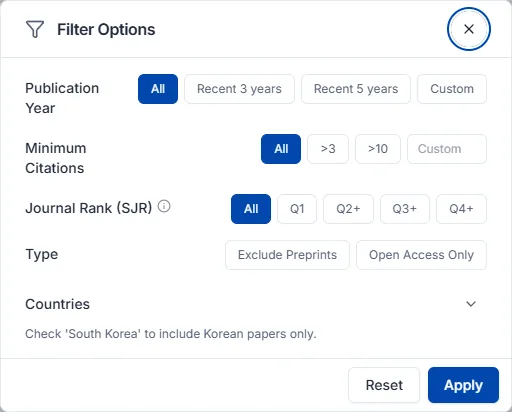
Journal rank (SJR) measures a journal's influence, weighing both citation counts and the authority of the citing journals. Choose Q1 or Q2+ when looking for a journal to submit to, or when your citations need stronger backing.
| Option | Meaning |
|---|---|
| Q1 | Top 25% — highest-quality journals in the field |
| Q2+ | Top 50% |
| Q3+ | Top 75% |
| Q4+ | All journals with an SJR rating |
| No filter | Rank is ignored |
By situation:
| Your situation | Suggested combination |
|---|---|
| Quickly scan the latest trends | Publication year, last 3 years |
| Learn the foundational papers first | High minimum citations + journal rank Q1 |
| Pick papers I can actually cite | Exclude preprints + journal rank Q2+ |
| Read the full text right now | Open access only |
| Look at research from a specific country | Country filter |
| Results include papers from other fields | Set field of study |
The more filters you stack, the narrower the results. If too few papers come back, relax the strongest conditions first — journal rank Q1 and high citation counts.
A result card carries the title, authors, and publication details (journal, year, volume) along with the indicators you judge by. The abstract and identifiers live in the detail panel that opens when you click the card.
Read relevance (list order) and citations together. High on both suggests core literature for your topic. High relevance with low citations may simply mean recent work or an emerging area — that is not a bad sign. When you need a quick scan, start with open access so nothing stands between you and the text.
The button that opens the full text is named according to the paper's availability.
When the publisher's policy keeps the viewer from displaying a PDF, click View on publisher to read it on the publisher's site.
Papers worth keeping can be saved to your library, where they become available for chat and citations.
Where the papers you collect live. What sits here becomes reference material for chat and the source of your citations. Fill it from search, the extension, or Zotero, and organize it with collections.
Click the save button on a paper card in paper search results to add it to your library.
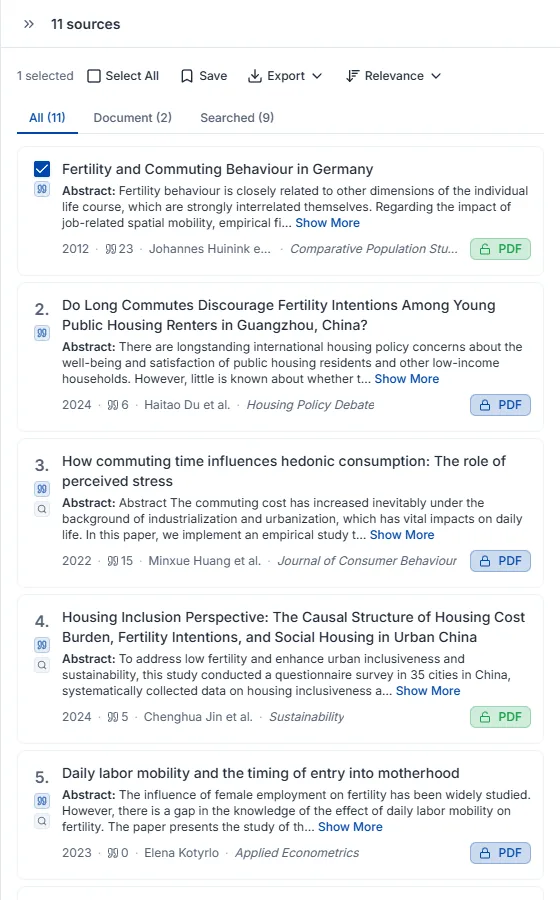
Saved papers appear in the library panel on the left, where you can sort them into collections or narrow them with filters.
The Upload button at the top of the library panel opens the Upload to Library window. Papers in Zotero come across through one of two tabs.
If you use Zotero, connecting the account is the better option.
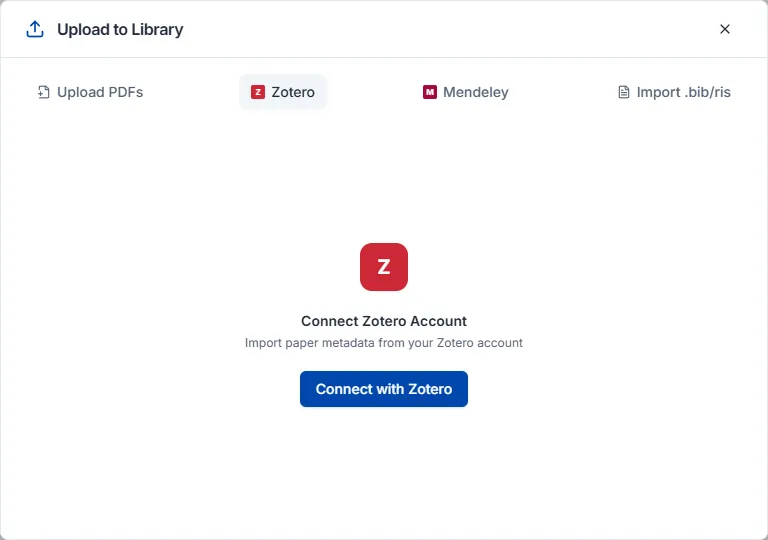
To connect an account, open the Zotero tab, click Connect with Zotero, then sign in to Zotero and approve access; your collections are listed. Pick the ones to move, or just click Import All.
Import .bib/ris supports BibTeX (.bib) and RIS (.ris). Export the papers you want from your current reference manager as RIS or BibTeX and upload the file. This works for files exported from EndNote, Mendeley, and other tools, not just Zotero.
Create one with the + button on the Collections tab of the library panel. Nesting a collection inside another gives you a hierarchy.
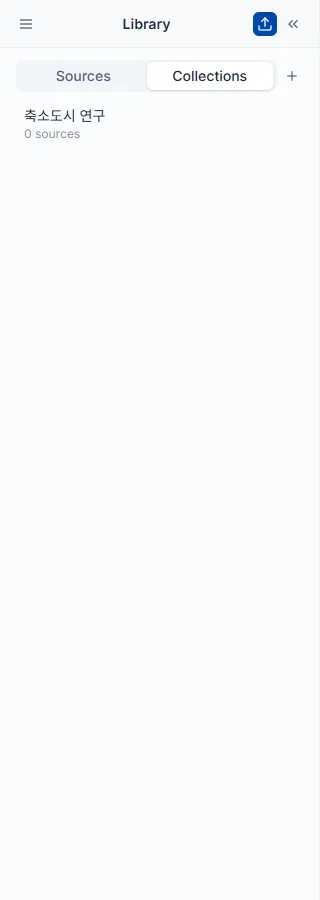
Add papers with the Add to collection button on a paper card, or select several papers and add them at once. A paper can belong to several collections at the same time, which makes cross-classification possible.
Hovering over a collection name reveals edit options for renaming and deleting. Deleting a collection leaves the papers themselves in your library.
Tick the checkboxes on paper cards to select several at once; the count appears at the top along with the bulk action options.
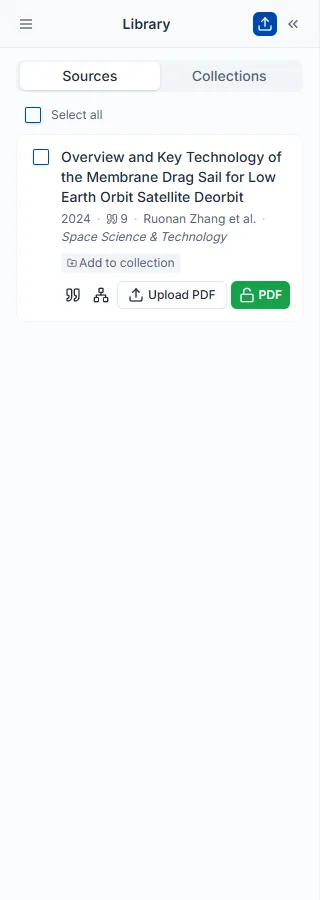
Click Filter at the top of the library panel and choose your conditions. Stacking filters narrows the range further.
There are fewer options than in the search filters, and these narrow only within papers you already saved.
Click Export in the library panel and choose a format to download the file. Ticking the checkboxes on specific paper cards first exports only those.
Use Nubint from the AI chat you already work in. Connect once, then start manuscript reviews, figures, paper searches and literature reviews in the conversation — the results stay in your Nubint account.
Connect Nubint to ChatGPT or Claude and you can call Nubint's paper search, manuscript review, literature work and figure tools from the chat you already use. No API key is needed. Paste the server URL, allow access once with your Nubint account, and you are done. Tools that use no credits, such as paper search, saving a manuscript, reading documents, suggesting edits and reference verification, work on the free plan too; reviews, literature reviews and figures spend credits and need the Starter plan or above.
Copy the server URL from Settings → AI connections in Nubint. The Nubint MCP page shows the same URL.
ChatGPT
Nubint, paste the server URL into the MCP server URL field, and choose OAuth for authentication.Claude
Nubint, paste the server URL into the remote MCP server URL field, and add it.Other AI apps that support remote MCP servers with browser sign-in (OAuth) can connect with the same URL. For developer tools that take an API key, such as Cursor or VS Code, see the developer docs.
The permission screen lists what the AI app can do on your behalf: find papers, save a manuscript you send and review it, read your Nubint documents and suggest edits, and run literature and figure work. It never changes a document directly: edits appear in the Nubint editor as suggestions that you accept or reject one by one. It never edits or deletes papers in your library either.
To disconnect, go to Connected AI apps under Settings → AI connections and disconnect the app. It loses access to Nubint immediately.
What you can do once connected is covered in three guides — review a manuscript you wrote, make figures, and find papers and write a literature review.
Hand a draft you wrote with ChatGPT or Claude straight to Nubint's reviews. A chat model cannot check for itself whether the references in its own text exist, or whether a cited paper really says what the sentence claims. Nubint checks those against a scholarly index and the papers' own text.
What to say
Save this manuscript to Nubint and run a peer review and a claim credibility check. The reference list is pasted below.
[3] or (Kim, 2023) are linked to the references.Seven reviews are available, the same engines as AI Paper Review in the editor.
Start with peer review, claim credibility and source quality — the ones a chat model cannot do on its own.
You can also run quick checks without saving. They look only at the text you paste and answer right away.
Check whether these references are real
Check this manuscript before I submit it
Reference checks use no credits. A reference that is not found in the index is never called "fake" — it comes back on a list for you to check, because books, statutes and older papers are often missing from scholarly indexes in the first place.
Draw mechanism diagrams, graphical abstracts, experimental setups and flowcharts from what you describe in the chat. The result is not just an image link in the conversation — it lands on a Nubint Figure canvas, where you go on to fix labels, redraw a part, and export.
What to say
Draw a graphical abstract of how a protein is made inside a cell. Landscape, with English labels.
What you can do from the chat
If the content is long, hand over the source — a paper abstract or an experimental protocol. The AI uploads that text to Nubint and draws from it. If there is a look you want to follow, you can also give a reference image as a style source.
Figures drawn in the same project sit side by side on one canvas. In a later chat, say "open that figure project again" and the AI brings back what you have made so far.
Charts of real data are drawn separately. Paste a table or CSV and say "plot the mean per group as a bar chart, with standard deviation error bars", and code, not an image model, plots the values as they are — bar, line, scatter, box plot or histogram. A cell that is not a number is left out rather than filled in, and you are told how many rows were left out along with the values actually plotted (sample size, mean, standard deviation). You get a PNG, and one chart costs the same credits as one figure. Asking for the editable SVG file as well adds the SVG export price. A chart that cannot be drawn from the data is not charged.
From a quick question about papers to a cited literature review, you can keep going inside the chat. Results stay in your Nubint account, so you can open them in the app from the link the AI gives you, or bring them back in a chat on another day.
Find papers — instant, and uses no credits. You can also add conditions in plain words, such as a year range, a minimum citation count, or open access only.
Find papers published since 2015 on sleep deprivation and metabolic health in university students
Keep the ones you like with "save this one to my library".
Literature review — picks the core papers and writes a cited review. There are three depths, from a quick overview to thesis level, with different prices and running times. The AI asks you to choose before it starts.
Write a literature review on this topic, enough for the related-work section of a journal article.
Nubint inside an AI app uses the same account and the same credits as the app. Prices are the same as using the same feature in the app.
Uses no credits — paper search, searching and saving to your library, reference checks, saving a manuscript, listing and reading your documents, edit suggestions, re-reading results, and checking your remaining credits. These work on the free plan too. Edit suggestions use no credits because the AI app writes the new text itself; Nubint only shows the suggestion in the editor.
Uses credits — manuscript reviews, literature reviews, figures, and data charts. These need the Starter plan or above. The AI is instructed to state the cost before running; if it does not, ask "how much will that cost?". The rates per feature are in Credits and quota and in the credit usage table on the pricing page.
A task that fails is not charged.
The tools do not show up — check that Nubint is turned on in the connector (tools) menu of a new chat. If it is still missing, remove the connection in the AI app and add the server URL again.
It says "available from the Starter plan" — a tool that spends credits (reviews, literature reviews, figures) was called on a free account. Search, saving a manuscript, reading documents, edit suggestions and reference checks still work on a free account. See changing your plan.
A result takes a long time — a literature review takes from a few minutes up to a little over ten. If the AI stopped checking, say "get the result of that task", or open the link you were given at the start in the app. The task keeps running in Nubint and the result stays in your account. Do not have it start the same request again — that is a new task and is charged again.
Picking up on another day — say "show me the work I have done in Nubint" and the AI finds your earlier literature reviews and continues from there.
The result came back in English — add "write it in Korean" (or your language). The language of a result is set when the task starts.
The AI seems to report a result differently — open the original in Nubint from the link the AI gave you. Review findings, the text of a literature review and its references are all there as they were produced.
A systematic review or data extraction request does not work — both features are coming soon and cannot be used from AI apps yet. For now, use paper search and literature reviews.
If that does not solve it, contact us.
Changing plans and payment methods, plus how credits and quotas are charged and when they reset.
You can change it at any time. Go to profile → Settings → Subscription tab, press Change plan, pick a plan and billing cycle, and review the details on the checkout page.
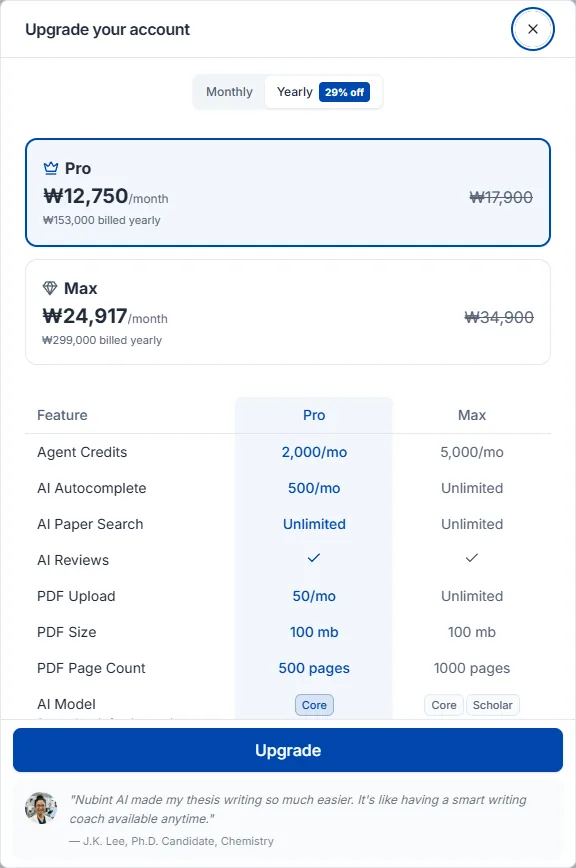
Upgrades apply the moment payment completes. The remainder of your current cycle is prorated against the new plan's cost, and the exact amount is shown on the checkout page beforehand.
Downgrades apply from your next billing date, and you keep the current plan until then. No payment is taken when you request one; the new plan's cost is billed on the next date. Before that date you can undo it with Cancel scheduled change in the Subscription tab, which leaves your current plan to renew as usual.
Feature and price comparisons for Free, Starter, Pro, and Max are on the pricing page. Switching to annual billing applies a discount, and the size of the discount differs by plan.
Plus is no longer sold: existing Plus subscribers keep their plan as it is, but once you move to another plan you cannot switch back to Plus.
Go to profile → Settings → Subscription tab and press Cancel Subscription below your current plan details. Cancelling runs through a few steps: pick a reason, describe it in at least 30 characters, then look over what you would lose and a final offer before confirming.
Cancelling leaves the period you already paid for intact. You keep every feature of your paid plan (Starter, Pro, or Max) until the current billing cycle ends, after which the account switches automatically to the Free plan. Saved papers, your library, and documents in progress all remain. No automatic payment is taken for the following cycle. Plus, which is no longer sold, works the same way for existing subscribers, but once a Plus subscription ends you cannot subscribe to it again.
Your payment method is registered automatically when you choose one at checkout for your first paid subscription. There is no separate registration step.
Which payment methods are available depends on the country you pay from. Alongside credit and debit cards, the checkout may show Apple Pay, Google Pay, PayPal, and local methods such as iDEAL or Pix.
To change it, go to profile → Settings → Subscription tab and press Change payment method in the payment method area. Save the new method at checkout and the change takes effect immediately, with your next billing cycle charged to the new method.
When you change your payment method, the checkout shows a zero amount. This is a verification step, and nothing is actually charged.
The method currently on file is shown in the same place, for example as Visa •••• 1234, or as PayPal if that is what you use.
If your card is nearing expiry, swap it in advance so billing is not interrupted. Your active subscription is unaffected.
Click your profile at the bottom left — My credits in the menu shows your remaining credits.
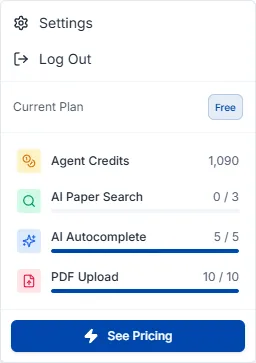
Credits are charged by actual AI usage rather than a fixed number of runs. A short question costs little; a long draft or a large literature analysis costs more.
The exact rates per feature are in the credit usage table at the bottom of the pricing page.
Paper search and the editor's inline citation search charge no credits and have no usage cap on any plan.
PDF upload consumes no credits and has no count limit on any plan, the free plan included. File size and page limits are on the pricing page.
Credits reset on your monthly renewal date — the sign-up date on the free plan, the subscription start date on paid plans. The AI model grade depends on your plan — the basic AI model on Free, the advanced AI model on Starter, and the premium AI model on Pro and Max.
When the monthly allowance runs short you can top up in units of 1,000 credits. Go to profile → Settings → Subscription tab → Add credits, pick 1,000 · 3,000 · 5,000 or enter your own amount (up to 100,000 credits per purchase), at $10 per 1,000 credits (₩15,400 when billed in Korean won, ¥1,760 in yen). You enter your card in the checkout itself, so no payment method needs to be on file, and the free plan can buy too. Note that credits only add usage — they do not unlock plan-gated features such as peer review or proofreading.
Purchased credits are valid for 6 months from the date of purchase. They are consumed in the order bonus credits → purchased credits → monthly credits, and among purchased credits the ones expiring soonest go first.
Turning on Auto-recharge buys 1,000 credits ($10) automatically whenever your balance drops below 500, so work is not interrupted by running out mid-task. Toggle it in the buy-credits area of the Subscription tab; it requires a paid plan and a registered payment method.
Click your profile at the bottom left, go to Settings → Account tab, press Delete Account, and confirm with Delete.
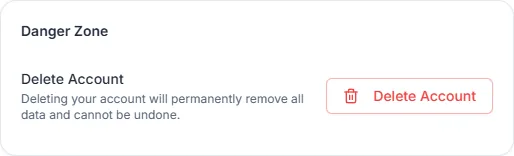
If you have an active paid subscription, cancel it first and then delete the account.
Within 14 days of payment and provided you have not used the credits that payment granted, you receive a full refund. Once credit usage has begun, delivery of digital content is considered to have started and refunds are restricted.
Renewal payments and mid-term cancellation of an annual subscription are not refundable. If you do not want to renew, stop automatic renewal before the renewal date via Cancel subscription — cancelling still leaves you access until the end of the period you already paid for.
Send refund requests to contact@nubint.ai.
How to reach us when you cannot find the answer here.
Send questions and feature suggestions to contact@nubint.ai.
We also post updates on social media — X (Twitter) · Threads · Instagram · Facebook · LinkedIn · YouTube