
Quick Start: Create a Paper Draft with a Prompt
Last updated: 2026-04-10·2 min read
Enter your research topic in a new document to auto-configure structure and autocomplete. Draft the paper section by section, then refine it with autocomplete, AI editing, inline citations, and the Literature Review and Peer Reviewer workflows.
Find the Right Feature for Your Situation
| Your Situation | Recommended Feature |
|---|---|
| I'm new to Nubint AI | Start with a Prompt |
| I haven't decided on a topic yet | AI Chat |
| I want to systematically survey prior research | Literature Review Agent |
| I want to import my Zotero library | Library Import |
Step 1: Fill in the Prompt
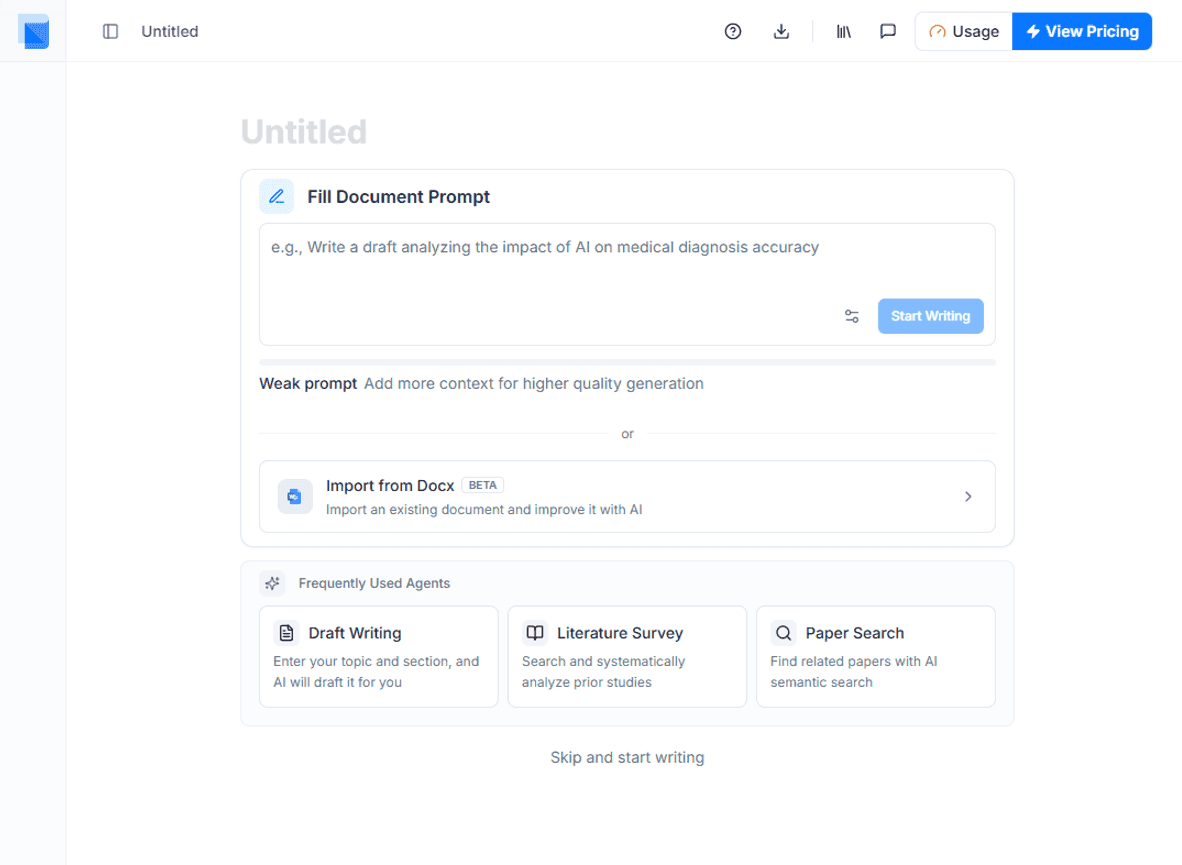
When you create a new document, the Start with a Prompt screen appears. Enter your research topic.
Step 2: Write Your Draft
After submitting the prompt, the basic paper structure and autocomplete settings are ready. Place your cursor in the editor and Autocomplete will suggest the next sentence. For a longer, well-structured draft, ask the research agent in the AI Chat panel on the right to write section by section.
Step 3: Deepen with AI Paper Editor & Research Agent
Once the draft is complete, use the AI Paper Editor's features and the research agent's dedicated workflows to refine your paper.
- Autocomplete — AI suggests the next sentence so you can write naturally
- AI Editing · Citation Insertion — Proofread sentences and add references directly in the AI Paper Editor
- Dedicated workflows — Literature Review, Peer Reviewer, Proofreader run from the AI Chat panel