Step 1. AI下書き
テーマを一行入れるだけで、タイトル・目次・冒頭の本文を引用付きで埋めます。プロンプト、検索範囲、見出し方式の3ステップで完了します。
Nubintの使い方に関するすべてのヘルプをご覧ください。
Nubint で最初の論文下書きを作り、整え、根拠を付けるまでを順番にたどってみましょう。ひと通り10分あれば十分です。
テーマを一行入れるだけで、タイトル・目次・冒頭の本文を引用付きで埋めます。プロンプト、検索範囲、見出し方式の3ステップで完了します。
直したい箇所を AI チャットに伝えると、削除する文と新しく入れる文が文書上に提案として表示されます。一つずつ確認して適用か却下かを選び、適用したものだけが文書に入ります。
詳しい使い方はチャットで文書を直す・書き進めるをご覧ください。
ピアレビュー、論文校正、主張の信頼性、出典の品質、文体トーン、およびベータ2種(論文原文との照合・AI生成の検出)の7種類が下書きの弱い部分を指摘します。指摘ごとに該当の文へ移動できます。
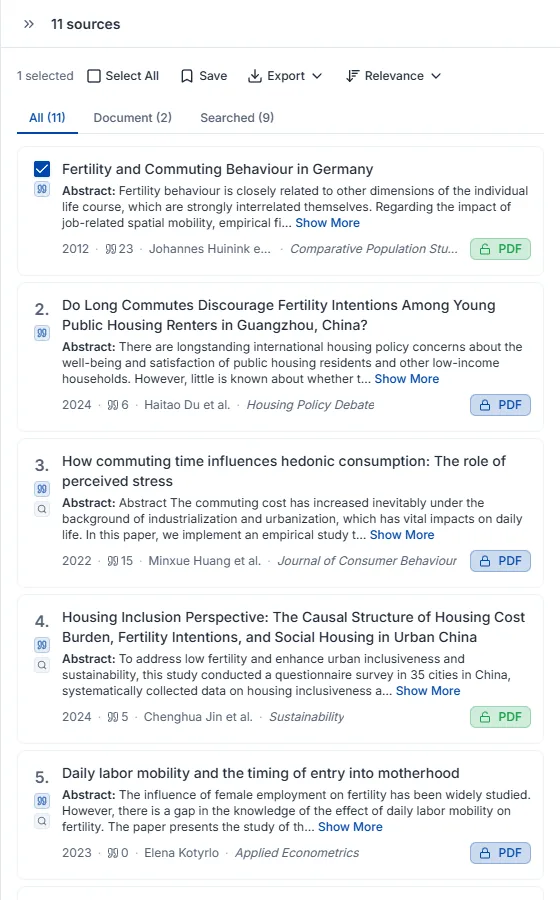
探したいテーマを AI チャットに伝えると、4.6億件の学術データベースから関連論文を探し、引用付きでまとめます。回答の下のソースを開いてコレクションに保存を押すと、見つかった論文がライブラリに入ります。サイドバーの論文検索で直接探し、カードの保存ボタンで保存することもできます。集めた論文が多いほど、引用推薦が正確になります。
詳しい使い方は論文検索の使い方をご覧ください。
書きかけの段落をまるごと入れると、根拠が必要な文ごとに適した論文を探して引用を付けます。
仕上がった原稿は DOCX または LaTeX で書き出せます。本文に入れた引用と参考文献リストが、選んだスタイルのまま引き継がれます。
文章で説明して論文に入れる図を作り、キャンバスで直して書き出すまでをひと通りたどります。
必要な図を文章で説明すると、そのまま論文に入れられる図ができます。スケッチや参考画像を一緒に添えても構いません。送る前に画風と比率を選べ、よくある構成はテンプレートから始めることもできます。
一度で思いどおりにならなくても、最初から作り直す必要はありません。直したい内容を文章で書けばその部分だけが変わり、領域を指定して中だけ描き直したり、文字を直したりもできます。配色変更・背景除去・比率調整・高解像度化も同じ場所にあります。領域の描き直しと文字修正は Starter プランから使えます。
書き出しメニューで解像度を確認し、形式を選びます。PNG・JPG はどのプランでもそのまま受け取れ、編集可能な SVG・PPTX は Starter プランからです。線や色を自分で調整したい場合はベクターキャンバスで開きます。AI で作った図について掲載元を尋ねられたときに使う掲載許可証明も一緒に書き出せます。
AI に何を見せ(添付)、何を探させるか(検索権限)を決めることがチャットのすべてです。その設定が回答に引用がつくかどうかを左右します。
チャット入力欄のクリップ型添付ボタンを押して PDF を選ぶと、アップロードと同時に会話に接続されます。アップロードした論文はライブラリにも保存されるので、後で別のチャットからコンテキスト追加で使い回せます。
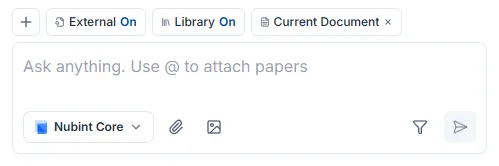
PDF はクリップボタンから、画像(JPEG・PNG・WebP)は画像ボタンから添付します。DOCX などの Word 文書はチャットに添付できないので、エディタの文書インポートを使ってください。
AI が添付した PDF を読めない場合はスキャンである可能性が高いです。PDF ビューアで本文テキストが選択できるか確認してください — 選択できなければテキストが画像としてのみ入っているファイルで、内容を抽出できません。テキストレイヤーのある元の PDF を使うほうが確実です。
PDF アップロードは、無料プランを含むすべてのプランで回数制限がありません。ファイルサイズとページ数の上限は料金ページで確認してください。
コンテキストは、AI が回答するときに参照するよう自分で添付する資料です。チャット入力欄の + ボタンを押して、ライブラリの論文やコレクションを選びます。
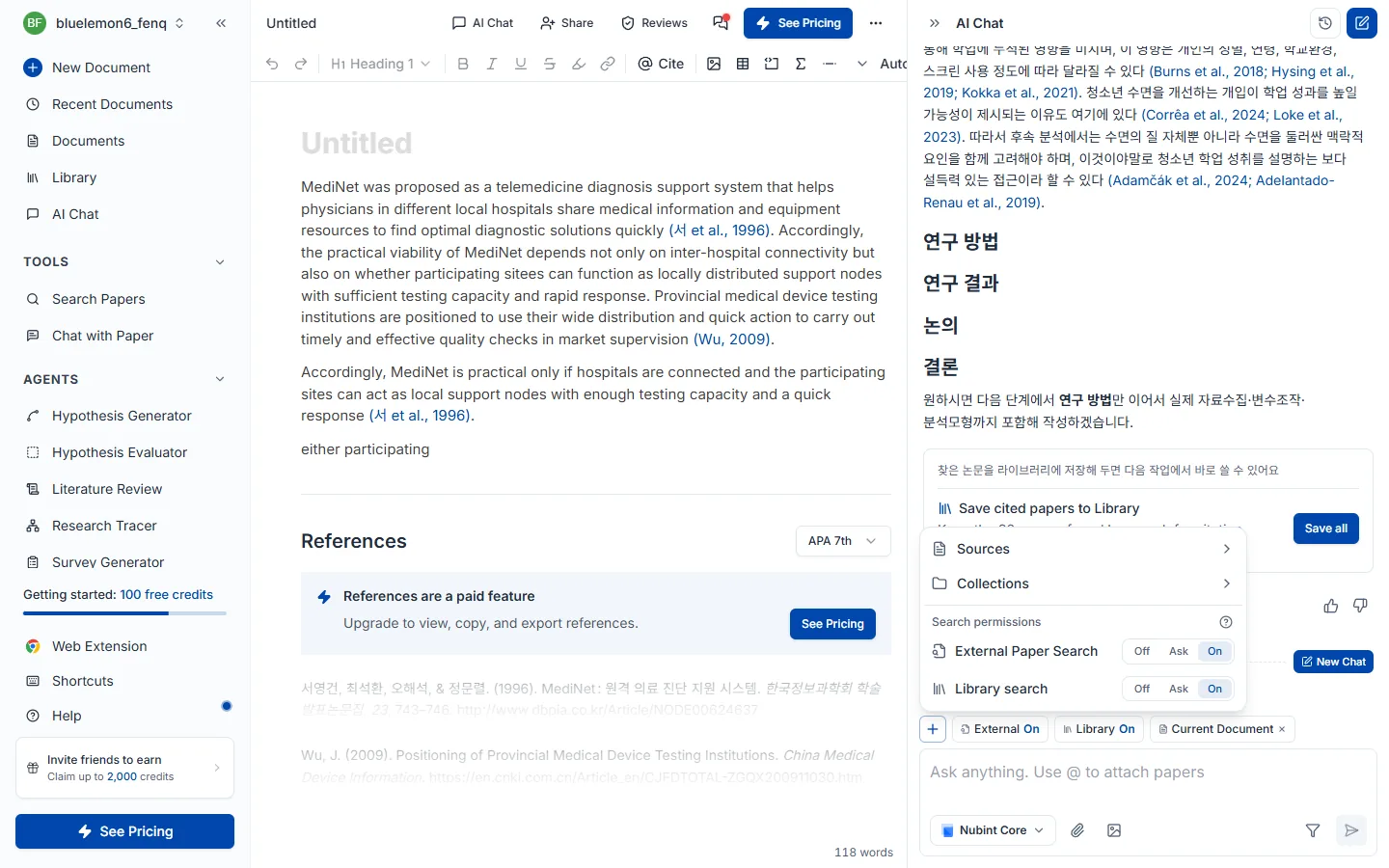
入力欄に @ を打ってもライブラリの論文をすぐ添付でき、ライブラリにない論文は PDF で添付してください。添付した資料は入力欄の上にチップで表示され、X で外せます。
エディタで開いている文書は添付する必要がありません。 エディタ横のチャットは開いている文書を常に読むので、下書きについて尋ねたり、直してほしいと頼んだりがそのままできます。
参照論文の上限 — 1回の質問で無料 20件、Starter 30件、Pro 40件、Max 60件まで参照します。+ メニューの 3/20 のようなカウンターが、直接添付した論文の数を示します。
添付した資料とは別に、AI に自分で論文を探させたい場合は検索権限をオンにしてください。
検索権限は、AI が自分で論文を探してよいかを決める設定です。チャット入力欄の上にある外部・ライブラリチップを押して、それぞれオン・オフを切り替えます。+ ボタンのメニューの検索権限でも同じ設定を変えられます。

探す場所は2つあり、別々に切り替えます。
| 検索 | どこから探すか |
|---|---|
| 外部 | 4.6億編の学術 DB から新しい論文を探します |
| ライブラリ | 自分のライブラリに保存した論文から選びます |
コレクションを添付しておくと、ライブラリ検索はそのコレクションの中だけを探します。
それぞれの検索はオフ / オンの2つです。
| モード | 動作 | こんなときに |
|---|---|---|
| オフ | 検索せず、添付した資料だけで回答します | 指定した論文だけで話したいとき。クレジットを節約したいとき |
| オン | 必要と判断すれば自分で検索します | 資料集めからまるごと任せたいとき |
両方同時にオンにできます。研究の初期は外部検索をオンにして広く探し、執筆段階ではライブラリだけをオンにして手持ちの論文中心に使う進め方をお勧めします。
引用がつかない場合はまずこの設定を確認してください。2つの検索がどちらもオフで添付した資料もなければ、AI は参照する論文がなく引用なしで回答します。
添付した資料と一緒に使うとき。 コンテキストとして添付した論文と検索してきた論文は合わせて使われ、1回の質問で参照する論文数(無料 20件、Starter 30件、Pro 40件、Max 60件)も合わせて数えます。枠はこの順に埋まります。
直接添付 → ライブラリ検索 → 外部検索
添付した論文だけで枠が埋まると、検索は新しい論文を持ってきません。論文を外すと枠が空きます。
状況別の使い分けはこうです。
| いまの状況 | 設定 |
|---|---|
| この論文1編について尋ねたい | 出典としてその論文を添付 + 検索権限オフ |
| 集めた論文だけで下書きを書きたい | ライブラリ検索オン + 外部検索オフ(コレクションを添付するとその中だけ) |
| テーマだけあって資料がまだない | 外部論文検索オン |
| 自分の下書きを直してほしい | 添付は不要 — 開いている文書は常に読まれます |
AI が回答を生成している間は、入力欄の中断ボタンで即座に止められます。すでに生成された結果はそのまま残ります。
PDF を添付するかコンテキスト追加でライブラリの論文をつけてから質問します。核心的な貢献の要約、研究手法の説明、結果と限界の解釈、用語の整理まで、論文の内容全般を尋ねられます。
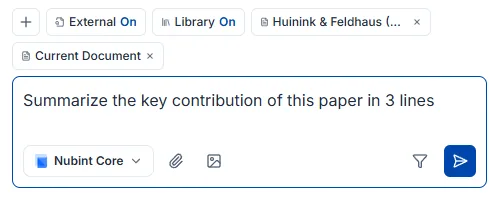
複数の論文をまとめて扱うこともできます。 コレクションをコンテキストとしてつけるか論文を複数選ぶと、AI が比較して総合的に答えます —「これらの論文の方法論の違いを表にして」「3つの論文が共通して指摘している限界は?」といった質問がこれにあたります。
回答についた引用番号をクリックすると、どの論文の内容かをすぐ確認できます。引用がつく仕組みは回答の引用で扱います。
AI が実際に確認した論文 — 検索結果とコンテキスト・添付で接続された論文 — にだけ引用番号がつきます。存在しない出典を作ってつけることはありません。 回答の引用番号をクリックすると論文情報を確認し、ライブラリに保存できます。
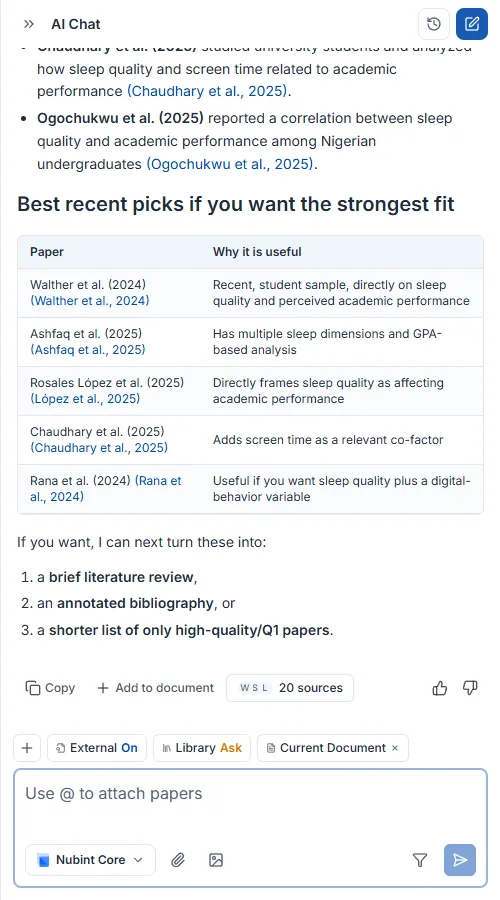
引用がつかないのは参照する論文がないからです。 検索権限がすべてオフで接続された論文もなければ、AI は一般的な知識だけで答えて引用をつけません。次のうち1つ以上を確認してください。
同じチャットの中では、前の回答で引用された論文が以降の回答でも続けて引用されることがあります。会話を分けて始め直したいときは新しいチャットを作ってください。
チャットパネル上部の新しいチャットボタンを押すと新しい会話が始まります。前の会話は自動的に保存され、チャット一覧から選べばその時点に戻って続けて質問できます。

前とは別の研究テーマを始めるとき、会話が長くなって回答の焦点を取り直したいときに新しく作ってください。
下書きで骨格を作り、チャットで本文を直して書き進め、引用をつけてから Word・LaTeX で書き出す順に使います。
新しい文書を作ると開始方法が3つ出ます。AI下書きで始める(テーマは決まったがどこから書くか迷うとき)、Wordファイルで始める(すでに書いていた .docx 原稿を続けたいとき)、空の文書で始める(構成が頭にあってすぐ打ちたいとき)です。
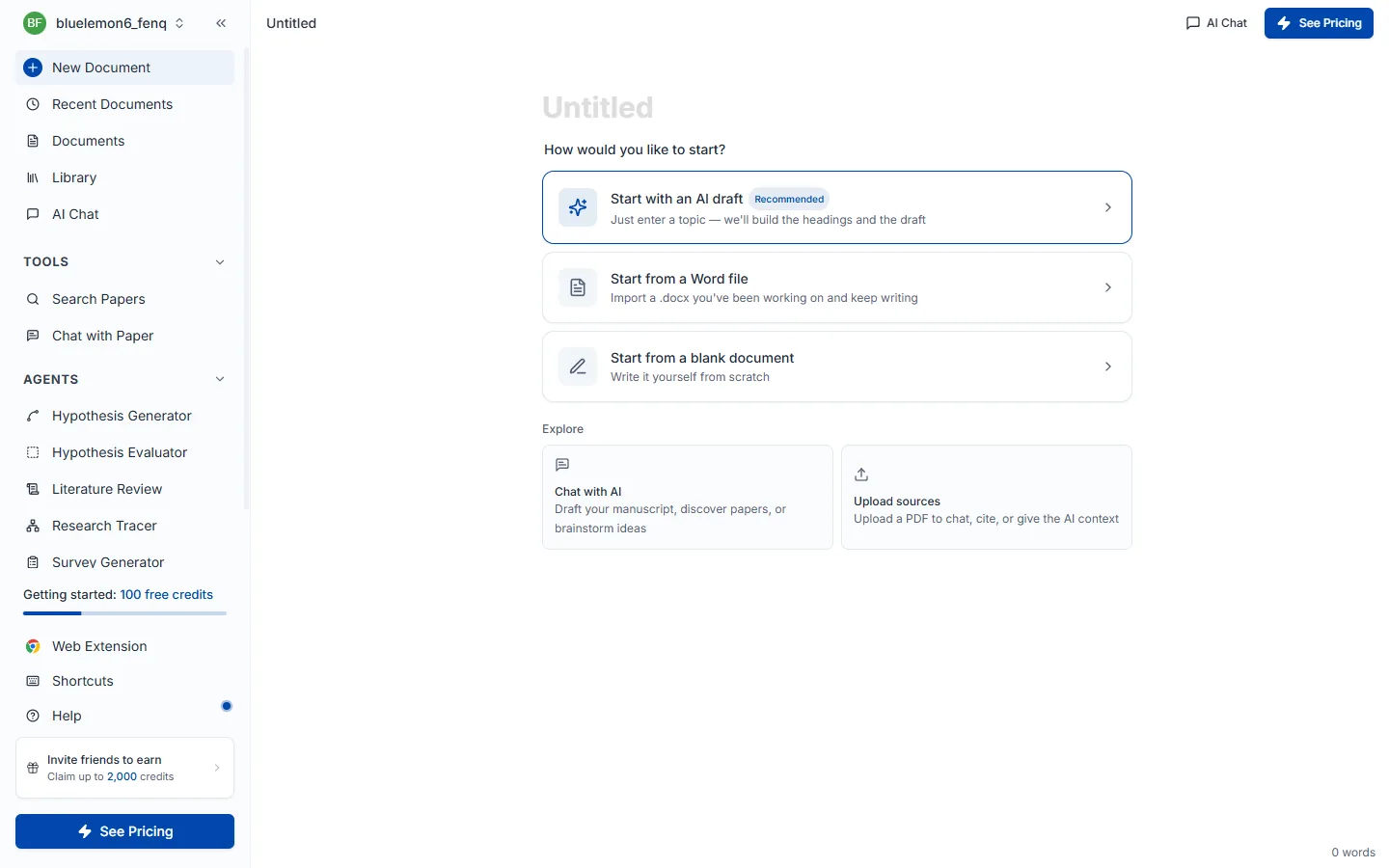
AI下書きを選ぶと3ステップのウィザードが開き、3つすべてを通らないと最後のAI下書き作成ボタンに届きません。
ステップ1 — 下書きプロンプト。 書こうとする論文のテーマを1〜2文で書きます。この文が AI が先行研究を検索し下書きを書く基準になります。入力欄の下のバーはプロンプト強度で、単語が増えるほど薄い緑から濃い緑へ満ちていきます。テーマを空のままにすると次に進めません。
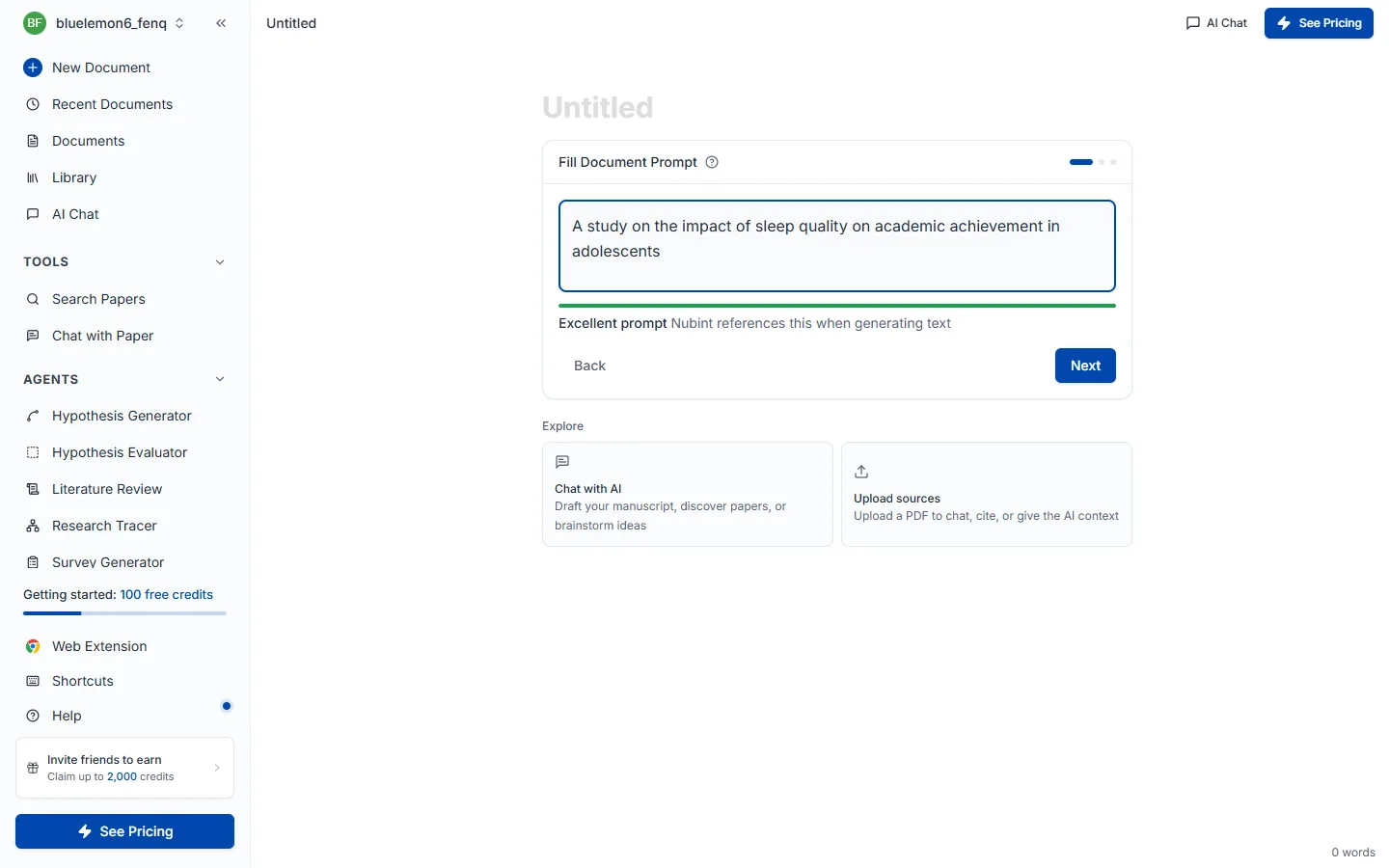
良い例は 睡眠の質が青少年の学業成績に及ぼす影響に関する研究、惜しい例は 睡眠 です — 対象・結果変数・範囲がないと検索結果が散らばります。
ステップ2 — 引用設定。 ここで選んだ値が以降に書かれるすべての文に適用されます。参照ソースは外部の出典(4.6億編の学術 DB)から自動引用するか、自分のライブラリに保存した論文だけを使うかを決めます(コレクションでさらに範囲を絞れます)。引用フィルターで出版年・最小引用回数・ジャーナルランク(SJR)・種別・国の条件をかけられ、そのままにすると全範囲から検索します。
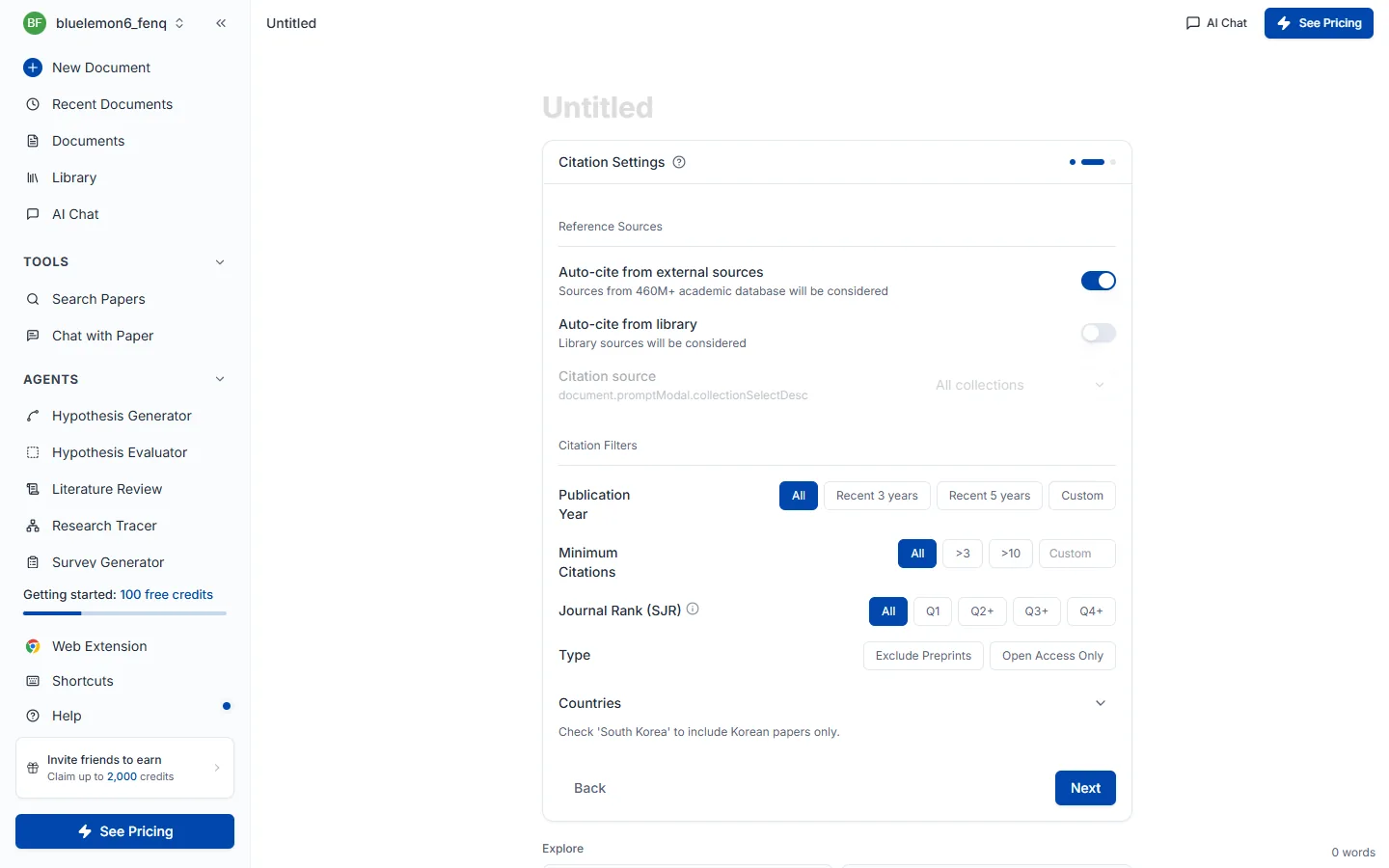
ステップ3 — 見出しと言語の設定。 論文の骨格になる目次を選びます。標準見出し(IMRaD) は序論・理論的背景・研究方法・研究結果・考察・結論の決まった6つの構造で、スマート見出しは入力したテーマに合わせて AI が大見出し5つと各小見出し2つを新しく構成します。実験・調査ベースの論文なら標準見出しが、理論研究や学際的なテーマのように IMRaD が合いにくい場合はスマート見出しが有利です。上部の論文の言語で、下書きを書く言語も選べます。
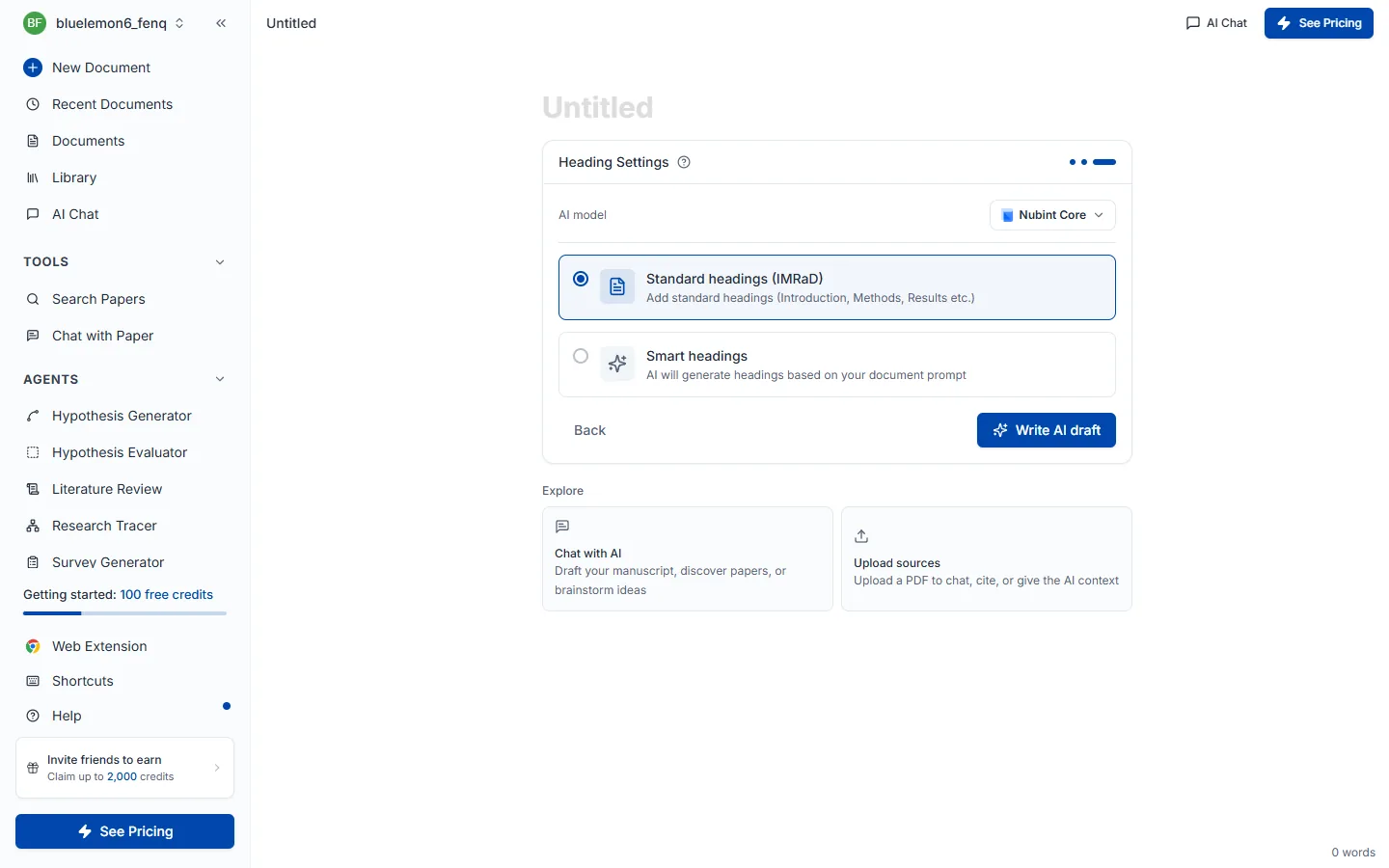
AI下書き作成を押すと先行研究を検索した後、タイトル(H1)と目次を入れ、前半2セクションの本文を引用とともに書きます。残りのセクションは見出しだけ残るので続けて書けばよく、本文には [1] のような引用番号がつき文書の一番下に参考文献が自動で積み上がります。通常1分前後かかります。
下書きが出た後は AIチャットに頼んで文書を直して書き進め、レビューパネルで点検する順に発展させます。
エディタで / を入力するとスラッシュメニューが開きます。見出し(H1~H3)、箇条書き・番号付きリスト、表、コードブロック、数式(KaTeX)、引用ブロック、区切り線を入れられます。
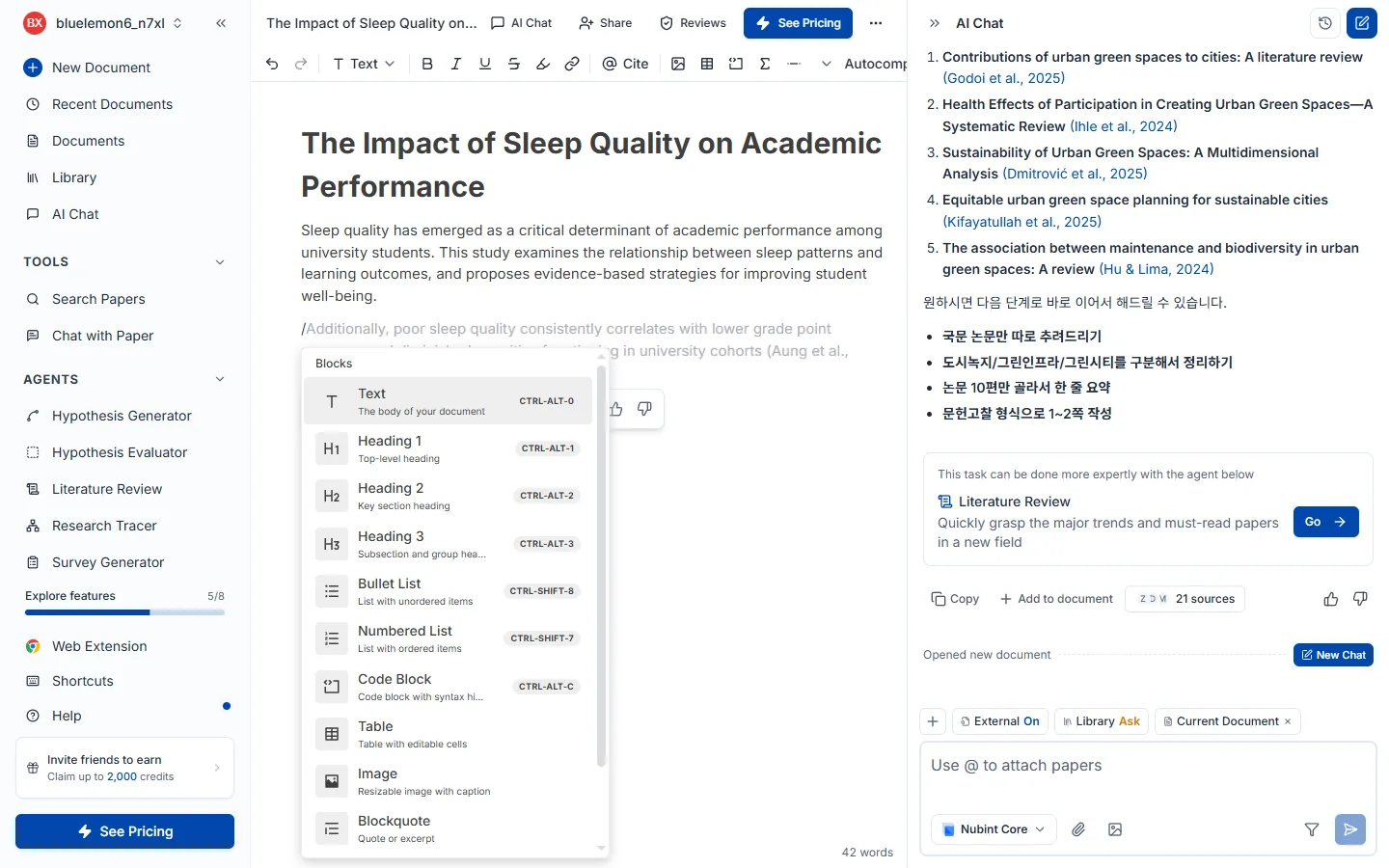
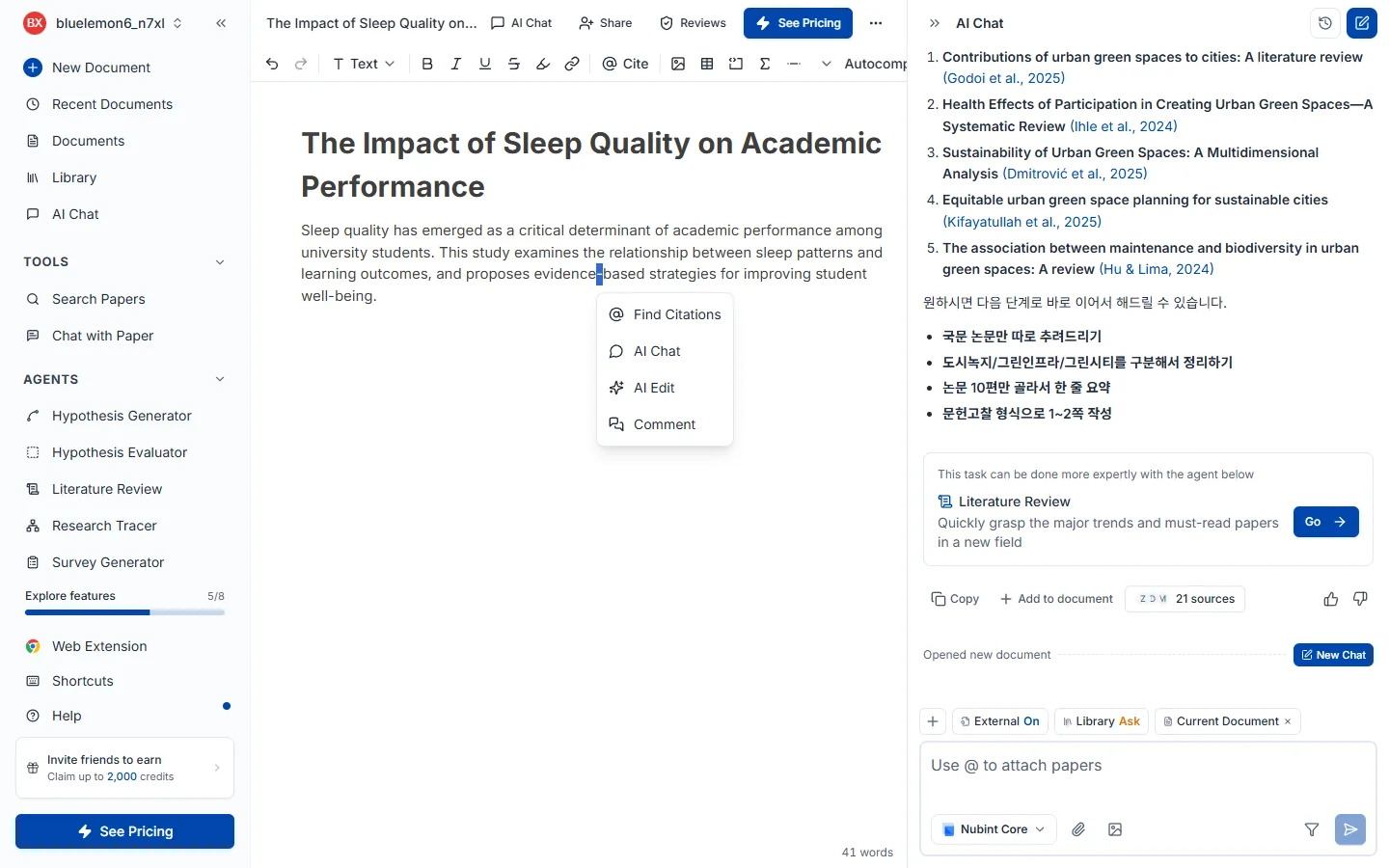
テキストをドラッグして選び、上部のツールバーで太字・斜体・下線・取り消し線・背景色・リンクを適用します。学術用語や変数名には斜体を使うのが慣例です。選んだ箇所の下には、引用の検索・AI チャット・コメント・レビューのメニューも出ます。
文書の一番下、参考文献リストの横にあるスタイル選択を開きます。左がスタイル、右が言語の2列のダイアログが開き、選んだ組み合わせで参考文献がどう表示されるかのプレビューも一緒に出ます。
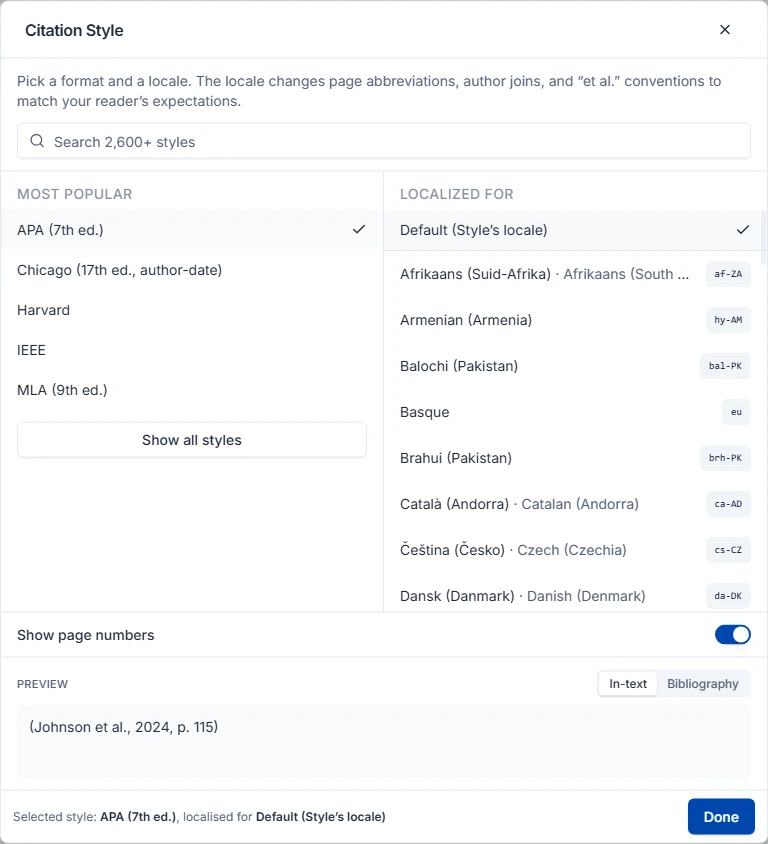
よく使う5つは最初から並んでおり、CSL スタイル約 2,850 種の全リストはダイアログを開いた直後に読み込まれます。探すものが決まっていれば検索欄を使ってください。完了を押すまで文書には何も反映されません — それまでは見ているだけの状態です。
スタイルは Citation Style Language (CSL) プロジェクトによるもので、CSL スタイルリポジトリに CC BY-SA 3.0 で公開されています。
引用スタイルは文書ごとの設定です。変更すると本文の引用と参考文献リストが一度に描き直され、その文書にだけ適用されます。ほかの文書はそれぞれの設定のままです。
一方、あえて連動させていないものが三つあります。
エディタ上部のその他メニューからエクスポートを押すとダイアログが開きます。Word (.docx) か LaTeX (.tex) を選べ、同じメニューから文書全体をクリップボードにコピーすることもできます。PDF エクスポートはありません — Word か LaTeX で書き出し、そちらから PDF に印刷してください。
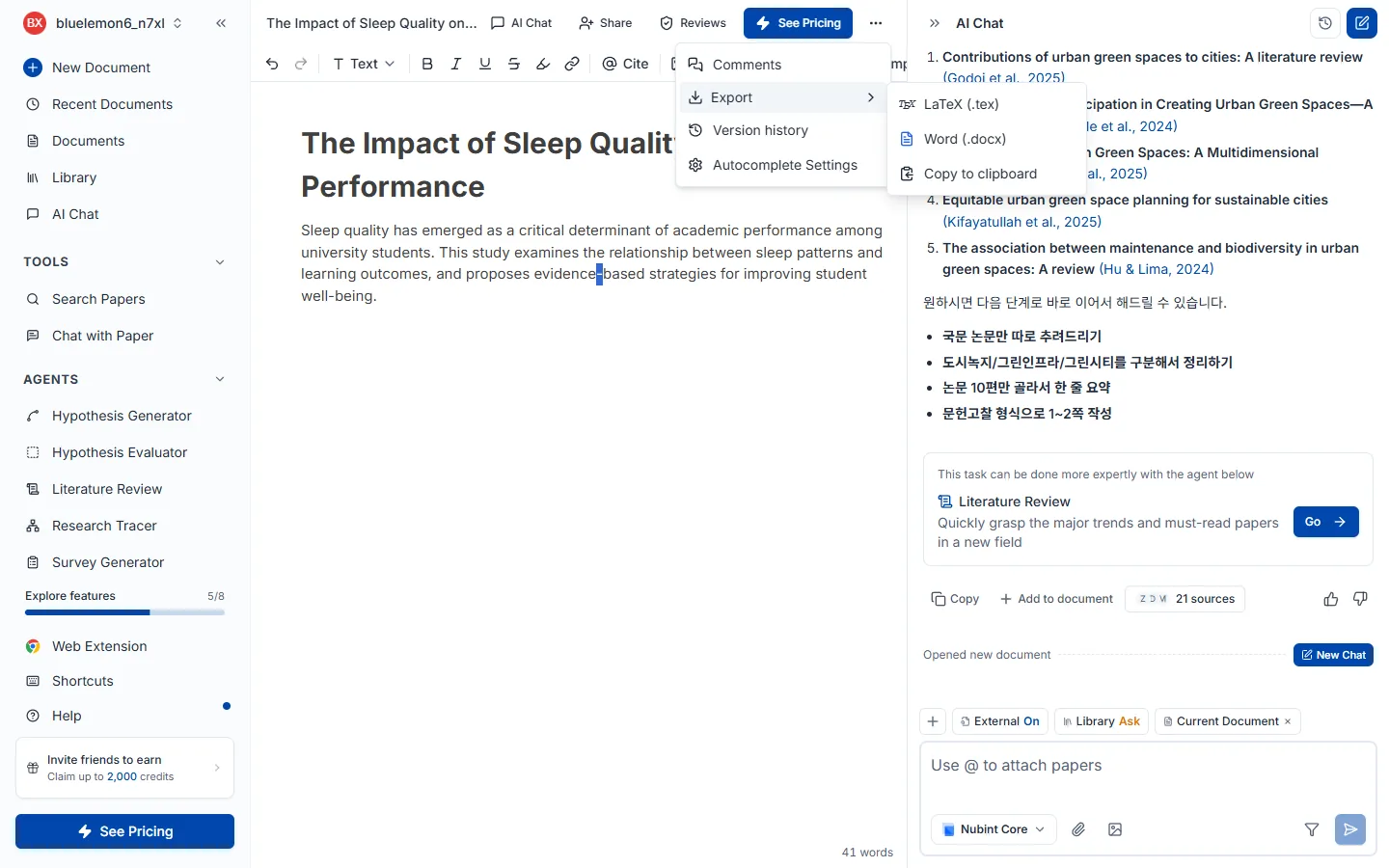
レイアウトプリセットを選べばたいてい済みます。Nubint 既定、ダブルスペース原稿(12pt Times New Roman・行間2・余白1インチ、学術誌投稿向け)、2段組み論文(10pt・狭い余白、学会プロシーディング向け)、学位論文・報告書(12pt・行間1.5・表紙と目次つき)。その下の詳細オプションを開くと、用紙サイズ、段数、フォントとサイズ、行間、余白、そして表紙・目次・ページ番号・コメントの有無を個別に指定できます。
Word にだけある選択が一つあります。本文の引用をどう書くかです。MS Word ネイティブ引用は Word の参考文献機能で本文引用と文献リストを結び付けます — 以降も Word で編集を続けるならこちらです。ハイパーリンク引用は代わりにクリックできるリンクとして書き出し、Google ドキュメントで扱える形式です。
引用スタイルはここでは決めません。エクスポートは文書に設定されたスタイル(参考文献リストの横で選んだもの)にそのまま従います。そのスタイルが脚注方式なら、書き出したファイルも脚注になります。
無料プランは本文のみ、有料プラン(Starter・Pro・Max)は本文と参考文献を合わせて書き出します。
エディタの横にある AIチャット は、開いている文書を読み、頼めば 直す箇所を文書上に提案します。 回答をコピーして貼り付ける必要はなく、やりたいことをチャットに書いて、提案を適用するだけです。
頼み方。 何をどう変えるかをチャットの入力欄に書いて送信します。
この段落を短くしてタイトルを○○に変えて誤字を直してこの後に一段落追加してエディタで起きること。 回答が終わると、削除・置き換え・挿入が提案として本文に表示されます。AI論文レビューの結果と同じ画面なので、表示された箇所を一つずつ確認しながら適用 / 却下を選びます。適用したものだけが文書に入り、却下すれば文書はそのままです。
まとめて処理する。 回答の下のAI の修正提案カードに、まだ選んでいない提案の件数が表示されます。文書で表示でその箇所へ移動し、すべて適用 / すべて却下でまとめて処理できます。次の依頼を送っても、先に受け取った提案は消えません。同じ段落をもう一度直すよう頼むと、その段落の提案だけが新しいものに置き換わります。
書き進める。 次の章を書いて のように続きを頼むと、新しい章はチャットの回答として届きます。読んでから回答の下の文書に入れるを押すと、文書の該当する位置に入ります。AI下書きの作成で最初に書く下書きだけは、そのまま文書に入ります。
元に戻す。 適用したあとで気が変わったら、エディタで Ctrl + Z を押して戻します。すべて適用の直後に表示される通知の元に戻すで、まとめて戻すこともできます。
新しい文書を作ると出る開始画面で Wordファイルで始めるを押し、.docx ファイルを選ぶと内容がエディタに読み込まれます。インポート後は チャットでの文書編集、引用の挿入をすぐ使えます。
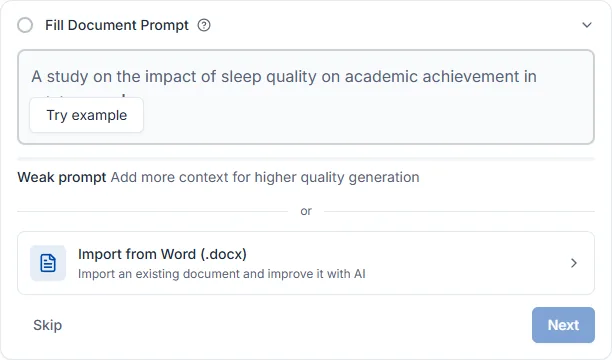
現在は .docx のみ対応で、.doc、.pdf、.hwp は受け付けません。
すでに書いた文に自分で選んだ論文を直接引用としてつけます。AI に根拠を探してほしいなら 引用推薦のほうが合っています。
入り方が3つあり、その後はすべて同じです — 論文検索窓でタイトルやキーワードから探して選ぶと、その場所に引用が挿入されます。
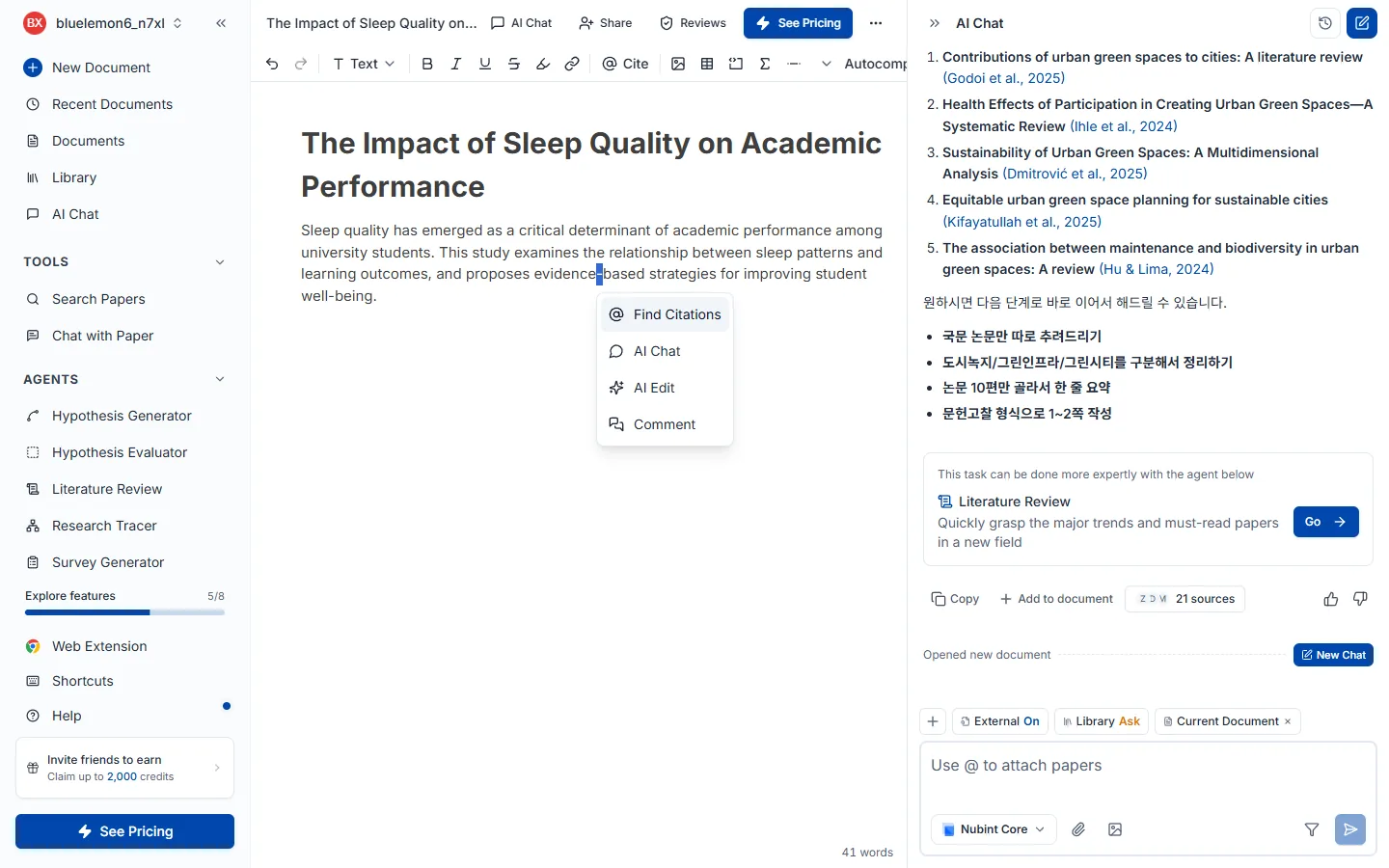
引用を入れたい位置に @ を打つのが最も速いです。カーソルを置いてから上部機能バーの @ 引用 ボタンを押すか、文をドラッグすると出る機能バーの引用ボタンを押しても構いません。
挿入された引用は文書に設定された形式(APA・MLA・Chicago など)に合わせて自動で整形され、文書下部の参考文献リストにも追加されます。形式を変えるには引用形式の変更をご覧ください。
7つのレビューは見るところが互いに重なりません。構造(ピアレビュー)→ 根拠(主張の信頼性・出典品質)→ 文(文体トーン・論文校正)の順に降り、提出直前に論文原文との照合・AI生成の検出で確認してください。
エディタ上部のレビューボタンを押すと、右側にレビューパネルが開きます。7種類がカードで並び、目的のカードのレビュー実行を押すと始まります。すでに実行したことがあればボタンは結果を見るに変わり、下書きを直した後は結果画面右上の更新アイコンで再実行できます。カード右上の ? はそのレビューのヘルプにつながり、パネルを開くだけでは何も消費されません。
7つのレビューは見るところが互いに重なりません。 大枠から文へと降りていく順番が効率的です — 構造を直すと文は書き直しになるからです。
| レビュー | 何を見るか | いつ実行するか | 無料 |
|---|---|---|---|
| ピアレビュー | 構造と論理、方法論、引用の十分さ | 下書きがある程度できた後 | — |
| 主張の信頼性 | 根拠なく断定した主張 | 下書きが溜まったとき | ✅ |
| 出典品質 | 引用した論文自体の信頼性 | 引用をある程度つけた後 | — |
| 文体トーン | 文章全体の調子が学術文体に合っているか | 文を整え始めるとき | ✅ |
| 論文校正 | 文法、綴り、句読点、語の選択 | 内容が確定した後の最後 | — |
| 論文原文との照合(ベータ) | 既存論文と文字どおり重なる文 | 提出直前の最終確認 | — |
| AI生成の検出(ベータ) | AIが書いた文章の特徴が出ている段落 | 提出直前の最終確認 | — |
主張の信頼性と出典品質は混同しやすいのですが、主張の信頼性は根拠がついているかを、出典品質はついている根拠が使えるものかを見ます。引用がまったくない文は主張の信頼性が、撤回されたり等級の低い引用は出典品質が捕まえます。
レビューは常に文書全体を対象にします。 本文を選択して実行しても、モバイルのレビュードロワーから実行しても、対象は文書全体です — 構造・論理・引用は前後の文脈があってはじめて正しく判断できるためです。
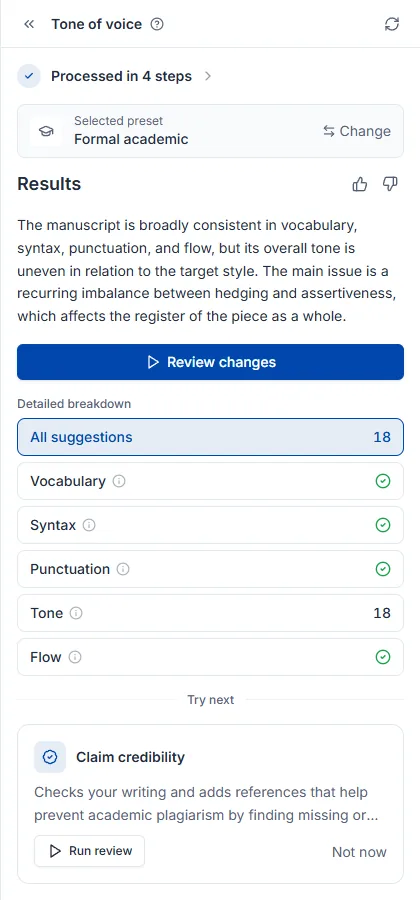
結果画面はレビューの種類にかかわらず同じ骨格です。N段階完了を開くとどの検査を経たかが分かり、結果が今回の実行を一段落でまとめます(横の 👍👎 で品質を伝えられます)。変更点の確認で指摘を一つずつ処理し、詳細分析は分類別の件数を(チェック印はその分類で何も引っかからなかったという意味です)、すべての提案は全体の件数を示します。本文の下線部分を押すと何が問題かが表示され、適用 / 却下を選べます。一番下の次に試すは、続けて実行するとよいレビューを勧めます。
ここにレビューごとの固有要素が一つずつ加わります — ピアレビューは総合評価のスコアとコメント、出典品質は書誌ノート、文体トーンは選択したプリセットです。
クレジットはレビューした文書の分量 × 種類別の単価で差し引かれます。文書全体を読むレビューなので、原価が長さに比例するためです。料金表の「A4 枚数」はこの分量を英文基準に換算した表記です。
| レビュー | 英文 A4 1枚あたりクレジット |
|---|---|
| ピアレビュー | 12 |
| 主張の信頼性 | 10 |
| 論文校正 | 6 |
| 出典品質 | 6 |
| 文体トーン | 6 |
| 論文原文との照合(ベータ) | 6 |
| AI生成の検出(ベータ) | 8 |
上の単価は英文 A4 1枚(英語で約500語)が基準です。5枚単位で切り上げて計算するので、数行だけ入れて実行しても5枚分、5枚を少し超えると10枚分になります。日本語・韓国語・中国語は同じ枚数でもトークンが約2倍で、金額も約2倍です — ピアレビューは英文 A4 10枚で120クレジット、同じ分量の日本語の文書ならその約2倍です。自分の文書の正確な金額は、実行前にレビューカードに表示される予想クレジットで確認してください。
残りクレジットはクレジットとクォータで、プラン別の違いは料金ページで確認してください。
構造と論理を見ます。論文の構造、論理の流れ、方法論の妥当性、引用が十分かの4軸で文書全体を読み、学術誌の査読者の視点で意見をつけます。実行方法とクレジットはレビューを始めるで共通して扱います。
下書きがある程度できた後に実行してください。大枠を先に固めれば文を二度直さずに済むので、7種類の中で最初に回すことをお勧めします。文の表現は論文校正が、根拠の有無は主張の信頼性が担当します。どのレビューも文書全体を対象に実行され、一部だけを選んで検査することはできません。
他のレビューと違いスコアが先に出ます。総合評価が妥当性・表現・貢献度をそれぞれ4点満点で採点し総合点(10点満点)を出すので、軸ごとのスコアでどこが弱いかを掴んでから弱点リストへ降りてください。
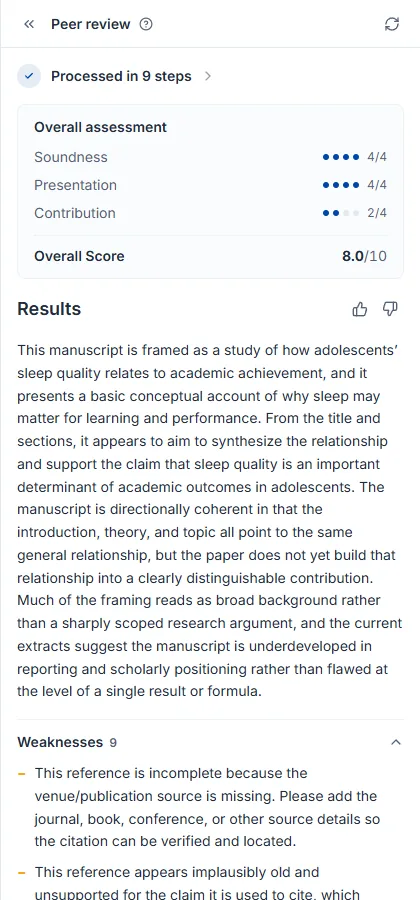
指摘は文書本文にコメントとしてつきます。他のレビューのようにポップオーバーで適用・却下するのではなく、該当する文の横に査読コメントが添えられる形です。コメントを開いて指摘を読み、本文を自分で直してから解決済みにするとリストから外れ、下書きを直して再実行すると新しいコメントが追加されます。結果画面の未解決コメント N とリストカードのバッジは同じ数字で、バッジが0になれば今回の査読で指摘されたものはすべて処理したという意味です。
文の表現だけを見ます。文法、綴り、句読点、語の選択を文単位で拾い、直した文を提案します。特に英語の下書きの学術的な表現を整えるのに有効です。実行方法とクレジットはレビューを始めるで共通して扱います。
内容が確定した後に実行してください。まだ段落が変わる予定なら後回しのほうが得です。文章の骨格はピアレビューが、学術文体に合っているかは文体トーンが見ます。両方回すならトーンを先に合わせて校正で仕上げてください — トーンを変えると文が書き直しになります。
直すべき箇所は本文にそのまま表示されます。赤い取り消し線が原文、緑が直した文です。下線部分を押して適用 / 却下を選びます。
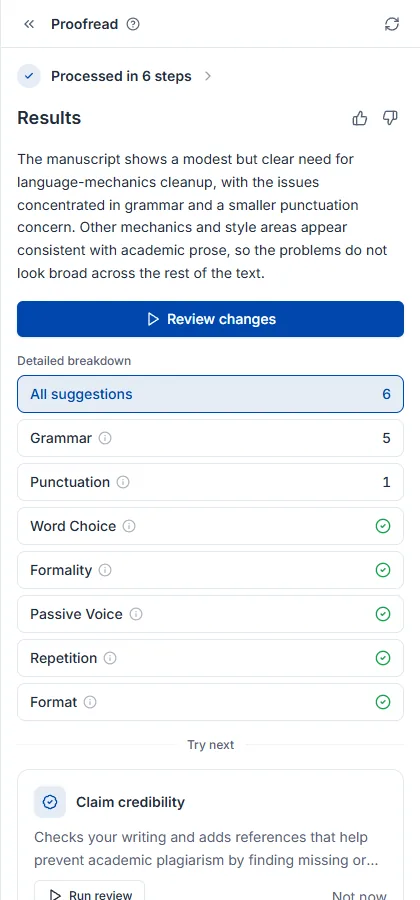
校正の全体的な進め方は論文を校正する方法ガイドで扱います。
引用した論文がその文を実際に裏づけているかを見ます。引用のある文ごとにその論文の本文(なければ抄録)と照合し、反対の内容・別テーマ・弱い裏づけを指摘して、そう判定した理由と論文中の根拠文を示します。無料プランでも実行でき、実行方法とクレジットはレビューを始めるで共通して扱います。
下書きがある程度溜まったときに実行してください。ついている引用の品質(撤回・プレプリントなど)は出典品質が見ます。指摘された文に実際の引用を埋めるには引用推薦を使ってください。
根拠が不足している文が本文に表示され、分類は誤引用・根拠と相反・根拠なし・根拠が弱い・原文未確保に分かれます。下線部分を押すと判定の理由と論文中の根拠文が表示され、確認 / 無視を選べます。
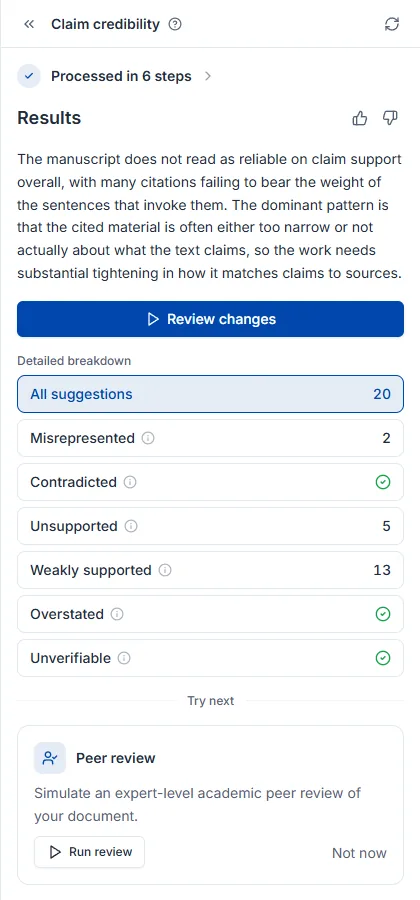
引用した論文そのものを見ます。撤回された論文、査読を経ていないプレプリント、等級の低いジャーナルを見つけ出すので、引用リストを人が一つずつ確認する必要がありません。実行方法とクレジットはレビューを始めるで共通して扱います。
引用をある程度つけた後に実行してください — 引用がなければ検査する対象もありません。引用がまったくない主張は主張の信頼性が見つけ、問題のある引用を差し替える代替論文は論文検索のフィルターで探せます。
指摘件数だけでなく参考文献全体の健康状態を一緒に示すのがこのレビューの特徴です。共通の結果要素に加えて書誌ノートが引用文献の年代分布とジャーナル分布をグラフで見せるので、文献が古いか、一つのジャーナルに偏っているかが一目で分かります。
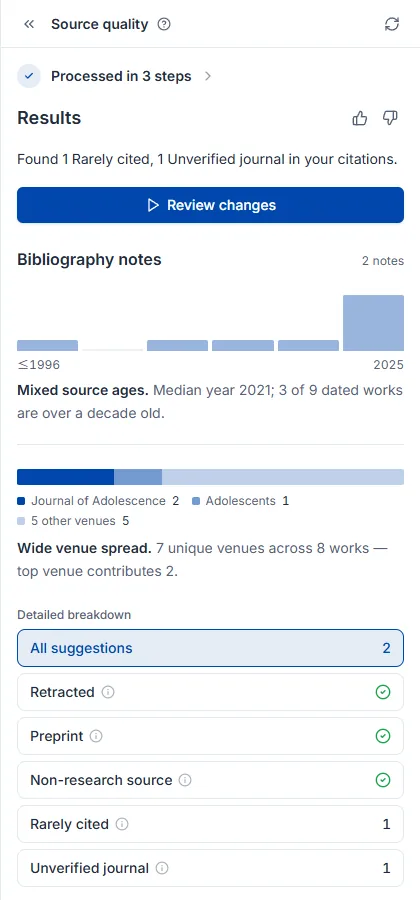
文章全体の調子を見ます。下書きの文体が学術論文に合っているかを確認し、外れた文を書き直します。無料プランでも実行でき、実行方法とクレジットはレビューを始めるで共通して扱います。
文法の誤りや誤字は論文校正が拾います。両方回すならトーンを先に合わせて校正で仕上げるほうが得です — トーンを変えると文が書き直しになるからです。
基準となる文体を先に決めることが重要です。 カードの設定アイコンで硬い文体・簡潔な文体などのプリセットを選ぶか、自分のライブラリの論文を基準にしてその文体に合わせられます。決めない場合は一般的な学術文体を基準に見ます。
結果の一番上にどの文体を基準に見たかが先に出ます。基準が違えば指摘も変わるので、まずここを確認してください。共通の結果要素に加えて選択したプリセットが今回の実行の目標文体を示し、変更で別の基準で再実行できます。
下書きの文が論文の抄録や本文とほぼ同じ文字列になっていないかを見つけます。実行方法とクレジットはレビューを始めるで共通に説明しています。Starter プランから利用できます。
剽窃チェックではありません。 照合範囲は Nubint が保有する論文コーパスのみです — 論文抄録(多言語)、韓国学術誌の抄録、そして引用した論文の本文(オープンアクセス本文とライブラリ PDF)。引用していない論文とは抄録のみで照合します。学位論文の本文、ウェブページ、ニュース、教科書は照合せず、言い換えも検出しません。所属機関の CopyKiller や Turnitin の結果の代わりにはなりません。
それでもこのレビューが必要な理由があります。AI で下書きを書くと、検索してきた論文の抄録の文がほぼそのまま下書きに入ることがあり、機関の剽窃チェッカーはその抄録を持っています。このレビューは提出前にその箇所を先に見つけます。
指摘は 2 種類に分かれます。
各指摘には重複した論文カードと原文の抜粋が付いており、その場で照合できます。引用符で囲まれた文は直接引用とみなし、指摘しません。
韓国語の下書きは韓国学術誌の抄録とのみ照合されるため、英語の下書きより照合範囲が狭くなります。ベータ期間中は照合範囲と判定基準を継続的に調整します。
段落ごとにAI が書いた文章の特徴がどの程度見られるかを判定します。実行方法とクレジットはレビューを始めるで共通に説明しています。Starter プラン以上で利用できます。
結果は参考情報であり、証拠ではありません。 AI 検出ツールは種類を問わず誤検出があります。格式ばった学術文、非ネイティブが書いた英語、翻訳ツールを通した文章は、人が書いたものでも AI と判定されやすくなります。逆に言い換えを経た AI 文章は検出されにくくなります。所属機関が使う検出ツール(GPTKiller、Turnitin など)とは結果が異なる場合があります。
判定の原理は 2 つの言語モデルによる「予測しやすさ」の比較です。両方のモデルが容易に予測できる段落ほど AI 文章の特徴が強いとみなします。確率の数値は表示せず、段落ごとに 2 段階でのみ示します。
結果の上部には文書レベルの判定(安全・注意・危険)が表示されます。採点対象の本文が約 300 語に満たない場合は判定保留となり、その実行にクレジットは消費されません。短い段落は隣の段落とまとめて判定するため漏れません。見出し(番号付きの小見出しを含む)、区切り線、太字だけの小見出し、表・図のキャプション、引用文は判定しません。
判定は段落単位、表示は文単位です。 AIの特徴が見られる段落で、その特徴に最も寄与している文(最大 3 件)にハイライトが付きます。文をクリックするとAIらしく見える理由が表示されます。段落のAIらしさへの寄与順位、AI文章によくある表現、段落内の文の長さがほぼ均一であること、のうち該当するものを示し、人の文章とAI文章を実際に分けると確認できた理由だけを使います。文の表示は見るべき箇所の目安であり、文ごとの判定ではありません。置き換える文がない指摘のため、ボタンは確認と無視です。
ご自身で書いた段落が指摘された場合はそのままで構いません。Nubint は検出結果を下げるための書き換え機能を提供しません — その用途は所属機関の規定に反する方向に使われる恐れがあるためです。
判定基準は言語ごとに異なります。日本語・英語・中国語・韓国語のいずれも、人が書いた学術抄録を基準に誤検出率を調整済みです。ベータ期間中も調整を続けます。
論文を書く前の段階を担います。仮説を立てて評価し、文献を調べ、研究の系譜をたどり、引用を探します。それぞれ専用ページで実行します。
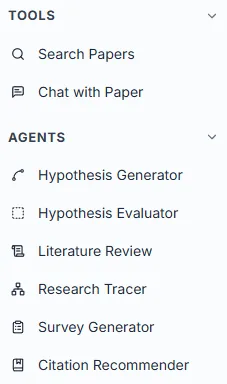
5種類あり、それぞれ専用ページで実行します。
| エージェント | 何をするか | 何を入力するか |
|---|---|---|
| 仮説生成 | テーマから検証可能な仮説候補を作ります | 研究テーマを一文で |
| 仮説評価 | すでに立てた仮説を5つの基準で採点します | 仮説の記述 |
| 文献調査 | 関連論文を集めて構造化されたレポートにまとめます | 調査するテーマ |
| 引用フロー探索 | 引用ネットワークをたどって分野の系譜を描きます | シード論文1編 |
| 引用推薦 | 下書きの主張に合う引用を探してつけます | すでに書いた下書き(2,500字) |
左サイドバーの エージェント グループを開いて選ぶと専用ページに移動します。入力欄にそのエージェントが求める内容を書いて実行ボタンを押すと結果ページに移り、段階ごとの進行状況が表示されます。AIチャットで対話していて特定のエージェントのほうが適した作業なら、チャット内に推薦カードが現れ、移動でそのページへ行けます。
エージェントは同じ画面構造を使います。入力欄1つとその下のコントロール列が全部です(引用フロー探索だけは例外で、論文検索から始まります)。例文を試すは何を書けばよいか迷うときに例文を入れてくれます。検索フィルターは文献レビューと引用推薦にだけあり、出版年・引用数・ジャーナルランクなどで参考論文を絞ります。実行ボタンの名前はエージェントごとに違い(仮説を生成、調査を開始 …)、Enter も同じ動作です。
実行中は送信ボタンが停止ボタン(■) に変わり、押すと即座に中断します。中断した実行の部分結果は保存されず、クレジットも差し引かれません — エラーで失敗した実行と同じ扱いです。
課金は実行するたびに、エージェントごとの固定価格で行われます。短い実行でも重い分析でも金額は同じで、料金ページに記載の数字がそのまま差し引かれます。論文検索はクレジットを消費せず、実行回数の制限もありません — どのプランでも無制限です。レビュー7種は軸が違い、レビューした文書の分量に応じて差し引かれます(AI論文レビュー を参照)。残りクレジットはクレジットとクォータで、プラン別の上限は料金ページで確認してください。
過去の実行結果はそのエージェントのページに残ります。AIチャットの履歴とは別に管理されるので、文献調査の記録は文献調査のページで探すことになります。エージェントが集めた論文はライブラリに、書いた下書きは文書に保存されます。
関心のあるテーマはあるが検証できる形の仮説がまだないときに使います。4.6億編の論文を根拠に仮説候補を作り、それぞれに根拠論文をつけてくれます。すでに仮説があるなら仮説評価へ直接どうぞ。
研究テーマを一文で書いて仮説を生成を押します。完成した仮説である必要はなく、睡眠不足が青少年の衝動性に及ぼす影響 のような関心事レベルで十分です。実行画面の構成とクレジットはエージェントの使い方で共通して扱います。
結果はリストではなくキャンバスです。入力したテーマから仮説カードが枝のように伸び、カード1枚が仮説1つです。
一度で完成した仮説を期待するより、気になるカードで仮説を練り直すを押して2〜3回枝を伸ばすほうが、はるかに使える結果になります。方向が決まっていれば + で自分で書いて派生させることもでき(例:「政策介入の観点で」)、キャンバスはその探索の過程をそのまま残します。
カードをクリックすると右の詳細パネルが開き、その仮説を概要・妥当性・新規性・実行可能性・重要性の5つの軸で検討した内容が根拠論文とともに出ます。本文の青い括弧引用はすべて実在の論文で、一番下の出典 N件からライブラリに保存できます。
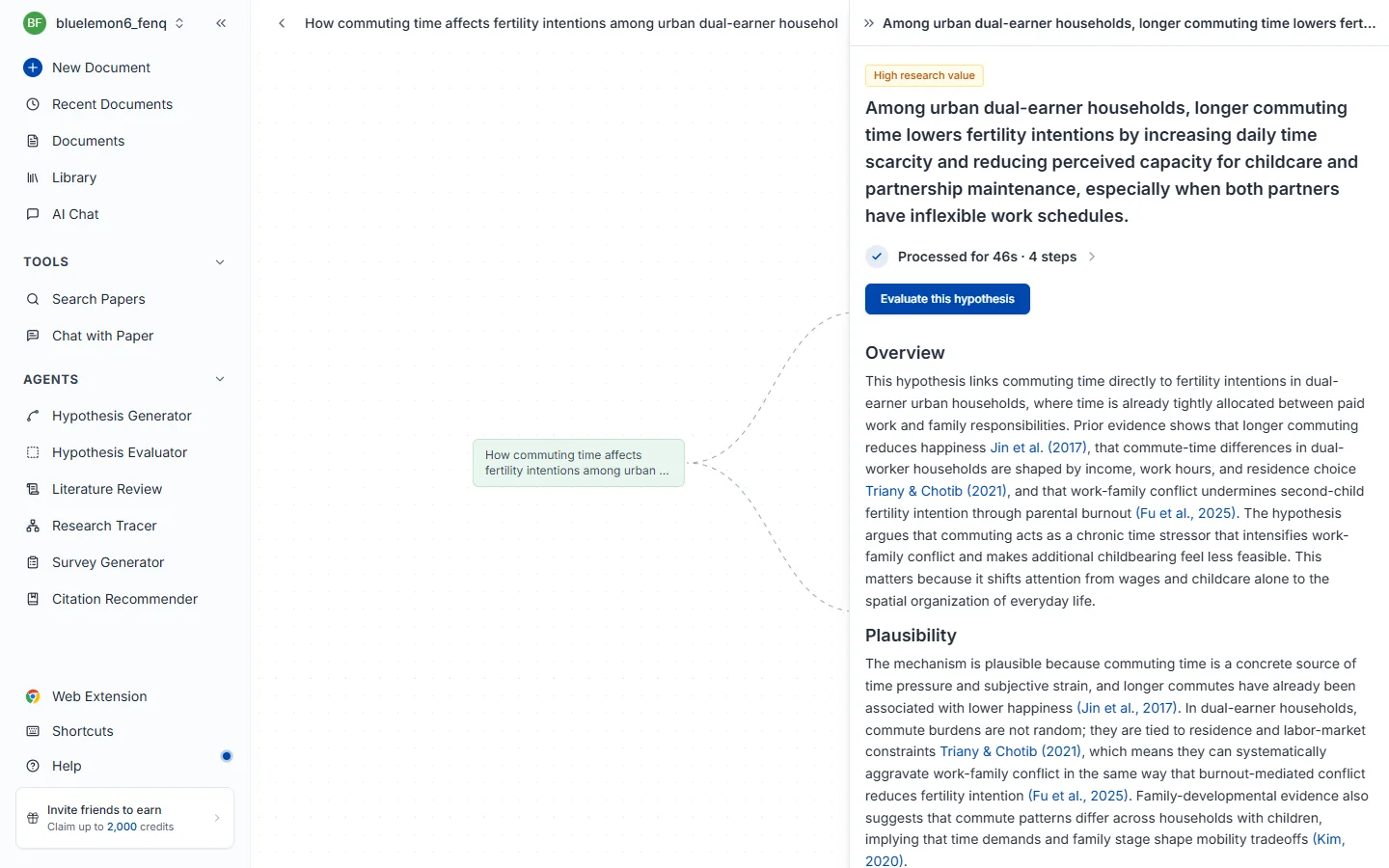
基準ごとの評価まで受けたいときは、この仮説を評価するで仮説評価へ渡してください。
仮説をすでに立てていて、このまま研究を始めてよいかの判断が必要なときに使います。書き方は明確か、既存の根拠が支えているか、先行研究に何を加えるか、実際に実行できるか、なぜ重要か、の5つの観点で採点し、低かった基準ごとに直す方向を教えてくれます。新規性は4.6億編の論文とリアルタイムで照合して測ります。
立てた仮説をそのまま貼り付けて評価するを押します。一文でもよく、平日に就寝1時間前にスマートフォンを使わなければ総睡眠時間が普段より20分以上増える のように条件と予想される効果を含む長い記述でも構いません。実行画面の構成とクレジットはエージェントの使い方で共通して扱います。
一番上の総合評価がこの仮説の強みと最大の弱点を一段落で指摘し、その下に基準ごとの評価と一行の診断がつきます。タイトル横の N papers は判断のために実際に照合した論文数です。
評価だけ見て流さず、低く出た項目の「もっと見る」を開いてください。 そこに書かれているのは「何が足りないか」ではなく「どう絞ればよいか」です。新規性が低ければすでに検証されたテーマということなので、対象・条件・測定方法を絞って差別点を作り、もう一度評価してスコアの変化を確認しましょう。
論文を探すのではなく読んで整理した結果が必要なときに使います。関連論文を自動で集めて最大30編を全文まで読み、主要な流れ・方法論・論点を引用つきのレポートにまとめます。速く探すだけでよいなら論文検索のほうが合っています。
調査するテーマを一文で書いて調査を開始を押します。キーワードを並べるより文のほうが結果がよく、たとえば 睡眠の質が青少年の学業成績に及ぼす影響に関する研究 のように書きます。
検索フィルターで出版年・引用数・ジャーナルランクなどをかけられます。最新の動向だけ見たいなら年を、検証された文献だけ見たいなら引用数をかけてください。分析する編数が多いので時間がかかり、途中で中断できます。実行画面の構成とクレジットはエージェントの使い方で共通して扱います。
結果はリストではなく読めるレポートです。タイトル横の N papers は実際に分析した論文数です。
段落ごとに引用がついているので、気に入った箇所をそのままコピーして下書きの骨組みに使い、引用だけ確認すれば済みます。青い (著者, 年) を押すと原文へ移動し、一番下の出典 N件から論文を選んでライブラリに保存できます。
文献調査の進め方全体は文献調査の実施方法ガイドで扱います。
「最近の論文の羅列」ではなく、この分野がなぜこう発展したのかを知る必要があるときに使います。シード論文1編から引用ネットワークを双方向に最大4段階までたどって系譜を描くので、研究のギャップを探したり文献調査の記述の骨組みを組むときに有効です。
他のエージェントと違い、テーマではなく論文1編から始めます。論文タイトルや著者名で検索してシードにする論文を選ぶと、選んだ瞬間に追跡が始まります。分野の代表的な論文や自分が読んだ中心的な論文をシードにするとよいでしょう。実行画面の構成とクレジットはエージェントの使い方で共通して扱います。
画面が2つに分かれます。左は引用ネットワークのグラフ、右は選んだ論文の詳細パネルです。緑のノードがシードで、線は引用関係 — 左に行くほど過去、右に行くほど後続の研究です。
グラフを左端までたどるとその分野の古典が、右端には最新の研究があります。文献調査の記述の順序を決めるとき、この軸をそのまま使えます。
論文ノードをクリックすると右に書誌情報と抄録が開きます。被引用数とジャーナル分位(CITED BY / Q2)で影響力を測れ、DOI・URL は横のアイコンですぐコピーできます。シード論文をクリックした場合は代わりに研究の流れパネルが開き、グラフがどの系譜に分かれたかを名づけて示します。
文はすでに書いたが、根拠としてつける論文が見つからないときに使います。下書きを貼り付けると主張ごとに最も強く裏づける引用を3~5件探し、文にそのまま差し込んで返します。キーワードではなく意味で探すので、表現が違っても同じ内容を扱った論文を捕まえます。
引用が必要な文や段落をそのまま貼り付けて引用を生成を押します。一文でも段落単位でもよく、最大2,500字です。検索フィルターで出版年・引用数・ジャーナルランクなどをかけられるので、投稿する予定のジャーナルの基準があればここで合わせてください。実行画面の構成とクレジットはエージェントの使い方で共通して扱います。
別のリストではなく自分が入れた下書きそのまま、引用がつく位置に (著者, 年) が挿入されて返ってきます。下線のついた文が引用を足した箇所なので、どこが変わったか一目で分かります。
コピーで段落全体をそのまま持っていけますが、その前に引用された文が自分の主張と実際に合っているか確認してください。
エディタの中で自分で選んだ論文をつけるなら、引用の挿入を使ってください。
論文を速く探すだけのときに使います。意味で検索するので正確な学術用語を知らなくてよく、クレジットは使わず、回数制限もありません。
論文を速く探すだけでよいときに使います。引用する論文を選ぶ、テーマに関連する論文の一覧をざっと見る、特定の論文をタイトルで探す、といった場面です。探した論文を読んで整理した結果まで必要なら文献調査のほうが合っています。
左サイドバーの論文検索を押すと、サイドバーの位置に検索パネルが開きます。ページを移動しないので、エディタで書きながらそのまま検索し、見つけた論文をすぐ引用・保存できます。
transformer attention mechanism NLPテキスト感情分析における事前学習モデルの性能比較深層学習ベースの医療画像分析でデータ拡張が診断精度に及ぼす影響は?検索窓の下、右側の並び替え(関連順・被引用順・新しい順・古い順)とフィルターボタンで結果を変えられます。既定は関連度順で、並び替えやフィルターを変えるとその場で再検索されます。フィルターの項目は検索フィルターを、カードの読み方は検索結果の読み方をご覧ください。
まだ検索していないときは最近の検索(最大8件)が表示されます。項目を押すと同じ検索語で再検索します。
検証された学術データベースからのみ取得するので、存在しない論文が混じりません。
クレジットは差し引かれません。 回数制限もなく、すべてのプランで無制限に検索できます。課金の仕組みはクレジットとクォータを参照してください。
検索窓の下、右側のフィルターボタンを押すとオプション画面が開きます。条件を選んで適用を押すとその場で再検索されて結果が絞られ、リセットで全部戻せます。フィルターが有効な間はボタンに青い点が付きます。4.6億編の中から研究目的に合う論文だけを取り出すための機能です。
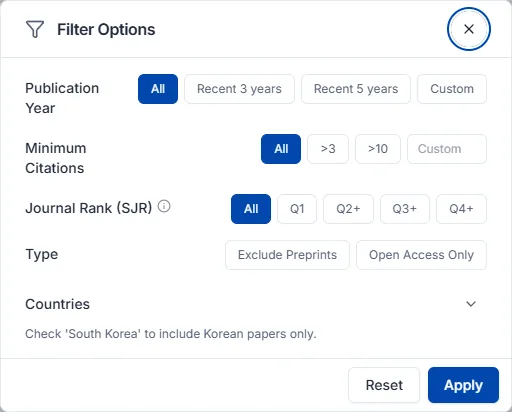
ジャーナルランク(SJR) はジャーナルの影響力を示す指標で、引用回数と引用したジャーナルの権威を合わせて反映します。投稿するジャーナルを探すときや引用の根拠の信頼度を上げたいときは Q1 か Q2 以上を選んでください。
| 選択 | 意味 |
|---|---|
| Q1 | 上位25% — その分野で最高品質のジャーナル |
| Q2 以上 | 上位50% |
| Q3 以上 | 上位75% |
| Q4 以上 | SJR 等級のあるすべてのジャーナル |
| フィルターなし | 等級を問わない |
状況別にはこう組み合わせます。
| いまの状況 | おすすめの組み合わせ |
|---|---|
| 最新の研究動向をざっと見たい | 出版年 直近3年 |
| この分野の中心的な論文から知りたい | 最小引用回数を高く + ジャーナルランク Q1 |
| 引用できる論文だけを選びたい | プレプリント除外 + ジャーナルランク Q2 以上 |
| 原文を今すぐ読みたい | オープンアクセスのみ |
| 特定の国の研究状況を見たい | 国フィルター |
| 結果に他分野の論文が混じる | 学問分野を指定 |
フィルターは重ねるほど結果が狭くなります。結果が少なすぎるときは、最も強い条件(ジャーナルランク Q1、高い引用回数)から1つずつ緩めてみてください。
結果カードにはタイトル、著者、出版情報(ジャーナル・年・巻号)とともに、判断に使う指標がつきます。抄録と識別子はカードを押して開く詳細パネルで確認します。
関連度(一覧の順序)と被引用数は一緒に見てください。 両方高ければそのテーマの中心文献である可能性が高く、関連度は高いのに被引用数が低い場合は最新の研究や新興分野かもしれません — 悪い兆候ではありません。速く目を通したいときはオープンアクセスから読むと、障壁なしにすぐ中身を確認できます。
原文を開くボタンは、論文の公開状況によって名前が変わります。
出版社のポリシーでビューアに PDF を表示できないときは、出版社サイトで見るを押して出版社のサイトで読みます。
気に入った論文はライブラリに保存しておくと、以降のチャットや引用にすぐ使えます。
集めた論文を入れておく場所です。ここにある論文がチャットの参照資料になり、引用の源になります。検索・拡張機能・Zotero で満たし、コレクションで整理します。
ライブラリパネル上部のアップロードボタンを押すと、ライブラリにアップロードの画面が開きます。Zotero の論文は2つのタブのどちらかで移します。
Zotero を使っているならアカウント連携のほうが得です。
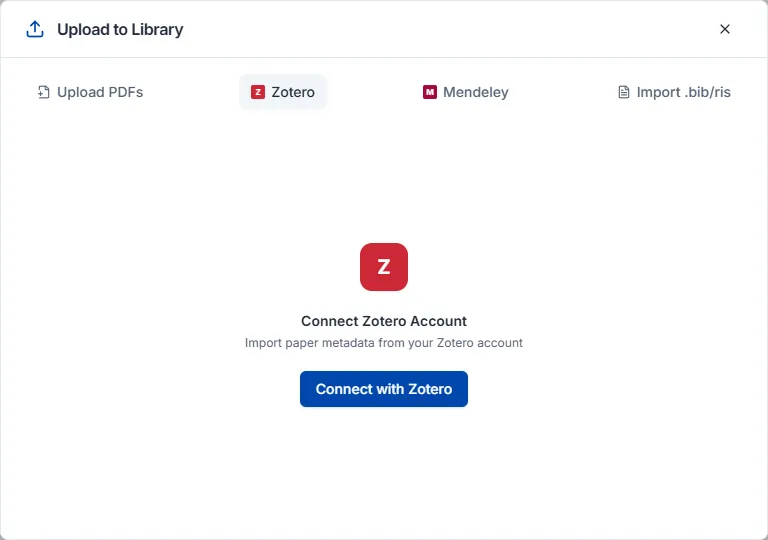
アカウント連携は、Zotero タブでZoteroに接続を押し、Zotero アカウントでログインして権限を承認すると、コレクションの一覧が表示されます。移すコレクションを選ぶか、そのまますべてインポートを押してください。
BIB / RIS をインポートは BibTeX(.bib)と RIS(.ris) に対応します。既存の論文管理ツールから移す論文を RIS か BibTeX で書き出してアップロードしてください。Zotero だけでなく EndNote、Mendeley など他のツールから書き出したファイルも同じ方法で取り込めます。
ライブラリパネルのコレクションタブにある + ボタンで作ります。上位コレクションの中に下位コレクションを置けば入れ子の構造で整理できます。
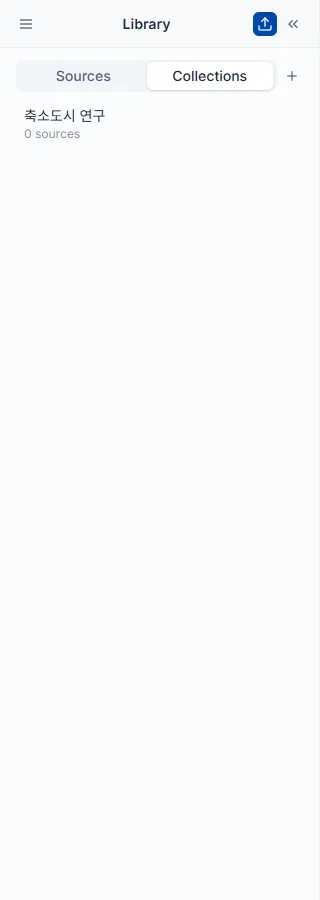
論文カードのコレクションに追加ボタンで入れ、複数の論文を選んで同時に追加することもできます。1つの論文が複数のコレクションに同時に属せるので、横断的な分類が可能です。
コレクション名にマウスを乗せると編集オプションが出て、名前の変更と削除がすぐできます。コレクションを削除しても論文自体はライブラリに残ります。
論文カードのチェックボックスで複数を同時に選ぶと、選んだ数が上部に表示され一括操作のオプションが現れます。
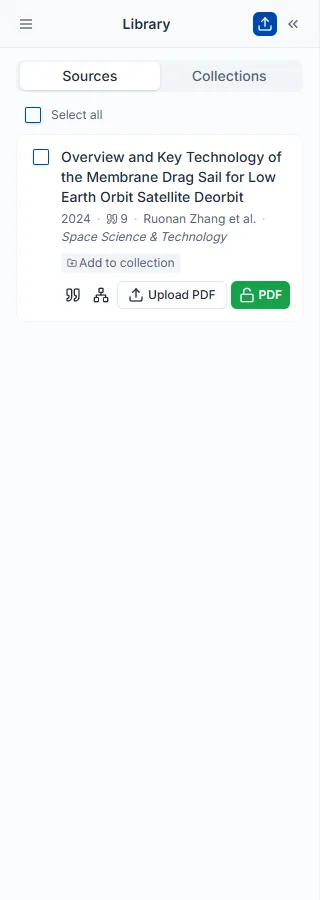
ライブラリパネル上部のフィルターボタンを押して条件を選びます。複数のフィルターを重ねるほど範囲が狭まります。
検索画面の検索フィルターより項目は少なく、こちらはすでに保存した論文の中だけを絞り込みます。
ライブラリパネルのエクスポートボタンで形式を選ぶとファイルがダウンロードされます。論文カードのチェックボックスで一部だけ選んでおくと、その論文だけが出ます。
使い慣れた AI チャットから Nubint を呼び出します。一度接続すれば、原稿レビュー、図、論文検索、文献調査を会話の中で始められ、結果は Nubint アカウントに残ります。
Nubint を ChatGPT や Claude に接続すると、いつもの会話画面から Nubint の論文検索・原稿レビュー・文献調査・図の生成をそのまま呼び出せます。API キーは不要です。サーバー URL を貼り付けて Nubint アカウントで一度許可すれば完了で、論文検索・原稿の保存・文書の読み取りと修正の提案・参考文献の実在確認などクレジットのかからないツールは無料プランでも使え、クレジットがかかるレビュー・文献調査・図はStarter プランから利用できます。
サーバー URL は Nubint の設定 → AI 連携タブでコピーします。Nubint MCP ページにも同じ URL があります。
ChatGPT
Nubint、MCP サーバー URL にはコピーした URL を入れ、認証は OAuth を選びます。Claude
Nubint、リモート MCP サーバー URL にはコピーした URL を入れて追加します。リモート MCP サーバーとブラウザでのログイン(OAuth)に対応したほかの AI アプリも、同じ URL で接続できます。Cursor・VS Code のように API キーを直接設定する開発ツールは、開発者ドキュメントをご覧ください。
許可画面には、その AI アプリがあなたの代わりにできることが書かれています。論文を探し、送った原稿を保存してレビューし、Nubint の文書を読んで修正を提案し、文献調査と図の作業を実行します。文書を直接書き換えることはなく、修正は Nubint のエディターに提案として表示され、あなたが一つずつ承認または却下します。ライブラリの論文を編集したり削除したりもしません。
接続を解除するには、設定 → AI 連携の接続中の AI アプリで該当するアプリの接続を解除します。解除するとすぐに、そのアプリは Nubint を使えなくなります。
接続したあとにできることは、3つに分けて案内します — 書いた原稿をレビューしてもらう · 図を作る · 論文探しと文献調査。
ChatGPT や Claude で書いた下書きを、その場で Nubint のレビューに回します。対話型 AI は、自分が書いた文章の参考文献が実在するのか、引用した論文が本当にそう述べているのかを自分では確認できません。その部分を Nubint が学術インデックスと論文の原文に照らして確かめます。
こう伝えてください
この原稿を Nubint に保存して、ピアレビューと主張の信頼性のレビューをして。参考文献リストは下に貼ってある。
[3] や (Kim, 2023) のような引用表記が参考文献と紐づきます。実行できるレビューは7種類で、エディタのAI論文レビューと同じエンジンです。
対話型 AI だけではできないピアレビュー · 主張の信頼性 · 出典品質から実行することをお勧めします。
保存せずに手早くチェックだけすることもできます。貼り付けた文章だけを見て、結果をすぐに返します。
この参考文献リストが実在する文献か確認して
この原稿を投稿前にチェックして
参考文献の確認にクレジットはかかりません。インデックスで見つからなかった文献は「偽物」と断定せず、ご自身で確認するリストとして返します — 単行本・法令・古い論文は、そもそも学術インデックスに収録されていないことが多いためです。
会話で説明した内容から、メカニズム図、グラフィカルアブストラクト、実験構成図、フローチャートを描きます。結果は会話に画像の URL として残るだけでなく、Nubint Figure のキャンバスに置かれます。文字を直す、一部だけ描き直す、書き出すといった作業は、そのキャンバスで続けます。
こう伝えてください
細胞の中でタンパク質が作られる過程をグラフィカルアブストラクトで描いて。横長で、ラベルは日本語で。
会話でできること
図に入れる内容が長いときは、論文の抄録や実験プロトコルを資料として渡してください。AI がその文章を Nubint にアップロードし、その内容に沿って描きます。合わせたい画風があれば、参考画像をスタイル参照として渡すこともできます。
同じプロジェクトで続けて描くと、結果が1つのキャンバスに並びます。あとの会話で「さっきの図のプロジェクトを開いて」と伝えると、これまでに作った図を呼び出します。
実データのグラフは別に描きます。表や CSV を貼り付けて「このデータでグループごとの平均を棒グラフにして、エラーバーは標準偏差で」と伝えると、画像モデルではなくコードが値をそのまま棒グラフ・折れ線・散布図・箱ひげ図・ヒストグラムに描きます。数値でないセルは補わずに除外し、何行除外したかと実際に描いた値(サンプル数・平均・標準偏差)もあわせて知らせます。PNG で受け取れ、グラフ1枚には図1枚と同じクレジットがかかります。編集可能な SVG ファイルも受け取る場合は、SVG 書き出しの分が加わります。データから描けずに失敗した場合は差し引かれません。
論文を探す軽い質問から引用つきの文献調査まで、会話の中で進められます。結果は Nubint アカウントに残るので、AI が示したリンクからアプリで開いたり、別の日の会話で呼び出したりできます。
論文を探す — クレジットはかからず、すぐに終わります。出版年の範囲、最小被引用数、オープンアクセスかどうかといった条件も、言葉で付け加えられます。
大学生の睡眠不足と代謝の健康に関する2015年以降の論文を探して
気に入った論文は「これを自分のライブラリに保存して」と伝えれば保存しておけます。
文献調査 — 中心となる論文を選び、引用つきのレビューを書きます。ざっと見渡すものから学位論文向けまで3段階の深さがあり、価格と所要時間が異なります。開始前に AI がどれにするか尋ねます。
このテーマで文献調査を書いて。学術誌論文の先行研究の節に使えるくらいで。
AI アプリから使う Nubint は、アプリと同じアカウント、同じクレジットを使います。価格も、アプリで同じ機能を使うときと同じです。
クレジットがかからないもの — 論文検索、ライブラリの検索と保存、参考文献の実在確認、原稿の保存、文書の一覧と読み取り、文書の修正の提案、結果の再表示、残りクレジットの確認。これらは無料プランでも使えます。修正の提案は、直す文章を AI アプリ自身が書き、Nubint はその提案をエディターに表示するだけなので、クレジットはかかりません。
クレジットがかかるもの — 原稿レビュー、文献調査、図、データのグラフ。Starter プランから使えます。AI は実行前に費用を伝えることになっているので、伝えてくれないときは「いくらかかる?」と聞いてください。機能別の基準は、クレジットとクォータと料金ページの「クレジットの消費について」にあります。
失敗した作業ではクレジットは差し引かれません。
ツールが表示されないとき — 新しい会話のコネクタ(ツール)メニューで Nubint がオンになっているか確認してください。それでも表示されない場合は、AI アプリ側で接続を削除し、サーバー URL をもう一度追加します。
「Starter プランから利用できます」と表示されるとき — 無料アカウントでクレジットがかかるツール(レビュー・文献調査・図)を呼び出したという意味です。検索・原稿の保存・文書の読み取り・修正の提案・参考文献の確認は無料アカウントでも動作します。プラン変更をご覧ください。
結果がなかなか返ってこないとき — 文献調査は数分から、長いと十数分かかります。AI が途中で確認をやめてしまった場合は「さっきの作業の結果を取ってきて」と伝えるか、最初に受け取ったリンクをアプリで開いてください。作業は Nubint 側で最後まで実行され、結果はアカウントに残ります。同じ依頼をもう一度開始させないでください — 新しい作業として、もう一度差し引かれます。
別の日に続きをするとき — 「Nubint で自分がやった作業の一覧を見せて」と伝えると、以前の文献調査を見つけて続きから進めます。
結果が英語で出るとき — 「日本語で書いて」と付け加えてください。成果物の言語は依頼するときに決まります。
AI が結果を違う内容で伝えているように感じるとき — AI が示したリンクから、Nubint で元の結果を開いてください。レビューの指摘、文献調査の本文とその参考文献がそのまま残っています。
システマティックレビューやデータ抽出を頼んだのにできないとき — この2つの機能は近日公開のため、AI アプリからはまだ使えません。今は論文探しと文献調査をお使いください。
それでも解決しない場合は、お問い合わせからご連絡ください。
プラン変更と支払い方法、そしてクレジットとクォータがどう差し引かれ、いつリセットされるかを扱います。
いつでも変更できます。プロフィール → 設定 → サブスクリプションタブでプラン変更を押し、プランと支払いサイクルを選んで決済ページで内容を確認してください。
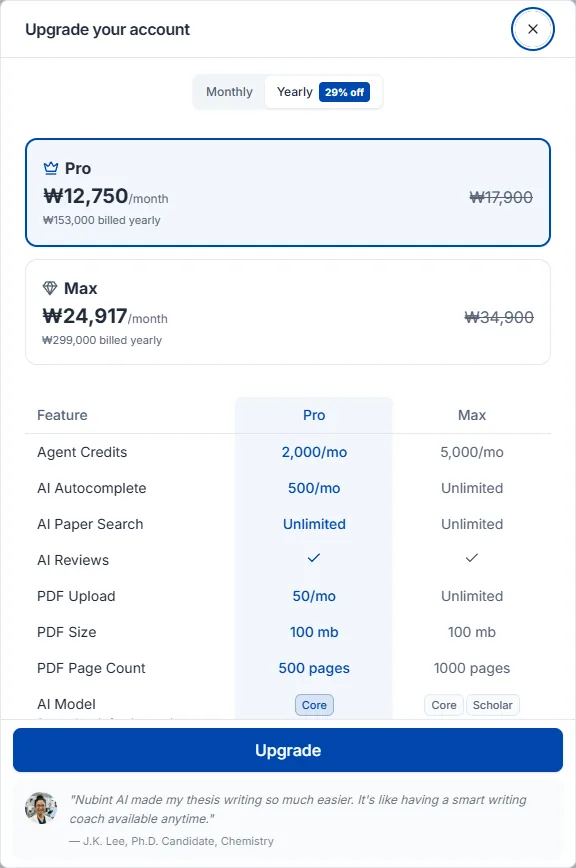
アップグレードは決済完了と同時に適用されます。残りの支払いサイクル分の差額が精算されて新しいプランの費用から差し引かれ、正確な請求額は決済ページで事前に確認できます。
ダウングレードは次回の支払い日から適用され、それまでは現在のプランをそのまま使えます。申し込み時点では決済は発生せず、次回の支払い日に変更後のプランの費用が請求されます。次回の支払い日より前ならサブスクリプションタブの予約をキャンセルで予約を戻せ、取り消すと現在のプランがそのまま自動更新されます。
Free・Starter・Pro・Max の機能と価格の比較は料金ページで確認してください。年額払いに切り替えると割引が適用され、割引率はプランによって異なります。
Plus は販売を終了しました。すでに Plus をご利用中の場合はそのまま継続できますが、別のプランに変更したあとは Plus に戻せません。
プロフィール → 設定 → サブスクリプション管理タブで現在のプラン情報の下にあるサブスクリプションをキャンセルを押します。解約はいくつかの段階を経ます — 理由を選び、30 文字以上で記入したうえで、失うものと最後のご提案を確認してから確定します。
解約してもすでに支払った期間はそのまま維持されます。現在の支払いサイクルが終わる日までご利用中の有料プラン(Starter・Pro・Max)のすべての機能を使い続けられ、サイクルが終わると自動的に Free プランに切り替わります。保存した論文、ライブラリ、作成中の文書などのデータはそのまま残ります。解約後は次のサイクルの自動決済は行われません。販売を終了した Plus も、ご利用中の方には同じように適用されますが、Plus の契約が終了したあとは再度申し込むことはできません。
初めて有料プランを購読するとき、決済画面でお支払い方法を選択すると自動的に登録されます。別途登録する手順はありません。
ご利用いただけるお支払い方法は、決済する国によって異なります。クレジット・デビットカードのほか、Apple Pay、Google Pay、PayPal などが決済画面に表示されます。
変更するときはプロフィール → 設定 → サブスクリプションタブのお支払い方法エリアで支払い方法を変更を押します。決済画面で新しいお支払い方法を保存すると即座に反映され、次のお支払いサイクルから新しい方法で自動決済されます。
お支払い方法を変更する際、決済画面に 0 円と表示されます。お支払い方法を確認するための手続きであり、実際に請求されることはありません。
現在登録されているお支払い方法は同じ場所に Visa •••• 1234 のように表示され、PayPal をご利用の場合は PayPal と表示されます。
カードの有効期限が近づいたら早めに変更しておいてください。決済が途切れず、進行中のサブスクリプションもそのまま維持されます。
左下のプロフィールをクリックすると、メニューのマイクレジットで残りのクレジットを確認できます。
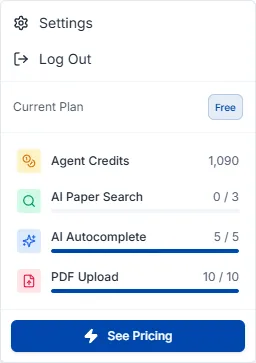
クレジットは固定の回数制限ではなく、実際の AI 使用量に応じて差し引かれます。短い質問は少なく、長い下書きや大規模な文献分析は多く消費します。
機能別の差し引き基準の数値は、料金ページ下部のクレジット消費の目安表にあります。
論文検索とエディタのインライン引用検索は、クレジット消費も回数制限もなく、すべてのプランで無制限です。
PDF アップロードはクレジットを消費せず、無料プランを含むすべてのプランで回数制限がありません。ファイルサイズとページ数の上限は料金ページで確認できます。
クレジットは毎月の更新日にリセットされます — 無料プランは登録日、有料プランはサブスクリプション開始日が基準です。AI モデルのグレードはプランによって異なります — 無料プランは基本AIモデル、Starter は上位AIモデル、Pro・Max は最上位AIモデルです。
月間クレジットが足りないときは 1,000 クレジット単位で追加購入できます。プロフィール → 設定 → サブスクリプション管理タブ → クレジット追加から、1,000 · 3,000 · 5,000 クレジットを選ぶか数量を直接指定でき(1 回あたり最大 100,000 クレジット)、1,000 クレジットあたり $10(円建ては ¥1,760、ウォン建ては ₩15,400)です。決済画面でカードを直接入力するため、支払い方法を事前に登録しておく必要はなく、無料プランでも購入できます。ただしクレジットは使用量を増やすだけで、ピアレビューや校正のようなプラン限定機能は解放されません。
追加購入したクレジットは購入日から 6 か月間有効です。差し引かれる順序はボーナスクレジット → 追加購入クレジット → 月間クレジットで、追加購入分の中では期限が近いものから使われます。
自動チャージをオンにすると、残高が 500 クレジット未満になったとき 1,000 クレジット($10)が自動で決済・補充され、作業中にクレジットが尽きて中断することを防げます。サブスクリプション管理タブのクレジット追加購入エリアでトグルを切り替えます。有料プランと登録済みの支払い方法が必要です。
決済日から14日以内で、その決済で受け取ったクレジットを使っていなければ全額返金されます。クレジットの使用が一度でも始まると、デジタルコンテンツの提供が開始されたものとみなされ返金が制限されます。
更新決済と年間サブスクリプションの途中解約は返金の対象になりません。更新を望まない場合は更新日より前に解約で自動更新を停止してください — 解約してもすでに支払った期間の満了日まではそのまま利用できます。
返金のご依頼は contact@nubint.ai までお送りください。
探している答えが見つからないときの連絡方法です。
お問い合わせと機能のご提案は contact@nubint.ai までお送りください。
ソーシャルメディアでも情報を発信しています — X (Twitter) · X 日本語アカウント · Threads · Instagram · Facebook · LinkedIn · YouTube