
How to Chat with Papers
Last updated: 2026-07-21·2 min read
Attach a PDF or connect library papers via Add Context, then ask questions — AI answers based on the actual paper content. You can get summaries, methodology explanations, result interpretations, and multi-paper comparisons through conversation, making it a fast way to understand papers.
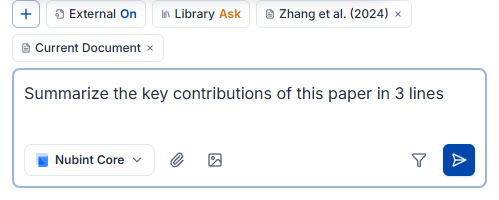
How do you start chatting with a paper?
Attach a PDF in chat or select a library paper via Add Context, then ask questions about that paper.
What can you ask?
You can ask about anything in the paper: key contributions, research methods, results and limitations, and terminology.
- "Summarize the key contributions of this paper in 3 lines"
- "What variables were controlled in the experimental design?"
- "Outline the limitations of this methodology and future research directions"
- "Explain the flow of prior work cited in the introduction"
Can you work with multiple papers at once?
Yes. Add a collection as context or select multiple papers, and AI will compare and synthesize across them.
- "Organize the methodological differences between these papers in a table"
- "What limitations do all three papers point out in common?"
How do you verify the evidence behind an answer?
Click the citation numbers in an answer to see exactly which paper each point comes from. See how citations work in chat for details.