
[Paper Review] Diffusion Explainer: Visual Explanation for Text-to-image Stable Diffusion
Diffusion Explainer is an open-source, web-based interactive visualization tool that explains how text-to-image Stable Diffusion generates images by animating and interlinking its core components—text encoding, noise refinement via UNet, and image upsampling. It enables non-experts to explore how prompt variations affect image generation trajectories in real time, offering insights into prompt engineering and model behavior through interactive, browser-based exploration without installation or specialized hardware.
Diffusion-based generative models' impressive ability to create convincing images has garnered global attention. However, their complex structures and operations often pose challenges for non-experts to grasp. We present Diffusion Explainer, the first interactive visualization tool that explains how Stable Diffusion transforms text prompts into images. Diffusion Explainer tightly integrates a visual overview of Stable Diffusion's complex structure with explanations of the underlying operations. By comparing image generation of prompt variants, users can discover the impact of keyword changes on image generation. A 56-participant user study demonstrates that Diffusion Explainer offers substantial learning benefits to non-experts. Our tool has been used by over 10,300 users from 124 countries at https://poloclub.github.io/diffusion-explainer/.
Motivation & Objective
- To address the growing need for accessible, intuitive education about complex generative AI models like Stable Diffusion.
- To overcome the challenge of explaining the intricate, iterative interplay between text encoding, noise refinement, and image generation in a way that is understandable to non-experts.
- To enable users to discover the impact of prompt engineering on image generation by comparing trajectories of two related prompts over timesteps.
- To provide a lightweight, open-source, web-based tool that runs locally in browsers, eliminating the need for installation or high-end hardware.
- To support policymakers, artists, and the public in understanding how AI-generated images are produced, especially for ethical and attribution-related concerns.
Proposed method
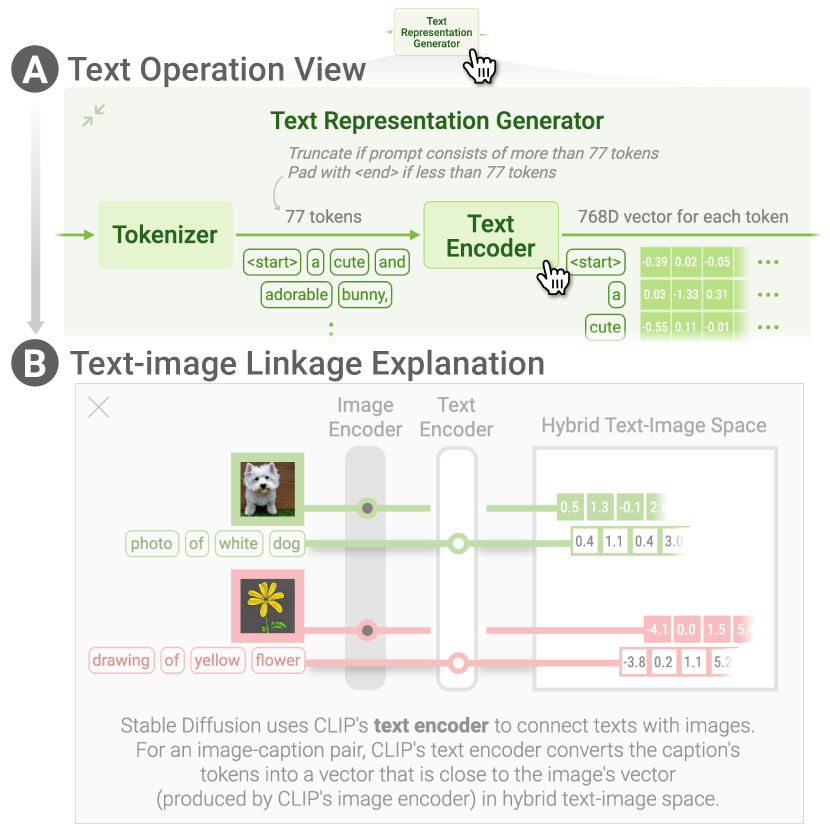
- The tool integrates a visual overview of Stable Diffusion’s architecture with interactive, animated views of its core components: Text Representation Generator, Image Representation Refiner, Timestep Controller, and Image Upscaler.
- It uses a multi-level abstraction interface that allows users to fluidly transition between high-level overviews and detailed views of operations such as tokenization, vector encoding, noise prediction, and refinement steps.
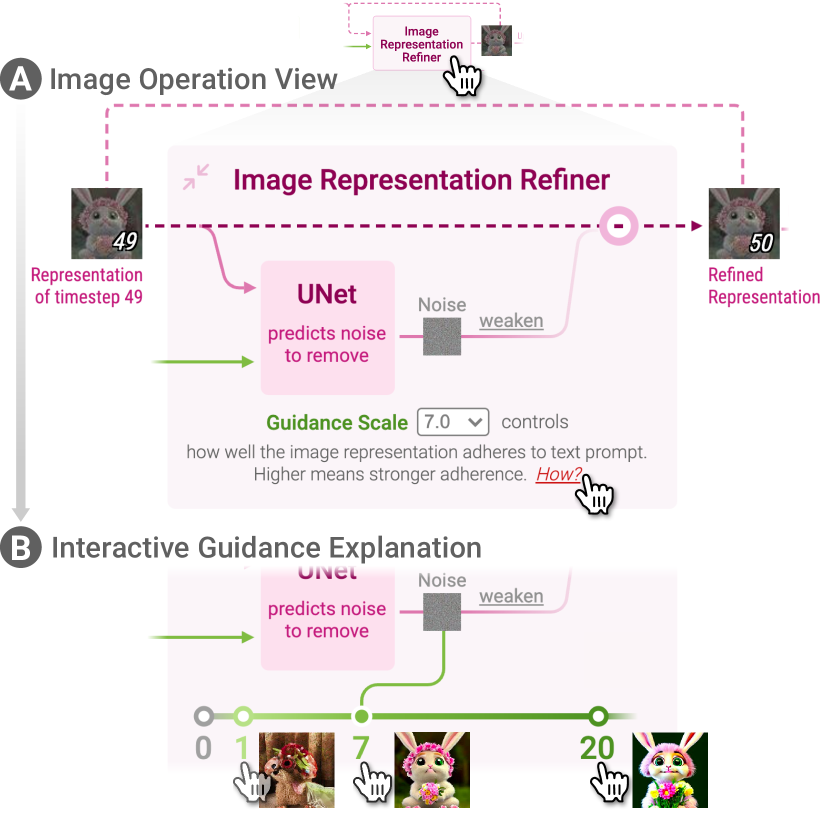
- The Text Operation View shows how prompts are tokenized and embedded via CLIP’s text encoder, while the Image Operation View visualizes the iterative noise removal process guided by the UNet and scheduler.
- The Text-Image Linkage Explanation dynamically maps semantic content from text vectors to corresponding image features, illustrating how textual guidance shapes visual output.
- The Interactive Guidance Explanation allows users to adjust the guidance scale in real time and observe its effect on image quality and prompt adherence.
- The Timestep Controller enables users to step through each refinement iteration, visualizing incremental improvements in image quality and alignment with the prompt.
Experimental results
Research questions
- RQ1How can complex, iterative diffusion processes in text-to-image generation be made accessible to non-experts through interactive visualization?
- RQ2To what extent do small changes in text prompts alter the trajectory of image representation refinement in Stable Diffusion?
- RQ3How does the guidance scale influence the balance between prompt adherence and image quality during generation?
- RQ4Can interactive, browser-based tools effectively explain the interplay between text encoding and image generation without requiring machine learning expertise?
- RQ5What insights can users gain about prompt engineering by observing visualized evolution of image representations over timesteps?
Key findings
- Users can observe that minor prompt changes, such as adding 'very very very' to 'a beautiful cityscape', lead to significant divergence in image representation trajectories starting at step 24, indicating that such modifiers can drastically alter generation outcomes.
- The tool reveals that prompts like 'a cute and adorable bunny... Pixar character' guide the image generation process through distinct, stable trajectories that preserve specific stylistic attributes, such as pose or character design.
- Adjusting the guidance scale from 1 to 7 to 20 demonstrates that lower values produce ambiguous or noisy images, while higher values cause over-exaggeration, and a value of 7 yields the best balance of prompt adherence and realism.
- The visual comparison of two related prompts shows that even subtle differences in wording can result in divergent image representations, highlighting the sensitivity of the diffusion process to prompt phrasing.
- The Timestep Controller enables users to trace how image quality improves incrementally, with visible refinement in texture, structure, and prompt alignment across timesteps.
- The tool enables users to identify that certain prompt modifiers, such as repetition, may reliably activate specific neural network regions, influencing the final image composition in predictable ways.
Read this paper
Open the full text in the Nubint reader and ask about any passage as you read.
Read this paper on NubintThis review was generated by AI from the original paper. Please check the paper before citing it.