Step 1. AI 초안
주제 한 줄만 넣으면 제목·목차·앞부분 본문을 인용과 함께 채워 줍니다. 프롬프트, 검색 범위, 제목 방식 3단계면 끝납니다.
누빈트 사용에 관한 모든 도움말을 찾아보세요.
누빈트로 첫 논문 초안을 만들고, 다듬고, 근거를 붙이는 과정을 순서대로 따라가 보세요. 한 바퀴 도는 데 10분이면 충분합니다.
주제 한 줄만 넣으면 제목·목차·앞부분 본문을 인용과 함께 채워 줍니다. 프롬프트, 검색 범위, 제목 방식 3단계면 끝납니다.
고치고 싶은 곳을 AI 채팅에 말하면 지울 글과 새로 넣을 글이 문서 위에 제안으로 뜹니다. 하나씩 보고 적용할지 거절할지 고르면 되고, 적용한 것만 문서에 들어갑니다.
자세한 사용법은 채팅으로 문서 고치기 · 이어 쓰기를 보세요.
피어리뷰, 논문 교정, 주장 신뢰도, 출처 품질, 문체 톤, 그리고 베타 2종(논문 원문 대조·AI 작성 감지)까지 7종으로 초안의 약한 곳을 짚어 줍니다. 지적마다 해당 문장으로 바로 이동합니다.
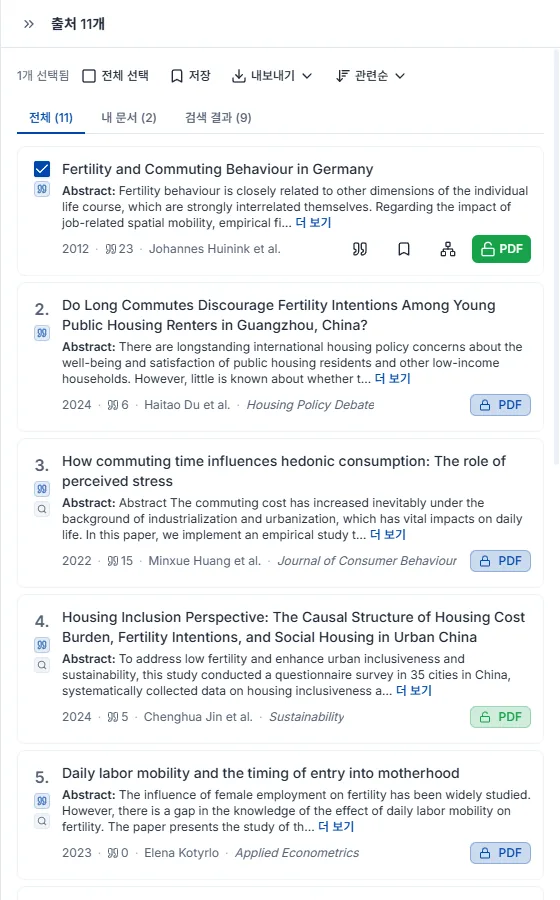
AI 채팅에 찾는 주제를 말하면 4.6억 편 학술 DB에서 관련 논문을 찾아 인용과 함께 정리해 줍니다. 답변 아래의 출처를 열어 컬렉션에 저장을 누르면 찾은 논문이 라이브러리에 담깁니다. 사이드바의 논문 검색에서 직접 찾아 카드의 저장 버튼으로 담아도 됩니다. 모아 둔 논문이 많을수록 인용 추천이 정확해집니다.
자세한 사용법은 논문 검색 사용법을 보세요.
쓰던 문단을 통째로 넣으면 근거가 필요한 문장마다 각각 맞는 논문을 찾아 인용을 붙여 줍니다.
완성한 원고는 DOCX 또는 LaTeX 로 내보냅니다. 본문에 넣은 인용과 참고문헌 목록이 고른 스타일 그대로 따라갑니다.
문장으로 설명해 논문에 넣을 그림을 만들고, 캔버스에서 손본 뒤 내보내기까지 한 바퀴 돌아봅니다.
필요한 그림을 문장으로 설명하면 논문에 넣을 수 있는 그림이 나옵니다. 스케치나 참고 이미지를 같이 올려도 됩니다. 보내기 전에 그림체와 비율을 고를 수 있고, 자주 쓰는 구성은 템플릿으로 시작할 수도 있습니다.
한 번에 원하는 그림이 나오지 않아도 처음부터 다시 만들지 않습니다. 고칠 내용을 말로 적으면 그 부분만 바뀌고, 영역을 지정해 그 안만 다시 그리거나 글자를 고칠 수도 있습니다. 색 바꾸기, 배경 제거, 비율 맞추기, 해상도 올리기도 같은 자리에 있습니다. 영역 다시 그리기와 글자 수정은 Starter 플랜부터 쓸 수 있습니다.
내보내기 메뉴에서 해상도를 확인하고 형식을 고릅니다. PNG·JPG 는 모든 플랜에서 바로 받고, 편집 가능한 SVG·PPTX 는 Starter 플랜부터입니다. 선·색을 직접 손보려면 벡터 캔버스에서 열면 됩니다. 저널이 AI 생성물의 출처를 물을 때 쓰는 게재 허가 증명도 함께 내보낼 수 있습니다.
AI에게 무엇을 보여주고(첨부) 무엇을 찾게 할지(검색 권한) 정하는 것이 채팅의 전부입니다. 그 설정이 답변에 인용이 붙는지를 결정합니다.
채팅 입력창의 클립 모양 첨부 버튼을 눌러 PDF를 고르면 업로드와 동시에 대화에 연결됩니다. 올린 논문은 라이브러리에도 저장되므로 이후 다른 채팅에서 컨텍스트 추가로 다시 쓸 수 있습니다.
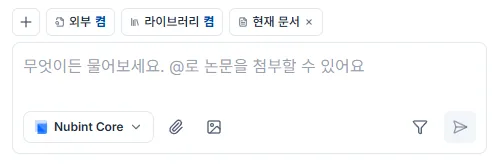
PDF는 클립 버튼으로, 이미지(JPEG·PNG·WebP)는 이미지 버튼으로 붙입니다. DOCX 같은 워드 문서는 채팅에 붙일 수 없으니 에디터의 문서 가져오기를 쓰세요.
AI가 첨부한 PDF를 읽지 못한다면 스캔본일 가능성이 큽니다. PDF 뷰어에서 본문 텍스트가 드래그되는지 확인해 보세요 — 드래그가 안 되면 텍스트가 이미지로만 담긴 파일이라 내용 추출이 되지 않습니다. 텍스트 레이어가 있는 원본 PDF를 쓰는 편이 좋습니다.
PDF 업로드는 무료 플랜을 포함한 모든 플랜에서 횟수 제한이 없습니다. 파일 크기와 페이지 수 상한은 요금제 페이지에서 확인하세요.
컨텍스트는 AI가 답변할 때 참조하도록 내가 직접 붙이는 자료입니다. 채팅 입력창의 + 버튼을 눌러 라이브러리의 논문이나 컬렉션을 고릅니다.
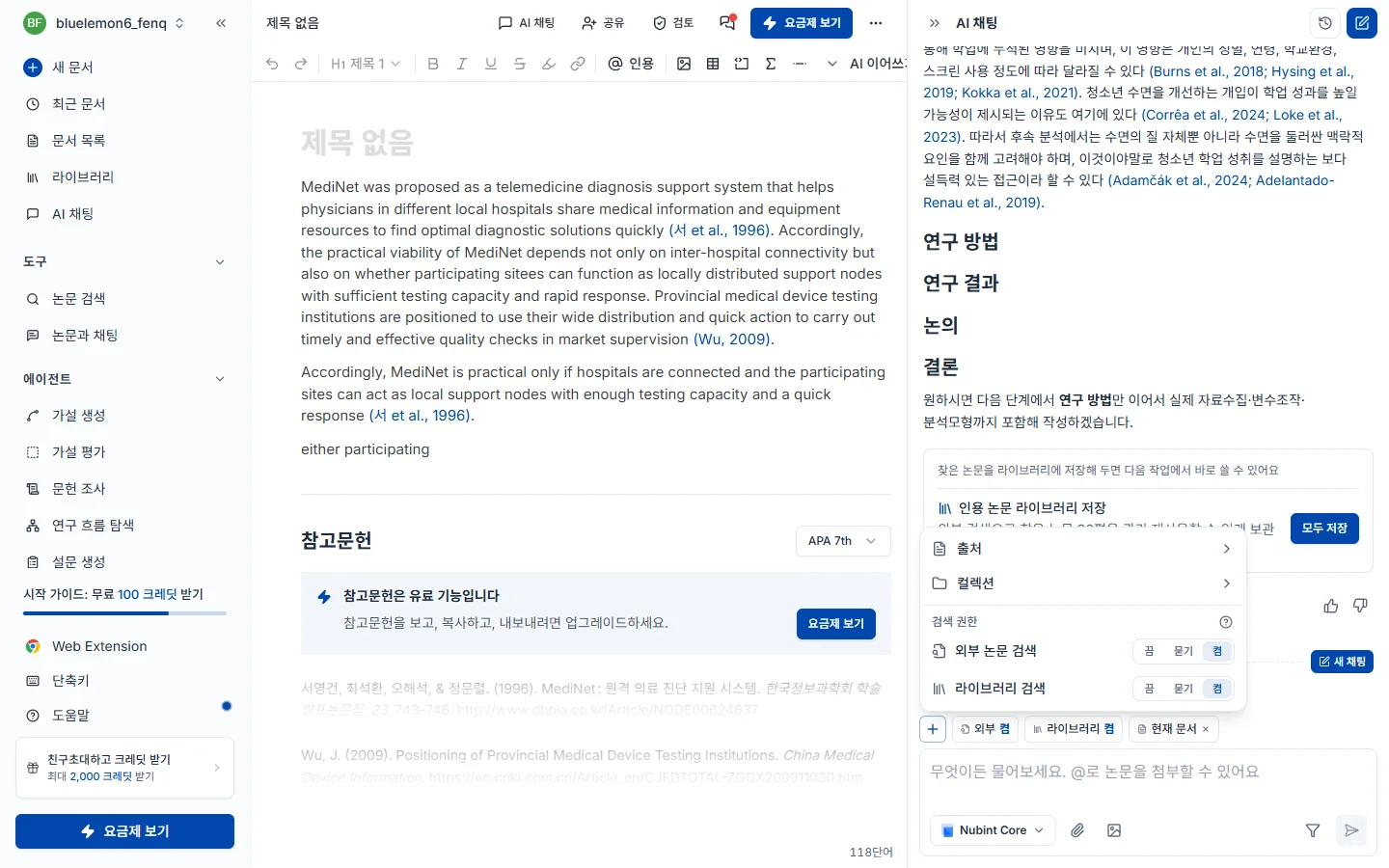
입력창에 @ 를 쳐도 라이브러리 논문을 바로 붙일 수 있고, 라이브러리에 없는 논문은 PDF로 첨부하세요. 붙인 자료는 입력창 위에 칩으로 표시되며 X 로 뺍니다.
에디터에 열려 있는 문서는 붙일 필요가 없습니다. 에디터 옆 채팅은 지금 열려 있는 문서를 항상 읽으므로, 초안에 대해 묻거나 고쳐 달라고 바로 말하면 됩니다.
참조 논문 상한 — 한 번의 질문에 무료 20편, Starter 30편, Pro 40편, Max 60편까지 참조합니다. + 버튼 메뉴의 3/20 같은 카운터가 직접 붙인 논문 수를 보여줍니다.
붙인 자료 말고 AI가 스스로 논문을 찾아오게 하려면 검색 권한을 켜세요.
검색 권한은 AI가 스스로 논문을 찾아도 되는지 정하는 설정입니다. 채팅 입력창 위의 외부 · 라이브러리 칩을 눌러 각각 켜고 끕니다. + 버튼 메뉴의 검색 권한에서도 같은 설정을 바꿀 수 있습니다.

찾는 곳은 두 군데이고, 따로 켜고 끕니다.
| 검색 | 어디서 찾나 |
|---|---|
| 외부 | 4.6억 편의 학술 DB에서 새 논문을 찾아옵니다 |
| 라이브러리 | 내 라이브러리에 저장한 논문 중에서 고릅니다 |
컬렉션을 붙여 두면 라이브러리 검색은 그 컬렉션 안에서만 찾습니다.
각 검색은 끔 / 켬 두 가지입니다.
| 모드 | 동작 | 이럴 때 사용 |
|---|---|---|
| 끔 | 검색하지 않고, 내가 붙인 자료만으로 답변합니다 | 지정한 논문만 놓고 이야기하고 싶을 때. 크레딧을 아끼고 싶을 때 |
| 켬 | 필요하다고 판단하면 알아서 검색합니다 | 자료 조사부터 통째로 맡기고 싶을 때 |
둘은 동시에 켤 수 있습니다. 연구 초기에는 외부 검색을 켜서 넓게 탐색하고, 작성 단계에서는 라이브러리만 켜서 보유 논문 위주로 쓰는 방식을 권합니다.
인용이 붙지 않는다면 이 설정을 먼저 확인하세요. 두 검색이 모두 끔 이고 붙인 자료도 없으면 AI는 참조할 논문이 없어 인용 없이 답변합니다.
내가 붙인 자료와 함께 쓸 때. 컨텍스트로 붙인 논문과 검색해 온 논문은 합쳐져서 쓰이고, 한 번의 질문에 참조하는 논문 수(무료 20편, Starter 30편, Pro 40편, Max 60편)도 합쳐서 셉니다. 자리는 이 순서로 채워집니다.
직접 첨부 → 라이브러리 검색 → 외부 검색
붙인 논문만으로 자리가 다 차면 검색은 새 논문을 가져오지 않습니다. 논문을 빼면 자리가 생깁니다.
상황별로는 이렇게 씁니다.
| 지금 내 상황 | 설정 |
|---|---|
| 이 논문 한 편에 대해 묻고 싶다 | 출처로 그 논문 첨부 + 검색 권한 끔 |
| 내가 모은 논문들로만 초안을 쓰고 싶다 | 라이브러리 검색 켬 + 외부 검색 끔 (컬렉션을 붙이면 그 안에서만) |
| 주제만 있고 자료가 아직 없다 | 외부 논문 검색 켬 |
| 내 초안을 고쳐 달라고 하고 싶다 | 따로 붙일 것 없음 — 열린 문서는 항상 읽습니다 |
AI가 응답을 만드는 중에는 입력창의 중단 버튼으로 즉시 멈출 수 있습니다. 이미 생성된 결과는 그대로 남습니다.
PDF를 첨부하거나 컨텍스트 추가로 라이브러리 논문을 붙인 뒤 질문하면 됩니다. 핵심 기여 요약, 연구 방법 설명, 결과와 한계 해석, 용어 정리까지 논문 내용 전반을 물어볼 수 있습니다.
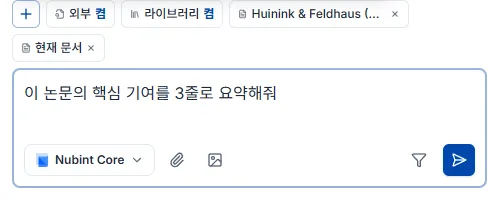
여러 논문을 한번에 다룰 수도 있습니다. 컬렉션을 컨텍스트로 붙이거나 논문을 여러 편 고르면 AI가 비교하고 종합해 답합니다 — "이 논문들의 방법론 차이를 표로 정리해줘", "세 논문이 공통으로 지적하는 한계는 뭐야?" 같은 질문이 여기 해당합니다.
답변에 달린 인용 번호를 클릭하면 어느 논문의 내용인지 바로 확인할 수 있습니다. 인용이 달리는 원리는 답변의 인용에서 다룹니다.
AI가 실제로 확인한 논문 — 검색 결과와 컨텍스트, 첨부로 연결된 논문 — 에만 인용 번호가 달립니다. 존재하지 않는 출처를 만들어 붙이지 않습니다. 답변의 인용 번호를 클릭하면 논문 정보를 확인하고 라이브러리에 저장할 수 있습니다.
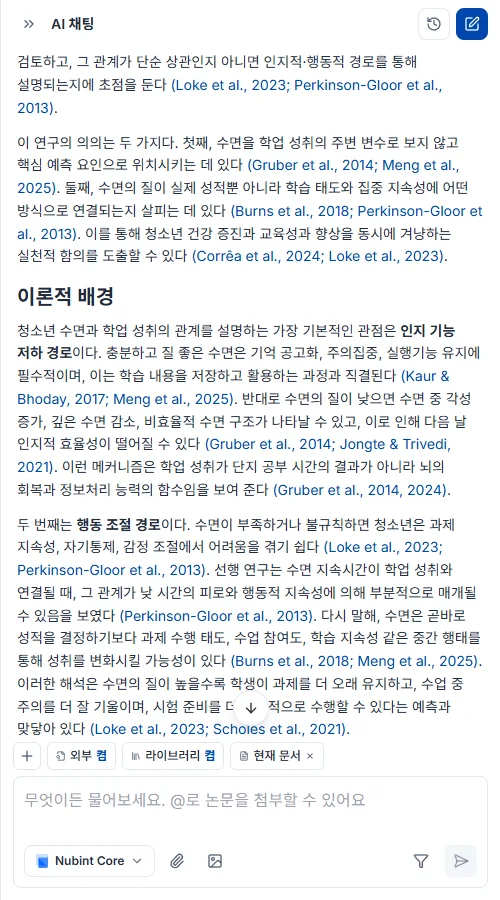
인용이 안 달린다면 참조할 논문이 없기 때문입니다. 검색 권한이 모두 꺼져 있거나 연결된 논문이 없으면 AI는 일반 지식으로만 답하고 인용을 달지 않습니다. 아래 중 하나 이상을 확인하세요.
같은 채팅에서 앞선 답변에 인용된 논문은 이후 답변에서도 이어서 인용될 수 있습니다. 대화를 나눠 다시 시작하고 싶다면 새 채팅을 만드세요.
채팅 패널 상단의 새 채팅 버튼을 누르면 새 대화가 시작됩니다. 이전 대화는 자동으로 저장되고, 채팅 목록에서 골라 그 시점으로 돌아가 이어서 질문할 수 있습니다.

이전 주제와 다른 연구 질문을 시작할 때, 대화가 길어져 답변의 초점을 새로 잡고 싶을 때 새로 만드세요.
초안으로 뼈대를 만들고, 채팅으로 본문을 고치고 이어 쓰고, 인용을 붙인 뒤, Word·LaTeX로 내보내는 순서로 씁니다.
새 문서를 만들면 시작 방법 세 가지가 나옵니다. AI 초안으로 시작하기(주제는 정했지만 어디서부터 써야 할지 막막할 때), 워드 파일로 시작하기(이미 쓰던 .docx 원고를 이어 쓸 때), 빈 문서로 시작하기(구조가 머릿속에 있어 바로 타이핑할 때)입니다.
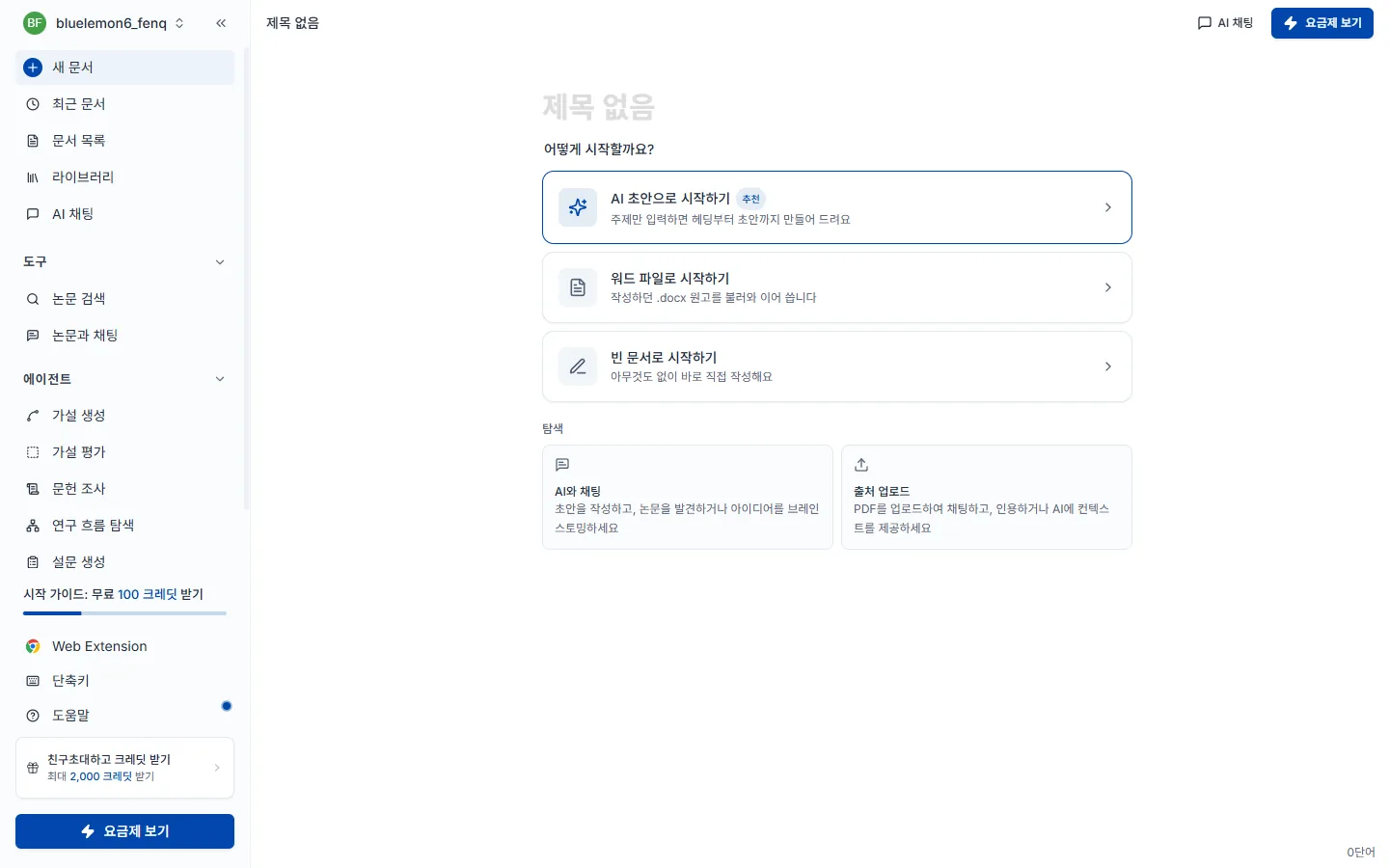
AI 초안을 고르면 3단계 마법사가 열리고, 세 단계를 모두 지나야 마지막 AI 초안 작성 버튼에 도달합니다.
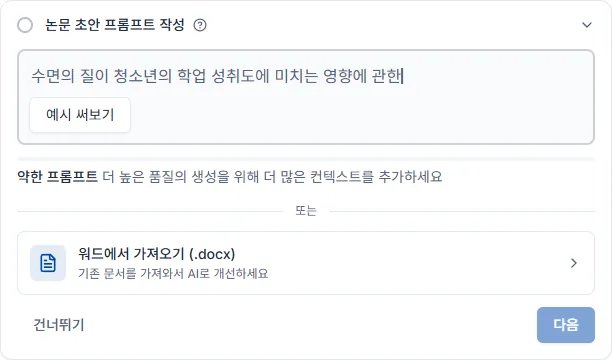
1단계 — 논문 초안 프롬프트. 쓰려는 논문의 주제를 한두 문장으로 적습니다. 이 문장이 AI가 선행연구를 검색하고 초안을 쓰는 기준이 됩니다. 입력창 아래 막대는 프롬프트 강도로, 단어가 늘어날수록 초록에서 녹색으로 차오릅니다. 주제를 비워 두면 다음으로 넘어가지 않습니다.
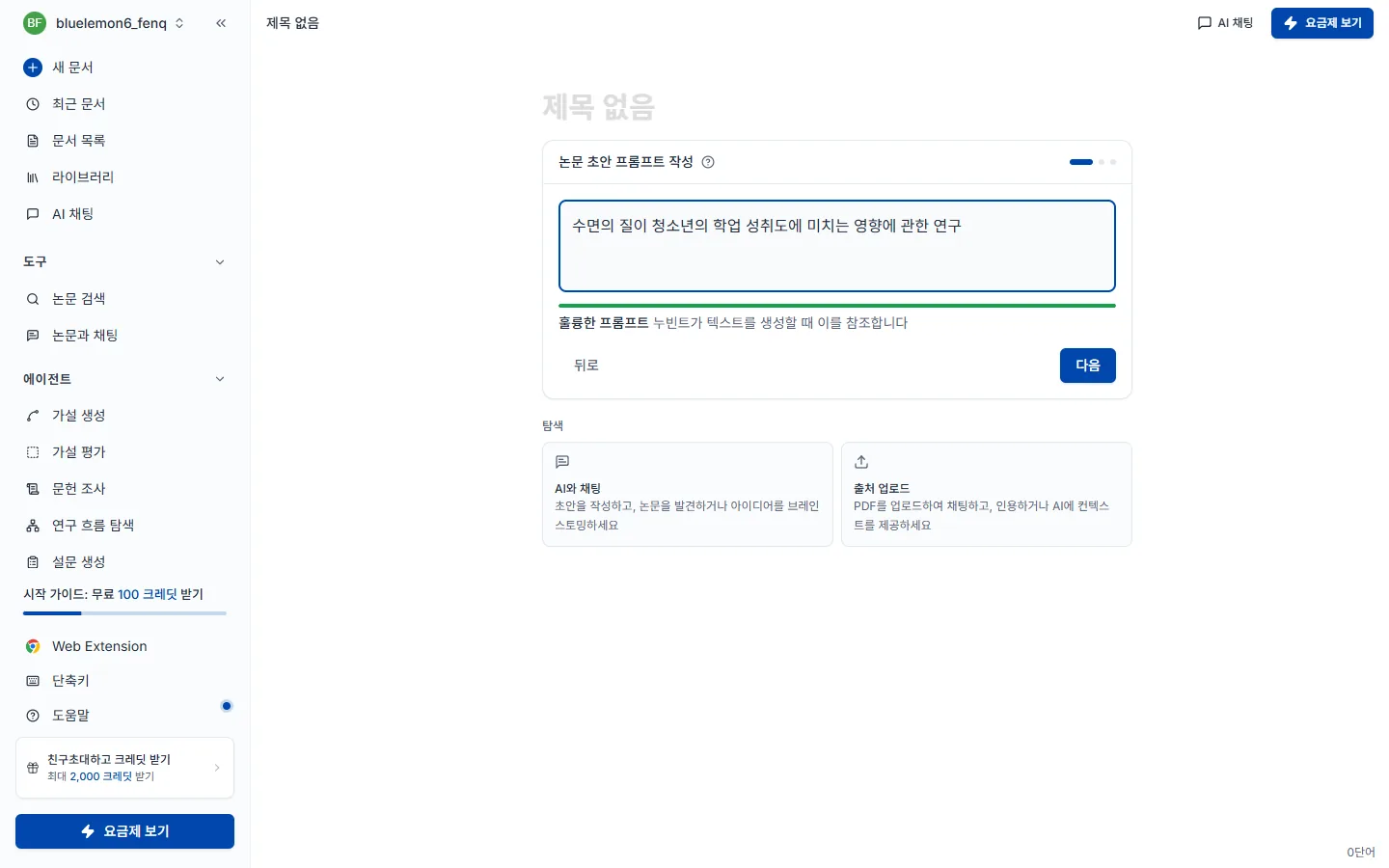
좋은 예는 수면의 질이 청소년의 학업 성취도에 미치는 영향에 관한 연구, 아쉬운 예는 수면 입니다 — 대상·결과 변수·범위가 없으면 검색 결과가 흩어집니다.
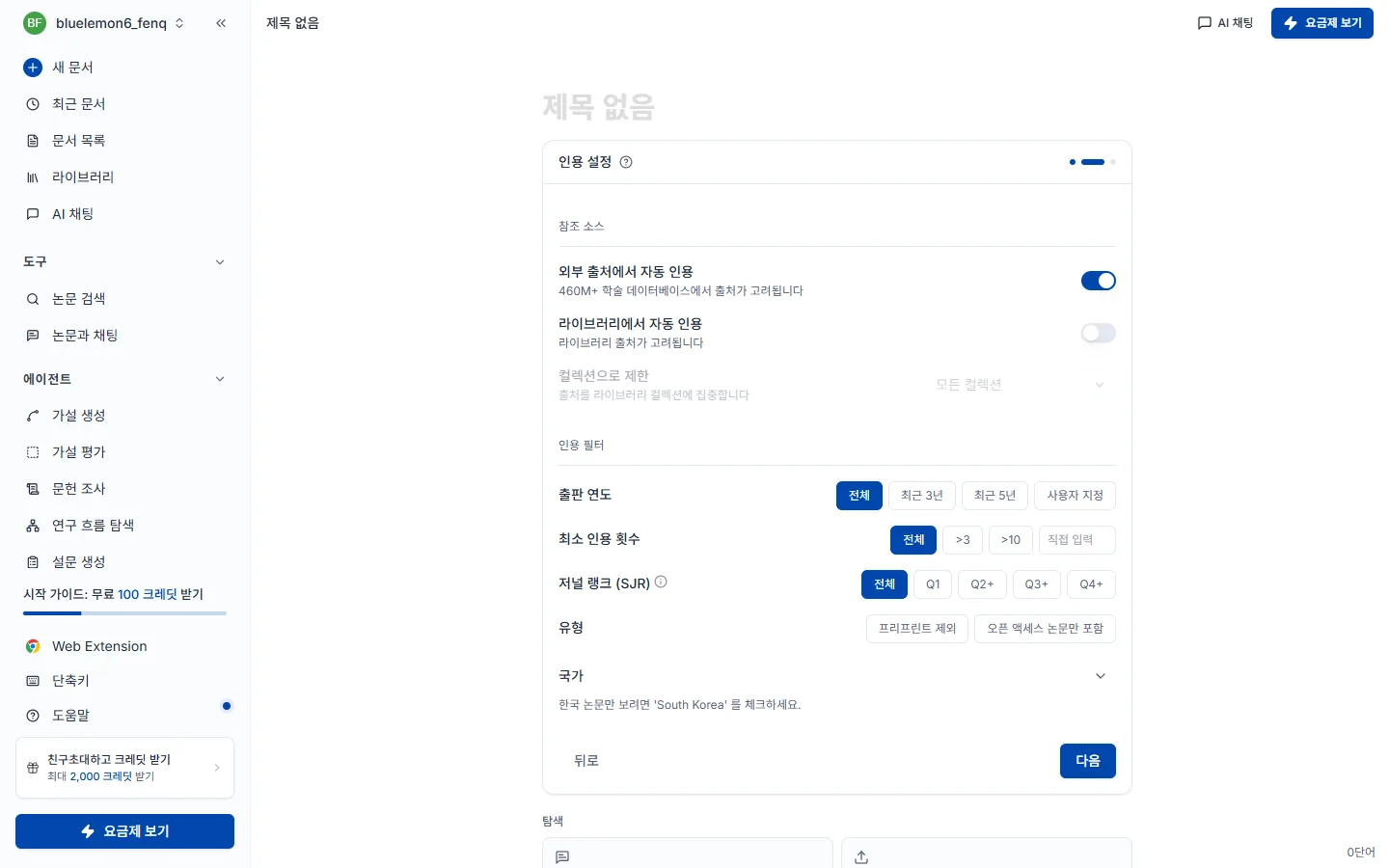
2단계 — 인용 설정. 여기서 고른 값이 이후 작성되는 모든 문장에 적용됩니다. 참조 소스는 외부 출처(4.6억 편 학술 DB)에서 자동 인용할지, 내 라이브러리에 저장한 논문만 쓸지 정합니다(컬렉션으로 범위를 더 좁힐 수 있습니다). 인용 필터로 출판 연도·최소 인용 횟수·저널 랭크(SJR)·유형·국가 조건을 걸 수 있고, 그대로 두면 전체 범위에서 검색합니다. 한국 논문만 보려면 국가에서 대한민국을 체크하세요.
3단계 — 헤딩 및 언어 설정. 논문의 뼈대가 될 목차를 고릅니다. 표준 헤딩(IMRaD) 은 서론·이론적 배경·연구 방법·연구 결과·논의·결론의 정해진 6개 구조이고, 스마트 헤딩은 입력한 주제에 맞춰 AI가 대제목 5개와 각 소제목 2개를 새로 구성합니다. 실험·조사 기반 논문이면 표준 헤딩이, 이론 연구나 학제간 주제처럼 IMRaD 가 잘 맞지 않으면 스마트 헤딩이 유리합니다. 위쪽의 논문 언어에서 초안을 어떤 언어로 쓸지도 고를 수 있습니다.
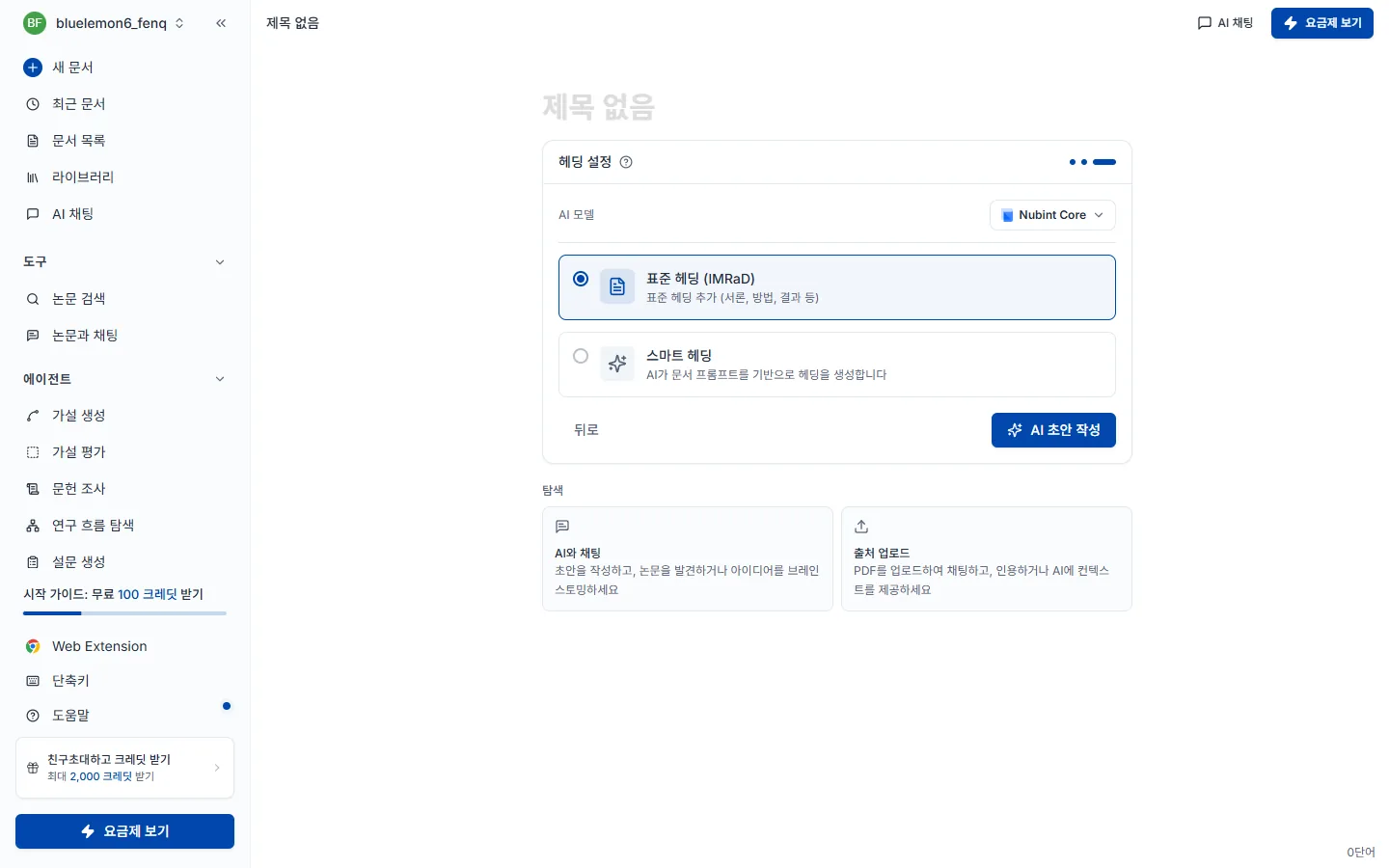
AI 초안 작성을 누르면 선행연구를 검색한 뒤 제목(H1)과 목차를 넣고, 앞부분 두 섹션의 본문을 인용과 함께 씁니다. 나머지 섹션은 헤딩만 남아 이어서 쓰면 됩니다. 본문에는 [1] 같은 인용 번호가 붙고 문서 맨 아래 참고문헌이 자동으로 쌓이며, 보통 1분 내외가 걸립니다.
초안이 나온 다음에는 AI 채팅에 부탁해 문서를 고치고 이어 쓰고, 검토 패널로 점검하는 순서로 발전시킵니다.
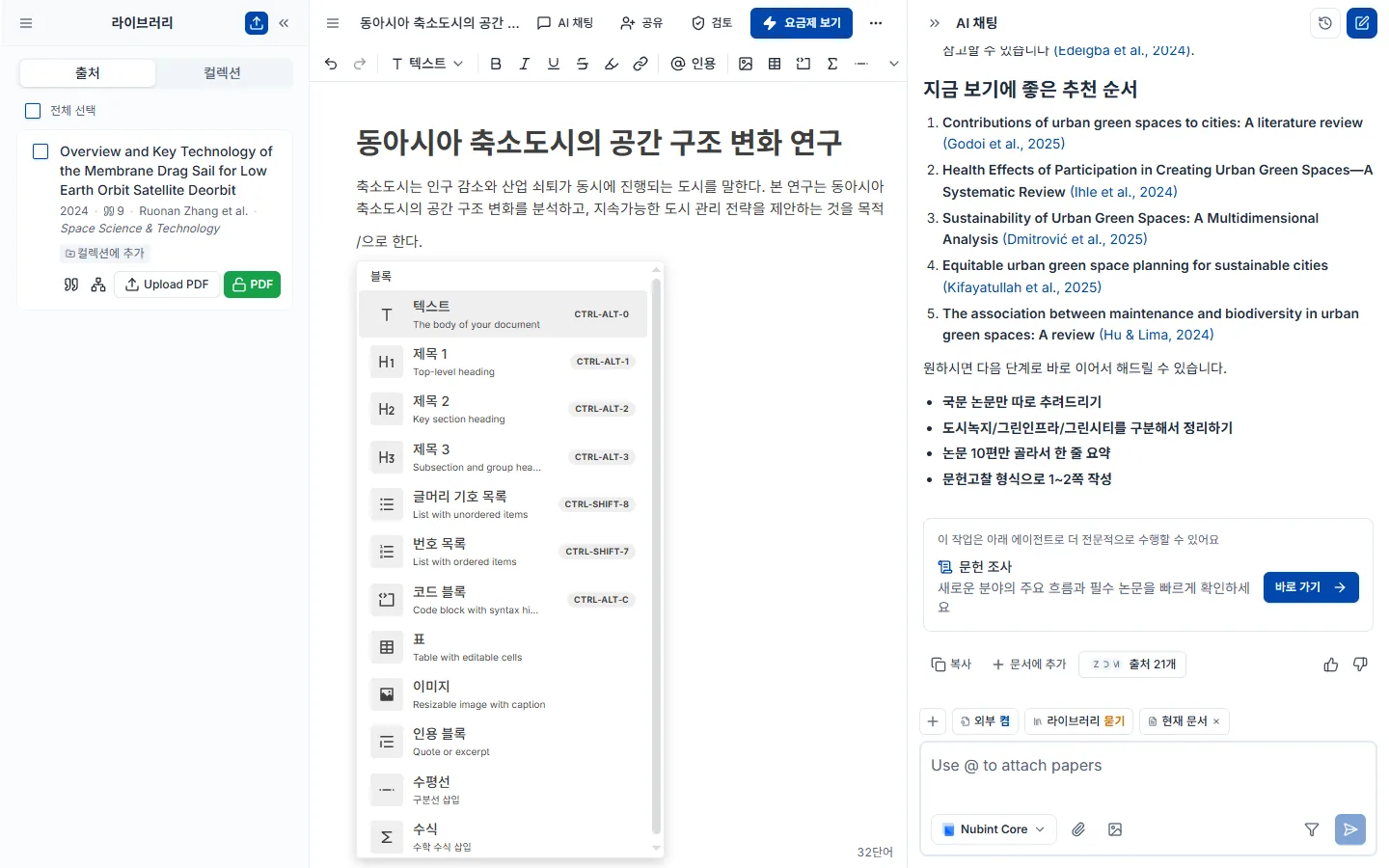
에디터에서 / 를 입력하면 슬래시 메뉴가 열립니다. 헤딩(H1~H3), 불릿·번호 목록, 표, 코드 블록, 수식(KaTeX), 인용 블록, 구분선을 넣을 수 있습니다.
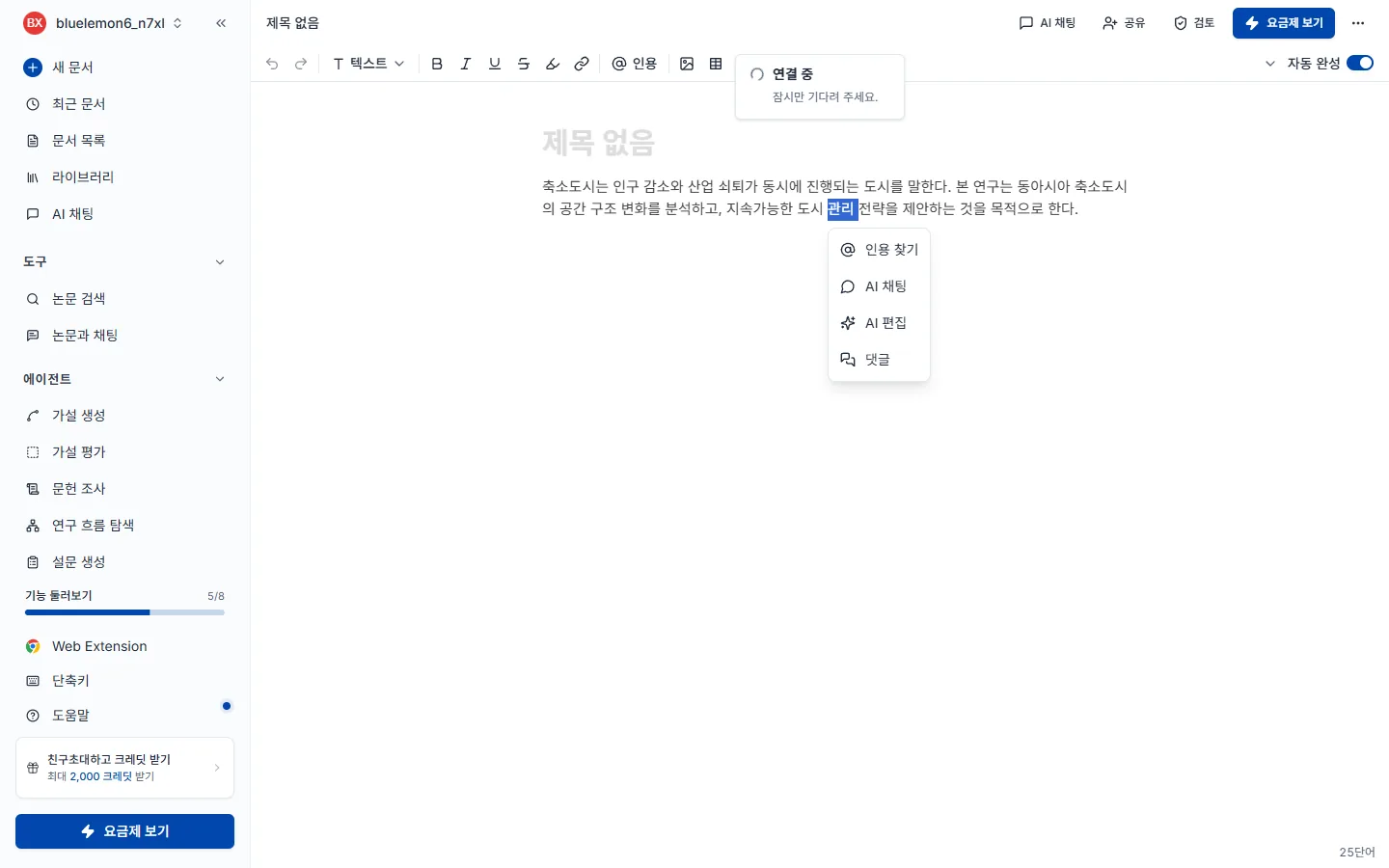
텍스트를 드래그해 고른 뒤 상단 기능바에서 굵기·기울임·밑줄·취소선·배경색·링크를 적용합니다. 학술 용어나 변수명에는 기울임을 쓰는 것이 관례입니다. 고른 자리 아래에는 인용 찾기 · AI 채팅 · 댓글 · 검토 메뉴가 뜹니다.
문서 맨 아래 참고문헌 목록 옆의 스타일 선택을 엽니다. 왼쪽은 스타일, 오른쪽은 언어인 두 열짜리 창이 열리고, 지금 고른 조합으로 참고문헌이 어떻게 보일지 미리보기가 함께 나옵니다.
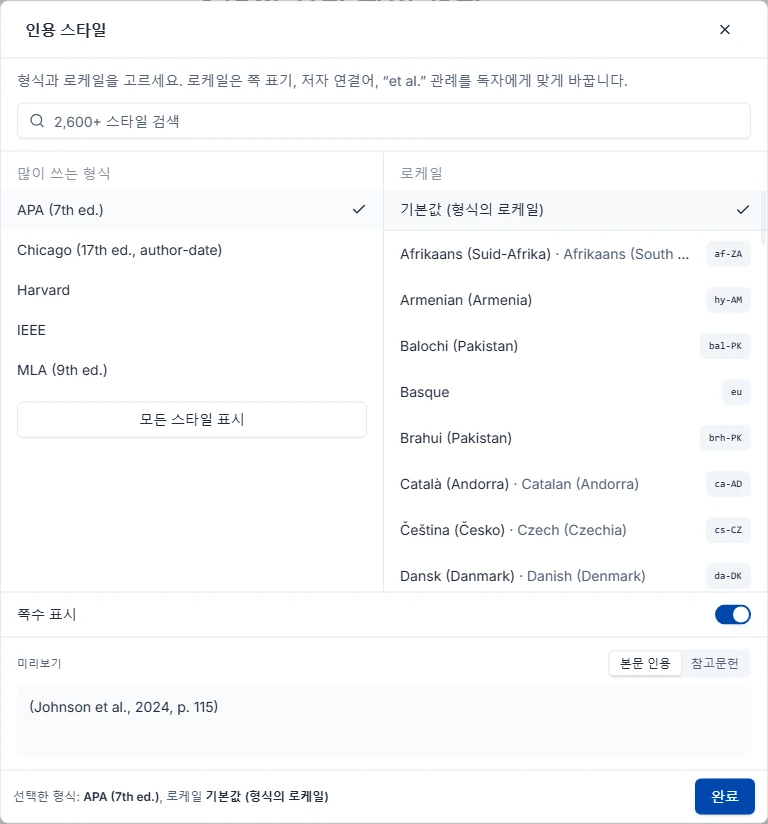
자주 쓰는 다섯 가지는 처음부터 떠 있고, CSL 스타일 약 2,850종 전체 목록은 창을 연 직후 불러옵니다. 찾는 게 정해져 있으면 검색창을 쓰세요. 완료를 누르기 전까지는 문서에 아무것도 반영되지 않습니다 — 그때까지는 둘러보기만 하는 상태입니다.
스타일은 Citation Style Language(CSL) 프로젝트에서 옵니다. CSL 스타일 저장소에 CC BY-SA 3.0으로 공개돼 있습니다.
인용 스타일은 문서에 딸린 설정입니다. 그래서 바꾸면 본문 인용과 참고문헌 목록이 한 번에 다시 그려지고, 그 문서에만 적용됩니다. 다른 문서는 각자의 설정을 그대로 유지합니다.
반대로 일부러 건드리지 않는 것이 셋 있습니다.
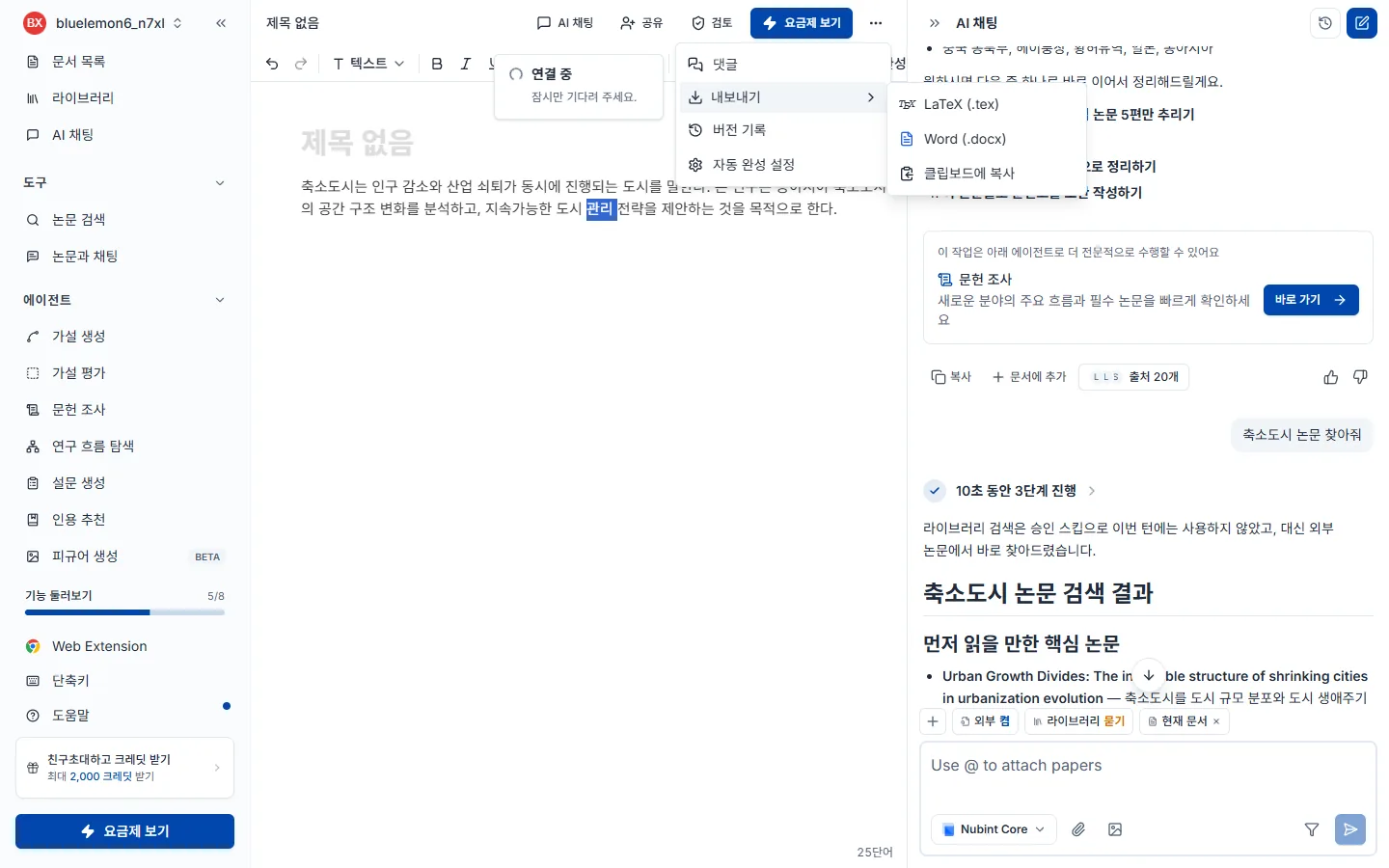
에디터 상단 더보기 메뉴에서 내보내기를 누르면 창이 열립니다. Word(.docx) 또는 LaTeX(.tex) 중에 고르며, 같은 메뉴에서 문서 전체를 클립보드로 복사할 수도 있습니다. PDF 내보내기는 없습니다 — Word나 LaTeX로 내보낸 뒤 그쪽에서 PDF로 인쇄하세요.
레이아웃 프리셋만 고르면 대개 끝납니다. 누빈트 기본, 더블 스페이스 원고(12pt Times New Roman·줄간격 2·여백 1인치, 학술지 투고용), 2단 논문(10pt·좁은 여백, 학회 논문집용), 학위논문 또는 보고서(12pt·줄간격 1.5·표지와 목차 포함). 그 아래 고급 옵션을 펼치면 용지 크기, 단 수, 글꼴과 글자 크기, 줄 간격, 여백, 그리고 표지·목차·쪽번호·댓글 포함 여부를 따로 정할 수 있습니다.
Word에만 있는 선택이 하나 있습니다. 본문 인용을 어떻게 쓸지입니다. MS Word 네이티브 인용은 Word의 참고문헌 기능으로 본문 인용과 참고문헌 목록을 연결해 둡니다 — 이후에도 Word에서 계속 고칠 거라면 이쪽입니다. 하이퍼링크 인용은 대신 클릭되는 링크로 쓰며, Google Docs에서 다룰 수 있는 형태입니다.
인용 스타일은 여기서 정하지 않습니다. 내보내기는 문서에 설정된 스타일(참고문헌 목록 옆에서 고른 것)을 그대로 따릅니다. 그 스타일이 각주 방식이면 내보낸 파일도 각주로 나갑니다.
무료 플랜은 본문만 내보내고, 유료 플랜(Starter·Pro·Max)은 본문과 참고문헌을 함께 내보냅니다.
에디터 옆 AI 채팅은 열려 있는 문서를 읽고, 부탁하면 고칠 곳을 문서 위에 제안합니다. 답변을 복사해 붙여 넣을 필요 없이, 하고 싶은 일을 채팅에 말로 적고 제안을 적용하면 됩니다.
부탁하는 법. 채팅 입력창에 무엇을 어떻게 바꿀지 적고 보냅니다.
이 문단 줄여줘제목을 ○○로 바꿔줘오타 고쳐줘여기 뒤에 한 문단 추가해줘에디터에서 일어나는 일. 답변이 끝나면 지우기, 바꾸기, 끼워 넣기가 제안으로 본문에 표시됩니다. AI 논문 검토 결과와 같은 화면이라, 표시된 곳을 하나씩 넘겨 보며 적용 / 거절을 고릅니다. 적용한 것만 문서에 들어가고, 거절하면 문서는 그대로입니다.
한꺼번에 처리하기. 답변 아래 AI 수정 제안 카드에 아직 고르지 않은 제안이 몇 건인지 나옵니다. 문서에서 보기로 그 자리로 가고, 모두 적용 / 모두 거절로 한 번에 처리합니다. 다음 부탁을 보내도 앞서 받은 제안은 사라지지 않습니다. 같은 문단을 다시 고쳐 달라고 하면 그 문단의 제안만 새것으로 바뀝니다.
이어 쓰기. 다음 장 써줘처럼 이어서 써 달라고 하면 새 장은 채팅 답변으로 옵니다. 읽어 보고 답변 아래 문서에 넣기를 누르면 문서의 제자리에 들어갑니다. AI 초안 만들기로 처음 쓰는 초안만 바로 문서에 들어갑니다.
되돌리기. 적용한 뒤 마음이 바뀌면 에디터에서 Ctrl + Z 로 되돌립니다. 모두 적용 직후에 뜨는 알림의 되돌리기로 한 번에 되돌릴 수도 있습니다.
새 문서를 만들면 나오는 시작 화면에서 워드 파일로 시작하기를 누르고 .docx 파일을 고르면 내용이 에디터로 불러와집니다. 가져온 뒤에는 채팅으로 문서 고치기 · 이어 쓰기, 인용 삽입을 바로 쓸 수 있습니다.
현재 .docx 만 지원하며 .doc, .pdf, .hwp 는 받지 않습니다.
이미 쓴 문장에 내가 고른 논문을 직접 인용으로 붙입니다. AI가 근거를 찾아 주길 원한다면 인용 추천이 맞습니다.
진입 방법이 세 가지고 그다음은 모두 같습니다 — 논문 검색창에서 제목이나 키워드로 찾아 고르면 그 자리에 인용이 삽입됩니다.
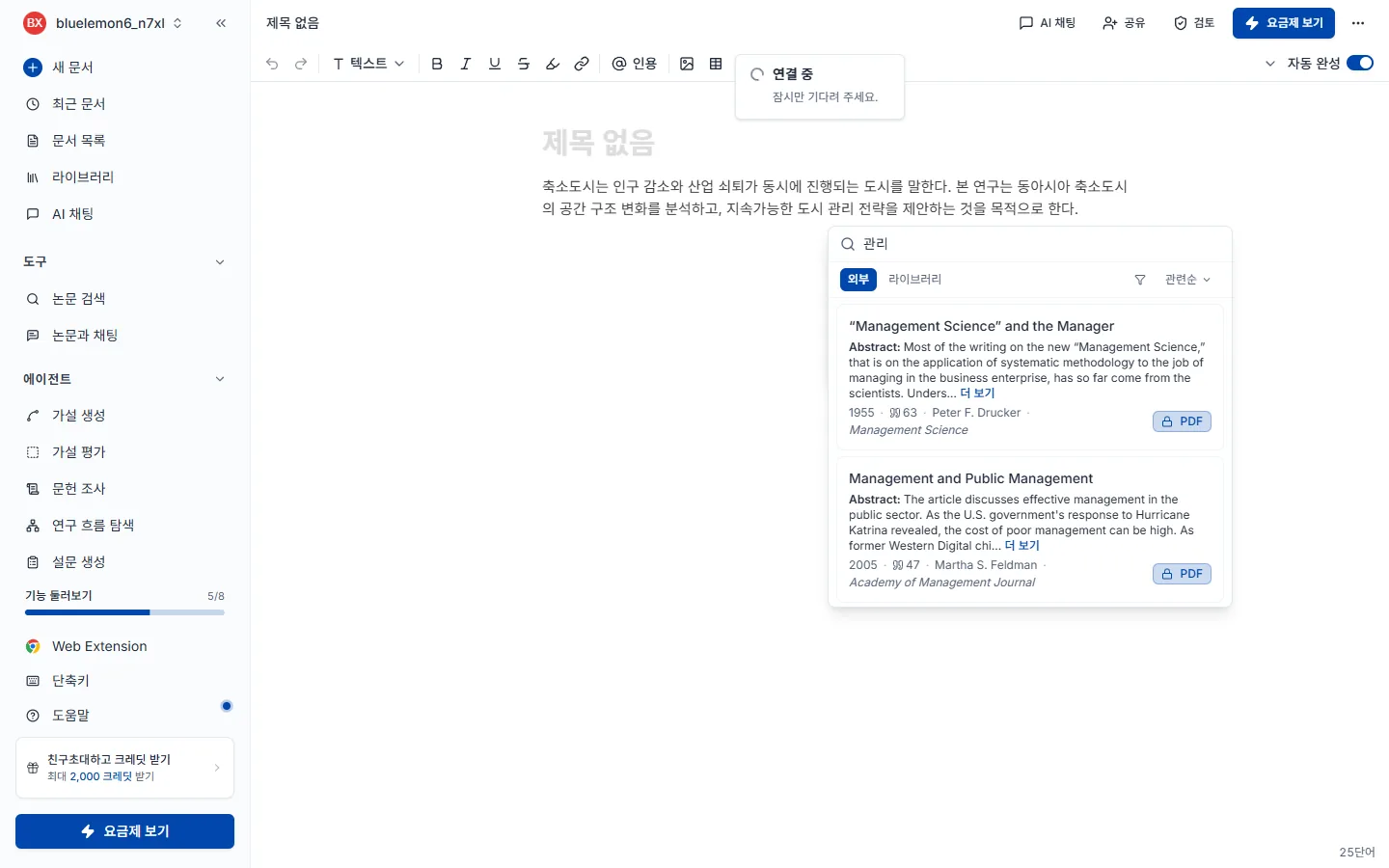
인용을 넣을 위치에 @ 를 치는 게 가장 빠릅니다. 커서를 둔 뒤 상단 기능바의 @ 인용 버튼을 누르거나, 문장을 드래그하면 뜨는 기능바에서 인용 버튼을 눌러도 됩니다.
삽입된 인용은 문서에 설정된 형식(APA·MLA·Chicago 등)에 맞춰 자동으로 포맷되고 문서 하단 참고문헌 목록에도 추가됩니다. 형식을 바꾸려면 인용 형식 변경을 보세요.
일곱 검토는 보는 곳이 서로 겹치지 않습니다. 구조(피어리뷰) → 근거(주장 신뢰도·출처 품질) → 문장(문체 톤·논문 교정) 순으로 내려오고, 제출 직전에 논문 원문 대조·AI 작성 감지로 확인하세요.
에디터 상단의 검토 버튼을 누르면 오른쪽에 검토 패널이 열립니다. 7종이 카드로 나열되고 원하는 카드의 검토 실행을 누르면 시작합니다. 이미 돌린 적이 있으면 버튼이 결과 보기로 바뀌고, 초안을 고친 뒤라면 결과 화면 우측 상단의 새로고침 아이콘으로 다시 돌립니다. 카드 우측 상단의 ? 는 그 검토의 도움말로 이어지며, 패널을 여는 것만으로는 아무것도 차감되지 않습니다.
일곱 검토는 보는 곳이 서로 겹치지 않습니다. 큰 틀부터 잡고 문장으로 내려오는 순서가 효율적입니다 — 구조를 고치면 문장이 다시 쓰이기 때문입니다.
| 검토 | 무엇을 보나 | 언제 돌리나 | 무료 |
|---|---|---|---|
| 피어리뷰 | 구조와 논리, 방법론, 인용의 충분성 | 초안을 어느 정도 완성한 뒤 | — |
| 주장 신뢰도 | 근거 없이 단정한 주장 | 초안이 쌓였을 때 | ✅ |
| 출처 품질 | 인용한 논문 자체의 신뢰도 | 인용을 어느 정도 붙인 뒤 | — |
| 문체 톤 | 글 전체의 어조가 학술 문체에 맞는지 | 문장을 다듬기 시작할 때 | ✅ |
| 논문 교정 | 문법, 맞춤법, 구두점, 단어 선택 | 내용이 확정된 뒤 마지막 | — |
| 논문 원문 대조 (베타) | 기존 논문과 글자 그대로 겹치는 문장 | 제출 직전 마지막 점검 | — |
| AI 작성 감지 (베타) | AI가 쓴 글의 특징이 나타나는 문단 | 제출 직전 마지막 점검 | — |
주장 신뢰도와 출처 품질은 헷갈리기 쉬운데, 주장 신뢰도는 근거가 붙어 있는지 를, 출처 품질은 붙어 있는 근거가 쓸 만한지 를 봅니다. 인용이 아예 없는 문장은 주장 신뢰도가, 철회되거나 등급이 낮은 인용은 출처 품질이 잡습니다.
검토는 언제나 문서 전체를 봅니다. 본문을 드래그해서 실행하거나 모바일 검토 드로어에서 실행해도 대상은 문서 전체입니다 — 구조·논리·인용은 앞뒤 맥락이 있어야 제대로 보이기 때문입니다.
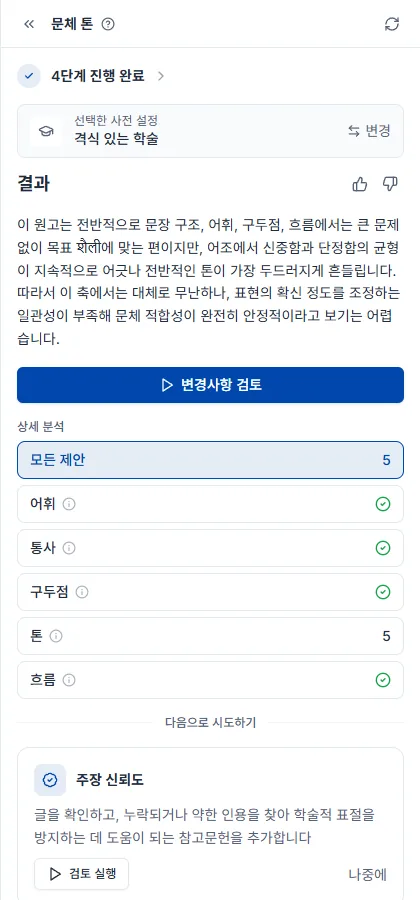
결과 화면은 검토 종류와 무관하게 같은 뼈대를 씁니다. N단계 진행 완료를 펼치면 어떤 검사를 거쳤는지 볼 수 있고, 결과가 이번 실행을 한 문단으로 요약합니다(옆의 👍👎 로 품질을 알려줄 수 있습니다). 변경사항 검토로 지적을 하나씩 넘겨보며 처리하고, 상세 분석은 분류별 건수를(체크 표시는 그 분류에서 걸린 게 없다는 뜻입니다), 모든 제안은 전체 건수를 보여줍니다. 본문에서 밑줄 친 곳을 누르면 무엇이 문제인지 뜨고 적용 / 거절을 고릅니다. 맨 아래 다음으로 시도하기는 이어서 돌리면 좋은 검토를 추천합니다.
여기에 검토마다 자기 것이 하나씩 더 붙습니다 — 피어리뷰는 종합 평가 점수와 코멘트, 출처 품질은 서지 노트, 문체 톤은 선택한 사전 설정입니다.
크레딧은 검토한 문서 분량 × 종류별 단가로 차감됩니다. 문서 전체를 훑는 검토라 원가가 길이에 비례하기 때문입니다. 요금표의 "A4 장수"는 이 분량을 영문 기준으로 환산한 표기입니다.
| 검토 | 영문 A4 1장당 크레딧 |
|---|---|
| 피어리뷰 | 12 |
| 주장 신뢰도 | 10 |
| 논문 교정 | 6 |
| 출처 품질 | 6 |
| 문체 톤 | 6 |
| 논문 원문 대조 (베타) | 6 |
| AI 작성 감지 (베타) | 8 |
위 단가의 기준은 영문 A4 1장(영어 약 500단어)입니다. 5장 단위로 올려서 계산하므로 몇 줄만 넣고 돌려도 5장으로 보고, 5장을 조금 넘으면 10장으로 봅니다. 한국어·일본어·중국어는 같은 분량이라도 토큰이 약 2배여서 금액도 약 2배입니다 — 피어리뷰는 영문 A4 10장이 120 크레딧이고, 같은 분량의 한국어 문서는 그 약 2배입니다. 내 문서의 정확한 금액은 실행 전에 검토 카드에 뜨는 예상 크레딧에서 확인하세요.
구조와 논리를 봅니다. 논문 구조, 논리적 흐름, 방법론의 적절성, 인용이 충분한지 네 축으로 문서 전체를 읽고 학술지 심사위원 관점의 의견을 답니다. 실행 방법과 크레딧은 검토 시작하기에서 공통으로 다룹니다.
초안을 어느 정도 완성한 뒤 돌리세요. 큰 틀을 먼저 잡아야 문장을 두 번 고치지 않으므로 검토 7종 중 가장 먼저 돌리기를 권합니다. 문장 표현은 논문 교정이, 근거 유무는 주장 신뢰도가 담당합니다. 모든 검토는 문서 전체를 대상으로 실행되며, 일부만 골라 검사할 수는 없습니다.
다른 검토와 달리 점수가 먼저 나옵니다. 종합 평가가 타당성·표현·기여도를 각 4점 만점으로 매기고 종합 점수(10점 만점)를 내므로, 축별 점수로 어디가 약한지 잡은 뒤 약점 목록으로 내려가면 됩니다.
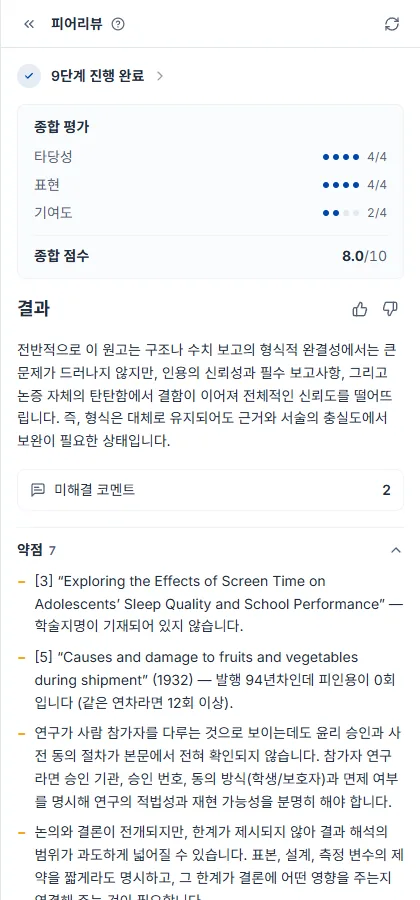
지적은 문서 본문에 코멘트로 달립니다. 다른 검토처럼 팝오버에서 적용·거절하는 방식이 아니라 해당 문장 옆에 리뷰어 코멘트가 붙습니다. 코멘트를 열어 읽고 본문을 직접 고친 뒤 해결 처리하면 목록에서 빠지고, 초안을 고쳐 다시 돌리면 새 코멘트가 추가됩니다. 결과 화면의 미해결 코멘트 N 과 목록 카드의 배지가 같은 숫자이며, 배지가 0이 되면 이번 심사에서 지적된 것은 다 처리했다는 뜻입니다.
문장 표현만 봅니다. 문법, 맞춤법, 구두점, 단어 선택을 문장 단위로 잡아 고쳐 쓴 문장을 제안하며, 특히 영어 초안의 학술적 표현을 다듬는 데 유용합니다. 실행 방법과 크레딧은 검토 시작하기에서 공통으로 다룹니다.
내용이 확정된 뒤에 돌리세요. 아직 문단이 바뀔 예정이라면 나중이 낫습니다. 글의 뼈대는 피어리뷰가, 학술 문체에 맞는지는 문체 톤이 봅니다. 둘 다 돌릴 거라면 톤을 먼저 맞추고 교정으로 마무리하세요 — 톤을 바꾸면 문장이 다시 쓰입니다.
고칠 곳은 본문에 바로 표시됩니다. 빨간 취소선이 원문, 초록이 고친 문장이고, 밑줄 친 곳을 눌러 적용 / 거절을 고르면 됩니다.
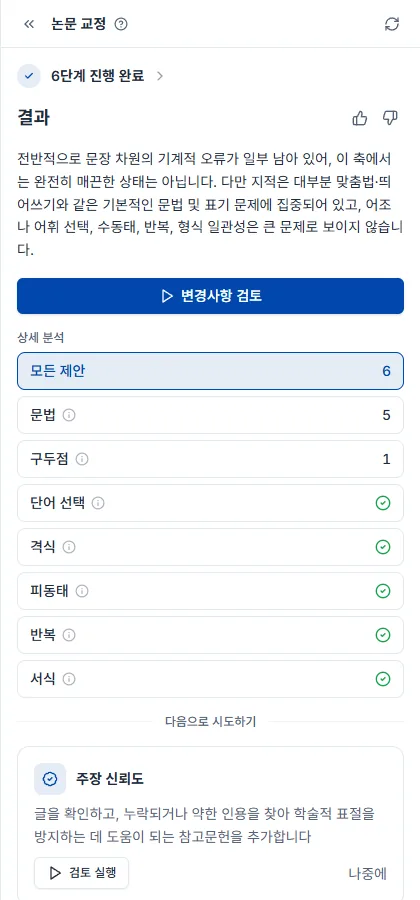
교정 전체 과정은 논문 교정하는 법 가이드에서 다룹니다.
인용한 논문이 그 문장을 실제로 뒷받침하는지를 봅니다. 인용이 걸린 문장마다 그 논문의 본문(없으면 초록)과 대조해 반대 내용·다른 주제·약한 뒷받침을 짚고, 그렇게 본 이유와 논문 속 근거 문장을 보여줍니다. 무료 플랜에서도 실행할 수 있고, 실행 방법과 크레딧은 검토 시작하기에서 공통으로 다룹니다.
초안이 어느 정도 쌓였을 때 돌리세요. 붙어 있는 인용의 품질(철회·프리프린트 등)은 출처 품질이 보고, 지적받은 문장에 실제 인용을 채우려면 인용 추천을 쓰면 됩니다.
근거가 부족한 문장이 본문에 표시되고, 분류는 잘못 인용됨·근거와 상반됨·근거 없음·근거 약함·원문 미확보로 나뉩니다. 밑줄 친 곳을 누르면 그렇게 본 이유와 논문 속 근거 문장이 나오고, 확인 / 무시를 고릅니다.
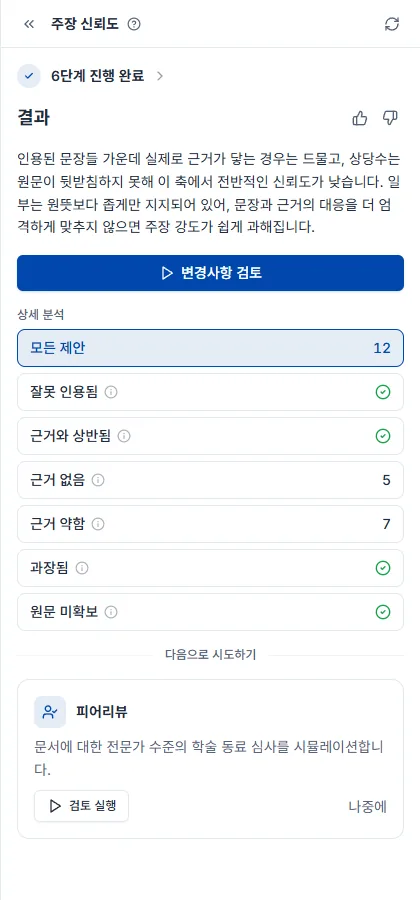
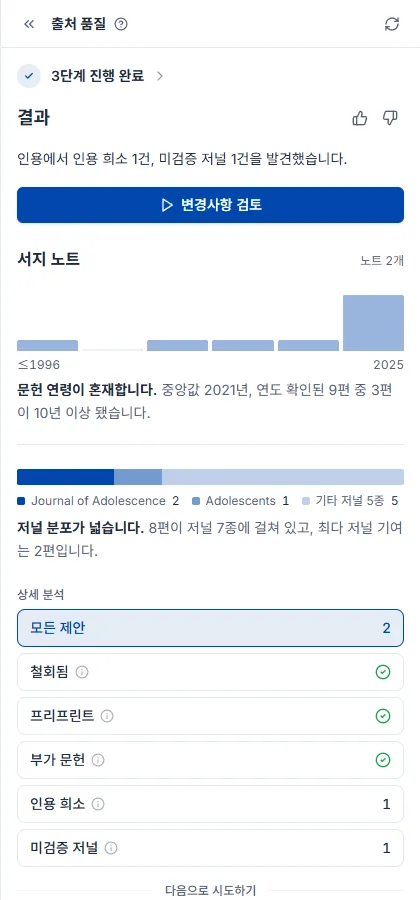
인용한 논문 자체를 봅니다. 철회된 논문, 심사를 거치지 않은 프리프린트, 등급이 낮은 저널을 찾아내므로 인용 목록을 사람이 일일이 확인하지 않아도 됩니다. 실행 방법과 크레딧은 검토 시작하기에서 공통으로 다룹니다.
인용을 어느 정도 붙인 뒤에 돌리세요 — 인용이 없으면 검사할 대상도 없습니다. 인용이 아예 없는 주장은 주장 신뢰도가 찾고, 문제가 있는 인용을 갈아 끼울 대체 논문은 논문 검색에서 필터로 찾을 수 있습니다.
지적 건수뿐 아니라 참고문헌 전체의 건강 상태를 같이 보여주는 게 이 검토의 특징입니다. 공통 결과 요소에 더해 서지 노트가 인용 문헌의 연도 분포와 저널 분포를 그래프로 보여주므로, 문헌이 오래됐는지 한 저널에 쏠렸는지가 한눈에 보입니다.
글 전체의 어조를 봅니다. 초안의 문체가 학술 논문에 맞는지 확인하고 어긋난 문장을 고쳐 씁니다. 무료 플랜에서도 실행할 수 있고, 실행 방법과 크레딧은 검토 시작하기에서 공통으로 다룹니다.
문법 오류나 오탈자는 논문 교정이 잡습니다. 둘 다 돌릴 거라면 톤을 먼저 맞추고 교정으로 마무리하는 편이 낫습니다 — 톤을 바꾸면 문장이 다시 쓰이기 때문입니다.
기준 문체를 먼저 정하는 게 중요합니다. 카드의 설정 아이콘에서 격식체·간결체 같은 프리셋을 고르거나, 내 라이브러리의 논문을 기준 삼아 그 문체에 맞출 수 있습니다. 정하지 않으면 일반적인 학술 문체를 기준으로 봅니다.
결과 맨 위에 어떤 문체를 기준으로 봤는지가 먼저 나옵니다. 기준이 다르면 지적도 달라지니 여기부터 확인하세요. 공통 결과 요소에 더해 선택한 사전 설정이 이번 실행의 목표 문체를 보여주고, 변경으로 다른 기준으로 다시 돌릴 수 있습니다.
초안의 문장이 논문의 초록이나 본문과 글자 그대로 겹치는지 찾습니다. 실행 방법과 크레딧은 검토 시작하기에서 공통으로 다룹니다. Starter 플랜부터 사용할 수 있습니다.
표절 검사가 아닙니다. 대조 범위는 Nubint가 가진 논문 코퍼스뿐입니다 — 논문 초록(다국어), 국내 학술지 초록, 그리고 내가 인용한 논문의 본문(공개 논문 본문과 라이브러리 PDF). 인용하지 않은 논문은 초록과만 대조합니다. 학위논문 본문, 웹 문서, 뉴스, 교재는 대조하지 않으며 의역도 잡지 않습니다. 학교의 카피킬러·Turnitin 결과를 대신하지 않습니다.
그런데도 이 검토가 필요한 이유가 있습니다. AI로 초안을 쓰면 검색해 온 논문의 초록 문장이 거의 그대로 초안에 들어오는 일이 생기는데, 학교 표절 검사기는 그 초록을 갖고 있습니다. 이 검토는 그 구간을 제출 전에 먼저 찾아줍니다.
지적은 두 가지로 나뉩니다.
각 지적에는 겹치는 논문 카드와 원문 발췌가 붙어 있어 바로 대조할 수 있습니다. 따옴표로 감싼 문장은 직접 인용으로 보고 지적하지 않습니다.
한국어 초안은 국내 학술지의 초록과만 대조되므로 영어 초안보다 대조 범위가 좁습니다. 베타 기간 동안 대조 범위와 판정 기준을 계속 조정합니다.
문단마다 AI가 쓴 글의 특징이 얼마나 나타나는지 판정합니다. 실행 방법과 크레딧은 검토 시작하기에서 공통으로 다룹니다. Starter 플랜부터 사용할 수 있습니다.
결과는 참고용이며 증거가 아닙니다. AI 감지기는 종류를 가리지 않고 오탐이 있습니다. 격식을 갖춘 학술문, 비원어민이 쓴 영어, 번역기를 거친 글은 사람이 썼어도 AI로 판정되기 쉽습니다. 반대로 의역을 거친 AI 글은 잘 잡히지 않습니다. 학교나 기관이 쓰는 감지기(GPT킬러, Turnitin 등)와 결과가 다를 수 있습니다.
판정 원리는 언어모델 두 개의 "예측 가능성" 비교입니다. 두 모델이 모두 쉽게 예측하는 문단일수록 AI 글의 특징이 강한 것으로 봅니다. 확률 숫자는 보여주지 않고 문단별 두 단계로만 표시합니다.
결과 상단에는 문서 단계가 붙습니다. 안전·주의·위험 세 단계이고, 채점한 본문이 300단어 상당에 못 미치면 판정 보류로 표시되며 그 실행은 크레딧을 차감하지 않습니다. 짧은 문단은 이웃 문단과 묶어 판정하므로 빠지지 않습니다. 제목(번호를 붙인 소제목 포함), 구분선, 굵은 글씨 소제목, 표·그림 캡션, 인용구는 판정하지 않습니다.
판정은 문단 단위, 표시는 문장 단위입니다. AI 특징이 나타난 문단에서 그 특징에 가장 크게 기여한 문장(최대 3개)에 하이라이트가 붙습니다. 문장을 누르면 AI 느낌이 나는 이유가 나옵니다. 문단의 AI 특징에 기여한 순위, AI 글에 흔한 표현, 문단의 문장 길이가 거의 균일함 중 해당하는 것을 보여주며, 사람 글과 AI 글을 실제로 가르는 것으로 확인된 이유만 씁니다. 문장 표시는 어디를 볼지 알려주는 안내이지 문장별 판정이 아닙니다. 바꿀 문장이 없는 지적이라 버튼은 확인과 무시입니다.
직접 쓴 문단이 지적됐다면 그대로 두어도 됩니다. Nubint는 감지 결과를 낮추기 위한 재작성 기능을 제공하지 않습니다 — 그 용도는 소속 기관의 규정을 어기는 쪽으로 쓰일 수 있기 때문입니다.
판정 기준은 언어별로 다릅니다. 한국어 · 영어 · 일본어 · 중국어 모두 사람이 쓴 학술 초록을 기준으로 오탐률을 맞춰 두었습니다. 베타 기간 동안 계속 조정합니다.
논문을 쓰기 전 단계를 맡습니다. 가설을 세우고 평가하고, 문헌을 조사하고, 연구 계보를 훑고, 인용을 찾습니다. 각각 전용 페이지에서 실행합니다.
다섯 가지가 있고 각각 전용 페이지에서 실행합니다.
| 에이전트 | 무엇을 하나 | 무엇을 입력하나 |
|---|---|---|
| 가설 생성 | 주제에서 검증 가능한 가설 후보를 만듭니다 | 연구 주제 한 문장 |
| 가설 평가 | 이미 세운 가설을 5가지 기준으로 채점합니다 | 가설 진술 |
| 문헌 조사 | 관련 논문을 모아 구조화된 보고서로 정리합니다 | 조사할 주제 |
| 인용 흐름 탐색 | 인용 네트워크를 따라 분야의 계보를 그립니다 | 시드 논문 한 편 |
| 인용 추천 | 초안의 주장에 맞는 인용을 찾아 붙입니다 | 이미 쓴 초안 (2,500자) |
왼쪽 사이드바의 에이전트 그룹을 펼치고 원하는 에이전트를 클릭하면 전용 페이지로 이동합니다. 입력창에 그 에이전트가 요구하는 내용을 적고 실행 버튼을 누르면 결과 페이지로 넘어가며 단계별 진행 상황이 표시됩니다. AI 채팅으로 대화하다가 특정 에이전트가 더 적합한 작업이면 채팅 안에 추천 카드가 나타나고, 바로 가기로 그 페이지에 갈 수 있습니다.
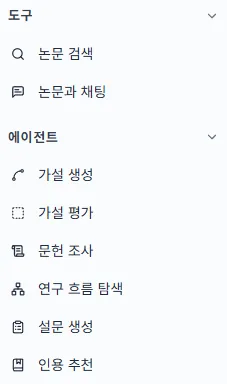
에이전트들은 같은 화면 구조를 씁니다. 입력창 하나와 그 아래 컨트롤 줄이 전부입니다(인용 흐름 탐색만 예외로, 논문 검색에서 시작합니다). 예시 보기는 무엇을 써야 할지 감이 안 올 때 예시 문장을 채워 줍니다. 검색 필터는 문헌 조사와 인용 추천에만 있으며 출판 연도·인용 수·저널 등급 등으로 참고 논문을 걸러냅니다. 실행 버튼 이름은 에이전트마다 다르고(가설 생성, 조사 시작하기 …) Enter 도 같은 동작입니다.
실행 중에는 전송 버튼이 정지 버튼(■) 으로 바뀌고, 누르면 즉시 중단됩니다. 중단된 실행의 부분 결과는 저장되지 않고, 크레딧도 차감되지 않습니다 — 오류로 실패한 실행과 마찬가지입니다.
과금은 실행할 때마다, 에이전트별 고정가로 이뤄집니다. 짧게 돌리든 무겁게 돌리든 같은 금액이고, 요금제 페이지에 적힌 숫자가 그대로 차감됩니다. 논문 검색은 크레딧이 차감되지 않고, 실행 횟수 제한도 없습니다 — 모든 요금제에서 무제한입니다. 검토 7종은 축이 달라 검토한 문서 분량에 따라 차감됩니다(AI 논문 검토 참고). 남은 크레딧은 크레딧과 쿼타에서, 요금제별 한도는 요금제 페이지에서 확인하세요.
이전 실행 결과는 그 에이전트의 페이지에 쌓입니다. AI 채팅 히스토리와 별도로 관리되므로 문헌 조사 기록은 문헌 조사 페이지에서 찾아야 합니다. 에이전트가 수집한 논문은 라이브러리에, 작성한 초안은 문서에 저장됩니다.
관심 주제는 있는데 검증할 수 있는 형태의 가설이 아직 없을 때 씁니다. 4.6억 편 논문을 근거로 가설 후보를 만들고 각각에 근거 논문을 붙여 줍니다. 이미 가설이 있다면 가설 평가로 바로 가세요.
연구 주제를 한 문장으로 적고 가설 생성을 누릅니다. 완성된 가설일 필요 없이 수면 부족이 청소년의 충동성에 미치는 영향 같은 관심사 수준이면 충분합니다. 실행 화면 구성과 크레딧은 에이전트 사용법에서 공통으로 다룹니다.
결과는 목록이 아니라 캔버스입니다. 입력한 주제에서 가설 카드가 가지처럼 뻗어 나오고 카드 하나가 가설 하나입니다.
한 번에 완성된 가설을 기대하기보다 마음에 걸리는 카드에서 가설 다듬기를 눌러 두세 번 가지를 치는 쪽이 훨씬 쓸 만한 결과가 나옵니다. 원하는 방향이 있으면 + 로 직접 적어 파생시킬 수도 있고(예: "정책 개입 관점으로"), 캔버스는 그 탐색 과정을 그대로 남겨 둡니다.
카드를 클릭하면 오른쪽 상세 패널에 그 가설을 개요·개연성·신규성·실행가능성·중요성 다섯 축으로 검토한 내용이 근거 논문과 함께 열립니다. 본문의 파란 괄호 인용은 전부 실제 논문이고, 맨 아래 출처 N개에서 라이브러리에 저장할 수 있습니다.
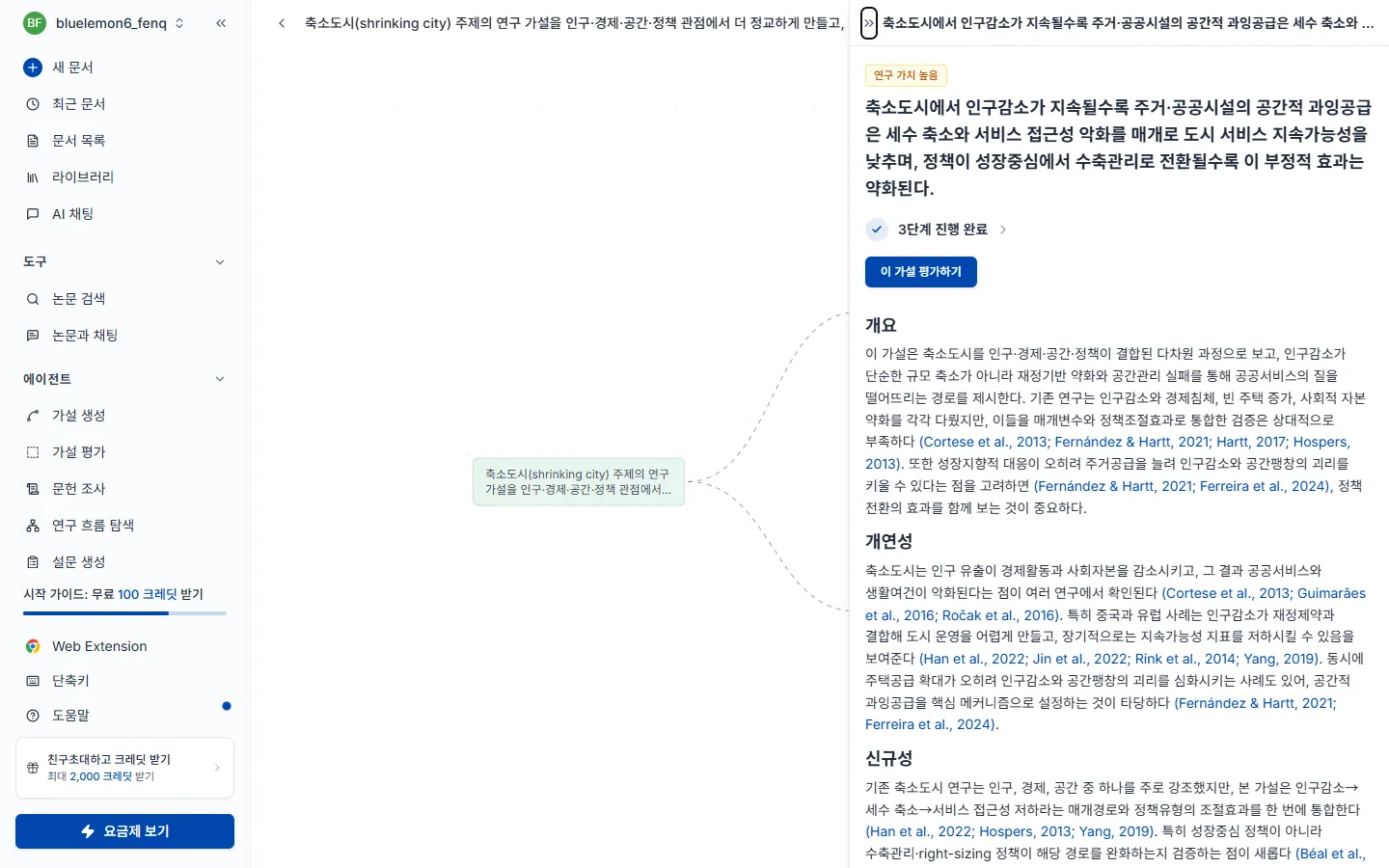
기준별 등급까지 받아 보려면 이 가설 평가하기로 가설 평가에 넘기세요.
가설을 이미 세웠고 이대로 연구를 시작해도 되는지 판단이 필요할 때 씁니다. 얼마나 분명하게 쓰였는지, 기존 근거가 뒷받침하는지, 기존 연구에 무엇을 더하는지, 실제로 해낼 수 있는지, 왜 중요한지 다섯 측면에서 채점하고 낮은 기준마다 고치는 방향을 알려줍니다. 신규성은 4.6억 편 논문과 실시간으로 대조해 측정합니다.
세워 둔 가설을 그대로 붙여넣고 평가하기를 누릅니다. 한 문장이어도 되고 평일에 취침 1시간 전 스마트폰을 사용하지 않으면 총 수면 시간이 평소 대비 20분 이상 늘어난다 처럼 조건과 예상 효과를 포함한 긴 진술이어도 됩니다. 실행 화면 구성과 크레딧은 에이전트 사용법에서 공통으로 다룹니다.
맨 위 종합 평가가 이 가설의 강점과 가장 큰 약점을 한 문단으로 짚고, 그 아래 기준마다 등급과 한 줄 진단이 붙습니다. 제목 옆 N papers 는 판단에 실제로 대조한 논문 수입니다.
등급만 보고 넘기지 말고 낮게 나온 항목의 더보기를 펼치세요. "무엇이 부족한지" 보다 "어떻게 좁히면 되는지" 가 거기 적혀 있습니다. 신규성이 낮다면 이미 검증된 주제라는 뜻이므로, 대상·조건·측정 방식을 좁혀 차별점을 만든 뒤 다시 평가해 점수 변화를 확인하세요.
논문을 찾는 게 아니라 읽고 정리한 결과가 필요할 때 씁니다. 관련 논문을 자동으로 모아 최대 30편을 전문까지 읽고, 주요 흐름·방법론·쟁점을 인용이 붙은 보고서로 정리합니다. 빠르게 찾기만 하면 되는 상황이라면 논문 검색이 맞습니다.
조사할 주제를 한 문장으로 적고 조사 시작하기를 누릅니다. 키워드를 나열하는 것보다 문장이 결과가 좋습니다 — 예를 들어 수면의 질이 청소년의 학업 성취도에 미치는 영향에 관한 연구 처럼 적습니다.
검색 필터로 출판 연도·인용 수·저널 등급 등을 걸 수 있습니다. 최신 동향만 보려면 연도를, 검증된 문헌만 보려면 인용 수를 거세요. 분석 편수가 많아 시간이 걸리며 진행 중 중단할 수 있습니다. 실행 화면 구성과 크레딧은 에이전트 사용법에서 공통으로 다룹니다.
결과는 목록이 아니라 읽을 수 있는 리포트입니다. 제목 옆 N papers 는 실제로 분석한 논문 수입니다.
문단마다 인용이 붙어 있으므로 마음에 드는 대목을 그대로 복사해 초안의 뼈대로 쓰고 인용만 확인하면 됩니다. 파란 (저자, 연도) 를 누르면 원문으로 가고, 맨 아래 출처 N개에서 논문을 골라 라이브러리에 저장할 수 있습니다.
문헌 조사 작성 전체 과정은 문헌 조사 수행하는 법 가이드에서 다룹니다.
"최근 논문 나열"이 아니라 이 분야가 왜 이렇게 발전했는지 를 알아야 할 때 씁니다. 시드 논문 한 편에서 인용 네트워크를 양방향으로 최대 4단계까지 따라가 계보를 그리므로, 연구 갭을 찾거나 문헌 조사의 서술 뼈대를 잡을 때 유용합니다.
다른 에이전트와 달리 주제가 아니라 논문 한 편에서 시작합니다. 논문 제목이나 저자명으로 검색해 시드로 쓸 논문을 고르면 선택하는 즉시 추적이 시작되며, 분야의 대표 논문이나 내가 읽은 핵심 논문을 시드로 삼으면 좋습니다. 실행 화면 구성과 크레딧은 에이전트 사용법에서 공통으로 다룹니다.
화면이 둘로 나뉩니다. 왼쪽은 인용 네트워크 그래프, 오른쪽은 선택한 논문의 상세 패널입니다. 초록 노드가 시드이고 연결선은 인용 관계로, 왼쪽으로 갈수록 과거 오른쪽으로 갈수록 후속 연구입니다.
그래프를 왼쪽 끝까지 따라가면 그 분야의 고전, 오른쪽 끝에는 최신 연구가 있습니다. 문헌 조사의 서술 순서를 잡을 때 이 축을 그대로 쓰면 됩니다.
논문 노드를 클릭하면 오른쪽에 서지 정보와 초록이 열립니다. 피인용 수와 저널 분위(CITED BY / Q2)로 영향력을 가늠할 수 있고 DOI·URL 은 옆 아이콘으로 바로 복사합니다. 시드 논문을 클릭하면 대신 연구 흐름 패널이 열려, 그래프가 어떤 계보로 나뉘었는지 이름을 붙여 보여 줍니다.
문장은 이미 썼는데 근거로 붙일 논문을 못 찾고 있을 때 씁니다. 초안을 붙여넣으면 주장마다 가장 강하게 뒷받침하는 인용을 3~5개 찾아 문장에 바로 끼워 돌려줍니다. 키워드가 아니라 의미로 찾기 때문에 표현이 달라도 같은 내용을 다룬 논문을 잡아냅니다.
인용이 필요한 문장이나 문단을 그대로 붙여넣고 인용 생성하기를 누릅니다. 한 문장도 되고 문단 단위도 되며 최대 2,500자입니다. 검색 필터로 출판 연도·인용 수·저널 등급 등을 걸 수 있으니 투고할 저널 기준이 있다면 여기서 맞추세요. 실행 화면 구성과 크레딧은 에이전트 사용법에서 공통으로 다룹니다.
별도 목록이 아니라 내가 넣은 초안 그대로, 인용이 붙은 자리에 (저자, 연도) 가 삽입되어 돌아옵니다. 밑줄 친 문장이 인용을 붙인 곳이라 어디가 바뀌었는지 한눈에 보입니다.
복사 로 전체 문단을 그대로 가져갈 수 있지만, 그 전에 인용 문장이 내 주장과 실제로 맞는지 확인하세요.
에디터 안에서 직접 고른 논문을 붙이려면 인용 삽입을 쓰세요.
논문을 빠르게 찾기만 할 때 씁니다. 의미로 검색하므로 정확한 학술 용어를 몰라도 되고, 크레딧이 들지 않고 횟수 제한도 없습니다.
논문을 빠르게 찾기만 하면 될 때 씁니다. 인용할 논문을 고르거나, 주제와 관련된 논문 목록을 훑거나, 특정 논문을 제목으로 찾을 때입니다. 찾은 논문을 읽고 정리한 결과까지 필요하다면 문헌 조사가 맞습니다.
왼쪽 사이드바의 논문 검색을 누르면 사이드바 자리에 검색 패널이 열립니다. 페이지를 옮기지 않으므로 에디터에서 글을 쓰다가도 그대로 검색하고, 찾은 논문을 바로 인용하거나 저장할 수 있습니다.
transformer attention mechanism NLP텍스트 감정 분석에서 사전 학습 모델의 성능 비교딥러닝 기반 의료 영상 분석에서 데이터 증강 기법이 진단 정확도에 미치는 영향은?검색창 아래 오른쪽의 정렬(관련순 · 인용순 · 최신순 · 오래된순)과 필터 버튼으로 결과를 바꿉니다. 기본은 관련도 순이고, 정렬이나 필터를 바꾸면 그 자리에서 다시 검색됩니다. 필터 항목은 검색 필터를, 카드를 읽는 법은 검색 결과 읽기를 보세요.
아직 검색어를 제출하지 않았을 때는 최근 검색 목록(최대 8개)이 보입니다. 항목을 누르면 같은 검색어로 다시 검색합니다.
검증된 학술 데이터베이스에서만 가져오므로 존재하지 않는 논문이 섞이지 않습니다.
크레딧은 차감되지 않습니다. 횟수 제한도 없어 모든 플랜에서 무제한으로 검색할 수 있습니다. 자세한 과금 구조는 크레딧과 쿼타를 참고하세요.
검색창 아래 오른쪽의 필터 버튼을 누르면 옵션 창이 열립니다. 조건을 고르고 적용하기를 누르면 그 자리에서 다시 검색돼 결과가 좁혀지고, 초기화로 전부 되돌립니다. 필터가 걸려 있는 동안은 버튼에 파란 점이 표시됩니다. 4.6억 편 중 연구 목적에 맞는 논문만 추려내는 용도입니다.
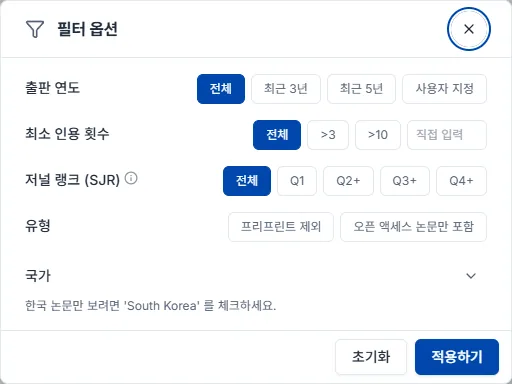
저널 랭크(SJR) 는 저널의 영향력 지표로, 인용 횟수와 인용한 저널의 권위를 함께 반영합니다. 투고할 저널을 찾거나 인용 근거의 신뢰도를 높이고 싶을 때 Q1 이나 Q2 이상을 고르세요.
| 선택 | 의미 |
|---|---|
| Q1 | 상위 25% — 해당 분야 최고 품질 저널 |
| Q2 이상 | 상위 50% |
| Q3 이상 | 상위 75% |
| Q4 이상 | SJR 등급이 있는 모든 저널 |
| 필터 없음 | 등급을 따지지 않음 |
상황별로는 이렇게 조합합니다.
| 지금 내 상황 | 추천 조합 |
|---|---|
| 최신 연구 동향을 빠르게 훑고 싶다 | 출판 연도 최근 3년 |
| 이 분야의 핵심 논문부터 알고 싶다 | 최소 인용 횟수 높게 + 저널 랭크 Q1 |
| 인용할 논문만 골라야 한다 | 프리프린트 제외 + 저널 랭크 Q2 이상 |
| 원문을 지금 바로 읽어야 한다 | 오픈 액세스 논문만 포함 |
| 국내 연구 현황을 보고 싶다 | 국가에서 대한민국 |
| 결과에 다른 분야 논문이 섞여 나온다 | 학문 분야 지정 |
필터는 여러 개를 걸수록 결과가 좁아집니다. 결과가 너무 적으면 가장 강한 조건(저널 랭크 Q1, 높은 인용 횟수)부터 하나씩 풀어 보세요.
결과 카드에는 제목, 저자, 출판 정보(저널·연도·권호)와 함께 판단에 쓰는 지표가 붙습니다. 초록과 식별자는 카드를 눌러 여는 상세 패널에서 봅니다.
관련도(목록 순서)와 인용수를 함께 보세요. 둘 다 높으면 그 주제의 핵심 문헌일 가능성이 높습니다. 관련도는 높은데 인용수가 낮다면 최신 연구이거나 신흥 분야일 수 있으니 나쁜 신호가 아닙니다. 빠른 검토가 필요할 때는 오픈 액세스부터 읽으면 접근 장벽 없이 바로 내용을 확인할 수 있습니다.
원문을 여는 버튼은 논문의 공개 상태에 따라 이름이 다릅니다.
출판사 정책으로 뷰어에 PDF 를 보여 줄 수 없을 때는 출판사에서 보기를 눌러 출판사 사이트에서 읽습니다.
마음에 드는 논문은 라이브러리에 저장해 두면 이후 채팅과 인용에 바로 쓸 수 있습니다.
모은 논문을 담아 두는 곳입니다. 여기 있는 논문은 채팅의 참조 자료가 되고 인용의 원천이 됩니다. 검색·익스텐션·Zotero로 채우고 컬렉션으로 정리합니다.
라이브러리 패널 위쪽의 업로드 버튼을 누르면 라이브러리에 업로드 창이 열립니다. Zotero 에 있는 논문은 두 탭 중 하나로 옮깁니다.
Zotero 를 쓰고 있다면 계정 연결이 낫습니다.
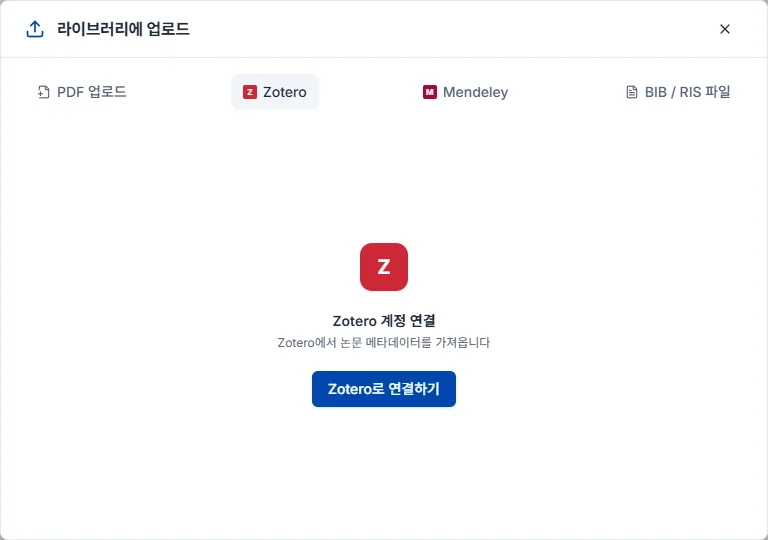
계정 연결은 Zotero 탭에서 Zotero로 연결하기를 누르고 Zotero 계정으로 로그인해 권한을 승인하면 컬렉션 목록이 뜹니다. 옮길 컬렉션을 고르거나 그대로 전체 가져오기를 누르세요.
BIB / RIS 파일은 BibTeX(.bib)와 RIS(.ris) 를 지원합니다. 기존 논문 관리 도구에서 옮길 논문을 RIS 나 BibTeX 로 내보낸 뒤 업로드하면 됩니다. Zotero 뿐 아니라 EndNote, Mendeley 등에서 내보낸 파일도 같은 방식으로 가져올 수 있습니다.
라이브러리 패널의 컬렉션 탭에서 + 버튼으로 만듭니다. 상위 컬렉션 안에 하위 컬렉션을 두어 중첩 구조로 정리할 수 있습니다.
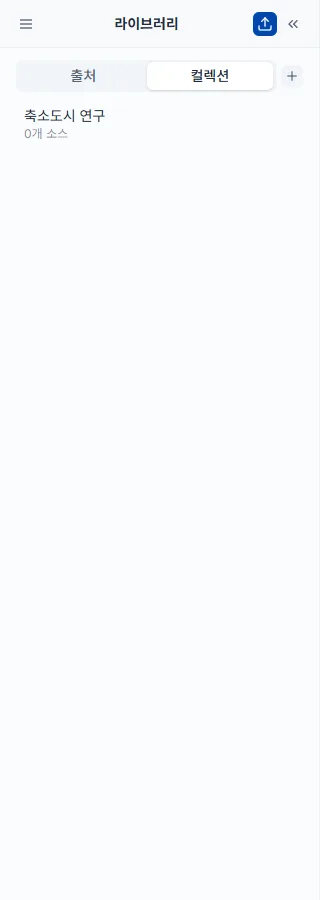
논문 카드의 컬렉션 추가 버튼으로 넣으며, 여러 논문을 한번에 골라 동시에 추가할 수도 있습니다. 하나의 논문이 여러 컬렉션에 동시에 속할 수 있어 교차 분류가 가능합니다.
컬렉션 이름 위에 마우스를 올리면 수정 옵션이 나타나 이름 변경과 삭제를 바로 할 수 있습니다. 컬렉션을 지워도 논문 자체는 라이브러리에 그대로 남습니다.
논문 카드의 체크박스로 여러 편을 동시에 고르면 선택한 수가 상단에 표시되고 일괄 작업 옵션이 나타납니다.
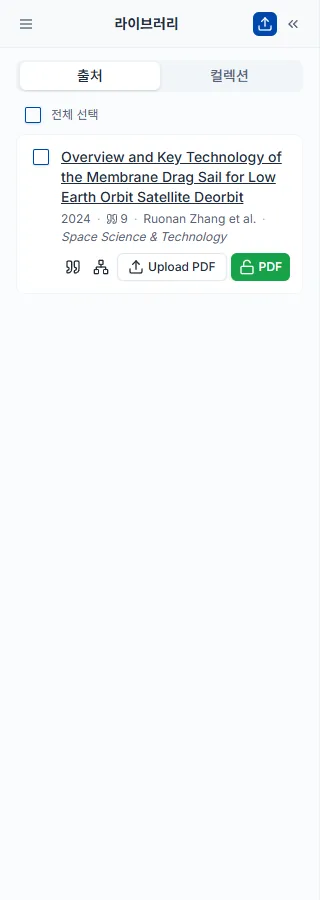
라이브러리 패널 상단의 필터 버튼을 누르고 조건을 고릅니다. 여러 필터를 동시에 걸수록 범위가 좁아집니다.
검색 화면의 검색 필터보다 항목이 적고, 이미 저장한 논문 안에서만 걸러냅니다.
라이브러리 패널의 내보내기 버튼에서 형식을 고르면 파일이 내려받아집니다. 논문 카드의 체크박스로 일부만 골라 두면 그 논문만 나갑니다.
쓰던 AI 대화창에서 누빈트를 부릅니다. 한 번 연결하면 원고 검토, 그림, 논문 검색과 문헌 조사를 대화 안에서 시작하고, 결과는 누빈트 계정에 남습니다.
누빈트를 ChatGPT나 Claude에 연결하면, 쓰던 대화창에서 누빈트의 논문 검색·원고 검토·문헌 조사·그림 생성을 그대로 부를 수 있습니다. API 키는 필요 없습니다. 서버 주소를 붙여 넣고 누빈트 계정으로 한 번 허용하면 끝나며, 논문 검색·원고 저장·문서 읽기와 수정 제안·참고문헌 실존 확인처럼 크레딧이 들지 않는 도구는 무료 플랜에서도 쓸 수 있고, 크레딧이 드는 검토·문헌 조사·그림은 Starter 플랜부터 쓸 수 있습니다.
서버 주소는 누빈트 설정 → AI 연결 탭에서 복사합니다. 누빈트 MCP 페이지에도 같은 주소가 있습니다.
ChatGPT
Nubint, MCP 서버 URL에는 복사한 주소를 넣고 인증은 OAuth를 고릅니다.Claude
Nubint, 원격 MCP 서버 URL에는 복사한 주소를 넣고 추가합니다.원격 MCP 서버와 브라우저 로그인(OAuth)을 지원하는 다른 AI 앱도 같은 주소로 연결할 수 있습니다. Cursor·VS Code처럼 API 키를 직접 넣는 개발 도구는 개발자 문서를 보세요.
허용 화면에는 그 AI 앱이 내 대신 할 수 있는 일이 적혀 있습니다. 논문을 찾고, 보낸 원고를 저장해 검토하고, 내 누빈트 문서를 읽고 수정을 제안하고, 문헌 조사와 그림 작업을 실행합니다. 문서를 직접 바꾸지는 않습니다 — 수정은 누빈트 에디터에 제안으로 뜨고, 내가 하나씩 수락하거나 거절합니다. 라이브러리의 논문을 고치거나 지우지도 않습니다.
연결을 끊으려면 설정 → AI 연결의 연결된 AI 앱에서 해당 앱을 해제합니다. 해제하는 즉시 그 앱은 누빈트를 쓸 수 없습니다.
연결한 뒤 할 수 있는 일은 세 가지로 나눠 안내합니다 — 쓴 원고 검토받기 · 그림 만들기 · 논문 찾기와 문헌 조사.
ChatGPT나 Claude로 쓴 초안을 그 자리에서 누빈트의 검토에 넘깁니다. 대화 모델은 자기가 쓴 글의 참고문헌이 실재하는지, 인용한 논문이 정말 그 말을 하는지 스스로 확인하지 못합니다. 그 부분을 누빈트가 학술 색인과 논문 원문에 대조해 봅니다.
이렇게 말하면 됩니다
이 원고를 누빈트에 저장하고 피어리뷰와 주장 신뢰도 검토를 해 줘. 참고문헌 목록은 아래에 붙였어.
[3] · (Kim, 2023) 같은 인용 표기가 참고문헌과 이어집니다.돌릴 수 있는 검토는 일곱 가지이고, 에디터의 AI 논문 검토와 같은 엔진입니다.
대화 모델이 혼자서는 할 수 없는 피어리뷰 · 주장 신뢰도 · 출처 품질부터 돌리기를 권합니다.
저장 없이 빠르게 점검만 할 수도 있습니다. 붙여 넣은 글만 보고 결과를 바로 돌려줍니다.
이 참고문헌 목록이 실재하는 문헌인지 확인해 줘
이 원고 투고 전에 점검해 줘
참고문헌 확인은 크레딧이 들지 않습니다. 색인에서 찾지 못한 문헌은 "가짜"라고 단정하지 않고 직접 확인할 목록으로 돌려줍니다 — 단행본·법령·오래된 논문은 학술 색인에 애초에 없는 경우가 많습니다.
대화에서 설명한 내용으로 메커니즘 도식, 그래피컬 애브스트랙트, 실험 구성도, 순서도를 그립니다. 결과는 대화에 그림 주소로만 남는 것이 아니라 누빈트 피규어 캔버스에 놓입니다. 글자를 고치고, 일부만 다시 그리고, 내보내는 일은 그 캔버스에서 이어 갑니다.
이렇게 말하면 됩니다
세포 안에서 단백질이 만들어지는 과정을 그래피컬 애브스트랙트로 그려 줘. 가로로 길게, 라벨은 한국어로.
대화에서 할 수 있는 일
그림에 넣을 내용이 길면 논문 초록이나 실험 프로토콜을 자료로 건네세요. AI가 그 글을 누빈트에 올리고 그 내용대로 그립니다. 따라 그릴 화풍이 있으면 참고 그림을 스타일 자료로 줄 수도 있습니다.
같은 프로젝트에서 이어 그리면 결과가 한 캔버스에 나란히 놓입니다. 나중 대화에서 "아까 그 그림 프로젝트 열어 줘"라고 하면 지금까지 만든 그림을 다시 불러옵니다.
실제 데이터 그래프는 따로 그립니다. 표나 CSV를 붙여 넣고 "이 데이터로 집단별 평균 막대 그래프를 그려 줘, 오차 막대는 표준편차로"라고 하면, 이미지 모델이 아니라 코드가 값 그대로 막대·꺾은선·산점도·상자 그림·히스토그램을 그립니다. 숫자가 아닌 칸은 채워 넣지 않고 빼며, 몇 줄을 뺐는지와 실제로 그린 값(표본 수·평균·표준편차)을 함께 알려 줍니다. PNG로 받으며, 그래프 한 장에는 그림 한 장과 같은 크레딧이 듭니다. 편집 가능한 SVG 파일까지 받으면 SVG 내보내기 값이 더해집니다. 데이터로 그릴 수 없어 실패하면 차감되지 않습니다.
논문을 찾는 가벼운 질문부터 인용이 달린 문헌 조사까지 대화 안에서 이어 갑니다. 결과는 누빈트 계정에 남아서, AI가 준 링크로 앱에서 열거나 다른 날 대화에서 다시 불러올 수 있습니다.
논문 찾기 — 크레딧이 들지 않고 바로 끝납니다. 연도 범위, 최소 인용 수, 오픈 액세스 여부 같은 조건도 말로 붙일 수 있습니다.
대학생 수면 부족과 대사 건강을 다룬 2015년 이후 논문 찾아 줘
마음에 드는 논문은 "이거 내 라이브러리에 저장해 줘"로 담아 둘 수 있습니다.
문헌 조사 — 핵심 논문을 골라 인용이 달린 리뷰를 씁니다. 빨리 훑는 것부터 학위논문용까지 세 가지 깊이가 있고 값과 걸리는 시간이 다릅니다. AI가 시작 전에 고르게 합니다.
이 주제로 문헌 조사를 써 줘. 학술지 논문의 선행연구 절에 쓸 정도로.
AI 앱에서 쓰는 누빈트는 앱과 같은 계정, 같은 크레딧을 씁니다. 값도 앱에서 같은 기능을 쓸 때와 같습니다.
크레딧이 들지 않는 것 — 논문 검색, 라이브러리 검색과 저장, 참고문헌 실존 확인, 원고 저장, 내 문서 목록 보기와 읽기, 문서 수정 제안, 결과 다시 보기, 남은 크레딧 확인. 이것들은 무료 플랜에서도 쓸 수 있습니다. 문서 수정 제안은 고칠 글을 AI 앱이 직접 쓰고 누빈트는 그 제안을 에디터에 띄우기만 해서 크레딧이 들지 않습니다.
크레딧이 드는 것 — 원고 검토, 문헌 조사, 그림, 데이터 그래프. Starter 플랜부터 쓸 수 있습니다. AI가 실행 전에 비용을 말하도록 되어 있으니, 말해 주지 않으면 "얼마 들어?"라고 물어보세요. 기능별 기준은 크레딧과 쿼타와 요금제 페이지의 크레딧 차감 안내에 있습니다.
실패한 작업은 차감되지 않습니다.
도구가 보이지 않을 때 — 새 대화의 커넥터(도구) 메뉴에서 누빈트가 켜져 있는지 확인하세요. 그래도 없으면 AI 앱에서 연결을 지우고 서버 주소를 다시 추가합니다.
"Starter 플랜부터 쓸 수 있다"고 나올 때 — 무료 계정에서 크레딧이 드는 도구(검토·문헌 조사·그림)를 불렀다는 뜻입니다. 검색·원고 저장·문서 읽기·문서 수정 제안·참고문헌 확인은 무료 계정에서도 동작합니다. 요금제 변경을 보세요.
결과가 오래 안 올 때 — 문헌 조사는 몇 분에서 길게는 십여 분이 걸립니다. AI가 중간에 확인을 멈췄다면 "아까 그 작업 결과 가져와 줘"라고 하거나, 처음에 받은 링크를 앱에서 여세요. 작업은 누빈트에서 끝까지 돌고 결과는 계정에 남습니다. 같은 요청을 다시 시작하게 하지는 마세요 — 새 작업으로 한 번 더 차감됩니다.
다른 날 이어서 할 때 — "누빈트에서 내가 한 작업 목록 보여 줘"라고 하면 지난 문헌 조사를 찾아 이어 갑니다.
결과가 영어로 나올 때 — "한국어로 써 줘"라고 덧붙이세요. 결과물의 언어는 요청할 때 정해집니다.
AI가 결과를 다르게 전하는 것 같을 때 — AI가 준 링크로 누빈트에서 원본 결과를 여세요. 검토 지적과 문헌 조사 본문, 그 참고문헌이 그대로 있습니다.
체계적 문헌고찰이나 데이터 추출을 시켰는데 안 될 때 — 두 기능은 출시 준비 중이라 AI 앱에서 아직 쓸 수 없습니다. 지금은 논문 찾기와 문헌 조사를 쓰세요.
그래도 풀리지 않으면 문의하기로 알려 주세요.
요금제 변경과 결제 수단, 그리고 크레딧과 쿼타가 어떻게 차감되고 언제 초기화되는지를 다룹니다.
언제든지 바꿀 수 있습니다. 프로필 → 설정 → 구독 탭에서 플랜 변경을 누르고 요금제와 결제 주기를 고른 뒤 결제 페이지에서 내용을 확인하면 됩니다.
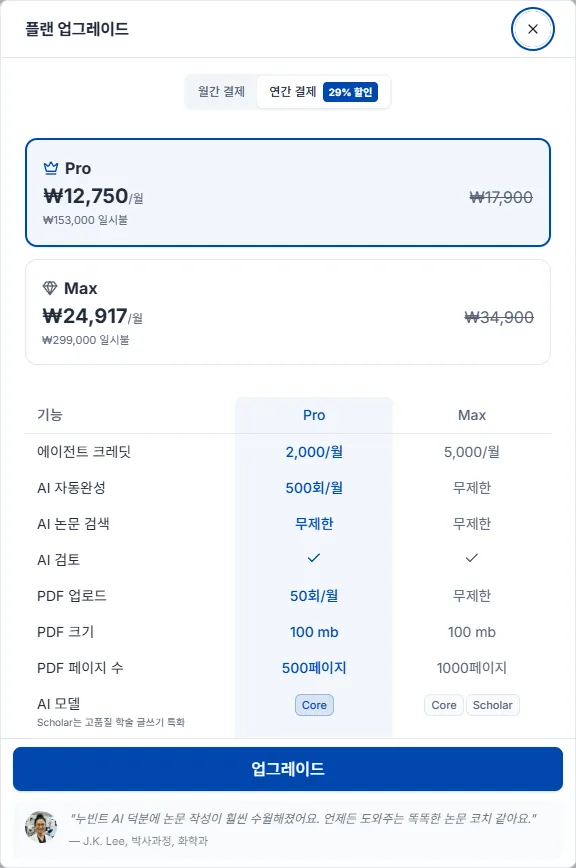
업그레이드는 결제 완료 즉시 적용됩니다. 남은 결제 주기에 대한 차액이 정산되어 새 요금제 비용에서 차감되며, 정확한 청구 금액은 결제 페이지에서 미리 확인할 수 있습니다.
다운그레이드는 다음 결제일부터 적용되고 그때까지는 현재 플랜을 그대로 씁니다. 신청 시점에는 결제가 발생하지 않으며 다음 결제일에 변경된 요금제 비용이 청구됩니다. 다음 결제일 전이라면 구독 탭의 예약 취소로 예약을 되돌릴 수 있고, 취소하면 현재 요금제가 그대로 자동 갱신됩니다.
Free·Starter·Pro·Max 의 기능과 가격 비교는 요금제 페이지에서 확인하세요. 연간 결제로 전환하면 할인이 적용되고, 할인 폭은 플랜마다 다릅니다.
Plus 는 더 이상 판매하지 않습니다 — 이미 Plus 를 구독 중이라면 그대로 유지되지만, 다른 플랜으로 바꾼 뒤에는 Plus 로 돌아올 수 없습니다.
프로필 → 설정 → 구독 관리 탭에서 현재 요금제 정보 아래의 구독 취소를 누릅니다. 해지는 몇 단계를 거칩니다 — 사유를 고르고 30자 이상으로 적은 뒤, 무엇을 잃게 되는지와 마지막 제안을 보고 확정합니다.
해지해도 이미 결제된 기간은 그대로 유지됩니다. 현재 결제 주기가 끝나는 날까지 이용 중인 유료 플랜(Starter·Pro·Max)의 모든 기능을 계속 쓸 수 있고, 주기가 끝나면 자동으로 Free 요금제로 전환됩니다. 저장된 논문, 라이브러리, 작성 중인 문서 같은 데이터는 그대로 남습니다. 해지 이후에는 다음 주기 자동 결제가 진행되지 않습니다. 판매를 중단한 Plus 도 기존 구독자에게는 똑같이 적용되지만, Plus 구독이 끝난 뒤에는 다시 구독할 수 없습니다.
처음 유료 요금제를 구독할 때 결제창에서 결제 수단을 선택하면 자동으로 등록됩니다. 따로 등록하는 절차는 없습니다.
사용할 수 있는 결제 수단은 결제하는 국가에 따라 다릅니다. 신용·체크카드 외에 네이버페이, 카카오페이, 삼성페이, 페이코, Apple Pay, Google Pay, PayPal 등이 결제창에 표시됩니다.
바꿀 때는 프로필 → 설정 → 구독 탭의 결제 수단 영역에서 결제수단 변경을 누릅니다. 결제창에서 새 결제 수단을 저장하면 즉시 반영되고, 다음 결제 주기부터 새 수단으로 자동 결제됩니다.
결제 수단을 바꿀 때 결제창에 0원이 표시됩니다. 결제 수단을 확인하기 위한 절차라 실제로 청구되지는 않습니다.
현재 등록된 결제 수단은 같은 자리에 Visa •••• 1234 처럼 표시되며, PayPal을 쓰고 있으면 PayPal로 표시됩니다.
카드 만료가 다가오면 미리 바꿔 두세요. 결제가 끊기지 않고, 진행 중인 구독도 그대로 유지됩니다.
좌측 하단 프로필을 클릭하면 메뉴의 내 크레딧에서 남은 크레딧을 볼 수 있습니다.
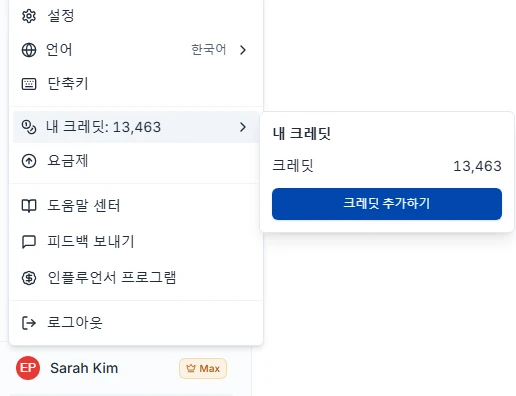
크레딧은 고정 횟수 제한이 아니라 실제 AI 사용량에 따라 차감됩니다. 짧은 질문은 적게, 긴 초안이나 대규모 문헌 분석은 많이 씁니다.
기능별 차감 기준 수치는 요금제 페이지 하단의 크레딧 차감 안내 표에 있습니다.
논문 검색과 에디터의 인라인 인용 검색은 크레딧 차감도 횟수 제한도 없이 모든 플랜에서 무제한입니다.
PDF 업로드는 크레딧을 차감하지 않고, Free를 포함한 모든 플랜에서 횟수 제한이 없습니다. 파일 크기와 페이지 수 상한은 요금제 페이지에서 확인하세요.
크레딧은 매월 갱신일에 초기화됩니다 — Free 플랜은 가입일, 유료 플랜은 구독 시작일 기준입니다. AI 모델 등급은 플랜에 따라 다릅니다 — Free 플랜은 기본 AI 모델, Starter 는 고급 AI 모델, Pro·Max 는 최고급 AI 모델입니다.
월간 크레딧이 부족하면 1,000 크레딧 단위로 추가 구매할 수 있습니다. 프로필 → 설정 → 구독 관리 탭 → 크레딧 추가에서 1,000 · 3,000 · 5,000 크레딧 중 고르거나 수량을 직접 정하며(1회 최대 100,000 크레딧), 1,000 크레딧당 $10(원화 결제는 ₩15,400, 엔화 결제는 ¥1,760)입니다. 결제창에서 카드를 바로 입력하므로 결제 수단을 미리 등록할 필요는 없고, Free 플랜도 구매할 수 있습니다. 단, 크레딧은 사용량만 늘려 줄 뿐 피어리뷰·논문 교정처럼 플랜에 묶인 기능을 열어 주지는 않습니다.
추가 구매한 크레딧은 구매일로부터 6개월간 유효합니다. 차감 순서는 보상 크레딧 → 추가 구매 크레딧 → 월간 크레딧이며, 추가 구매분 중에서는 만료가 가까운 것부터 먼저 씁니다.
자동 충전을 켜면 잔액이 500 크레딧 미만으로 내려갈 때 1,000 크레딧($10)이 자동으로 결제·충전되어, 작업 도중 크레딧이 떨어져 중단되는 일을 막아 줍니다. 구독 관리 탭의 크레딧 추가 구매 영역에서 토글로 켜고 끄며, 유료 플랜과 등록된 결제 수단이 필요합니다.
결제일로부터 14일 이내이고 해당 결제로 받은 크레딧을 쓰지 않았다면 전액 환불됩니다. 크레딧 사용이 한 번이라도 시작되면 디지털 콘텐츠 제공이 개시된 것으로 보아 환불이 제한됩니다.
갱신 결제와 연간 구독의 중도 해지는 환불 대상이 아닙니다. 갱신을 원하지 않으면 갱신일 전에 구독 해지로 자동 갱신을 중단해 주세요 — 해지해도 이미 결제된 기간 만료일까지는 그대로 이용할 수 있습니다.
환불 요청은 contact@nubint.ai 로 보내 주세요.
찾는 답이 없을 때 연락하는 방법입니다.
문의와 기능 제안은 contact@nubint.ai 로 보내 주세요.
소셜 미디어에서도 소식을 전합니다 — X (Twitter) · Threads · Instagram · Facebook · LinkedIn · YouTube