Step 1. AI下書き
テーマを一行入れるだけで、タイトル・目次・冒頭の本文を引用付きで埋めます。プロンプト、検索範囲、見出し方式の3ステップで完了します。
Nubintの使い方に関するすべてのヘルプをご覧ください。
Nubint で最初の論文下書きを作り、整え、根拠を付けるまでを順番にたどってみましょう。ひと通り10分あれば十分です。
テーマを一行入れるだけで、タイトル・目次・冒頭の本文を引用付きで埋めます。プロンプト、検索範囲、見出し方式の3ステップで完了します。
段落の末尾にカーソルを置くと次の文を提案します。プリセットで一文だけ受け取るか、段落を書き切るかを選べます。
直したい文を選んで方向性を書くと、その通りに整えます。結果を確認してから適用するか選べます。
ピアレビュー、論文校正、主張の信頼性、出典の品質、文体トーンの5種類が下書きの弱い部分を指摘します。指摘ごとに該当の文へ移動できます。
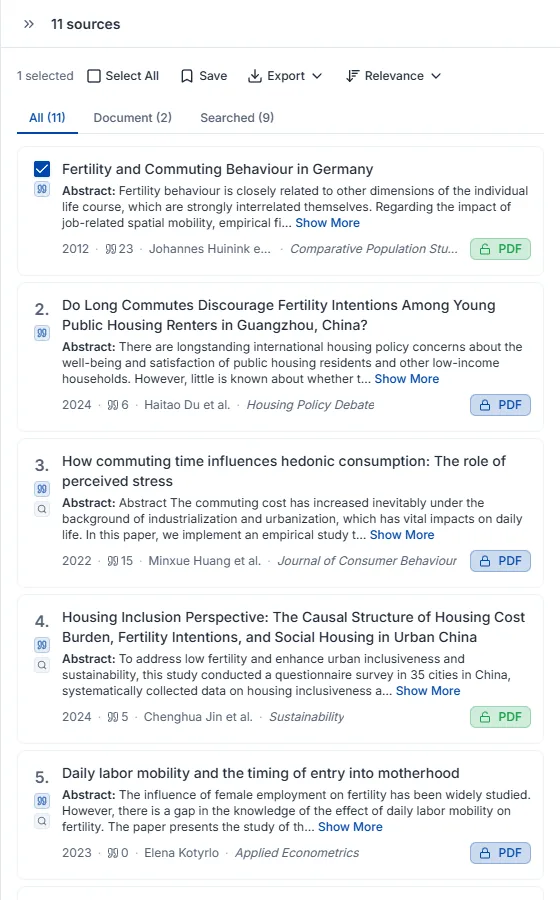
4.6億件の学術データベースから先行研究を探します。結果ごとに、なぜその論文なのかの根拠が付きます。
検索結果からそのまま保存できます。集めた論文が多いほど、オートコンプリートと引用推薦が正確になります。
書きかけの段落をまるごと入れると、根拠が必要な文ごとに適した論文を探して引用を付けます。
仕上がった原稿は DOCX、PDF、LaTeX などで書き出せます。本文に入れた引用と参考文献リストが、選んだスタイルのまま引き継がれます。
AI に何を見せ(添付)、何を探させるか(検索権限)を決めることがチャットのすべてです。その設定が回答に引用がつくかどうかを左右します。
チャット入力欄のクリップ型添付ボタンを押して PDF を選ぶと、アップロードと同時に会話に接続されます。アップロードした論文はライブラリにも保存されるので、後で別のチャットからコンテキスト追加で使い回せます。
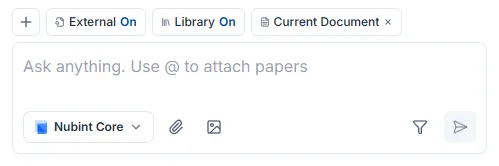
PDF はクリップボタンから、画像(JPEG・PNG・WebP)は画像ボタンから添付します。DOCX などの Word 文書はチャットに添付できないので、エディタの文書インポートを使ってください。
AI が添付した PDF を読めない場合はスキャンである可能性が高いです。PDF ビューアで本文テキストが選択できるか確認してください — 選択できなければテキストが画像としてのみ入っているファイルで、内容を抽出できません。テキストレイヤーのある元の PDF を使うほうが確実です。
アップロードにはプラン別の月間上限があります。詳しい上限は料金ページで確認してください。
コンテキストは AI が回答するときに参照する資料です。チャット入力欄の + ボタンを押すと2つを設定します — 自分で資料を指定する添付と、AI が自分で資料を探してよいかを決める検索権限です。両者は排他的ではなく、添付した資料と検索してきた資料は合わせて使われます。
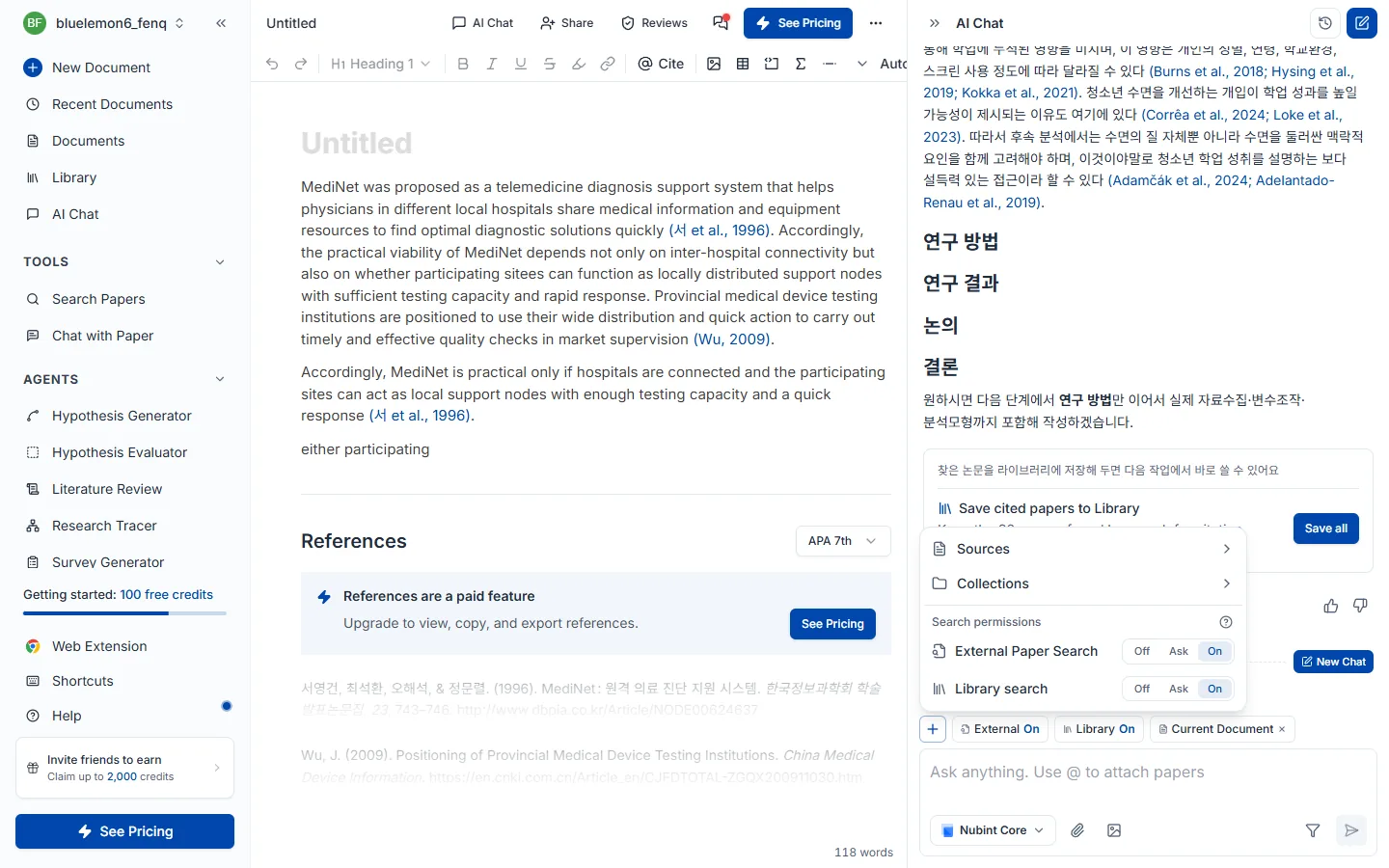
資料を直接添付するには + ボタンのメニューから選びます。
入力欄に @ を打ってもライブラリの論文をすぐ添付でき、ライブラリにない論文は PDF で添付してください。添付した資料は入力欄の上にチップで表示され、X で外せます。
検索権限はオフ / 確認 / オンの3段階です。外部論文検索とライブラリ検索にそれぞれ別々に指定します。

| モード | 動作 | こんなときに |
|---|---|---|
| オフ | 検索せず、添付した資料だけで回答します | 指定した論文だけで話したいとき。クレジットを節約したいとき |
| 確認 | 検索が必要になったらまず尋ね、承認すると検索します | 何を持ってくるか見てから判断したいとき |
| オン | 必要と判断すれば自分で検索します | 資料集めからまるごと任せたいとき |
外部論文検索は4.6億編の学術 DB から新しい論文を探し、ライブラリ検索は自分のライブラリに保存された論文から関連するものを選んで使います。両方同時にオンにできます — 研究の初期は外部検索をオンにして広く探し、執筆段階ではライブラリだけをオンにして手持ちの論文中心に使う進め方をお勧めします。
引用がつかない場合はまずこの設定を確認してください。2つの検索がどちらもオフで添付した資料もなければ、AI は参照する論文がなく引用なしで回答します。
状況別の使い分けはこうです。
| いまの状況 | 設定 |
|---|---|
| この論文1編について尋ねたい | 出典としてその論文を添付 + 検索権限オフ |
| 集めた論文だけで下書きを書きたい | コレクションを添付、またはライブラリ検索オン |
| テーマだけあって資料がまだない | 外部論文検索オン |
| 自分の下書きを直してほしい | 現在の文書を添付 |
| 何を持ってくるか確認しながら使いたい | 検索権限を確認に |
AI が回答を生成している間は、入力欄の中断ボタンで即座に止められます。すでに生成された結果はそのまま残ります。
PDF を添付するかコンテキスト追加でライブラリの論文をつけてから質問します。核心的な貢献の要約、研究手法の説明、結果と限界の解釈、用語の整理まで、論文の内容全般を尋ねられます。
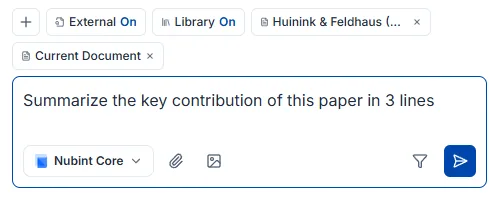
複数の論文をまとめて扱うこともできます。 コレクションをコンテキストとしてつけるか論文を複数選ぶと、AI が比較して総合的に答えます —「これらの論文の方法論の違いを表にして」「3つの論文が共通して指摘している限界は?」といった質問がこれにあたります。
回答についた引用番号をクリックすると、どの論文の内容かをすぐ確認できます。引用がつく仕組みは回答の引用で扱います。
AI が実際に確認した論文 — 検索結果とコンテキスト・添付で接続された論文 — にだけ引用番号がつきます。存在しない出典を作ってつけることはありません。 回答の引用番号をクリックすると論文情報を確認し、ライブラリに保存できます。
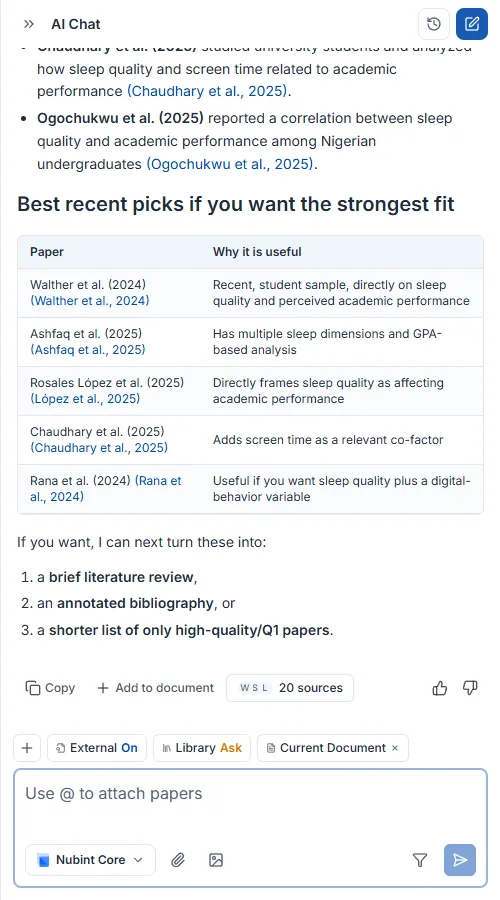
引用がつかないのは参照する論文がないからです。 検索権限がすべてオフで接続された論文もなければ、AI は一般的な知識だけで答えて引用をつけません。次のうち1つ以上を確認してください。
同じチャットの中では、前の回答で引用された論文が以降の回答でも続けて引用されることがあります。会話を分けて始め直したいときは新しいチャットを作ってください。
チャットパネル上部の新しいチャットボタンを押すと新しい会話が始まります。前の会話は自動的に保存され、チャット一覧から選べばその時点に戻って続けて質問できます。

前とは別の研究テーマを始めるとき、会話が長くなって回答の焦点を取り直したいときに新しく作ってください。
下書きで骨格を作り、オートコンプリートと編集で本文を埋め、引用をつけてから Word・LaTeX で書き出す順に使います。
新しい文書を作ると開始方法が3つ出ます。AI下書きで始める(テーマは決まったがどこから書くか迷うとき)、Wordファイルで始める(すでに書いていた .docx 原稿を続けたいとき)、空の文書で始める(構成が頭にあってすぐ打ちたいとき)です。
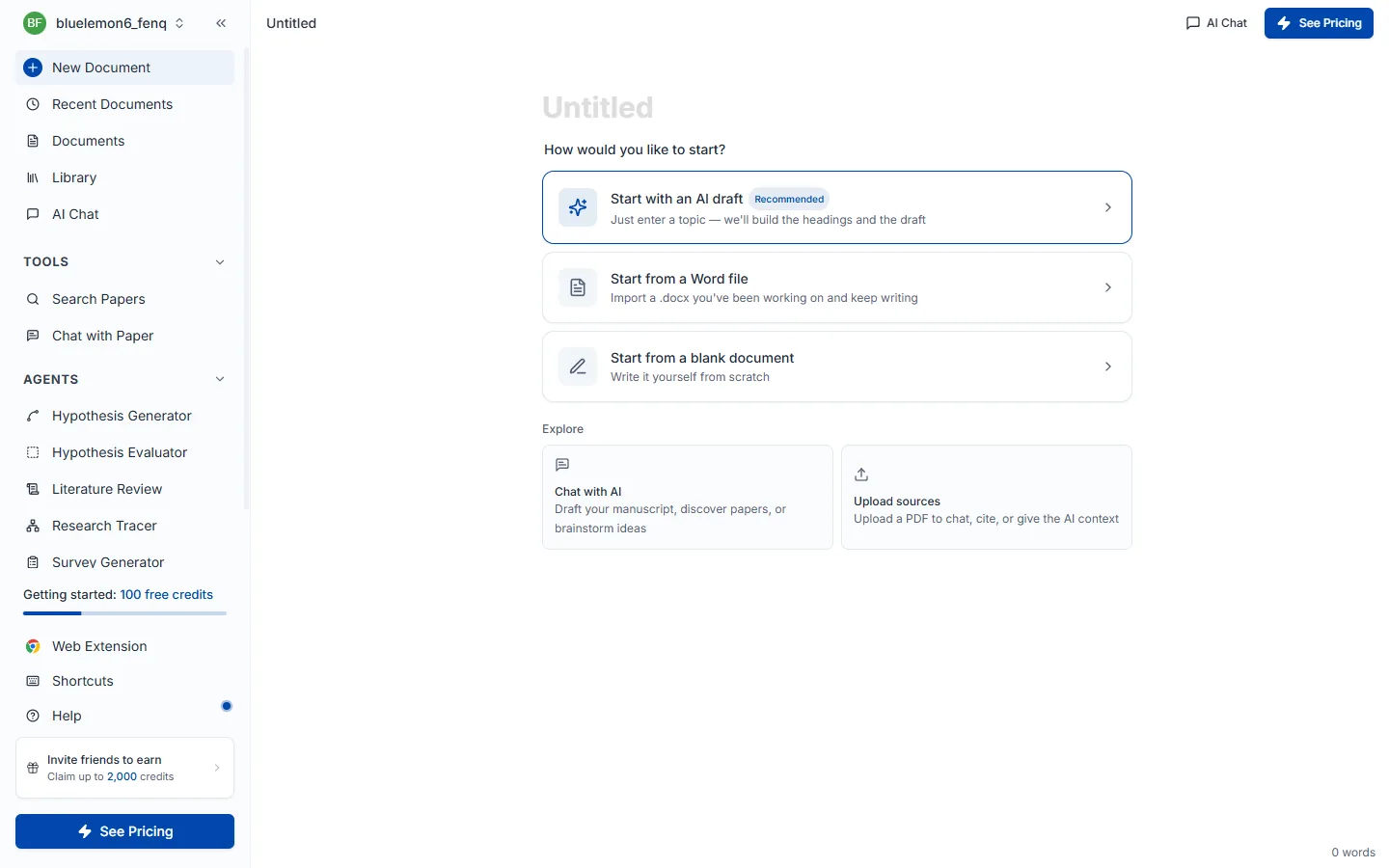
AI下書きを選ぶと3ステップのウィザードが開き、3つすべてを通らないと最後のAI下書き作成ボタンに届きません。
ステップ1 — 下書きプロンプト。 書こうとする論文のテーマを1〜2文で書きます。この文が AI が先行研究を検索し下書きを書く基準になります。入力欄の下のバーはプロンプト強度で、単語が増えるほど薄い緑から濃い緑へ満ちていきます。テーマを空のままにすると次に進めません。
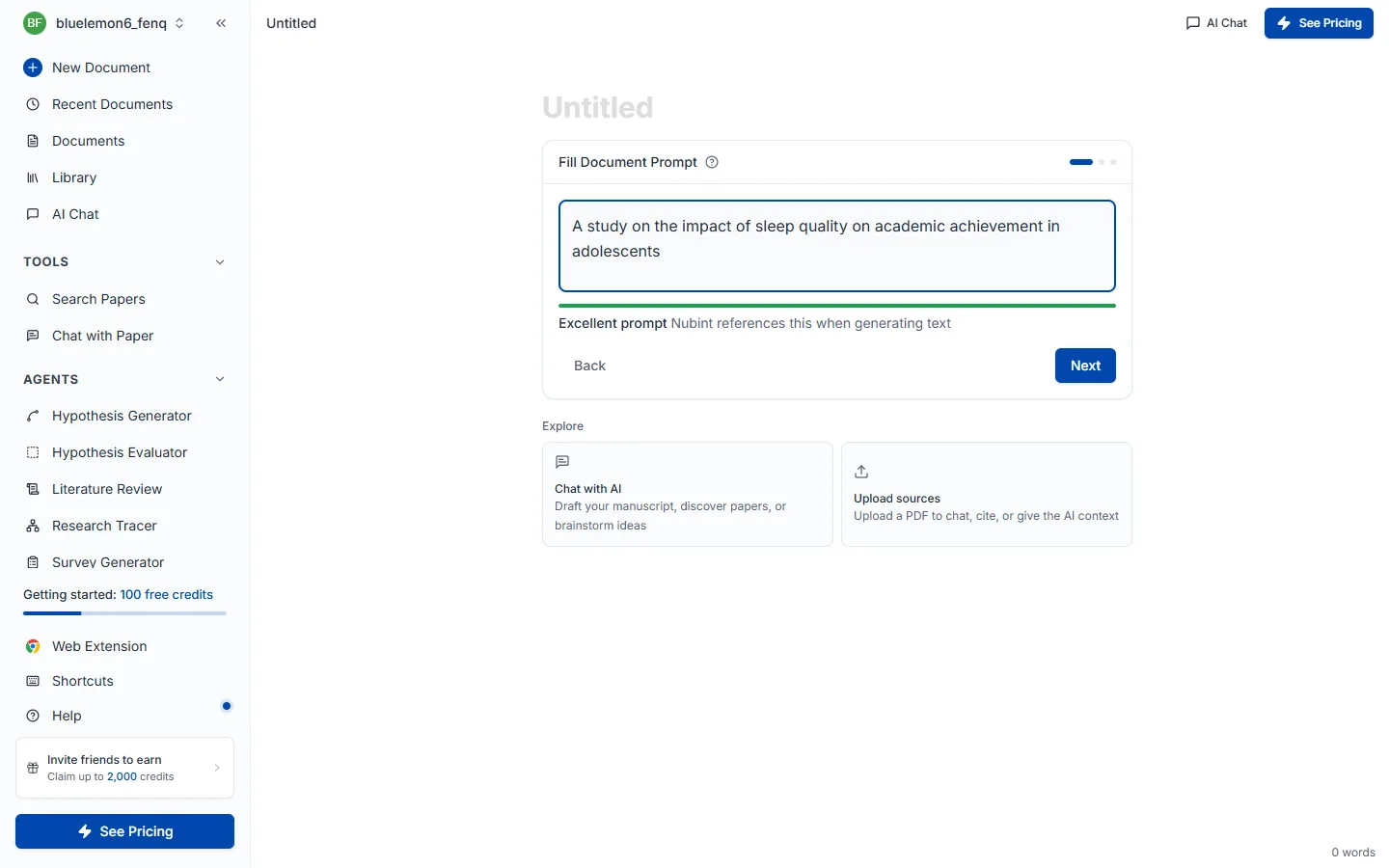
良い例は 睡眠の質が青少年の学業成績に及ぼす影響に関する研究、惜しい例は 睡眠 です — 対象・結果変数・範囲がないと検索結果が散らばります。
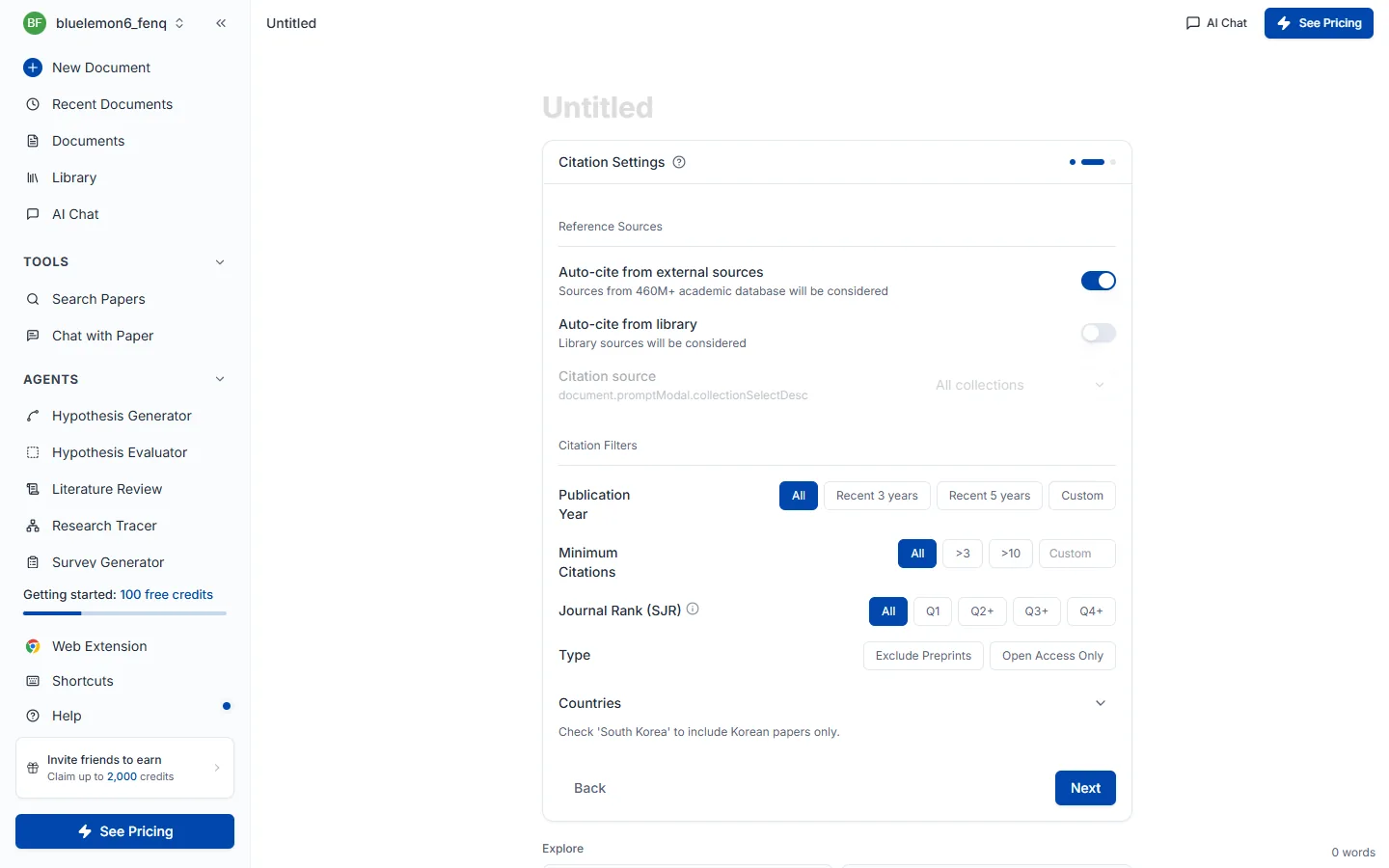
ステップ2 — 引用設定。 ここで選んだ値が以降に書かれるすべての文に適用されます。参照ソースは外部の出典(4.6億編の学術 DB)から自動引用するか、自分のライブラリに保存した論文だけを使うかを決めます(コレクションでさらに範囲を絞れます)。引用フィルターで出版年・最小引用回数・ジャーナルランク(SJR)・種別・国の条件をかけられ、そのままにすると全範囲から検索します。
ステップ3 — 見出し設定。 論文の骨格になる目次を選びます。標準見出し(IMRaD) は序論・理論的背景・研究方法・研究結果・考察・結論の決まった6つの構造で、スマート見出しは入力したテーマに合わせて AI が大見出し5つと各小見出し2つを新しく構成します。実験・調査ベースの論文なら標準見出しが、理論研究や学際的なテーマのように IMRaD が合いにくい場合はスマート見出しが有利です。上部で下書きに使う AI モデルも変えられます。
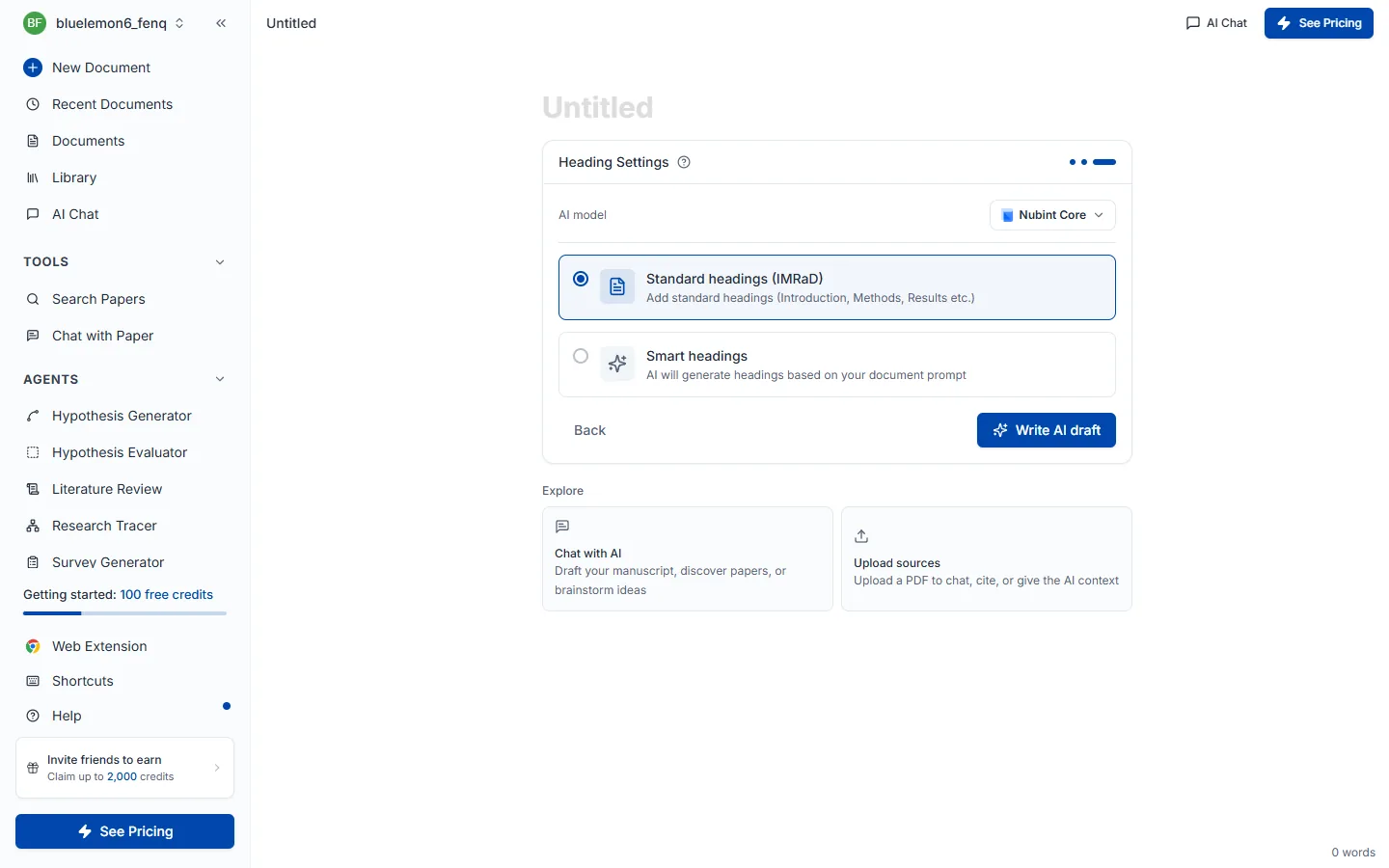
AI下書き作成を押すと先行研究を検索した後、タイトル(H1)と目次を入れ、前半2セクションの本文を引用とともに書きます。残りのセクションは見出しだけ残るので続けて書けばよく、本文には [1] のような引用番号がつき文書の一番下に参考文献が自動で積み上がります。通常1分前後かかります。
下書きが出た後は AIオートコンプリートで文を継ぎ、AI編集で整え、レビューパネルで点検する順に発展させます。
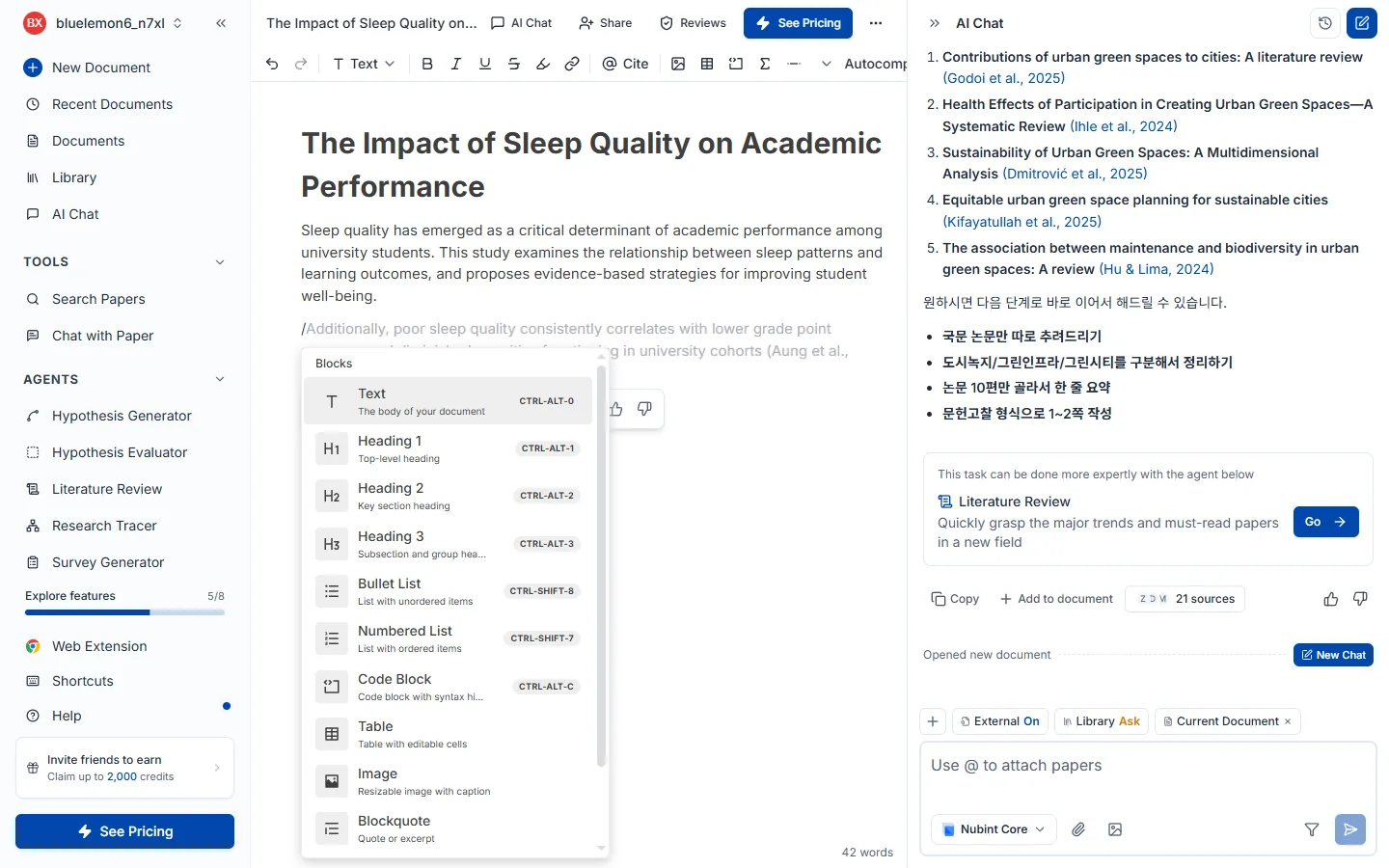
エディタで / を入力するとスラッシュメニューが開きます。見出し(H1~H3)、箇条書き・番号付きリスト、表、コードブロック、数式(KaTeX)、引用ブロック、区切り線を入れられます。
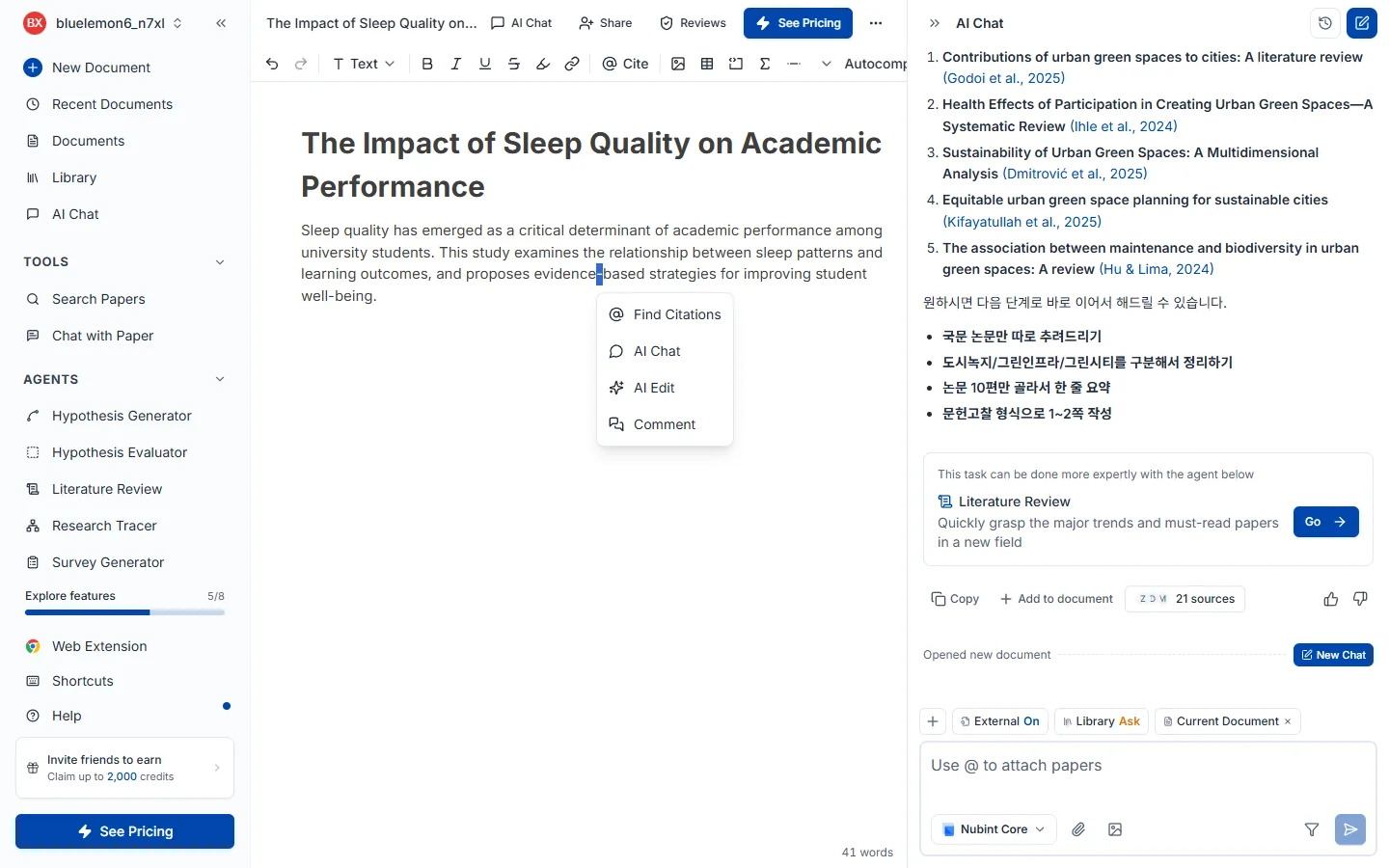
テキストをドラッグすると書式ツールバーが出ます。太字・斜体・下線・取り消し線・インラインコード・リンク・背景色を適用でき、学術用語や変数名には斜体を使うのが慣例です。
エディタ内の参考文献リスト横の形式設定か、上部ヘッダーの文書設定で変更します。形式を変えると文書に挿入されたすべての引用が自動で更新されるので、一つずつ直す必要はありません。
引用スタイルは Citation Style Language (CSL) プロジェクトのものを使っています。APA、MLA、Chicago、Vancouver、Nature など数千の形式が CSL Style Repository でオープンソースとして提供され、CC BY-SA 3.0 ライセンスで配布されています。
エディタ上部のその他メニューから Word(.docx) と LaTeX(.tex) でエクスポートするか、本文をクリップボードにコピーできます。
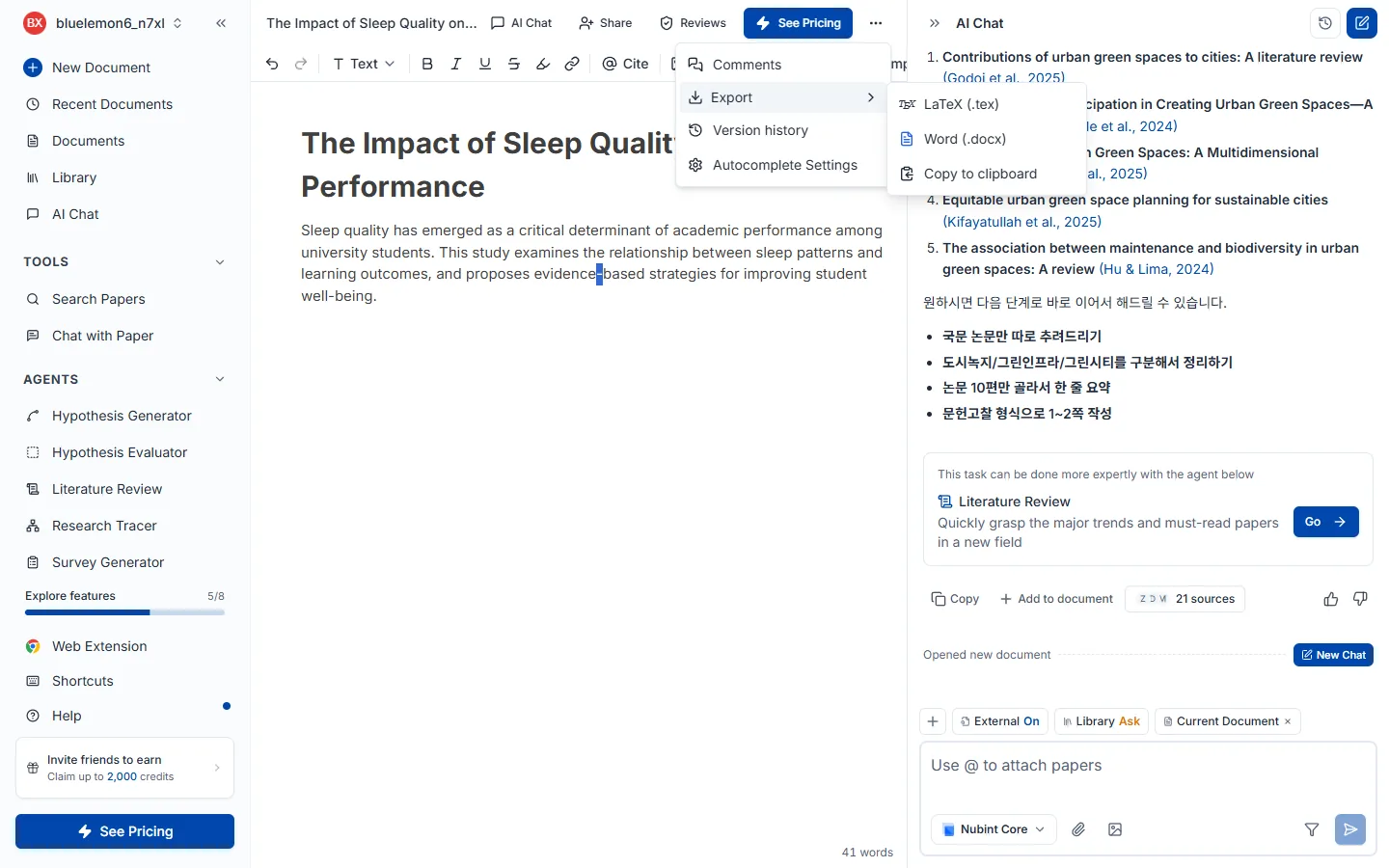
無料プランは本文のみ、Pro・Max プランは本文と参考文献を一緒にエクスポートできます。
段落を書いていて詰まったとき、次の文を引用までつけて受け取る機能です。文を先に作って出典を後からつけるのではなく、根拠となる論文を先に探してその内容に合う文を書きます。
カーソルを段落の末尾に置くと入力欄が開きます(Ctrl + / で直接開くこともできます)。どう書き継ぐかを文で書いて Enter を押すか、下のプリセットを選ぶと実行され、根拠論文を探す → 文を書くの順に進みます。
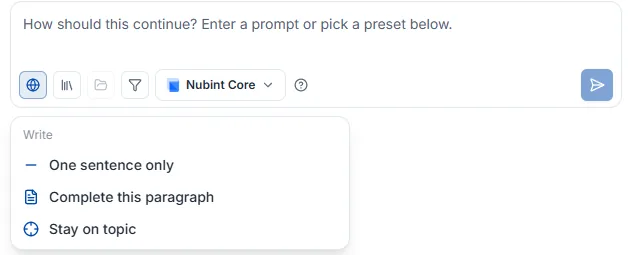
例:前の段落の限界を指摘する文で続けて、この主張を裏づける実証研究を引用して一文
プリセットは指示文を書く代わりに方向だけを選ぶ方法で、選んだ瞬間に実行されます。最初は作成グループだけが見え、残りは提案が出た後に続けて指示を開くと現れます — 直す対象がないと意味が通らないためです。
一文だけ · この段落を完成 (3~5文) · テーマに集中(脇道にそれないように)切れ味を上げる(ありきたりな一般論ではなく具体的に)· 表現を簡潔に引用なしで書き直す · 根拠資料の検証(引用内容と文が実際に合っているか)· 自分のライブラリから引用根拠をどこから探すかは入力欄の下のコントロール列で決め、AI編集と同じ設定を共有します。
提案はカーソルの位置にグレーの文字で現れます。
Esc を押すかカーソルを別の場所へ移します承認・やり直しは結果カードのボタンだけで行います — 本文を書いている最中に矢印キーや Tab が奪われないよう、承認のショートカットは置いていません。
クレジットは回数制限なく、実行するたびに実際の使用量分だけクレジット残高から差し引かれます。承認しなくても実行した時点で差し引かれ(やり直し・続けて指示もそれぞれ実行です)、進行中に停止や Esc でキャンセルすれば差し引かれません。
すでに書いた文を直す機能です。新しい文を書き継ぐ AIオートコンプリートと違い、ドラッグした部分を書き直します。
直したいテキストをドラッグしてツールバーの AI編集を押し、プリセットを選ぶか直したい内容を自然な言葉で書いて Enter を押します。実行中は進行段階(文書の引用確認 → 根拠論文を探す → 文を整える)が表示され、停止ボタンでのみ中断できます — 実行中は外側をクリックしても閉じません。
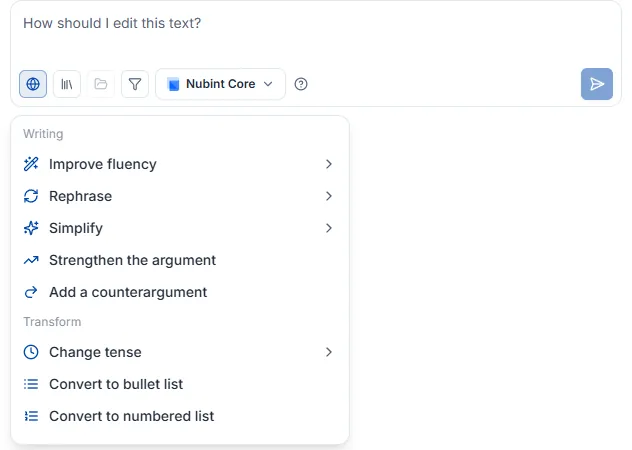
根拠をどこから探すか(ウェブ検索・ライブラリ・コレクション・フィルター・モデル)は AIオートコンプリートと同じ設定を共有します。翻訳やリスト変換のように根拠検索が要らない編集は、ウェブ検索をオフにしたほうが速いです。
プリセットは3グループです。下位オプションがある項目はマウスを乗せると横に開きます(モバイルでは押すと同じ場所でリストが切り替わります)。
流暢さの向上(流れの修正 / つなぎ語の追加 / 重複の削除)· 言い換え · 簡潔化 · 論証の強化 · 反論の追加。言い換えと簡潔化はトーンを選べます(学術的に · 日常的に · 説得力をもって · 大胆に · 親しみやすく)時制の変更(過去/現在/未来)· 箇条書きリストへ · 番号付きリストへ · 散文へ · 表へ · 翻訳(韓国語・英語・スペイン語・ドイツ語・フランス語・中国語・日本語)格式を上げる(口語を論文の文体へ)· 技術的な精密さ(曖昧な表現を正確な用語へ)· 主張を強める · 主張を和らげる(過度な断定を慎重な表現へ)結果カードで適用方法を選びます。
破棄するには Esc を押すかポップオーバーの外側をクリックしてください。
クレジットはクレジット残高から実費で差し引かれます。適用しなくても実行するたびに差し引かれ(やり直し・続けて指示もそれぞれ実行です)、進行中に停止を押せば差し引かれません。Scholar は Core より、ウェブ検索・ライブラリ検索をオンにすると根拠を探す分だけ多く使います。
新しい文書を作ると出る開始画面で Docxからインポートを押し、.docx ファイルを選ぶと内容がエディタに読み込まれます。インポート後は AIオートコンプリート、AI編集、引用の挿入をすぐ使えます。
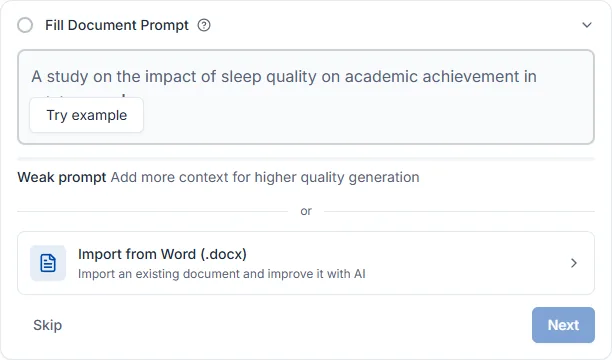
現在は .docx のみ対応で、.doc、.pdf、.hwp は受け付けません。
すでに書いた文に自分で選んだ論文を直接引用としてつけます。AI に根拠を探してほしいなら AIオートコンプリートか引用推薦のほうが合っています。
入り方が3つあり、その後はすべて同じです — 論文検索窓でタイトルやキーワードから探して選ぶと、その場所に引用が挿入されます。
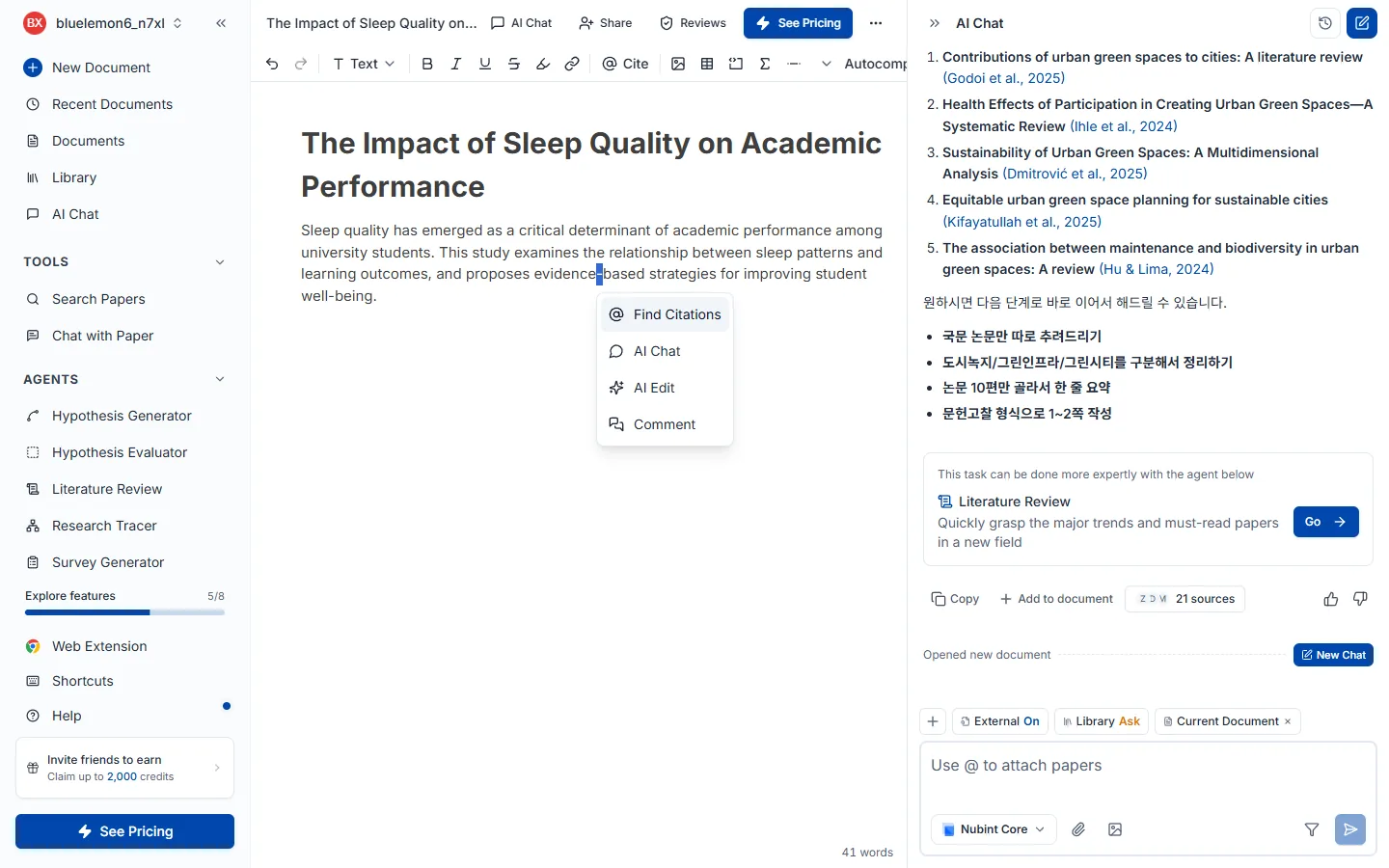
引用を入れたい位置に @ を打つのが最も速いです。カーソルを置いてから上部機能バーの @ 引用 ボタンを押すか、文をドラッグすると出る機能バーの引用ボタンを押しても構いません。
挿入された引用は文書に設定された形式(APA・MLA・Chicago など)に合わせて自動で整形され、文書下部の参考文献リストにも追加されます。形式を変えるには引用形式の変更をご覧ください。
5つのレビューは見るところが互いに重なりません。構造(ピアレビュー)→ 根拠(主張の信頼性・出典品質)→ 文(文体トーン・論文校正)の順に降りてください。
エディタ上部のレビューボタンを押すと、右側にレビューパネルが開きます。5種類がカードで並び、目的のカードのレビュー実行を押すと始まります。すでに実行したことがあればボタンは結果を見るに変わり、下書きを直した後は結果画面右上の更新アイコンで再実行できます。カード右上の ? はそのレビューのヘルプにつながり、パネルを開くだけでは何も消費されません。
5つのレビューは見るところが互いに重なりません。 大枠から文へと降りていく順番が効率的です — 構造を直すと文は書き直しになるからです。
| レビュー | 何を見るか | いつ実行するか | 無料 |
|---|---|---|---|
| ピアレビュー | 構造と論理、方法論、引用の十分さ | 下書きがある程度できた後 | — |
| 主張の信頼性 | 根拠なく断定した主張 | 下書きが溜まったとき | ✅ |
| 出典品質 | 引用した論文自体の信頼性 | 引用をある程度つけた後 | — |
| 文体トーン | 文章全体の調子が学術文体に合っているか | 文を整え始めるとき | ✅ |
| 論文校正 | 文法、綴り、句読点、語の選択 | 内容が確定した後の最後 | — |
主張の信頼性と出典品質は混同しやすいのですが、主張の信頼性は根拠がついているかを、出典品質はついている根拠が使えるものかを見ます。引用がまったくない文は主張の信頼性が、撤回されたり等級の低い引用は出典品質が捕まえます。
文書の一部だけをレビューすることもできます。 カードの設定アイコンで範囲を指定すればその部分だけを検査するので、長い文書で直したばかりの箇所を確認するのに便利です。ただしピアレビューは例外で、範囲を指定しても文書全体で実行されます — 構造と論理を見るレビューなので、一部の段落だけを切り出す意味がないためです。
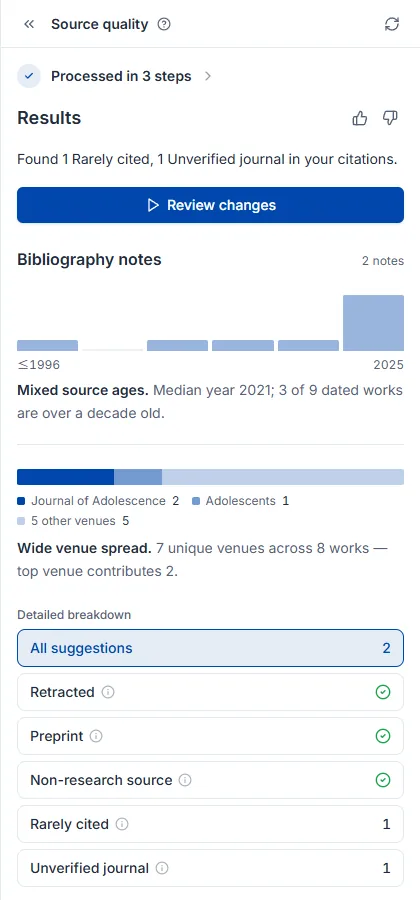
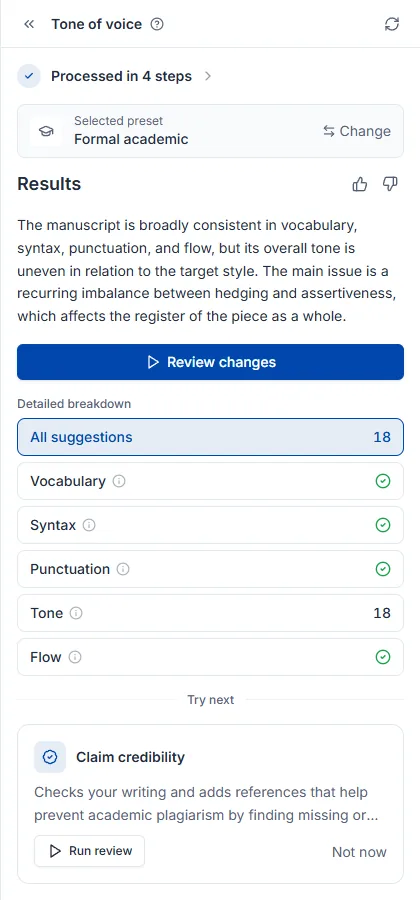
結果画面はレビューの種類にかかわらず同じ骨格です。N段階完了を開くとどの検査を経たかが分かり、結果が今回の実行を一段落でまとめます(横の 👍👎 で品質を伝えられます)。変更点の確認で指摘を一つずつ処理し、詳細分析は分類別の件数を(チェック印はその分類で何も引っかからなかったという意味です)、すべての提案は全体の件数を示します。本文の下線部分を押すと何が問題かが表示され、適用 / 却下を選べます。一番下の次に試すは、続けて実行するとよいレビューを勧めます。
ここにレビューごとの固有要素が一つずつ加わります — ピアレビューは総合評価のスコアとコメント、出典品質は書誌ノート、文体トーンは選択したプリセットです。
クレジットは A4 枚数 × 種類別の単価で差し引かれます。文書全体を読むレビューなので、原価が長さに比例するためです。
| レビュー | A4 1枚あたりクレジット |
|---|---|
| ピアレビュー | 6 |
| 主張の信頼性 | 5 |
| 論文校正 | 3 |
| 出典品質 | 3 |
| 文体トーン | 3 |
A4 1枚は日本語で約2,000字、英語で約500語です。混在している場合はそれぞれ数えて合算します。最低5枚で計算するので、数行だけ入れて実行しても5枚分になります。範囲を指定して一部だけレビューした場合は、その部分の枚数で計算します。たとえば A4 10枚の文書にピアレビューを実行すると60クレジットです。
残りクレジットはクレジットとクォータで、プラン別の違いは料金ページで確認してください。
構造と論理を見ます。論文の構造、論理の流れ、方法論の妥当性、引用が十分かの4軸で文書全体を読み、学術誌の査読者の視点で意見をつけます。実行方法とクレジットはレビューを始めるで共通して扱います。
下書きがある程度できた後に実行してください。大枠を先に固めれば文を二度直さずに済むので、5種類の中で最初に回すことをお勧めします。文の表現は論文校正が、根拠の有無は主張の信頼性が担当します。検査範囲を指定してもピアレビューだけは文書全体で実行されます。
他のレビューと違いスコアが先に出ます。総合評価が妥当性・表現・貢献度をそれぞれ4点満点で採点し総合点(10点満点)を出すので、軸ごとのスコアでどこが弱いかを掴んでから弱点リストへ降りてください。
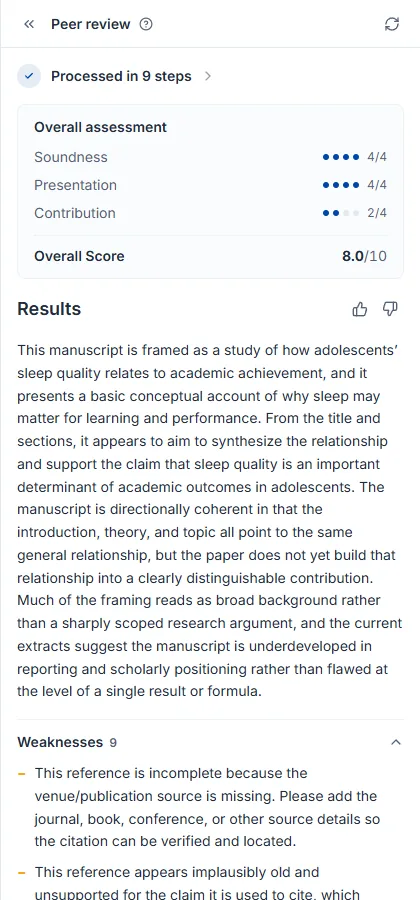
指摘は文書本文にコメントとしてつきます。他のレビューのようにポップオーバーで適用・却下するのではなく、該当する文の横に査読コメントが添えられる形です。コメントを開いて指摘を読み、本文を自分で直してから解決済みにするとリストから外れ、下書きを直して再実行すると新しいコメントが追加されます。結果画面の未解決コメント N とリストカードのバッジは同じ数字で、バッジが0になれば今回の査読で指摘されたものはすべて処理したという意味です。
文の表現だけを見ます。文法、綴り、句読点、語の選択を文単位で拾い、直した文を提案します。特に英語の下書きの学術的な表現を整えるのに有効です。実行方法とクレジットはレビューを始めるで共通して扱います。
内容が確定した後に実行してください。まだ段落が変わる予定なら後回しのほうが得です。文章の骨格はピアレビューが、学術文体に合っているかは文体トーンが見ます。両方回すならトーンを先に合わせて校正で仕上げてください — トーンを変えると文が書き直しになります。
直すべき箇所は本文にそのまま表示されます。赤い取り消し線が原文、緑が直した文です。下線部分を押して適用 / 却下を選びます。
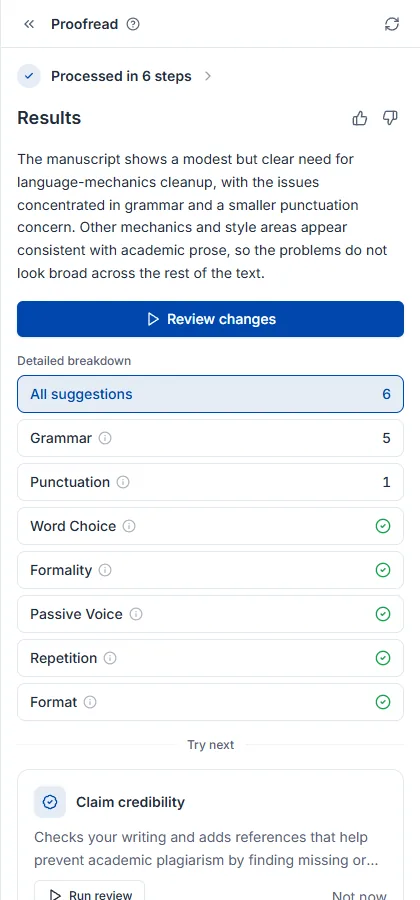
校正の全体的な進め方は論文を校正する方法ガイドで扱います。
根拠がついているかを見ます。根拠なく断定した主張や引用が弱い箇所を見つけ、なぜ問題なのか・どんな根拠が必要かを一緒に教えてくれるので、引用の補強と剽窃リスクの低減に使います。無料プランでも実行でき、実行方法とクレジットはレビューを始めるで共通して扱います。
下書きがある程度溜まったときに実行してください。ついている引用の品質(撤回・プレプリントなど)は出典品質が見ます。指摘された文に実際の引用を埋めるには引用推薦を使ってください。
根拠が不足している文が本文に表示され、分類は誤引用・根拠と相反・根拠なし・根拠が弱い・誇張・原文未確保に分かれます。下線部分を押すと何が問題かを確認でき、適用 / 却下を選べます。
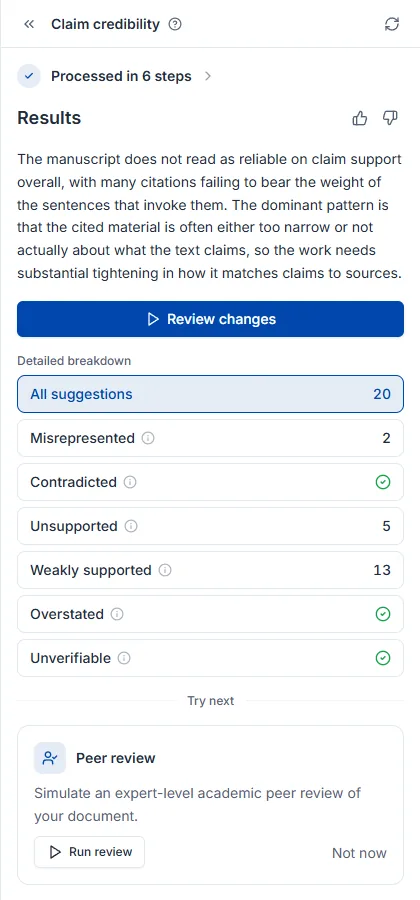
引用した論文そのものを見ます。撤回された論文、査読を経ていないプレプリント、等級の低いジャーナルを見つけ出すので、引用リストを人が一つずつ確認する必要がありません。実行方法とクレジットはレビューを始めるで共通して扱います。
引用をある程度つけた後に実行してください — 引用がなければ検査する対象もありません。引用がまったくない主張は主張の信頼性が見つけ、問題のある引用を差し替える代替論文は論文検索のフィルターで探せます。
指摘件数だけでなく参考文献全体の健康状態を一緒に示すのがこのレビューの特徴です。共通の結果要素に加えて書誌ノートが引用文献の年代分布とジャーナル分布をグラフで見せるので、文献が古いか、一つのジャーナルに偏っているかが一目で分かります。
文章全体の調子を見ます。下書きの文体が学術論文に合っているかを確認し、外れた文を書き直します。無料プランでも実行でき、実行方法とクレジットはレビューを始めるで共通して扱います。
文法の誤りや誤字は論文校正が拾います。両方回すならトーンを先に合わせて校正で仕上げるほうが得です — トーンを変えると文が書き直しになるからです。
基準となる文体を先に決めることが重要です。 カードの設定アイコンで硬い文体・簡潔な文体などのプリセットを選ぶか、自分のライブラリの論文を基準にしてその文体に合わせられます。決めない場合は一般的な学術文体を基準に見ます。
結果の一番上にどの文体を基準に見たかが先に出ます。基準が違えば指摘も変わるので、まずここを確認してください。共通の結果要素に加えて選択したプリセットが今回の実行の目標文体を示し、変更で別の基準で再実行できます。
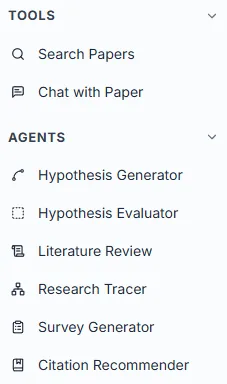
論文を書く前の段階を担います。仮説を立てて評価し、文献を調べ、研究の系譜をたどり、アンケートと引用を作ります。それぞれ専用ページで実行します。
6種類あり、それぞれ専用ページで実行します。
| エージェント | 何をするか | 何を入力するか |
|---|---|---|
| 仮説生成 | テーマから検証可能な仮説候補を作ります | 研究テーマを一文で |
| 仮説評価 | すでに立てた仮説を4つの基準で採点します | 仮説の記述 |
| 文献調査 | 関連論文を集めて構造化されたレポートにまとめます | 調査するテーマ |
| 研究の流れ探索 | 引用ネットワークをたどって分野の系譜を描きます | シード論文1編 |
| アンケート生成 | 検証済みの尺度をもとに設問を作ります | 測定したい仮説・テーマ |
| 引用推薦 | 下書きの主張に合う引用を探してつけます | すでに書いた下書き(2,500字) |
左サイドバーの エージェント グループを開いて選ぶと専用ページに移動します。入力欄にそのエージェントが求める内容を書いて実行ボタンを押すと結果ページに移り、段階ごとの進行状況が表示されます。AIチャットで対話していて特定のエージェントのほうが適した作業なら、チャット内に推薦カードが現れ、移動でそのページへ行けます。
6つのエージェントは同じ画面構造を使います。入力欄1つとその下のコントロール列が全部です。例を見るは何を書けばよいか迷うときに例文を入れてくれ、モデル選択は Core(速い)と Scholar(最高品質)から選びます。検索フィルターは文献調査と引用推薦にだけあり、出版年・引用数・ジャーナルランクなどで参考論文を絞ります。実行ボタンの名前はエージェントごとに違い(仮説生成、調査を開始 …)、Enter も同じ動作です。
実行中は送信ボタンが停止ボタン(■) に変わり、押すと即座に中断します。中断した実行の部分結果は保存されず、クレジットはその時点まで実際に使った分だけ差し引かれます — 予想される全体の費用がまるごと引かれることはありません。
課金は実行するたびに行われます。実際の AI 使用量とエージェントごとの最低クレジットのうち大きいほうで計算されるので、短い実行は少なく、重い分析は多く差し引かれます。論文検索はクレジットを消費せずプラン別の回数制限だけで管理され、レビュー5種は軸が違うので A4 の枚数に比例して差し引かれます。残りクレジットはクレジットとクォータで、プラン別の上限は料金ページで確認してください。
過去の実行結果はそのエージェントのページに残ります。AIチャットの履歴とは別に管理されるので、文献調査の記録は文献調査のページで探すことになります。エージェントが集めた論文はライブラリに、書いた下書きは文書に保存されます。
関心のあるテーマはあるが検証できる形の仮説がまだないときに使います。4.6億編の論文を根拠に仮説候補を作り、それぞれに根拠論文をつけてくれます。すでに仮説があるなら仮説評価へ直接どうぞ。
研究テーマを一文で書いて仮説生成を押します。完成した仮説である必要はなく、睡眠不足が青少年の衝動性に及ぼす影響 のような関心事レベルで十分です。実行画面の構成とクレジットはエージェントの使い方で共通して扱います。
結果はリストではなくキャンバスです。入力したテーマから仮説カードが枝のように伸び、カード1枚が仮説1つです。
一度で完成した仮説を期待するより、気になるカードで仮説を練り直すを押して2〜3回枝を伸ばすほうが、はるかに使える結果になります。方向が決まっていれば + で自分で書いて派生させることもでき(例:「政策介入の観点で」)、キャンバスはその探索の過程をそのまま残します。
カードをクリックすると右の詳細パネルが開き、その仮説を概要・妥当性・新規性・実行可能性・重要性の5つの軸で検討した内容が根拠論文とともに出ます。本文の青い括弧引用はすべて実在の論文で、一番下の出典 N件からライブラリに保存できます。
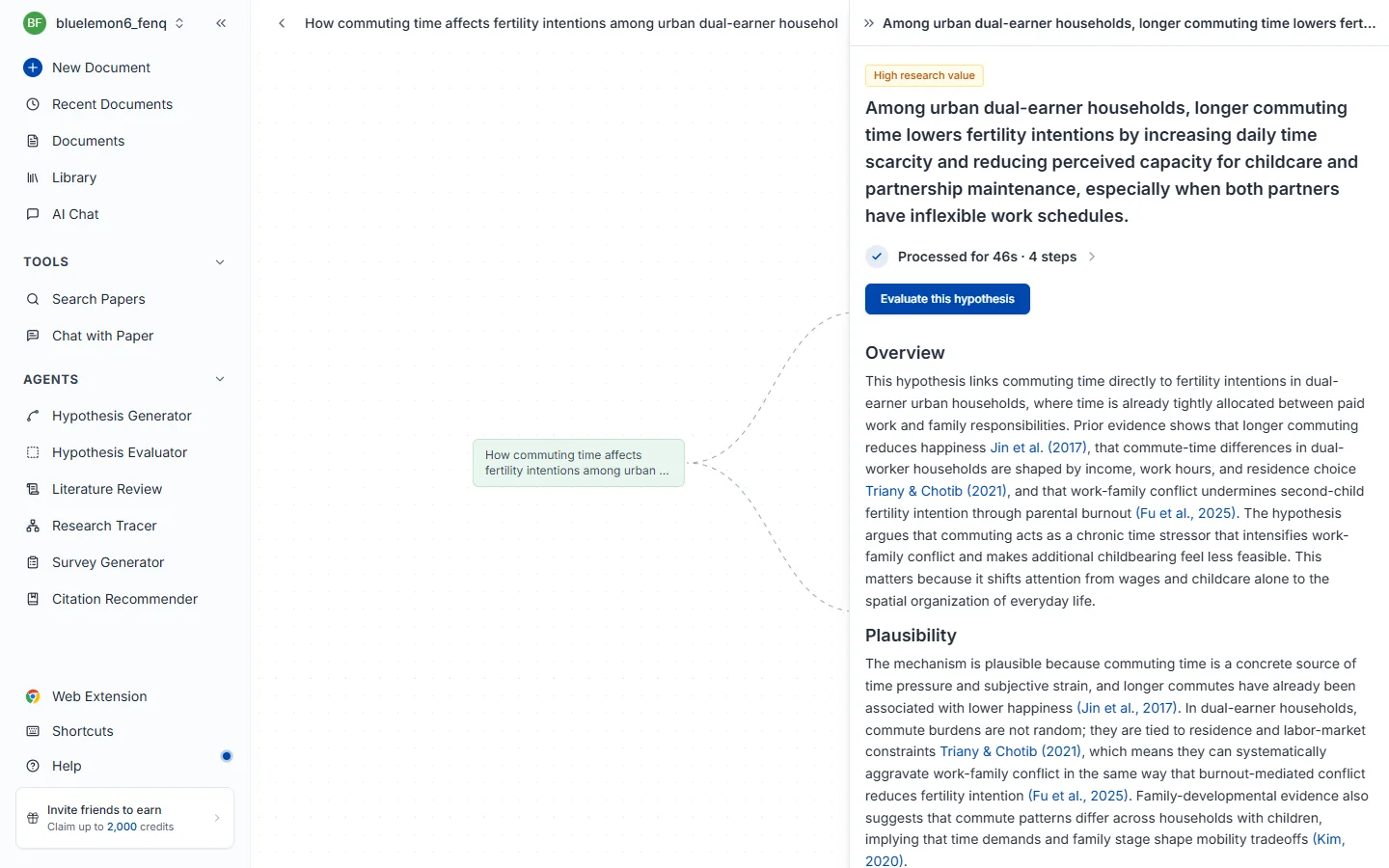
基準ごとの評価まで受けたいときは、この仮説を評価するで仮説評価へ渡してください。
仮説をすでに立てていて、このまま研究を始めてよいかの判断が必要なときに使います。検証可能性・独創性・実現可能性・明確性の4基準で採点し、低かった基準ごとに直す方向を教えてくれます。独創性は4.6億編の論文とリアルタイムで照合して測ります。
立てた仮説をそのまま貼り付けて評価を受けるを押します。一文でもよく、平日に就寝1時間前にスマートフォンを使わなければ総睡眠時間が普段より20分以上増える のように条件と予想される効果を含む長い記述でも構いません。実行画面の構成とクレジットはエージェントの使い方で共通して扱います。
一番上の総合評価がこの仮説の強みと最大の弱点を一段落で指摘し、その下に基準ごとの評価と一行の診断がつきます。タイトル横の N papers は判断のために実際に照合した論文数です。
評価だけ見て流さず、低く出た項目の「もっと見る」を開いてください。 そこに書かれているのは「何が足りないか」ではなく「どう絞ればよいか」です。独創性が低ければすでに検証されたテーマということなので、対象・条件・測定方法を絞って差別点を作り、もう一度評価してスコアの変化を確認しましょう。
論文を探すのではなく読んで整理した結果が必要なときに使います。関連論文を自動で集めて最大40編を全文まで読み、主要な流れ・方法論・論点を引用つきのレポートにまとめます。速く探すだけでよいなら論文検索のほうが合っています。
調査するテーマを一文で書いて調査を開始を押します。キーワードを並べるより文のほうが結果がよく、たとえば 睡眠の質が青少年の学業成績に及ぼす影響に関する研究 のように書きます。
検索フィルターで出版年・引用数・ジャーナルランクなどをかけられます。最新の動向だけ見たいなら年を、検証された文献だけ見たいなら引用数をかけてください。分析する編数が多いので時間がかかり、途中で中断できます。実行画面の構成とクレジットはエージェントの使い方で共通して扱います。
結果はリストではなく読めるレポートです。タイトル横の N papers は実際に分析した論文数です。
段落ごとに引用がついているので、気に入った箇所をそのままコピーして下書きの骨組みに使い、引用だけ確認すれば済みます。青い (著者, 年) を押すと原文へ移動し、一番下の出典 N件から論文を選んでライブラリに保存できます。
文献調査の進め方全体は文献調査の実施方法ガイドで扱います。
「最近の論文の羅列」ではなく、この分野がなぜこう発展したのかを知る必要があるときに使います。シード論文1編から引用ネットワークを双方向に最大5段階までたどって系譜を描くので、研究のギャップを探したり文献調査の記述の骨組みを組むときに有効です。
他のエージェントと違い、テーマではなく論文1編から始めます。論文タイトルや著者名で検索してシードにする論文を選ぶと、選んだ瞬間に追跡が始まります。分野の代表的な論文や自分が読んだ中心的な論文をシードにするとよいでしょう。実行画面の構成とクレジットはエージェントの使い方で共通して扱います。
画面が2つに分かれます。左は引用ネットワークのグラフ、右は選んだ論文の詳細パネルです。緑のノードがシードで、線は引用関係 — 左に行くほど過去、右に行くほど後続の研究です。
グラフを左端までたどるとその分野の古典が、右端には最新の研究があります。文献調査の記述の順序を決めるとき、この軸をそのまま使えます。
ノードをクリックすると右に書誌情報と抄録が開き、研究の流れの項目がその論文がどの系譜に属するかを名づけて説明します。被引用数とジャーナル分位(CITED BY / Q2)で影響力を測れ、DOI・URL は横のアイコンですぐコピーできます。
アンケートでデータを集める必要があるが、設問をゼロから組むのが負担なときに使います。既存研究ですでに検証された測定尺度を探して設問に移してくれるので、自分で作った設問より結果を擁護しやすいのが要点です。
測定したい内容を書いてアンケートを生成を押します。仮説でもよく、会社員のストレス要因と解消方法 のようなテーマレベルでも構いません。実行画面の構成とクレジットはエージェントの使い方で共通して扱います。
設問の草案ではなく、そのまま配布できるアンケートがまるごと出ます。案内文から最後の設問まで揃っており、リッカート・選択式・自由記述が混じって10~30問が生成されます。
Download でファイルを受け取り、使っているアンケートツールに移して貼り付けます。その前に研究の文脈に合わない設問を落とし、表現を対象者に合わせて直してください。
文はすでに書いたが、根拠としてつける論文が見つからないときに使います。下書きを貼り付けると主張ごとに最も強く裏づける引用を3~5件探し、文にそのまま差し込んで返します。キーワードではなく意味で探すので、表現が違っても同じ内容を扱った論文を捕まえます。
引用が必要な文や段落をそのまま貼り付けて引用を生成を押します。一文でも段落単位でもよく、最大2,500字です。検索フィルターで出版年・引用数・ジャーナルランクなどをかけられるので、投稿する予定のジャーナルの基準があればここで合わせてください。実行画面の構成とクレジットはエージェントの使い方で共通して扱います。
別のリストではなく自分が入れた下書きそのまま、引用がつく位置に (著者, 年) が挿入されて返ってきます。下線のついた文が引用を足した箇所なので、どこが変わったか一目で分かります。
コピーで段落全体をそのまま持っていけますが、その前に引用された文が自分の主張と実際に合っているか確認してください。
エディタの中で使うなら AIオートコンプリートが文を書きながら引用までつけてくれます。
論文を速く探すだけのときに使います。意味で検索するので正確な学術用語を知らなくてよく、クレジットではなく回数制限で管理されます。
論文を速く探すだけでよいときに使います。引用する論文を選ぶ、テーマに関連する論文の一覧をざっと見る、特定の論文をタイトルで探す、といった場面です。探した論文を読んで整理した結果まで必要なら文献調査のほうが合っています。
検索窓にキーワードでも文でも入れれば大丈夫です。意味で探すので正確な学術用語を知らなくても研究の意図に合う論文が出ます。
transformer attention mechanism NLPテキスト感情分析における事前学習モデルの性能比較深層学習ベースの医療画像分析でデータ拡張が診断精度に及ぼす影響は?結果は関連度順に数秒で出ます。検証された学術データベースからのみ取得するので、存在しない論文が混じりません。 結果を絞るには検索フィルターを、カードの読み方は検索結果の読み方をご覧ください。
クレジットは差し引かれません。 論文検索はクレジットではなくプラン別の回数制限で管理され、無料プランは1日3回、有料プランは制限がありません。残り回数はクレジットとクォータで確認できます。
検索入力欄の右にあるフィルターアイコンを押すとオプション画面が開きます。条件を選んで適用を押すと結果が絞られ、リセットで全部戻せます。4.6億編の中から研究目的に合う論文だけを取り出すための機能です。
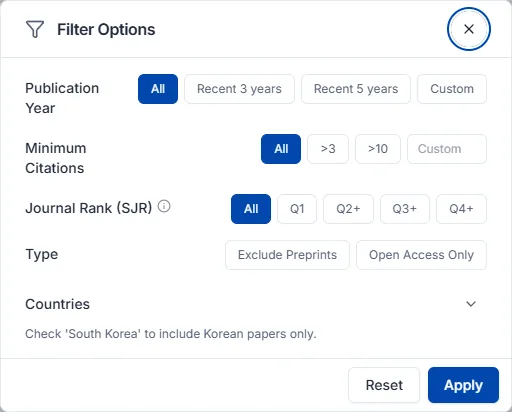
ジャーナルランク(SJR) はジャーナルの影響力を示す指標で、引用回数と引用したジャーナルの権威を合わせて反映します。投稿するジャーナルを探すときや引用の根拠の信頼度を上げたいときは Q1 か Q2 以上を選んでください。
| 選択 | 意味 |
|---|---|
| Q1 | 上位25% — その分野で最高品質のジャーナル |
| Q2 以上 | 上位50% |
| Q3 以上 | 上位75% |
| Q4 以上 | SJR 等級のあるすべてのジャーナル |
| フィルターなし | 等級を問わない |
状況別にはこう組み合わせます。
| いまの状況 | おすすめの組み合わせ |
|---|---|
| 最新の研究動向をざっと見たい | 出版年 直近3年 |
| この分野の中心的な論文から知りたい | 最小引用回数を高く + ジャーナルランク Q1 |
| 引用できる論文だけを選びたい | プレプリント除外 + ジャーナルランク Q2 以上 |
| 原文を今すぐ読みたい | オープンアクセスのみ |
| 特定の国の研究状況を見たい | 国フィルター |
| 結果に他分野の論文が混じる | 学問分野を指定 |
フィルターは重ねるほど結果が狭くなります。結果が少なすぎるときは、最も強い条件(ジャーナルランク Q1、高い引用回数)から1つずつ緩めてみてください。
論文カードにはタイトル、著者、出版情報(ジャーナル・年・巻号)とともに、判断に使う指標が3つつきます。
関連度と被引用数は一緒に見てください。 両方高ければそのテーマの中心文献である可能性が高く、関連度は高いのに被引用数が低い場合は最新の研究や新興分野かもしれません — 悪い兆候ではありません。速く目を通したいときはオープンアクセスから読むと、障壁なしにすぐ中身を確認できます。
原文は論文の公開状況に応じて3通りで開きます。
気に入った論文はライブラリに保存しておくと、以降のチャットや引用にすぐ使えます。
集めた論文を入れておく場所です。ここにある論文がチャットの参照資料になり、引用の源になります。検索・拡張機能・Zotero で満たし、コレクションで整理します。
ライブラリパネルのインポートボタンから2つのうち1つを選びます。
Zotero を使っているならアカウント連携のほうが得です。
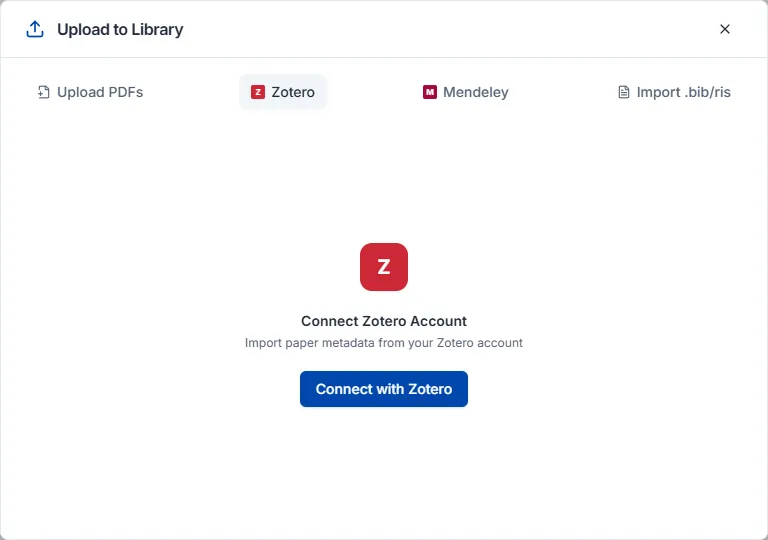
アカウント連携は、インポート → Zotero アカウント連携 を選んで Zotero アカウントでログインすると既存のコレクションが自動で移ります。
ファイルアップロードは RIS、BibTeX、CSV に対応します。既存の論文管理ツールから移す論文を RIS か BibTeX で書き出してアップロードしてください。Zotero だけでなく EndNote、Mendeley など他のツールから書き出したファイルも同じ方法で取り込めます。
論文ページを開いたままブラウザのツールバーで Nubint Web Importer のアイコンを押すと、タイトル・著者・ジャーナル・DOI が自動で認識されます。保存先を My Library か既存のコレクションから選び、Add を押すとライブラリに入ります。すでに保存済みの論文は "In library" と表示されます。
Chrome ウェブストアで Nubint Web Importer を検索してインストールすればよく、Microsoft Edge でも同じ拡張機能が使えます。インストール後アイコンを押して Nubint アカウントでログインすると、ウェブで使っていたライブラリ・コレクションがそのまま連携されます。
標準的な引用メタデータを提供するほとんどの論文ページで動作します — Nature、PubMed、arXiv、ScienceDirect、Springer などが代表的です。論文情報が認識されないと "No reference detected" と出るので、そのときは抄録・詳細ページ(DOI、arXiv、PubMed のリンク)から試し直してください。
保存時にクレジットは差し引かれません。 書誌情報を取得するだけで、AI 分析や要約は行わないためです。
ライブラリパネル上部の新規コレクションボタンで作ります。上位コレクションの中に下位コレクションを置けば入れ子の構造で整理できます。
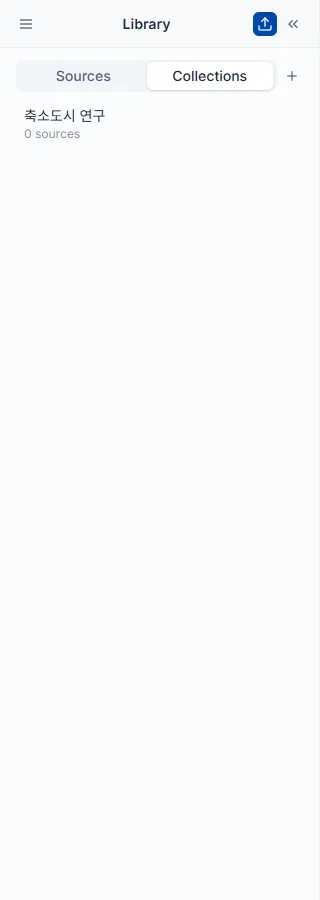
論文カードのコレクションに追加ボタンで入れ、複数の論文を選んで同時に追加することもできます。1つの論文が複数のコレクションに同時に属せるので、横断的な分類が可能です。
コレクション名にマウスを乗せると編集オプションが出て、名前の変更と削除がすぐできます。コレクションを削除しても論文自体はライブラリに残ります。
論文カードのチェックボックスで複数を同時に選ぶと、選んだ数が上部に表示され一括操作のオプションが現れます。
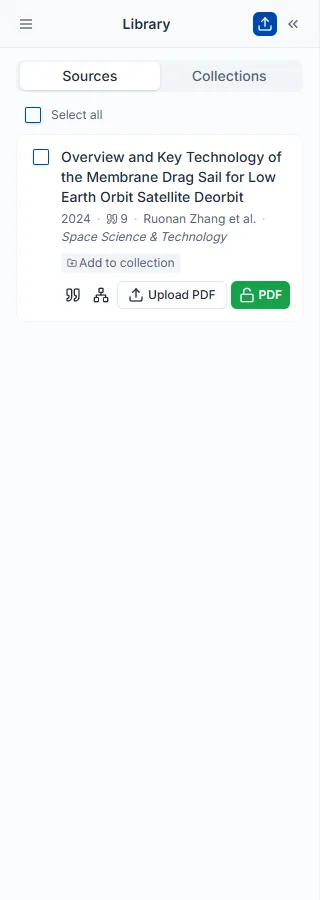
ライブラリパネル上部のフィルターボタンを押して条件を選びます。複数のフィルターを重ねるほど範囲が狭まります。
検索画面の検索フィルターと項目はほぼ同じですが、こちらはすでに保存した論文の中だけを絞り込みます。
ライブラリパネルのエクスポートボタンで形式を選ぶとファイルがダウンロードされます。論文カードのチェックボックスで一部だけ選んでおくと、その論文だけが出ます。
プラン変更と支払い方法、そしてクレジットとクォータがどう差し引かれ、いつリセットされるかを扱います。
いつでも変更できます。プロフィール → 設定 → サブスクリプションタブでプラン変更を押し、プランと支払いサイクルを選んで決済ページで内容を確認してください。
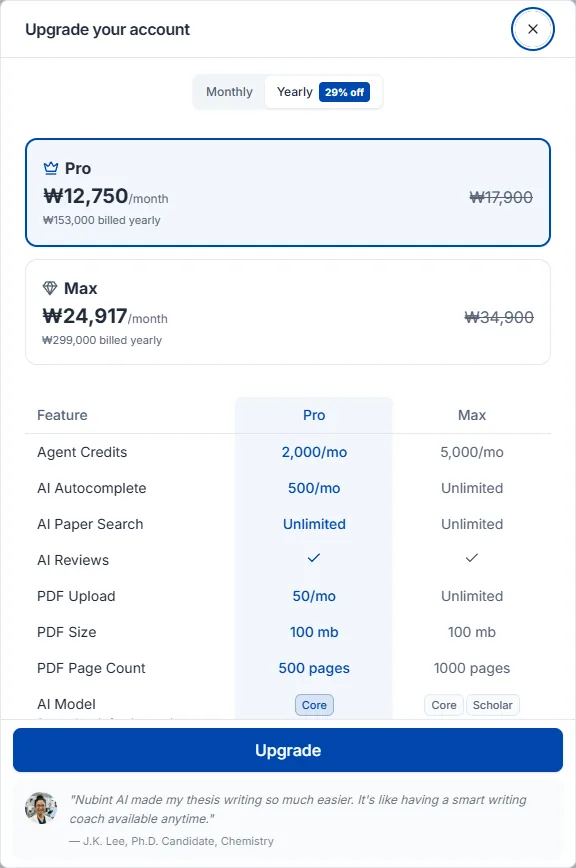
アップグレードは決済完了と同時に適用されます。残りの支払いサイクル分の差額が精算されて新しいプランの費用から差し引かれ、正確な請求額は決済ページで事前に確認できます。
ダウングレードは次回の支払い日から適用され、それまでは現在のプランをそのまま使えます。申し込み時点では決済は発生せず、次回の支払い日に変更後のプランの費用が請求されます。次回の支払い日より前ならサブスクリプションタブのダウングレードを取り消すで予約を戻せ、取り消すと現在のプランがそのまま自動更新されます。
Free・Pro・Max の機能と価格の比較は料金ページで確認してください。年額払いに切り替えると割引が適用されます。
プロフィール → 設定 → サブスクリプションタブで現在のプラン情報の下にある解約を押し、確認メッセージで完了します。
解約してもすでに支払った期間はそのまま維持されます。現在の支払いサイクルが終わる日まで Pro・Max のすべての機能を使い続けられ、サイクルが終わると自動的に Free プランに切り替わります。保存した論文、ライブラリ、作成中の文書などのデータはそのまま残ります。解約後は次のサイクルの自動決済は行われません。
初めて有料プランを購読するとき、決済画面でお支払い方法を選択すると自動的に登録されます。別途登録する手順はありません。
ご利用いただけるお支払い方法は、決済する国によって異なります。クレジット・デビットカードのほか、Apple Pay、Google Pay、PayPal などが決済画面に表示されます。
変更するときはプロフィール → 設定 → サブスクリプションタブのお支払い方法エリアで支払い方法を変更を押します。決済画面で新しいお支払い方法を保存すると即座に反映され、次のお支払いサイクルから新しい方法で自動決済されます。
お支払い方法を変更する際、決済画面に 0 円と表示されます。お支払い方法を確認するための手続きであり、実際に請求されることはありません。
現在登録されているお支払い方法は同じ場所に Visa •••• 1234 のように表示され、PayPal をご利用の場合は PayPal と表示されます。
カードの有効期限が近づいたら早めに変更しておいてください。決済が途切れず、進行中のサブスクリプションもそのまま維持されます。
左上のプロフィール領域をクリックすると、残りのクレジットと機能別クォータを一目で確認できます。
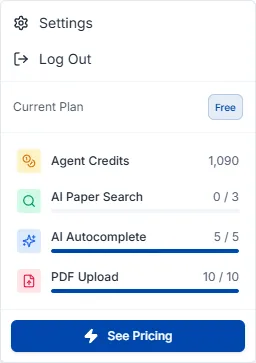
クレジットは固定の回数制限ではなく、実際の AI 使用量に応じて差し引かれます。短い質問は少なく、大規模な文献分析は多く消費します。
クォータは論文検索と PDF アップロードに適用される使用回数の制限です。この2つはクレジットを消費せず回数だけで管理され、プランによって上限が異なります。有料プラン(Pro・Max)はどちらも無制限のため、プロフィール領域にはクォータが表示されず残りのクレジットのみが表示されます。
クレジットは毎月の更新日に、クォータは機能とプランに応じて毎日または毎月リセットされます。
有料プラン(Pro・Max)は月間クレジットが足りないとき 1,500 クレジット単位で追加購入できます。プロフィール → 設定 → サブスクリプションタブ → クレジット追加購入から、1回あたり最大 15,000 クレジットまで、1,500 クレジットあたり $10 で購入できます。支払い方法の登録が必要で、無料プランは追加購入できません。
追加購入したクレジットは購入日から6か月間有効です。差し引かれる順序はボーナスクレジット → 追加購入クレジット → 月間クレジットで、追加購入分の中では期限が近いものから使われます。
自動チャージをオンにすると、残高が 500 クレジット未満になったとき 1,500 クレジット($10)が自動で補充され、作業中にクレジットが尽きて中断することを防げます。サブスクリプションタブのクレジット追加購入エリアでトグルを切り替えます。有料プランと支払い方法の登録が必要です。
決済日から14日以内で、その決済で受け取ったクレジットを使っていなければ全額返金されます。クレジットの使用が一度でも始まると、デジタルコンテンツの提供が開始されたものとみなされ返金が制限されます。
更新決済と年間サブスクリプションの途中解約は返金の対象になりません。更新を望まない場合は更新日より前に解約で自動更新を停止してください — 解約してもすでに支払った期間の満了日まではそのまま利用できます。
返金のご依頼は contact@nubint.ai までお送りください。
探している答えが見つからないときの連絡方法です。
お問い合わせと機能のご提案は contact@nubint.ai までお送りください。
ソーシャルメディアでも情報を発信しています — X (Twitter) · Threads · Instagram · Facebook · LinkedIn · YouTube