
[Paper Review] Promptify: Text-to-Image Generation through Interactive Prompt Exploration with Large Language Models
Promptify is an interactive system that leverages large language models (LLMs) to assist users in exploring and refining text-to-image prompts for Stable Diffusion. It provides steerable subject and style suggestions, visualizes generated images via semantic clustering, and offers feedback-driven prompt refinement—demonstrating in a user study that it reduces cognitive load and improves image quality on the first attempt compared to baseline tools.
Text-to-image generative models have demonstrated remarkable capabilities in generating high-quality images based on textual prompts. However, crafting prompts that accurately capture the user's creative intent remains challenging. It often involves laborious trial-and-error procedures to ensure that the model interprets the prompts in alignment with the user's intention. To address the challenges, we present Promptify, an interactive system that supports prompt exploration and refinement for text-to-image generative models. Promptify utilizes a suggestion engine powered by large language models to help users quickly explore and craft diverse prompts. Our interface allows users to organize the generated images flexibly, and based on their preferences, Promptify suggests potential changes to the original prompt. This feedback loop enables users to iteratively refine their prompts and enhance desired features while avoiding unwanted ones. Our user study shows that Promptify effectively facilitates the text-to-image workflow and outperforms an existing baseline tool widely used for text-to-image generation.
Motivation & Objective
- To address the challenge of crafting effective text-to-image prompts, which often requires extensive trial-and-error and is difficult for novice users.
- To reduce cognitive load in the prompt engineering process by providing intelligent, interactive suggestions for subject matter and style.
- To support iterative exploration and refinement of prompts through a visual interface that organizes generated images and suggests improvements.
- To bridge the gap between user intent and model output by leveraging LLMs to generate diverse, high-quality prompt variations.
- To evaluate the effectiveness of the system in comparison to existing tools, particularly in terms of usability and image quality on first attempt.
Proposed method
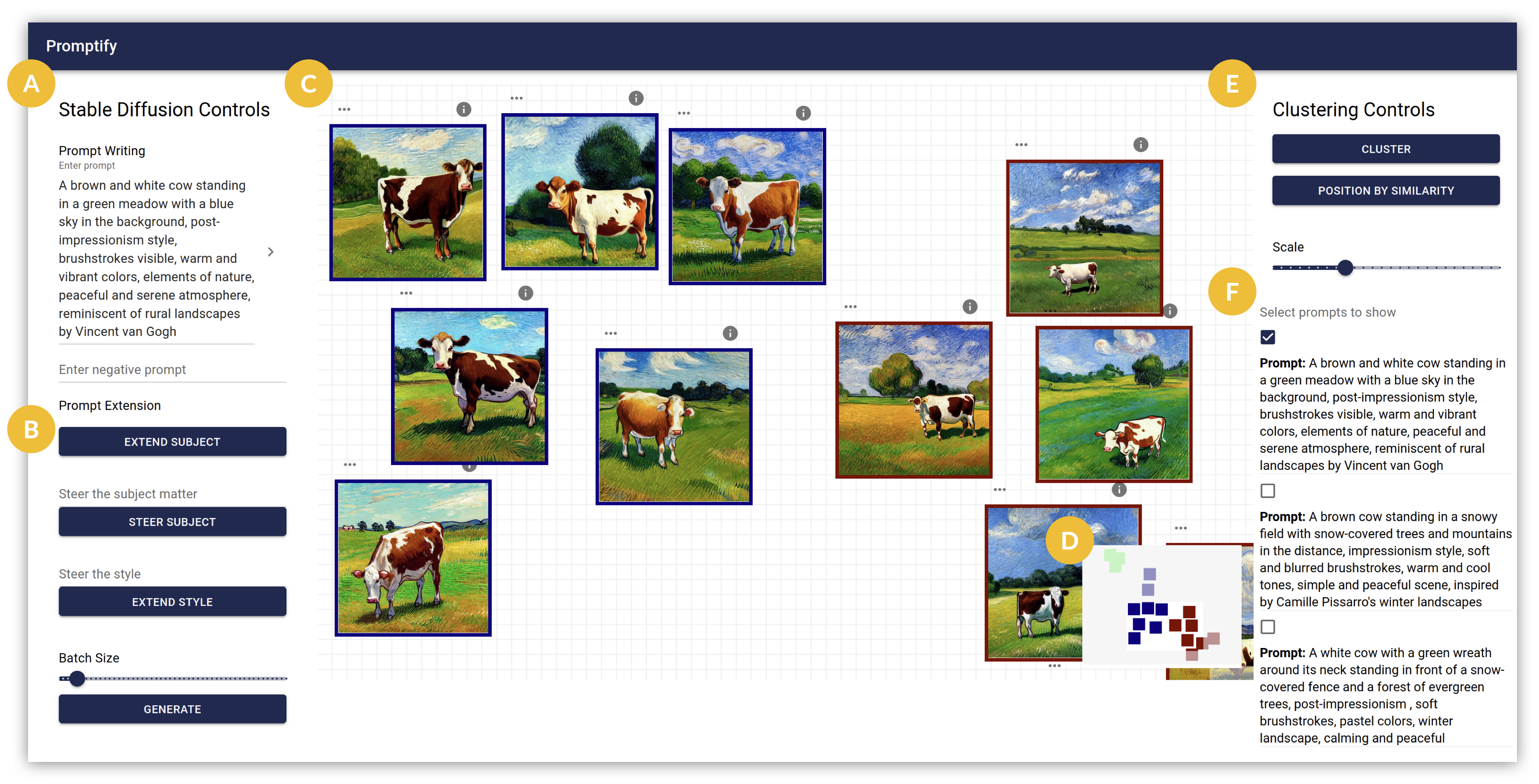
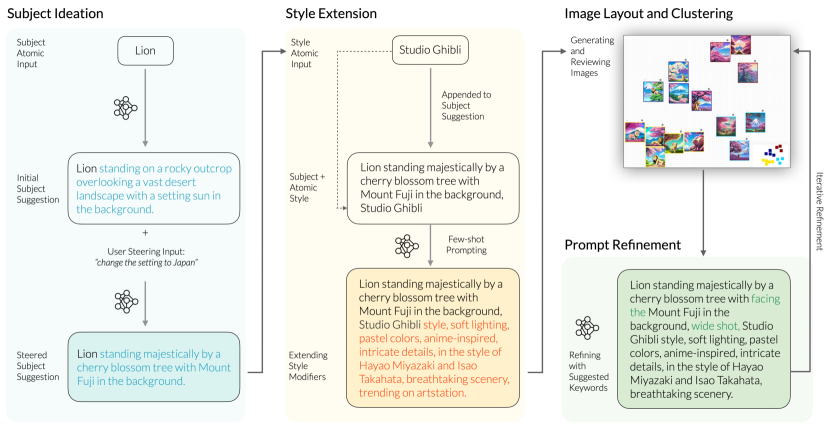
- An LLM-powered prompt suggestion engine generates subject and style suggestions separately, using few-shot prompting with community-provided examples for style and natural language steering for subject ideation.
- The system uses CLIP embeddings to cluster and visualize generated images in a flexible layout, enabling users to browse, organize, and navigate image collections.
- Users can interact with individual images or clusters to receive targeted prompt refinement suggestions based on visual features and semantic similarity.
- The interface includes a minimap for navigation, prompt history toggling, and a scale slider to adjust clustering density and image spacing.
- The system maintains a feedback loop where user interactions with images inform subsequent prompt suggestions, enhancing alignment with creative intent.
- The prompt suggestion engine is built on GPT-3.5, fine-tuned to generate diverse, stylistically coherent prompts from minimal user input.
Experimental results
Research questions
- RQ1How can LLMs be effectively leveraged to support interactive, iterative prompt exploration for text-to-image generation?
- RQ2To what extent does an LLM-driven suggestion engine reduce user cognitive load compared to traditional prompt engineering workflows?
- RQ3Can visual clustering of generated images improve users’ ability to explore and refine prompts efficiently?
- RQ4How effective is the system in helping users generate high-quality, visually appealing images on the first attempt?
- RQ5What role do semantic image clustering and feedback-driven prompt refinement play in enhancing user satisfaction and creative output?
Key findings
- Promptify significantly reduced cognitive load compared to the widely used Automatic1111 baseline, as reported in a 14-participant user study.
- Users were able to generate more visually appealing images on their first attempt when using Promptify, indicating improved alignment between prompt intent and model output.
- The system’s ability to suggest subject and style modifications through natural language steering enabled more diverse and creative prompt exploration.
- Semantic clustering of generated images helped users efficiently browse and compare results, improving navigation and decision-making.
- Despite strong performance, Promptify did not significantly outperform Automatic1111 in matching artistic vision, likely due to model limitations in handling long prompts and phrase prioritization.
- The study revealed that longer prompts often led to missing details, as the diffusion model tended to overlook certain phrases, highlighting a key challenge in prompt engineering.
Read this paper
Open the full text in the Nubint reader and ask about any passage as you read.
Read this paper on NubintThis review was generated by AI from the original paper. Please check the paper before citing it.